Yes, you absolutely can use your Amazon Echo as a Bluetooth speaker! It’s a super easy way to play music, podcasts, or anything else from your phone or tablet through your Echo’s surprisingly good speaker. Get ready to boost your audio experience without buying a new speaker!
Hey there, tech explorers! Max here from AffTechy.com. You know, sometimes we get so caught up in the fancy stuff, we forget the simple magic our gadgets can do. I remember struggling with tangled wires, trying to connect my phone to speakers, and wishing there was an easier way. Then I discovered how amazing it is to just… connect wirelessly!
Music just makes life better, right? Whether it’s your favorite playlist to kickstart your day, a podcast to make your commute fly by, or background tunes for a dinner party, good sound really matters. And if you’ve got an Amazon Echo, chances are you’ve got a pretty decent speaker just waiting to be unleashed in a new way.
You might be thinking, “Wait, can my smart speaker actually do that?” The answer is a resounding YES! It’s not just for asking about the weather or controlling your lights. Your Echo is a fantastic Bluetooth speaker, and I’m going to show you just how simple it is to set up. Let’s make your sound experience way more awesome, shall we?
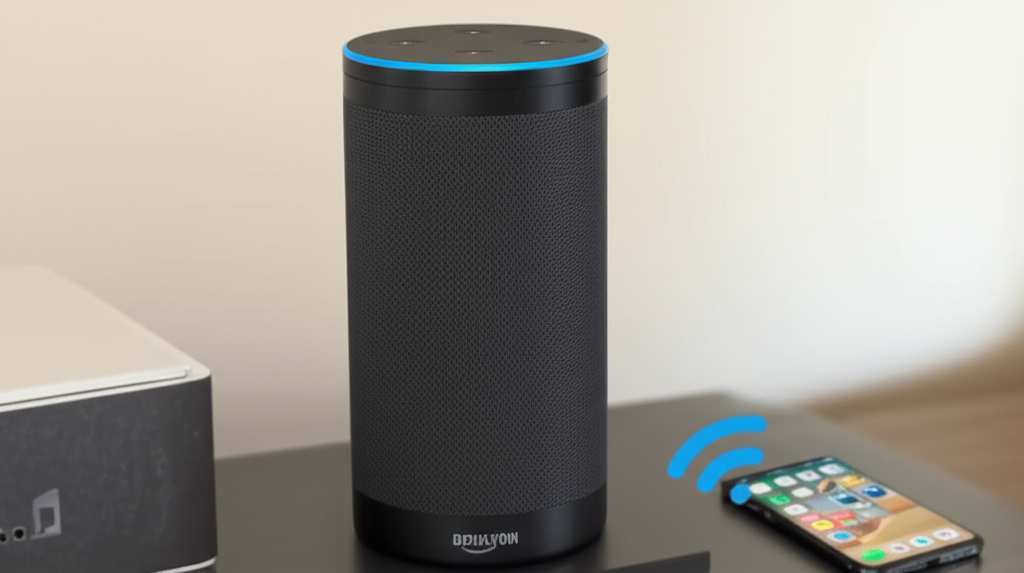
Can You Use an Amazon Echo As a Bluetooth Speaker? The Simple Truth!
So, can you use an Amazon Echo as a Bluetooth speaker? Absolutely! It’s one of those hidden gems that makes owning an Echo even more fun. Think of it as giving your phone or tablet a super-powered voice. Instead of the tinny sound from your device, you get the richer, fuller sound from your Echo. It’s like upgrading your music experience instantly!
This feature is a game-changer if you love streaming audio from your phone. You can play anything you want: Spotify, Apple Music, Audible, YouTube videos, or even that funny voice memo from your friend. Your Echo becomes your go-to speaker for all your devices, no extra cables or complicated setups needed.
The process is designed to be super straightforward. Amazon knows most of us aren’t tech wizards, so they’ve made it as easy as pie. You’ll be streaming your favorite tunes in no time. Let’s dive into how you actually do it!
Why Your Echo is Great as a Bluetooth Speaker
Before we get into the “how,” let’s chat about why this is such a cool feature. Your Amazon Echo, whether it’s an Echo Dot, Echo Show, or a full-sized Echo, has a speaker built right in. This speaker is already pretty good at playing music from Amazon Music or other services. But when you connect it via Bluetooth, you’re unlocking its potential for any audio source from your phone or tablet.
It’s about convenience. You don’t need to buy a separate Bluetooth speaker if you already have an Echo. Plus, the sound quality on most Echo devices is surprisingly robust for their size. They are designed to fill a room with sound, which is often much better than what your phone or tablet can produce on its own. It’s a win-win for better audio and less clutter!
Think about it: you’re in the kitchen, want to listen to a podcast from your phone, but the phone speaker isn’t loud enough. Just connect your phone to the Echo in the next room, and voilà! Instant audio upgrade. It’s that simple and that useful.
Setting Up Your Echo as a Bluetooth Speaker: Step-by-Step Magic!
Alright, let’s get down to business. Connecting your phone or tablet to your Echo is a breeze. You’ll mostly be using voice commands or the Alexa app. Both methods are super user-friendly, so pick the one that feels most comfortable for you.
Method 1: Using Your Voice (The Easiest Way!)
This is my favorite method because it’s so hands-free and quick. You literally just ask Alexa to do it for you.
- Wake up Alexa: Say “Alexa.”
- Put Echo in pairing mode: Say, “Alexa, pair Bluetooth.” You should hear a confirmation sound or Alexa will tell you it’s ready to pair.
- On your phone/tablet: Go to your device’s Bluetooth settings. You’ll need to turn Bluetooth on if it’s not already.
- Find your Echo: Look for your Echo device in the list of available devices. It might appear as “Echo,” “Echo Dot,” or a similar name.
- Connect: Tap on your Echo’s name to connect. Your phone or tablet might say “Connected” or you’ll hear Alexa say something like, “Connected to [Your Device Name].”
- Play your audio: Now, open any app on your phone or tablet that plays sound (like Spotify, YouTube, etc.) and hit play. The audio should stream to your Echo!
See? Told you it was easy! It’s like magic for your ears. You can also say “Alexa, disconnect Bluetooth” when you’re done.
Method 2: Using the Alexa App (Great for Visual Learners!)
If you prefer to see things on screen or your voice commands aren’t cooperating, the Alexa app is your best friend. It’s available for both iOS and Android.
- Open the Alexa App: Make sure you’re logged into your Amazon account on the app.
- Go to Devices: Tap on the “Devices” icon, usually found at the bottom right of the screen.
- Select Your Echo: Tap on “Echo & Alexa,” then choose the specific Echo device you want to use as a speaker.
- Find Bluetooth Connections: Scroll down until you see a section for “Bluetooth Connections.” Tap on it.
- Pair a New Device: Tap on “Pair a New Device.” Your Echo will now enter pairing mode, just like when you use the voice command.
- Connect from Your Phone/Tablet: On your phone or tablet, go to Bluetooth settings and select your Echo device from the list of available devices to pair.
- Confirm Connection: Once connected, you’ll see it listed under “Paired Devices” in the Alexa app, and you can start playing audio from your phone or tablet.
This method gives you a clear visual guide, which is super helpful if you’re setting it up for the first time. Both ways get you to the same awesome result: great sound from your Echo!
Tips for the Best Bluetooth Experience
Now that you know how to connect, here are a few pointers to make your audio sessions even better:
- Keep it Close: Bluetooth has a range, usually around 30 feet (10 meters). For the best connection and sound quality, keep your phone or tablet relatively close to your Echo. Walls and other electronics can sometimes interfere.
- One Device at a Time: Your Echo can only be paired with one Bluetooth device at a time. If you want to connect a different phone or tablet, you’ll need to disconnect the current one first.
- Check Your Echo Model: Most modern Echo devices support Bluetooth. If you have a very old model, it’s worth double-checking its specs, but for the vast majority, this feature is standard.
- Volume Control: You can control the volume using your phone/tablet, or by using voice commands with Alexa (e.g., “Alexa, turn up the volume”).
- Disconnecting is Easy: When you’re finished, simply say “Alexa, disconnect Bluetooth” or turn off Bluetooth on your phone/tablet. Your Echo will go back to being its usual helpful self.
Echo vs. Dedicated Bluetooth Speakers: What’s the Difference?
It’s a fair question! If your Echo can be a Bluetooth speaker, why would you ever buy a separate one? Well, they both have their strengths. Let’s break it down:
| Feature | Amazon Echo (as Bluetooth Speaker) | Dedicated Bluetooth Speaker |
|---|---|---|
| Sound Quality | Good to Very Good (depending on Echo model) | Varies widely, but high-end models can offer superior bass, clarity, and loudness. |
| Portability | Limited (needs power outlet) | High (often battery-powered) |
| Connectivity | Bluetooth, Wi-Fi | Primarily Bluetooth (some have Wi-Fi or aux input) |
| Smart Features | Yes (voice assistant, smart home control) | Generally none (unless it’s a smart speaker with Bluetooth) |
| Setup | Easy Bluetooth pairing (voice or app) | Simple Bluetooth pairing |
| Cost | Already owned if you have an Echo | Ranges from $20 to $300+ |
As you can see, your Echo shines when you want smart capabilities and good sound without buying another gadget. It’s perfect for home use. Dedicated Bluetooth speakers, especially the portable ones, are fantastic for picnics, beach trips, or anywhere you need music on the go and don’t have a power outlet handy. They are also often built with tougher materials for outdoor use.
For many people, the Echo serves as their primary “home speaker” for phone audio, while a portable Bluetooth speaker might be for adventures. It’s all about what fits your lifestyle!
A Quick Look at Echo Sound Quality
Let’s talk sound! The sound quality you get from your Echo when using it as a Bluetooth speaker is generally quite impressive. For everyday listening, podcasts, and casual music enjoyment, it’s more than enough. For instance, the standard Echo devices offer a good balance of bass and treble that can fill a medium-sized room.
The Echo Dot, being smaller, is a bit more compact in its sound. It’s great for personal listening or adding background music to a smaller space like a bedroom or office. If you’re a true audiophile seeking concert-level clarity and deep bass, you might find dedicated high-fidelity Bluetooth speakers offer a richer experience. But for most of us? The Echo delivers fantastic audio!
A fun fact: Amazon continuously updates the software for Echo devices. This means the audio processing can actually improve over time, giving you even better sound without you having to do anything!
Troubleshooting Common Bluetooth Issues
Sometimes, technology throws us a curveball. If you’re having trouble connecting, don’t worry! Here are a few common fixes:
- Restart Everything: The oldest trick in the book, but it often works! Turn off Bluetooth on your phone/tablet, then turn it back on. Also, try saying “Alexa, disconnect Bluetooth” and then “Alexa, pair Bluetooth” again. If needed, unplug your Echo, wait 10 seconds, and plug it back in.
- Forget the Device: On your phone or tablet, go to Bluetooth settings, find your Echo in the list of paired devices, and tap “Forget” or “Unpair.” Then, try pairing again from scratch.
- Check for Updates: Ensure your Alexa app and your phone’s operating system are up to date. Sometimes, outdated software can cause compatibility issues.
- Too Many Devices? Make sure your Echo isn’t trying to connect to another device. Sometimes, it can get confused if it was recently paired with something else.
- Clear Echo’s Bluetooth Cache: You can ask Alexa to “forget all Bluetooth devices.” Say, “Alexa, forget all Bluetooth devices.” This will clear its memory, and you can start fresh with pairing.
If you’re still stuck, checking out support pages from Amazon or a tech site like CNET can offer more in-depth solutions. For example, CNET has a great guide on troubleshooting Alexa devices that might help!
Frequently Asked Questions (FAQs)
Got more questions? I’ve got answers!
Q1: Can I use my Echo as a Bluetooth speaker for my TV?
A1: Generally, no. Most Echo devices don’t support audio input from a TV via Bluetooth. They are designed to stream audio from your phone/tablet to the Echo, not the other way around for TV audio.
Q2: Will my Echo still listen for “Alexa” commands when it’s connected via Bluetooth?
A2: Yes! It’s amazing, right? Your Echo stays fully functional as a smart assistant even when it’s acting as a Bluetooth speaker. You can still ask it questions or control smart home devices.
Q3: How do I stop my Echo from playing audio from my phone?
A3: You can say “Alexa, disconnect Bluetooth,” or simply turn off Bluetooth on your phone or tablet. The connection will be dropped.
Q4: Can I connect two Echo devices together for stereo sound via Bluetooth?
A4: While you can create stereo pairs with two identical Echo devices for Amazon Music or other compatible services via Wi-Fi, you cannot create a stereo pair using Bluetooth for audio from your phone. Each Echo acts as a single Bluetooth speaker.
Q5: What’s the difference in sound quality between an Echo Dot and a full-sized Echo as a Bluetooth speaker?
A5: A full-sized Echo typically has a larger speaker and better bass response than an Echo Dot. So, while both work great, the larger Echo will generally offer a fuller, more powerful sound experience.
Q6: Can I use my Echo as a Bluetooth speaker for my computer?
A6: Absolutely! Just like with your phone or tablet, you can pair your computer (Windows or Mac) with your Echo via Bluetooth and stream audio from your computer to the Echo.
Conclusion: Unleash Your Echo’s Audio Power!
So there you have it! Your Amazon Echo is way more than just a voice assistant; it’s a fantastic, versatile Bluetooth speaker just waiting to be used. You’ve learned how to connect it using simple voice commands or the handy Alexa app, and you’ve got tips to ensure a smooth listening experience. Plus, we’ve covered why it’s a great option for home audio and how to fix common hiccups.
It’s incredible how a simple feature can add so much more value to a device you already own. No need to buy extra gadgets if you don’t have to! Your Echo is ready to bring your music, podcasts, and any other audio to life with richer sound.
Now go forth and connect! Try it with your favorite playlist, a binge-worthy podcast, or even the audio from that movie you’re watching on your tablet. You’ll be amazed at the difference it makes. Now go enjoy amazing sound and make every moment louder and better!