Unlock awesome sound! Using aux mode on your Bluetooth speaker is super easy. Just plug in a cable, and you’ve got instant, reliable audio without Bluetooth pairing hassles. It’s a fantastic backup for clearer sound or when Bluetooth just won’t cooperate. Let’s get you connected and jamming!
Hey there, tech explorer! Ever get that feeling when you just want to play your favorite tunes, but your Bluetooth speaker is being a bit stubborn? Or maybe you’ve got a device that doesn’t do Bluetooth at all? It’s totally normal, and honestly, it happens to the best of us. We all love the convenience of wireless sound, but sometimes, good old-fashioned wires are the way to go.
Think about it: music makes road trips better, movies feel more epic, and even just chilling at home is more enjoyable with a good soundtrack. But when your speaker and device won’t talk to each other wirelessly, it can feel like a party pooper. Don’t worry, though! Your Bluetooth speaker often has a secret superpower you might not be using: Aux mode.
This little feature can be a lifesaver, giving you a super simple way to connect and enjoy your audio. It’s like having a trusty backup plan for your sound. Ready to learn how to make the most of it? Let’s dive in and make your sound experience even better, step by step!

Let’s get this party started!
What Exactly Is Aux Mode?
Okay, so what’s this “Aux mode” all about? Aux stands for auxiliary, which basically means “extra” or “added.” In the world of speakers and audio devices, the Aux port is a standard audio jack. It’s usually a small, round hole, often colored green or black, and it’s designed for a wired audio connection.
Think of it as a direct highway for your sound. Instead of sending audio signals through the air via Bluetooth, you’re sending them through a physical cable. This bypasses the whole pairing process and can offer a more stable connection, especially if you have a lot of Bluetooth devices around or if your Bluetooth signal is a bit shaky.
So, when you switch your Bluetooth speaker to Aux mode, you’re telling it, “Hey, I’m going to plug something in, and I want the sound to come through that cable, not wirelessly.” It’s a straightforward switch that opens up a whole new way to use your speaker.

Why Would You Even Use Aux Mode?
You might be thinking, “But my speaker is Bluetooth, isn’t that the point?” And you’re right, Bluetooth is awesome! But there are definitely times when Aux mode shines. Let’s look at a few scenarios where this wired connection is your new best friend.
When Bluetooth Just Isn’t Cooperating
We’ve all been there. You’re trying to connect your phone to your speaker, and it just won’t find it. Or it connects, but the sound keeps cutting out. Bluetooth can sometimes be a bit finicky, especially if there are many other wireless devices nearby interfering with the signal. Aux mode is a direct, wired connection, so it’s immune to these kinds of wireless interference issues.
Connecting Non-Bluetooth Devices
Not all devices have Bluetooth capabilities. Older MP3 players, some laptops, gaming consoles, or even your smart TV might have a headphone jack but no Bluetooth. If you want to use your awesome Bluetooth speaker with these devices, the Aux port is your golden ticket. It bridges the gap, allowing you to enjoy your speaker’s sound with virtually any device that has a headphone output.
Potentially Better Sound Quality
While Bluetooth technology has gotten incredibly good, especially with newer codecs, a direct wired connection can sometimes offer a slightly cleaner, more robust audio signal. For audiophiles or those who are really sensitive to sound quality, the Aux mode might provide a marginally superior listening experience. It’s like the difference between a clear phone call and a crystal-clear in-person conversation – both are good, but one is more direct.
Saving Battery Life (Sometimes!)
This one is a bit of a trade-off. While the speaker itself still needs power, the Bluetooth radio inside it uses some energy to constantly search for and maintain a connection. When you use Aux mode, the Bluetooth radio is largely inactive. This can potentially lead to slightly longer battery life for your speaker, although the difference might be minimal depending on the speaker model.
A Reliable Backup
Even if your primary method of connection is Bluetooth, having the Aux option is a fantastic backup. If your phone’s Bluetooth suddenly decides to take a break, or if you’re at a friend’s house and they can’t figure out how to pair their device, you can just grab an Aux cable and get the music playing. It’s peace of mind for your audio needs!
How to Use Aux Mode: A Simple Step-by-Step Guide
Ready to unleash the power of wired audio? It’s incredibly simple. Seriously, you’ll be jamming in minutes. Here’s exactly what you need to do.
What You’ll Need
Before we start, let’s make sure you have the right gear. You probably have most of this already!
- Your Bluetooth Speaker: Of course! Make sure it’s charged or plugged in.
- Your Audio Source Device: This could be your smartphone, tablet, laptop, MP3 player, or any device with a headphone jack (usually a 3.5mm jack).
- An Aux Cable: This is the crucial part. It’s a cable with a 3.5mm audio connector on both ends. They look like headphone plugs. You can find these at most electronics stores or online.
The Easy Steps
Follow these steps, and you’ll be good to go:
-
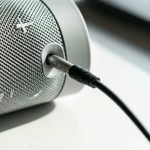
Locate the Aux Port on Your Speaker: First things first, find the Aux-In port on your Bluetooth speaker. It’s usually a small, round socket labeled “AUX,” “In,” or sometimes it just has a headphone icon. It’s often found on the back or side of the speaker, near the charging port.
Fun Fact: The 3.5mm audio jack has been around since the 1960s! It’s a classic piece of tech that’s still super useful today.
-
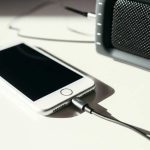
Locate the Headphone Jack on Your Device: Now, find the headphone jack on your audio source device. Most smartphones and tablets made before the last few years have one. If your phone doesn’t have one, you might need a small adapter (like a USB-C to 3.5mm adapter or a Lightning to 3.5mm adapter) to plug the Aux cable into.
-
Connect the Aux Cable: Take one end of your Aux cable and plug it firmly into the headphone jack of your audio source device. Then, take the other end and plug it securely into the Aux-In port on your Bluetooth speaker.
-
Switch Your Speaker to Aux Mode: This is the key step! Most Bluetooth speakers have a button to switch between different input modes (Bluetooth, Aux, etc.). You might need to press and hold a “Mode” or “Bluetooth” button, or there might be a dedicated Aux button. Your speaker will usually make a sound or a light will change to indicate it’s now in Aux mode. Check your speaker’s manual if you’re unsure!
Pro Tip: Some speakers automatically switch to Aux mode when they detect a cable plugged in. Give it a try!
-
Play Your Audio: Now, open your music app, podcast, or video on your device and hit play. The sound should now be coming through your Bluetooth speaker!
-
Adjust Volume: You can control the volume from your device and also from the speaker itself. Start with the volume on both at a low setting and gradually increase them to avoid sudden loud noises.
And that’s it! You’ve successfully used Aux mode. See? Easy peasy!
A Quick Look at Aux Cables
Aux cables are pretty straightforward, but there are a couple of things to know. The most common type you’ll need for your speaker is a 3.5mm male-to-male stereo audio cable. This means it has the standard headphone-style plug on both ends.
You can get them in various lengths, from short 1-foot cables to longer 6-foot or more ones. Shorter cables are great for connecting a phone right next to the speaker, while longer ones give you more flexibility to place your speaker further away from your device.
Here’s a little comparison of what to look for:
| Cable Type | Connector Type | Typical Use Case | Best For |
|---|---|---|---|
| 3.5mm Male-to-Male | Standard headphone plug on both ends | Connecting a phone/laptop to a Bluetooth speaker’s Aux-In | Most Bluetooth speakers with Aux-In |
| 3.5mm to RCA | One headphone plug, two red/white plugs | Connecting to older stereo systems or some home theater setups | Specific audio equipment, not typical for Bluetooth speakers |
For your Bluetooth speaker’s Aux mode, you almost always want the standard 3.5mm male-to-male cable. It’s the universal connector for most personal audio devices!
When Aux Mode Might Not Be an Option
While Aux mode is super common, it’s not on every single Bluetooth speaker. Some smaller, ultra-portable speakers might skip the Aux port to save space and cost. Also, if your speaker is exclusively designed for wireless use, it simply won’t have an Aux input.
If you’re buying a new speaker and want the flexibility of Aux mode, always check the product description or look for the physical port on the back or side. Reputable tech review sites like CNET often detail the ports available on a speaker.
Don’t be discouraged if a particular speaker doesn’t have it, though! There are tons of great options out there that do. And if your current speaker lacks an Aux port, it might be time to consider an upgrade that offers both wireless freedom and wired reliability.
Tips for the Best Aux Experience
Want to make your Aux mode listening even better? Here are a few friendly tips:
- Use a Quality Cable: While most Aux cables work fine, a slightly better-quality cable can sometimes offer improved sound clarity and durability.
- Keep Volume Levels Balanced: Start with low volumes on both your device and speaker, then gradually increase. This protects your hearing and your speakers.
- Check for Interference: Although Aux is wired, ensure the cable isn’t frayed or damaged, as this can cause static or popping sounds.
- Consider Adapters if Needed: If your device lacks a headphone jack, invest in a reliable adapter. Cheap ones can sometimes degrade sound quality.
- Experiment with Sound Settings: Play around with the EQ settings on your device or app to fine-tune the sound to your liking through the Aux connection.
Troubleshooting Common Aux Mode Issues
Even with a simple wired connection, things can sometimes go a little sideways. Here are a few common hiccups and how to fix them:
No Sound at All
- Check Connections: Make sure the Aux cable is plugged in securely at both ends. Unplug and replug them.
- Verify Aux Mode: Ensure your speaker is actually in Aux mode. Sometimes speakers need a button press to activate it.
- Device Volume: Is the volume on your source device turned up? It sounds obvious, but it’s often the culprit!
- Speaker Volume: Similarly, is the speaker volume turned up?
- Try a Different Cable: Your Aux cable might be faulty. Try a different one if you have it.
- Test on Another Device: Plug the Aux cable into your phone and speaker, then try playing audio from a different app or even a different phone to rule out a device issue.
Sound is Distorted, Staticy, or Crackly
- Check Cable Integrity: Look for any damage or kinks in your Aux cable. A damaged cable is a common cause of poor sound.
- Loose Connection: Ensure the cable is fully seated in the ports. Sometimes a slight wiggle can fix crackling.
- Device Volume Too High: If the volume on your source device is maxed out, it can sometimes cause distortion before it even reaches the speaker. Try lowering it slightly.
- Speaker Volume Too High: Similarly, pushing the speaker’s volume to its absolute limit can cause distortion.
- Interference (Less Common with Aux): While rare for wired connections, a very poorly shielded cable or proximity to strong electrical sources could theoretically cause some interference.
Only One Side is Playing Sound (Stereo vs. Mono)
The standard 3.5mm Aux cable is stereo, meaning it carries two channels of audio (left and right). If only one side is playing, it usually points to a few things:
- Faulty Cable: This is the most common reason. The cable might be damaged internally, preventing one channel from transmitting. Try a new cable.
- Port Issue: Less likely, but the port on your device or speaker might have an issue with one of the stereo channels.
- Audio Source Setting: Double-check your device’s audio settings. Some devices have accessibility options that can force audio into mono. Make sure this is turned off.
If you’ve tried these steps and are still having trouble, it might be worth checking your speaker’s manual or contacting the manufacturer for support. But most of the time, a simple cable swap or connection check will solve the problem!
Comparing Bluetooth vs. Aux Mode
Let’s quickly recap the main differences to help you decide when to use which mode:
| Feature | Bluetooth Mode | Aux Mode |
|---|---|---|
| Connection Type | Wireless (Radio waves) | Wired (Physical cable) |
| Setup | Pairing required (initial setup) | Plug-and-play (immediate connection) |
| Reliability | Can be affected by interference, distance, and other devices | Highly stable, not affected by wireless interference |
| Device Compatibility | Requires Bluetooth on both devices | Requires a headphone jack (or adapter) on source device and Aux-In on speaker |
| Sound Quality | Very good, especially with modern codecs; can have slight compression | Potentially very clear and direct; quality depends on cable and source |
| Battery Usage (Speaker) | Uses Bluetooth radio, consumes slightly more power | Bluetooth radio is inactive, potentially conserves a little battery |
| Convenience | No cables needed, freedom of movement | Requires physical connection, limited by cable length |
As you can see, both modes have their strengths! Bluetooth offers ultimate freedom, while Aux provides a reliable, no-fuss connection. It’s great to have both options available on your speaker.
Frequently Asked Questions (FAQ)
Got more questions buzzing around? Here are answers to some common ones:
Q1: Do I need to turn off Bluetooth on my phone when using Aux mode?
A1: Nope! You can leave your phone’s Bluetooth on. The speaker will prioritize the wired Aux connection when it’s active. Think of it like plugging in headphones – your phone knows to send audio through the wire.
Q2: Can I use my Bluetooth headphones with an Aux cable?
A2: Not directly. Bluetooth headphones connect wirelessly to your device. You can’t plug a Bluetooth headphone into a speaker via Aux. However, you can plug an Aux cable into a device (like a laptop) that’s already connected via Bluetooth to your headphones, but that’s a bit of a roundabout way and doesn’t use the headphone jack on the speaker itself.
Q3: My speaker has a USB port. Can I use that like Aux?
A3: Sometimes, yes! Some speakers can play audio directly from a USB drive (like a flash drive with music files). Others might use USB for firmware updates or even as a power output. It’s not the same as Aux mode, which is specifically for a live audio signal from a device’s headphone jack. Always check your speaker’s manual to see what the USB port is for.
Q4: What kind of Aux cable should I buy?
A4: For connecting your phone or music player to a Bluetooth speaker, you’ll want a standard 3.5mm male-to-male stereo audio cable. They’re inexpensive and widely available. The length depends on how far apart you want your device and speaker to be.
Q5: Will using Aux mode drain my phone’s battery faster?
A5: Using the headphone jack and Aux cable is generally very efficient. It doesn’t use Bluetooth or Wi-Fi, so it won’t drain your phone’s battery as quickly as a constant Bluetooth connection might. It’s a pretty low-power way to get your audio out.
Q6: My speaker sounds better on Bluetooth than Aux. Why?
A6: This can happen! While Aux offers a direct signal, some modern Bluetooth speakers use advanced audio codecs (like aptX or LDAC) that can transmit high-quality audio wirelessly. If your speaker and device support these, Bluetooth might sound superior. Also, sometimes the onboard digital-to-analog converter (DAC) in the speaker is tuned better for its Bluetooth input than its Aux input. Experiment and see what sounds best to you!
Conclusion: Your Sound, Your Way!
And there you have it! You’re now officially an expert in using Aux mode on your Bluetooth speaker. It’s such a simple feature, but it adds so much versatility to your audio setup. Whether your Bluetooth is acting up, you’re connecting an older device, or you just want that super-stable wired connection, Aux mode is your trusty sidekick.
Remember those simple steps: find the port, grab your cable, plug it in, switch the mode, and play your heart out. It’s a fantastic way to ensure you can always enjoy your favorite music, podcasts, or movie sound effects, no matter what. Don’t hesitate to experiment and find the perfect setup for your needs.
Now go forth and fill your world with amazing sound! Enjoy every beat, every note, and every word. Happy listening!