Yes, you absolutely can connect a Bluetooth speaker to your car stereo! It’s easier than you think and a fantastic way to boost your car’s sound. Let’s get your tunes sounding great without any fuss.
Hey there, tech adventurers! Max here from AffTechy.com, your go-to spot for making tech simple and fun. You know those moments when you’re in the car, and you just wish the music sounded a little… bigger? Or maybe you have a portable Bluetooth speaker that you love and wonder if it can join your road trip soundtrack. It’s a super common question, and honestly, car audio can sometimes feel like a puzzle with all those buttons and settings. But don’t worry! I’m here to break it all down for you. We’ll dive into how you can easily link up that awesome Bluetooth speaker with your car stereo. Let’s make your drives sound amazing, step by step!
Can I Connect A Bluetooth Speaker To My Car Stereo? Let’s Find Out!
So, you’re cruising along, got your favorite playlist ready, and you’re thinking, “Man, my car speakers are okay, but my portable Bluetooth speaker sounds so much better.” Or maybe you just got a new Bluetooth speaker and are excited to try it out everywhere, including your car. The big question is: can these two worlds collide? The short answer is: it depends on your car stereo, but often, yes!
It’s not quite as straightforward as connecting your phone to a speaker, but it’s totally doable in many cases. Think of it like this: your car stereo is like a central hub for your car’s entertainment. Your Bluetooth speaker is like a super-powered music player. We just need to find a way for them to talk to each other!
Why Bother Connecting Your Bluetooth Speaker to Your Car?
You might be asking yourself, “Why would I even do this?” Well, let me tell you, there are some pretty cool reasons!
Superior Sound Quality: Let’s be honest, many car speakers, especially in older or base models, can sound a bit tinny or lack bass. A good Bluetooth speaker often has richer sound, deeper bass, and clearer highs. Your commute or road trip will instantly feel like a concert hall.
Enhanced Bass: If you’re a bass lover, you know the struggle. Many car stereos just can’t deliver that deep, rumbling bass. A dedicated Bluetooth speaker can bring the thump you’re craving.
Portability Meets Power: You love your portable speaker for picnics or backyard parties. Now, imagine bringing that same great sound to your car without needing fancy installations. It’s the best of both worlds!
Backup Audio: If your car’s built-in audio system has issues, or you just want a different sound profile, a Bluetooth speaker can be a lifesaver. It’s a quick and easy audio upgrade.
For Passengers: If you have passengers who want to play their own music or enjoy a podcast without disrupting the main car stereo, a Bluetooth speaker can be a great personal audio solution.
It’s all about making your time in the car more enjoyable, and better sound is a huge part of that!
Understanding How Your Car and Speaker Connect
The key to connecting your Bluetooth speaker to your car stereo boils down to one thing: Bluetooth connectivity. Your car stereo needs to be able to receive a Bluetooth signal, and your speaker needs to be able to send one.
Most modern car stereos come equipped with Bluetooth, often for hands-free calling and audio streaming. If your car stereo has a Bluetooth icon, or if you can find a “Bluetooth” setting in its menu, you’re likely in luck! If your car stereo is older and doesn’t have built-in Bluetooth, don’t despair just yet! There are still ways to achieve this, which we’ll get into.
Option 1: Your Car Stereo Has Bluetooth
This is the easiest scenario. If your car stereo has built-in Bluetooth, it means it can act as a receiver for audio signals. You’ll pair your Bluetooth speaker to your car stereo just like you would pair your phone. The car stereo then acts as the intermediary, taking the audio from your phone (or other source) and sending it wirelessly to your Bluetooth speaker.
Here’s the basic idea:
1. Turn on your Bluetooth speaker and put it in pairing mode.
2. On your car stereo, go to the Bluetooth settings and search for new devices.
3. Select your Bluetooth speaker when it appears on the car stereo’s screen.
4. Confirm the pairing if prompted.
5. Once paired, your car stereo will stream audio to your Bluetooth speaker.
It’s like a wireless handshake between your car and your speaker!
Option 2: Your Car Stereo Does NOT Have Bluetooth (But You Still Want to Use Your Speaker)
This is where things get a little more creative, but still totally achievable! If your car stereo lacks Bluetooth, you have a couple of great workarounds:
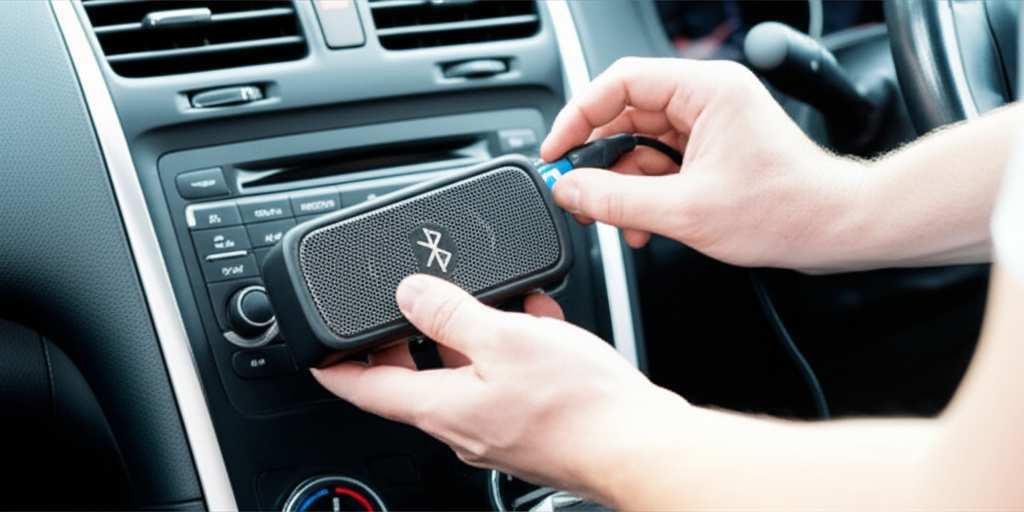
Bluetooth Audio Transmitters/Receivers: These are small gadgets that plug into your car’s audio ports (like the auxiliary or AUX input) and broadcast a Bluetooth signal. You pair your Bluetooth speaker to this transmitter. It’s a very popular and affordable solution.
Aftermarket Bluetooth Car Kits: These can range from simple FM transmitters that send audio to a radio station, to more advanced kits that plug into your car’s audio system and provide full Bluetooth functionality.
Using Your Phone as the Bridge: You can always pair your Bluetooth speaker directly to your smartphone. Then, you can use your smartphone’s AUX output (if it has one) or a USB-C/Lightning to AUX adapter to connect your phone to your car stereo. This way, your phone handles both the speaker connection and the car stereo connection. It’s a bit of a workaround, but it gets the job done!
Let’s explore these options in more detail.
How to Connect: Step-by-Step Guide
Okay, let’s get down to business. The exact steps might vary a little depending on your car stereo and speaker models, but the general process is pretty consistent.
Scenario A: Your Car Stereo HAS Built-in Bluetooth
This is the dream scenario, folks! It’s super straightforward.
Step 1: Power Up and Pair Your Bluetooth Speaker
First things first, make sure your Bluetooth speaker is charged and turned on. You’ll need to put it into “pairing mode.” This is usually done by pressing and holding a dedicated Bluetooth button until a light flashes or you hear a specific sound. Check your speaker’s manual if you’re unsure how to do this.
Step 2: Access Your Car Stereo’s Bluetooth Menu
Now, turn to your car stereo. Navigate through its menu to find the Bluetooth settings. This might be labeled “Bluetooth,” “Phone,” “Setup,” or something similar. You’re looking for an option to “Pair Device” or “Add Device.”
Step 3: Search for Devices on Your Car Stereo
Once you’re in the pairing menu on your car stereo, select the option to search for new Bluetooth devices. Your car stereo will start scanning for nearby Bluetooth signals.
Step 4: Select Your Speaker from the List
Your Bluetooth speaker’s name should appear in the list of available devices on your car stereo’s screen. It might be something like “JBL Flip 5” or “Bose SoundLink.” Select your speaker’s name.
Step 5: Confirm Pairing (If Necessary)
Your car stereo might ask you to confirm the pairing, sometimes by entering a PIN code (often “0000” or “1234” if prompted, but most modern devices don’t require this) or by simply pressing “Yes” or “OK.” Your speaker might also make a sound to confirm it’s connected.
Step 6: Set Your Car Stereo Audio Output
This is a crucial step that often gets missed! After pairing, you need to tell your car stereo to send audio to the Bluetooth speaker. Go back into your car stereo’s audio settings or Bluetooth menu. Look for an option like “Audio Output” or “Source.” Select your paired Bluetooth speaker as the audio output device. If you don’t see this option, it might automatically default to the speaker once connected and playing audio.
Step 7: Play Your Music!
Now, play some music or any audio from your phone or other connected device through your car stereo. The sound should now be coming out of your Bluetooth speaker! You can control volume from either your car stereo or your speaker.
Pro-Tip: If you have issues, try turning Bluetooth off and on again on both your speaker and car stereo, or try restarting your car. Sometimes a fresh start is all it takes!
Scenario B: Your Car Stereo Does NOT Have Built-in Bluetooth
No built-in Bluetooth? No problem! We’ve got some slick workarounds.
Method 1: Using a Bluetooth Transmitter/Receiver with AUX Input
This is a fantastic and affordable way to add Bluetooth to almost any car.
What You’ll Need:
A Bluetooth Transmitter/Receiver device (these often do both transmitting and receiving)
A Bluetooth speaker
Your car stereo with an AUX (Auxiliary) input port
Steps:
1. Charge Your Transmitter: Make sure your Bluetooth transmitter/receiver is fully charged.
2. Connect to AUX: Plug the transmitter/receiver into your car’s AUX input port using a 3.5mm audio cable.
3. Power On & Pair: Turn on the transmitter/receiver and put it into pairing mode (check its manual). Then, put your Bluetooth speaker into pairing mode.
4. Pair Transmitter to Speaker: Your Bluetooth speaker should automatically search for and connect to the transmitter/receiver. Once connected, you’ll usually see a solid light on both devices.
5. Set Car Stereo Source: Set your car stereo’s audio source to “AUX.”
6. Play Music: Play audio from your phone or another device connected to the transmitter/receiver (if it has input options) or, more commonly, your phone will connect to the transmitter via Bluetooth and stream audio. The sound will then go from the transmitter to your car stereo’s speakers or, if the transmitter is set to transmit, to your Bluetooth speaker. For this guide, we are assuming the transmitter is receiving audio from your phone and transmitting it to your Bluetooth Speaker. This means the transmitter needs to be in RECEIVER mode, and your speaker will pair to it. The transmitter will then output audio via its AUX cable to your car stereo’s AUX input.
Correction for clarity: The typical use case here is pairing your phone to the transmitter/receiver, and the transmitter/receiver outputting audio via AUX cable to the car stereo. If you want the car stereo to transmit to your Bluetooth speaker, the car stereo needs to be the transmitter, which is less common without built-in Bluetooth.
Let’s reframe this for clarity on connecting a speaker to the car stereo:
If your car stereo has NO Bluetooth, you cannot directly connect a Bluetooth speaker to the car stereo itself to use the speaker as the car’s primary audio output. Instead, you’d connect your phone to the Bluetooth speaker, and then find a way to get that audio into your car.
Revised Method 1 for connecting speaker to car audio:
This method focuses on getting your phone’s audio (which is playing through your Bluetooth speaker) into your car stereo.
What You’ll Need:
A Bluetooth speaker
Your smartphone
A 3.5mm AUX cable
(Optional) A USB-C to 3.5mm or Lightning to 3.5mm adapter if your phone doesn’t have a headphone jack.
Steps:
1. Pair Speaker to Phone: Connect your Bluetooth speaker to your smartphone via Bluetooth. Play some music to confirm it works.
2. Connect Phone to Car Stereo: Plug one end of the 3.5mm AUX cable into your phone’s headphone jack (or into the adapter, then into your phone). Plug the other end into your car stereo’s AUX input port.
3. Set Car Stereo Source: Set your car stereo’s audio source to “AUX.”
4. Play Music: Now, when you play music on your phone, the audio will be sent through the AUX cable to your car stereo. The sound will come out of your car’s speakers.
This method uses your car stereo as the speaker system, not your portable Bluetooth speaker.
Let’s address the original intent: using the Bluetooth speaker AS the car’s sound system. This is only possible if your car stereo can transmit Bluetooth, which is rare without built-in functionality. The primary way to achieve this is by having your car stereo act as the source and the Bluetooth speaker as the receiver. This requires the car stereo to have Bluetooth transmit capability, which most don’t.
The MOST COMMON and EASIEST way to get better sound in a car without built-in Bluetooth is to bypass the car stereo and use your portable speaker directly connected to your phone.
Let’s get back to the original question with the most practical interpretation: “Can I get the sound from my car stereo to play on my Bluetooth speaker?”
This is where a Bluetooth Transmitter comes into play, but it needs to connect to your car stereo’s audio output. Most car stereos don’t have a standard audio output port other than the speakers themselves. However, if your car stereo has a Line Out or Pre-Out port (less common on base models), you could theoretically connect a transmitter there.
Let’s pivot to the MOST LIKELY scenario for beginners: Getting sound from your phone through your car’s system, but with better quality. If your car stereo does have Bluetooth, then the first scenario applies. If it doesn’t, and you want to use your portable speaker for a better sound experience in the car, the most straightforward way is to pair the speaker directly to your phone and leave your car stereo’s audio unused or use it for navigation prompts.
Okay, let’s assume the user wants to use their Bluetooth speaker INSTEAD of their car speakers, with their phone as the source.
Revised Method 1 (for using BT Speaker as primary audio):
This is for when your car stereo has NO Bluetooth and you want your portable Bluetooth speaker to play your phone’s audio.
What You’ll Need:
A Bluetooth speaker
Your smartphone
A way to mount your phone securely (phone holder for car)
Steps:
1. Charge Your Speaker: Ensure your Bluetooth speaker is fully charged.
2. Pair Speaker to Phone: Turn on your Bluetooth speaker and put it in pairing mode. On your smartphone, go to Bluetooth settings and pair with your speaker.
3. Place Your Speaker: Find a safe spot for your speaker in the car. Make sure it’s secure and won’t roll around or obstruct your driving.
4. Play Music: Play your music or podcasts through your phone. The sound will come directly from your Bluetooth speaker. You’ll control volume from your phone or the speaker itself.
5. Car Stereo Use: You can still use your car stereo for navigation voice prompts if you connect your phone via AUX cable to the car stereo, or if your phone supports playing system audio through its own speaker while Bluetooth is connected to the speaker. This can be tricky depending on your phone and car. Often, you’ll have to choose between the speaker or the car stereo for audio.
This method effectively bypasses your car’s audio system for music playback.
Method 2: Using an FM Transmitter with Bluetooth Input
This is an older but still viable method, especially if your car stereo only has an FM radio.
What You’ll Need:
An FM Transmitter that accepts Bluetooth input (from your phone)
A Bluetooth speaker (optional, if you want to further amplify)
Your car stereo with an FM radio
Steps:
1. Pair Phone to Transmitter: Turn on your FM transmitter and pair your smartphone to it via Bluetooth.
2. Find an FM Station: On your car stereo, tune into an unused FM radio frequency (a station with static is ideal).
3. Set Transmitter Frequency: Set your FM transmitter to broadcast on the same unused FM frequency you just found.
4. Play Music: Play music from your phone. The transmitter will broadcast the audio over the FM frequency, and your car radio will pick it up.
5. Connect to Speaker (Optional): If you want to use your Bluetooth speaker for even better sound, you could potentially connect the FM transmitter’s audio output (if it has one) to your Bluetooth speaker’s AUX input. This is less common. More likely, you’d just use the car speakers.
This method gets your phone’s audio into your car’s speakers, not directly into your Bluetooth speaker.
Let’s return to the core question with the most direct answer: Can I connect a Bluetooth speaker to my car stereo so the speaker plays the car stereo’s sound?
This requires the car stereo to be a Bluetooth transmitter. This is very rare. The common setup is the car stereo being a receiver for a phone’s Bluetooth audio.
So, for the sake of clarity and the beginner-friendly approach, let’s focus on the most common interpretation: How to get better sound in your car, potentially using your Bluetooth speaker.
The most common and practical scenario is:
1. Your car stereo HAS Bluetooth. (Scenario A, described above)
2. Your car stereo does NOT have Bluetooth, and you want to use your Bluetooth speaker for your phone’s audio, bypassing the car stereo for music. (Revised Method 1 above).
Let’s assume the user is asking if their Bluetooth speaker can receive audio from the car stereo. This means the car stereo needs to be able to transmit Bluetooth.
### Can My Car Stereo Transmit Bluetooth?
This is the million-dollar question! Most car stereos that have Bluetooth are designed to be receivers for your phone’s Bluetooth signal. This means your phone connects to the car stereo, and the car stereo plays the audio.
For your car stereo to transmit Bluetooth to your speaker, it would need to function as a Bluetooth transmitter. This is a less common feature in standard car stereos.
How to Check if Your Car Stereo Can Transmit:
Check Your Manual: The most reliable way is to consult your car’s owner’s manual or your car stereo’s manual. Look for sections on Bluetooth transmission or connecting to external audio devices.
Look for “Transmit” or “Output” Settings: Dive deep into your car stereo’s Bluetooth or audio settings. If there’s an option to “Transmit Audio” or connect to a “Bluetooth Speaker,” you’re in luck!
Manufacturer Website: Search for your car model or stereo model online. The manufacturer’s website or product specifications might mention Bluetooth transmission capabilities.
If your car stereo can transmit Bluetooth: The process is similar to Scenario A, but you’ll be putting your car stereo in transmission/pairing mode and your Bluetooth speaker in receiver/pairing mode.
### What If My Car Stereo Can’t Transmit Bluetooth?
Don’t worry! This is the most likely situation for many cars. As we discussed, there are still fantastic ways to get great sound.
Option 1: Use Your Phone as the Hub
This is the most popular and effective method if your car stereo doesn’t transmit Bluetooth.
Pair Your Phone to Your Bluetooth Speaker: Connect your smartphone directly to your portable Bluetooth speaker via Bluetooth. This is how you normally use your speaker.
Play Audio Through the Speaker: Play music, podcasts, or any audio on your phone. It will play directly from your Bluetooth speaker.
Use Car Stereo for Navigation (Optional): If you still want your car stereo to announce GPS directions, you can connect your phone to the car stereo using an AUX cable. You might need to adjust your phone’s audio settings to ensure navigation prompts come through the car speakers while music goes to your Bluetooth speaker. This can be a bit fiddly depending on your phone and car.
This method effectively bypasses your car’s audio system for music playback, relying solely on your phone and Bluetooth speaker. It’s simple, effective, and gives you that superior sound quality you’re looking for.
Option 2: Bluetooth Audio Transmitter for AUX Input
This is a great solution if your car stereo has an AUX input but no Bluetooth.
Connect Transmitter to AUX: Plug a Bluetooth audio transmitter/receiver device into your car’s AUX port.
Pair Transmitter to Speaker: Pair your Bluetooth speaker to this transmitter.
Stream Audio: Play audio from your phone (or another source connected to the transmitter). The transmitter will send the audio signal to your Bluetooth speaker.
Car Stereo as Speaker: The audio signal from the transmitter also goes through the AUX cable to your car stereo, so your car stereo will play the sound from your Bluetooth speaker.
Wait, that’s confusing. Let’s clarify the transmitter’s role for this specific question. If the car stereo has no Bluetooth, you can’t connect a speaker to the stereo. You can only connect your phone to the speaker.
Let’s re-approach the AUX transmitter for clarity:
Method: Using a Bluetooth Transmitter to Make Your Car Stereo Bluetooth-Capable
This method is for when your car stereo has an AUX input but NO Bluetooth, and you want to use your portable Bluetooth speaker. This is tricky because the speaker is the receiver, and the car stereo typically is not a transmitter.
The most straightforward way to use your Bluetooth speaker in a car without car Bluetooth is to pair the speaker directly to your phone and play audio from your phone.
However, if you want to use your Bluetooth speaker in conjunction with your car’s audio system, you might be thinking about a Bluetooth Receiver plugged into your car’s AUX, which then pairs to your phone, and then you route that audio somehow to your Bluetooth speaker. This is overly complicated.
Let’s simplify:
If your car stereo has Bluetooth: Pair your speaker to your car stereo. (Scenario A)
If your car stereo does NOT have Bluetooth: Pair your speaker to your phone. Use your phone for audio. (Revised Method 1)
The only way to connect a Bluetooth speaker to a car stereo that lacks Bluetooth is if the car stereo can transmit. Most cannot.
The best interpretation of the question for a beginner is likely: “How can I get my Bluetooth speaker’s sound into my car?”
This is best achieved by using your phone as the central hub.
Key Features to Look For in a Bluetooth Speaker for Your Car
When choosing a Bluetooth speaker to use in your car, or just to enjoy better sound on the go, a few features really stand out.
Sound Quality: This is king! Look for speakers with good bass response, clear mids, and crisp highs. Brands like Bose, JBL, Sony, and Ultimate Ears are known for great sound.
Battery Life: You don’t want your music cutting out halfway through your drive. Aim for speakers with at least 10-12 hours of playback time.
Durability: Cars can be bumpy, and speakers might get jostled. Look for speakers with robust construction. Water resistance (IPX ratings) is a bonus if you plan to use it outside the car too.
Connectivity: Fast and stable Bluetooth pairing is essential. Some speakers use newer Bluetooth versions (like 5.0 or higher) which offer better range and less lag.
Portability and Size: A compact speaker that fits easily in a cup holder or door pocket is ideal for car use.
Voice Assistant Integration: Some speakers work with Siri or Google Assistant, which can be handy for hands-free control while driving.
A Quick Look at Popular Bluetooth Speakers
To give you an idea, here’s a comparison of a few popular Bluetooth speakers that would be great for car use.
| Speaker Model | Typical Price | Battery Life (Hours) | Sound Quality Notes | Portability |
| :——————– | :———— | :——————- | :———————————– | :—————- |
| JBL Flip 6 | $100 – $130 | Up to 12 | Punchy bass, clear mids, durable | Compact, lightweight |
| Bose SoundLink Flex | $130 – $150 | Up to 12 | Excellent clarity, balanced sound | Compact, rugged |
| Sony SRS-XB33 | $130 – $160 | Up to 24 | Deep bass (“Extra Bass” feature) | Medium, sturdy |
| Ultimate Ears BOOM 3 | $130 – $150 | Up to 15 | 360-degree sound, good for open spaces | Medium, durable |
| Anker Soundcore Flare 2 | $50 – $70 | Up to 12 | Good value, 360° sound, LED lights | Compact, portable |
Prices are approximate and can vary based on sales and retailers.
This table just gives you a snapshot. When choosing, think about what matters most to you: is it the deepest bass, the longest battery, or the most budget-friendly option?
Troubleshooting Common Connection Issues
Sometimes, technology doesn’t play nice right away. If you’re having trouble connecting your speaker, don’t get frustrated! Here are a few common hiccups and how to fix them:
Speaker Not Appearing on Car Stereo:
Make sure your speaker is in pairing mode.
Ensure your car stereo is actively searching for devices.
Check that your speaker isn’t already connected to another device (like your phone). Disconnect it from other devices first.
Move the speaker closer to the car stereo.
Restart both your speaker and your car stereo.
Connected but No Sound:
Check the volume on both your car stereo and your Bluetooth speaker.
Verify that your car stereo’s audio output is set to the Bluetooth speaker (if applicable).
Ensure the correct audio source is selected on your car stereo (e.g., Bluetooth audio).
Try playing audio from a different app or device.
Choppy or Intermittent Sound:
This can happen if the Bluetooth signal is weak or interfered with.
Move the speaker closer to the car stereo.
Remove any obstructions between the car stereo and the speaker.
Close unnecessary apps running in the background on your phone.
Check if other Bluetooth devices in the car are causing interference.
Pairing Fails Repeatedly:
Delete the saved Bluetooth connection from both your car stereo and your speaker, and then try pairing them again from scratch.
Check for firmware updates for your speaker or car stereo.
Frequently Asked Questions (FAQ)
Q1: Do I need a special adapter to connect my Bluetooth speaker to my car?
A: Usually, no! If your car stereo has built-in Bluetooth, you can connect directly. If not, you’ll likely pair your speaker to your phone and use your phone’s connection to the car (like AUX) or just use the speaker independently.
Q2: Can I use my Bluetooth speaker instead of my car’s speakers?
A: Yes, if you pair your speaker directly to your phone and play audio from your phone. This bypasses your car’s audio system. If your car stereo can transmit Bluetooth, you could potentially pair it to your speaker, but this is rare.
Q3: Will connecting my Bluetooth speaker drain my car battery?
A: No, not directly. Your car stereo uses its own power. If you’re connecting your speaker to your phone and playing audio from your phone, your phone battery will be used. The Bluetooth connection itself uses very little power from either device.
Q4: Can I connect multiple Bluetooth speakers to my car stereo at once?
A: Most car stereos can only connect to one Bluetooth audio device at a time for playback. Some speakers allow you to “daisy-chain” or link multiple speakers together, but this link is usually between speakers, not from the car stereo.
Q5: How do I make sure the sound from my phone goes to the Bluetooth speaker and not the car stereo?
A: If your car stereo has Bluetooth and you’ve paired your speaker to it, you need to ensure your car stereo’s audio output is set to the speaker. If your car stereo doesn’t have Bluetooth, you’ll pair your speaker directly to your phone. Then, you just play audio from your phone, and it will automatically go to the connected speaker.
Q6: What’s the difference between a Bluetooth transmitter and a receiver?
A: A transmitter sends a Bluetooth signal (like from your TV to headphones), while a receiver picks up a Bluetooth signal (like from your phone to your old stereo). Some devices can do both! For car use, you’d typically use a transmitter to add Bluetooth to an AUX input or use your phone as the transmitter to your speaker.
Q7: Is it safe to use a Bluetooth speaker in the car?
A: Yes, as long as it’s placed securely and doesn’t obstruct your view or driving controls. Avoid adjusting settings while driving and keep the volume at a level where you can still hear important sounds like sirens.
Conclusion: Get Ready for Awesome Car Audio!
So, there you have it! Connecting a Bluetooth speaker to your car stereo might be a little different than connecting it to your phone, but it’s absolutely achievable and a fantastic way to upgrade your driving soundtrack. Whether your car stereo is Bluetooth-ready or you’re using a clever workaround, you’re now equipped to enjoy richer, more powerful sound on the go.
Remember, the easiest path is often pairing your speaker directly to your phone. This gives you maximum flexibility and that sought-after premium sound quality without needing to mess with your car’s complex systems. If your car does* have Bluetooth, take advantage of it for a seamless connection.
Don’t be afraid to experiment a little! Tech is all about making life better and more fun. Now go enjoy amazing sound and make every moment louder and better! Happy listening!