Connect your Bluetooth receiver to any speaker easily! This guide makes it simple to stream music wirelessly from your phone or tablet to your favorite sound system. Get ready for amazing sound without the wires!
Hey there, tech explorers! Ever find yourself surrounded by awesome speakers, but wishing you could just wirelessly beam your favorite tunes to them? It’s a common thought, right? We all love our music, podcasts, and even those epic movie sound effects to be crystal clear. Sometimes, the speakers we have are fantastic, but they’re not the latest models with built-in Bluetooth. It can feel a bit frustrating when you want to untether yourself from cables.
I remember when I first got my hands on a killer soundbar. It sounded incredible, but it only had wired connections. I really wanted to play music from my phone without fumbling with aux cords. It felt like a small hurdle, but it made me think – there has to be an easier way for everyone to enjoy wireless audio, no matter their speaker’s age.
Well, guess what? There absolutely is! The magic word is “Bluetooth receiver.” It’s like a little translator that lets your older speakers understand your modern devices. We’re going to dive into exactly how to connect one. Don’t worry about confusing tech jargon; we’ll break it down super simply.
So, if you’re ready to ditch the wires and fill your room with sound, let’s get this connection party started! We’ll cover everything you need to know, step by step.
What Exactly is a Bluetooth Receiver?
Think of a Bluetooth receiver as a bridge. Your phone or tablet talks using Bluetooth, which is a wireless technology. Most older speakers can’t “hear” this wireless talk directly. That’s where the receiver steps in. It’s a small gadget that catches the Bluetooth signal from your device. Then, it translates that signal into something your speaker can understand, usually through a simple audio cable.
It’s like giving your old radio the ability to stream Spotify! You get all the benefits of wireless audio without having to buy a brand-new speaker system. It’s a budget-friendly and super smart way to upgrade your sound experience. Plus, they are usually quite small and don’t take up much space.
Why You Might Want a Bluetooth Receiver
There are tons of reasons why a Bluetooth receiver is a fantastic idea. Maybe you have a beloved set of bookshelf speakers that sound amazing, but they’re from the pre-Bluetooth era. Or perhaps you have a powerful home stereo system that you’d hate to replace.
You might also have a portable speaker that you love for its sound quality, but it only has an aux input. Or maybe you want to make your car stereo system wireless so you can easily stream from your phone during drives. Whatever your situation, a Bluetooth receiver offers a simple solution to a common problem. It’s all about making your existing audio gear work with your modern devices.
Different Types of Bluetooth Receivers
Just like there are different kinds of headphones, there are a few variations of Bluetooth receivers. Knowing these can help you pick the perfect one for your needs.
The most common type is a standalone Bluetooth audio receiver. These are small boxes or dongles that plug into your speaker’s audio input and get power from a USB port or wall adapter. They are super versatile and work with almost any speaker that has an audio jack.
Then there are Bluetooth adapters for cars. These are designed specifically for car audio systems, often plugging into the car’s aux port and a power source like a cigarette lighter adapter. Some even come with built-in microphones for hands-free calls.
You’ll also find Bluetooth transmitters/receivers (often called transceivers). These are cool because they can do both jobs! They can receive Bluetooth signals (like we’ve been talking about) or transmit audio from a non-Bluetooth source (like your TV) to Bluetooth headphones or speakers. This is a great option if you want a dual-purpose device.
Getting Ready: What You’ll Need
Before we connect, let’s make sure you have everything ready. It’s usually pretty straightforward, but having these items handy will make the process smooth.
- Your Bluetooth Receiver: This is the star of the show!
- Your Speaker(s): The audio gear you want to make wireless.
- An Audio Cable: Most receivers come with one, but check! You’ll likely need a 3.5mm to 3.5mm audio cable (sometimes called an aux cable). If your speaker has different inputs (like RCA), you might need an adapter cable (e.g., 3.5mm to RCA).
- Power Source: Most receivers need power. This is usually a USB cable and adapter (like your phone charger) or a dedicated power adapter.
- Your Bluetooth-Enabled Device: Your smartphone, tablet, or computer.
It’s always a good idea to check what kind of audio input your speaker has. Most modern and many older speakers use a standard 3.5mm headphone jack-style input. Some older home stereos might use two RCA connectors (usually red and white). The receiver you choose should match these connection types.
How to Connect Your Bluetooth Receiver to Your Speaker: Step-by-Step
Alright, let’s get down to business! This is the fun part where we turn your old speakers into wireless wonders. Follow these simple steps, and you’ll be streaming in no time.
Step 1: Power Up Your Bluetooth Receiver
First things first, find a power source for your receiver. Most Bluetooth receivers come with a USB cable. You can plug this into a USB wall adapter (like the one you use for your phone charger) or a powered USB port on your speaker or stereo system, if it has one. Some might come with their own wall adapter.
Plug it in and turn it on if there’s a power button. You’ll usually see a small LED light blink. This light often indicates that the receiver is ready to pair or is already powered on.
Step 2: Connect the Receiver to Your Speaker
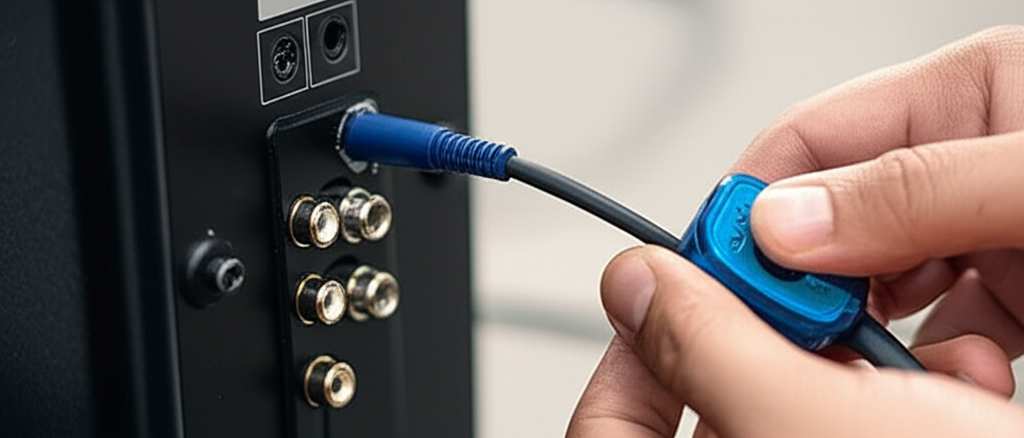
Now, let’s make the audio connection. Grab your audio cable. On one end, plug it into the audio output port on your Bluetooth receiver. This port is usually labeled “OUT” or looks like a standard headphone jack (3.5mm).
On the other end of the audio cable, plug it into the audio input port on your speaker. This is often labeled “AUX,” “LINE IN,” or might be a headphone jack. Make sure you’re using the correct input port on your speaker. If your speaker uses RCA inputs (red and white jacks), use the appropriate adapter cable.
Step 3: Select the Correct Input on Your Speaker
This is a crucial step that many people miss! Your speaker needs to know where to get its audio signal from. If your speaker has multiple input options (like “CD,” “Tuner,” “AUX”), you need to select the one you just plugged the receiver into.
Look for a button on your speaker or remote control that cycles through the inputs. Press it until the display shows “AUX” or whatever input your receiver is connected to. If you don’t do this, you won’t hear any sound, even if everything else is connected correctly!
Step 4: Put Your Bluetooth Receiver in Pairing Mode
Now, we need to tell the receiver to look for your phone or tablet. Most receivers go into pairing mode automatically when they first power up or if they can’t find a device to connect to. You’ll often see the LED light blinking rapidly, usually blue or red.
If it’s not blinking rapidly, there’s usually a button on the receiver itself. Press and hold this button for a few seconds until the light starts blinking fast. This means it’s ready to pair!
Step 5: Pair Your Device with the Receiver
Head over to your smartphone, tablet, or computer. You need to turn on its Bluetooth. Go to your device’s settings menu, find the Bluetooth option, and toggle it on.
Your device will start scanning for nearby Bluetooth devices. You should see a list of available devices pop up. Look for the name of your Bluetooth receiver in the list. It might be something like “BT-Receiver,” “MusicLink,” or a brand name. Tap on the name of your receiver to connect.
Step 6: Confirm the Connection
Once you tap to connect, your device might ask you to confirm. You might also see a PIN prompt, though most modern devices don’t require one for audio receivers. If it asks for a PIN, try “0000” or “1234,” as these are common defaults. If not, just confirm the pairing.
When the pairing is successful, the blinking light on your Bluetooth receiver will usually turn solid (e.g., a solid blue light). Your device will also show that it’s connected to the receiver. Some receivers might even announce “Connection successful” through your speakers.
Step 7: Play Your Music!
You’re all set! Open your favorite music app, podcast player, or video and hit play. The sound should now come out of your connected speaker. You can control the volume from your device or directly on your speaker.
If you don’t hear anything, go back and double-check that the correct input is selected on your speaker and that your device is indeed connected to the Bluetooth receiver in its settings. Sometimes, simply turning the receiver and your device’s Bluetooth off and on again can fix minor glitches.
Tips for the Best Bluetooth Audio Experience
Connecting is just the first step. Here are some handy tips to make sure your wireless audio is as good as it can be.
- Keep Devices Close: Bluetooth has a range, usually around 30 feet (10 meters). For the best sound quality and a stable connection, keep your phone or tablet relatively close to the receiver. Walls and other electronic devices can sometimes interfere.
- Update Your Device’s Software: Just like your phone, Bluetooth technology gets updates. Keeping your device’s operating system up-to-date can improve performance and compatibility.
- Check the Bluetooth Version: Newer Bluetooth versions (like 5.0 or higher) offer better range, faster speeds, and improved power efficiency compared to older ones. If you’re buying a new receiver, look for a newer version.
- Use a Quality Audio Cable: While most standard aux cables work fine, a higher-quality cable can sometimes reduce interference and improve clarity, especially with sensitive audio setups.
- Manage Multiple Devices: Some receivers can connect to multiple devices, but usually only play audio from one at a time. If you have trouble switching, disconnect from one device before trying to connect to another.
Understanding Bluetooth Codecs: A Quick Peek
You might hear about different “Bluetooth codecs” like SBC, AAC, and aptX. These are like languages that Bluetooth devices use to send audio data.
SBC (Subband Coding) is the standard and is supported by all Bluetooth devices. It’s reliable but not always the highest quality. AAC is used by Apple devices (like iPhones and iPads) and offers better sound quality than SBC. aptX is common on Android devices and some other gadgets, often providing near-CD quality sound and lower latency (which is great for watching videos).
For a basic Bluetooth receiver, you’ll likely be using SBC or AAC. If you’re an audiophile and use an Android device, looking for a receiver that supports aptX can be a nice upgrade for sound quality.
Troubleshooting Common Issues
Even with the best guides, sometimes things don’t work perfectly the first time. Here are a few common hiccups and how to fix them.
- No Sound:
- Is the receiver powered on?
- Is the audio cable plugged in securely at both ends?
- Is the correct input (AUX, LINE IN) selected on your speaker?
- Is your device connected to the receiver in Bluetooth settings?
- Is the volume up on both your device and the speaker?
- Connection Drops Frequently:
- Are your devices too far apart? Try moving them closer.
- Are there many other Bluetooth or Wi-Fi devices nearby that might be causing interference?
- Try restarting both the receiver and your device.
- Sound Quality is Poor (Static, Crackling):
- Check the audio cable for damage.
- Ensure the receiver and your device are close together.
- Try a different audio input on your speaker.
- If your receiver supports different Bluetooth versions or codecs, check if there’s a setting to optimize.
- Device Won’t Pair:
- Is the receiver in pairing mode (blinking light)?
- Turn off Bluetooth on your device, then turn it back on and try again.
- Restart the receiver and try pairing again.
- If the receiver has been paired with many devices, try clearing its memory (check the receiver’s manual) and re-pair.
Remember, the instruction manual that came with your specific Bluetooth receiver is your best friend for detailed troubleshooting. Sometimes, a quick Google search for your receiver’s model number and the issue can also yield helpful results from other users.
Comparing Popular Bluetooth Receiver Features
When you’re looking to buy a Bluetooth receiver, different models offer slightly different features. Here’s a quick look at what you might find and why it matters.
| Feature | Description | Why It Matters |
|---|---|---|
| Bluetooth Version | e.g., 4.2, 5.0, 5.2 | Higher versions offer better range, stability, and faster connections. 5.0+ is generally recommended. |
| Supported Codecs | e.g., SBC, AAC, aptX, aptX HD | Determines sound quality. SBC is standard, AAC is good for Apple, aptX offers higher fidelity for compatible devices. |
| Power Source | USB, Wall Adapter, Battery | USB is convenient if you have ports available. Battery-powered ones are portable but need charging. |
| Audio Output | 3.5mm, RCA, Optical | Must match your speaker’s input. 3.5mm and RCA are most common for home audio. |
| Multipoint Pairing | Connects to two devices simultaneously | Handy if you want to switch between your phone and tablet without re-pairing. |
| Low Latency | Minimizes audio delay | Important for watching videos or playing games so audio and video stay in sync. Look for aptX Low Latency. |
For most users, a receiver with Bluetooth 5.0 or higher, supporting SBC and AAC, will be more than enough. If you’re serious about audio quality or syncing video, then looking into aptX or aptX HD (for better quality) and aptX Low Latency becomes more important. It’s all about matching the features to how you plan to use it!
A Quick Look at Receiver Examples
Let’s say you’re browsing online or in a store. You might see receivers like these:
| Receiver Model Example | Key Features | Best For |
|---|---|---|
| Avantree Audition | Bluetooth 5.0, aptX HD, aptX Low Latency, Transmitter/Receiver | Audiophiles, video streaming, versatile use |
| Mpow BH279 | Bluetooth 5.0, Multipoint Pairing, Long Range | Connecting multiple devices, stable home use |
| UGREEN Bluetooth 5.0 Receiver | Bluetooth 5.0, 3.5mm & RCA Output, Compact | Basic home stereo upgrade, car audio |
As you can see, each one has a slightly different focus. The Avantree is packed with advanced features for top-notch sound. The Mpow is great if you juggle a couple of devices. And the UGREEN is a solid, straightforward choice for most common setups. Always check reviews and product descriptions to see what fits your needs best. For more detailed reviews, sites like CNET and TechRadar often have great comparisons of the latest Bluetooth gadgets.
Frequently Asked Questions (FAQs)
Got more questions? That’s totally normal! Here are some common ones people ask.
Q1: Do I need a special app to use a Bluetooth receiver?
Nope! For most basic Bluetooth receivers, you don’t need any special app. You just use your device’s built-in Bluetooth settings to pair. The receiver itself is just a piece of hardware that helps your speaker get the wireless signal.
Q2: Can I use a Bluetooth receiver with my TV?
Yes, absolutely! If your TV has an audio output jack (usually a headphone jack or RCA outputs), you can connect a Bluetooth receiver to it. This lets you send the TV’s sound to Bluetooth headphones or speakers. Some receivers are specifically designed as transmitters for this purpose.
Q3: Will the sound quality be as good as a wired connection?
It depends! With older Bluetooth versions and basic codecs like SBC, a wired connection might sound slightly better. However, with newer Bluetooth versions (5.0+) and advanced codecs like aptX HD, the difference can be very small, and sometimes even unnoticeable to most ears. For everyday listening, it’s usually fantastic.
Q4: How far away can my phone be from the receiver?
Standard Bluetooth range is about 30 feet (10 meters) in an open space. However, this can be reduced by walls, furniture, and other electronic devices. For the best and most stable connection, it’s ideal to keep your phone or tablet within about 15-20 feet of the receiver.
Q5: My receiver is paired but no sound is playing. What should I do?
This is a common one! First, double-check that your speaker is set to the correct input (like “AUX” or “LINE IN”) where the receiver is plugged in. Also, make sure the volume is turned up on both your phone/tablet and the speaker itself. Sometimes, simply turning off Bluetooth on your device and turning it back on can resolve connection issues.
Q6: Can I connect my Bluetooth receiver to multiple speakers at once?
Most basic Bluetooth receivers are designed to connect to only one speaker or audio system at a time. However, some advanced models, often called “Bluetooth transmitters,” can broadcast to two pairs of Bluetooth headphones or speakers simultaneously. You’ll need to check the product specifications carefully for this feature.
Ready to Unleash Your Sound!
See? Connecting a Bluetooth receiver to your speaker is totally doable and opens up a world of wireless convenience. You don’t need to be a tech wizard to enjoy streaming your favorite audio from your phone or tablet to your existing speakers. We’ve walked through what a receiver is, why you might want one, and the simple steps to get it all hooked up.
You’ve learned how to power it up, make the audio connections, put it in pairing mode, and finally, link it to your device. We even covered some handy tips for better sound and how to troubleshoot common problems. It’s all about making your technology work for you, making life a little easier and a lot more fun.
So go ahead, give it a try! Whether it’s bringing your old stereo back to life or making your favorite speakers wireless, you’ve got the knowledge. Explore the freedom of wireless sound and enjoy your music, podcasts, and movies like never before. Now go enjoy amazing sound and make every moment louder and better!