Connect your Bluetooth speaker to your record player easily! This guide shows you how to get that classic vinyl sound streaming wirelessly, making your music setup simple and awesome.
Hey there, music lovers! Ever spun a favorite record and wished you could share that warm, fuzzy sound with a modern Bluetooth speaker? It’s a totally common thought these days. We love the rich sound of vinyl, but we also love the convenience of wireless speakers. For a while, it felt like you had to choose between the two.
But guess what? You don’t have to! Getting your beloved turntable to play through your sleek Bluetooth speaker is totally achievable. It might sound a bit techy, but trust me, we’ll break it down so it’s super simple. Think of it like connecting any other gadget – just a few easy steps and you’re jamming.
I remember when I first got my vintage record player. I loved the ritual of putting on a record, but my only speaker was a small Bluetooth one. I thought I was stuck with my old, crackly speaker or had to buy a whole new system. Thankfully, I learned there are some really straightforward ways to bridge that gap.

So, if you’re ready to give your vinyl collection a wireless upgrade and fill your room with amazing sound, you’re in the right place. We’re going to go through everything, step by step. Let’s make this happen!
Why Connect Your Record Player to a Bluetooth Speaker?
Let’s chat about why this is such a cool idea. Record players, or turntables, give music a special kind of warmth. It’s that analog sound, you know? It feels more real, more alive. But modern Bluetooth speakers are so convenient! You can put them anywhere, and they sound great.
Imagine this: you’re having friends over, and you pull out a classic vinyl album. Instead of being tied to a wired speaker, you can easily connect your turntable to a portable Bluetooth speaker. You can even move that speaker around the room, or take it out to the patio. It’s the best of both worlds!
Plus, sometimes the speakers that come with basic record players aren’t the best quality. Connecting to a dedicated Bluetooth speaker can seriously boost your audio experience. You’ll hear details in your music you might have missed before. It’s all about making your music sound its best and being able to enjoy it anywhere.

Understanding Your Record Player: Does it Have Bluetooth?
The very first thing we need to figure out is what kind of record player you have. Some newer record players actually come with built-in Bluetooth! If yours does, you’re in luck, and the process will be super simple.
How to Check if Your Record Player Has Bluetooth
It’s usually pretty easy to spot.
Look for a button that says “Bluetooth” or has the Bluetooth symbol (it looks like a little sideways “B”).
Check the back or sides for any pairing buttons or indicators.
If you’re unsure, grab your record player’s manual. It will definitely tell you if it has this feature.
You can also search your record player’s model number online. The manufacturer’s website or product pages will list its features.
If your record player has Bluetooth, you’re halfway there! We’ll cover how to pair it in just a bit.
What if Your Record Player Doesn’t Have Bluetooth? No Worries!
Don’t worry if your turntable is an older model or just doesn’t have Bluetooth built-in. This is super common, and there are still fantastic ways to get that vinyl sound to your wireless speaker. The magic ingredient here is a little device called a Bluetooth transmitter.
What is a Bluetooth Transmitter?
Think of a Bluetooth transmitter as a translator. Your record player outputs audio, but it speaks a language that your Bluetooth speaker doesn’t understand directly. The transmitter takes that audio signal and converts it into a Bluetooth signal that your speaker can pick up.
How it Works: You plug your record player’s audio output into the transmitter. Then, you pair your Bluetooth speaker to the transmitter. Easy peasy!
Types of Transmitters: Most of these are small, plug-and-play devices. Some might need to be plugged into a power source (like a USB port or wall adapter), while others have rechargeable batteries.
This is a really popular solution, and it opens up your options for connecting almost any audio device to a Bluetooth speaker.
Connecting Your Record Player: Step-by-Step
Now, let’s get to the good part: actually making the connection! The steps will be a little different depending on whether your record player has built-in Bluetooth or if you’re using a transmitter.
Scenario 1: Your Record Player HAS Built-in Bluetooth
If your record player has Bluetooth, this is like pairing any other device, like your phone.
1. Turn on Your Bluetooth Speaker: Make sure your speaker is powered on and in pairing mode. How you do this varies by speaker, but there’s usually a button you hold down. Check your speaker’s manual if you’re not sure. You’ll often see a flashing light indicating it’s ready to pair.
2. Put Your Record Player in Pairing Mode: Find that Bluetooth button on your record player. Press and hold it, or press it once, depending on the model. Again, consult your record player’s manual for the exact steps. You might see an indicator light on the player change.
3. Wait for Them to Connect: Your record player will search for nearby Bluetooth devices. Your speaker should pop up on its screen or list. Select your speaker’s name.
4. Confirm the Pairing: If prompted, confirm the connection. Once they’re paired, the indicator lights on both devices will usually become solid or change color, showing they’re connected.
5. Play Some Vinyl! Put on a record and enjoy the sound through your Bluetooth speaker. You might need to adjust the volume on both your record player and your speaker.
Scenario 2: Using a Bluetooth Transmitter (No Built-in Bluetooth on Player)
This scenario involves a couple more steps, but it’s still very straightforward.
1. Connect the Transmitter to Your Record Player:
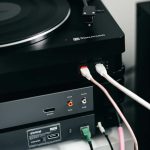
Identify the Audio Output: Look at the back of your record player. You’ll likely see RCA outputs (red and white jacks) or a 3.5mm headphone jack.
Use the Right Cables: Your Bluetooth transmitter will come with cables. If your record player has RCA outputs, you’ll probably use a cable that splits into RCA plugs on one end and a single 3.5mm plug on the other. If your player has a headphone jack, you’ll just need a 3.5mm to 3.5mm cable.
Plug it In: Connect the RCA plugs (or the 3.5mm plug) to the corresponding jacks on your record player. Plug the other end (usually a 3.5mm jack) into the audio input on your Bluetooth transmitter.
2. Power Up Your Bluetooth Transmitter:
Some transmitters plug into a USB port for power. You can use a USB wall adapter or even a powered USB port on a stereo receiver if you have one.
Other transmitters have their own power adapter.
Make sure the transmitter is turned on.
3. Put Your Bluetooth Transmitter in Pairing Mode:
Similar to the record player, there’s usually a button on the transmitter. Press and hold it until an indicator light starts flashing. This means it’s ready to find a speaker.
4. Turn on Your Bluetooth Speaker and Put it in Pairing Mode:
Just like in Scenario 1, power on your speaker and activate its pairing mode. Refer to your speaker’s manual if needed.
5. Wait for the Connection:
The transmitter will search for your speaker. Once it finds it, the indicator lights on both devices should change to show they’ve successfully paired. This might take a minute or two.
6. Play Your Record!
Now, put on a record. The sound should be sent from your record player, through the transmitter, and out of your Bluetooth speaker. You might need to adjust volume levels on both your record player (if it has a volume control) and your speaker.
Important Considerations for the Best Sound
Connecting is just the first step! To really enjoy your music, there are a few more things to keep in mind.
Audio Output Types on Record Players
Most record players have one of these:
RCA Outputs: These are the classic red and white jacks. They carry stereo sound. You’ll need an RCA to 3.5mm adapter cable for most transmitters.
3.5mm Headphone Jack: Some modern or all-in-one record players have a standard headphone port. You can plug a 3.5mm to 3.5mm cable directly from this to your transmitter.
Built-in Phono Preamp: This is important! If your record player has a built-in preamp, you can connect it directly to a transmitter or powered speakers. If it doesn’t, you’ll need an external phono preamp between the turntable and the transmitter. Many transmitters have a switch for “Phono” or “Line” level input, which can help. If you’re unsure, check your record player’s specs. A phono preamp boosts the super-low signal from the turntable cartridge to a usable “line level.”
Choosing the Right Bluetooth Transmitter
Not all transmitters are created equal! Here’s what to look for:
Bluetooth Version: Newer versions (like Bluetooth 5.0 or higher) offer better range, faster connections, and more stable audio.
Audio Codec Support: Codecs like aptX (especially aptX Low Latency) are great for reducing that annoying delay between the sound and the video (if you’re watching something). For music, it means better sound quality.
Inputs/Outputs: Make sure it has the right connectors for your record player and speaker. Some transmitters can connect to two speakers at once!
Power Source: Battery-powered is great for portability, while USB or wall-powered is good for a fixed setup.
Latency: The Sound Delay Issue
Sometimes, especially with older Bluetooth versions or cheaper transmitters, you might notice a slight delay. This is called latency. It’s usually not a big deal for just listening to music. However, if you’re watching a video while listening, it can be noticeable.
Look for transmitters that support aptX Low Latency (aptX LL). This technology is designed to minimize audio delay, making it perfect for movie watching or gaming. Your Bluetooth speaker also needs to support aptX LL for this to work.
Comparing Bluetooth Transmitter Options
Let’s look at a couple of popular types of Bluetooth transmitters to give you an idea of what’s out there.
| Feature | Basic Transmitter | Advanced Transmitter (aptX LL) |
| :—————— | :————————————- | :————————————- |
| Price Range | $15 – $30 | $30 – $60 |
| Bluetooth Version | 4.0 – 4.2 | 5.0 and up |
| Audio Codecs | SBC | SBC, aptX, aptX LL |
| Latency | Noticeable (especially with video) | Very Low (ideal for video) |
| Power | USB or Battery | USB or Battery |
| Connectivity | Connects to one speaker | Can often connect to two speakers |
| Ideal Use | Music listening, older setups | Music, Movies, Gaming |
What does this mean for you? If you’re just playing records and enjoying the music, a basic transmitter will likely do the job just fine. But if you want the smoothest experience, especially if you ever plan to sync audio with video, investing in a transmitter with aptX Low Latency is a really smart move. It makes a noticeable difference!
Tips for the Best Bluetooth Speaker Setup
Once everything is connected, here are some extra tips to make your listening experience even better.
Speaker Placement Matters
Avoid Corners: Placing speakers in corners can sometimes make the bass sound boomy and overpowering. Try pulling them out a bit.
Height: For optimal sound, try to have your speakers at ear level when you’re sitting down.
Distance: Keep speakers a reasonable distance apart for good stereo imaging. Don’t cram them right next to each other.
Volume Control Strategy
Start Low: Always start with the volume on both your record player (if applicable) and your Bluetooth speaker turned down low.
Adjust Gradually: Slowly turn up the volume on your speaker first, then adjust your record player if needed. This prevents sudden loud noises.
Find the Sweet Spot: Different speakers sound best at different volume levels. Experiment to find what sounds clearest and fullest for your specific speaker.
Keep Them Charged or Powered
If you have a battery-powered transmitter or speaker, remember to charge them regularly. There’s nothing worse than your music cutting out mid-song!
If your transmitter uses USB power, make sure the port is always active.
Firmware Updates
Some newer Bluetooth devices allow for firmware updates. Check the manufacturer’s website periodically. Updates can improve performance, fix bugs, and sometimes even add new features.
Troubleshooting Common Issues
Even with the best guides, sometimes things don’t work perfectly the first time. Here are a few common problems and how to fix them.
No Sound at All
Check All Connections: Make sure all cables are plugged in securely.
Volume Levels: Is the volume turned up on both your record player (if it has a volume knob) and your Bluetooth speaker?
Input Selection: If your record player or transmitter has input selection, ensure it’s set to the correct one.
Transmitter/Player Power: Are both devices powered on?
Speaker Paired Correctly: Double-check that your speaker is actually paired to the transmitter (or the record player, if it has Bluetooth). Try unpairing and re-pairing.
Sound is Choppy or Cutting Out
Distance: Are you too far from your Bluetooth speaker? Try moving closer. Walls and other electronic devices can interfere with the signal.
Interference: Microwaves, Wi-Fi routers, and other wireless devices can cause interference. Try moving them further apart.
Low Battery: A low battery on your speaker or transmitter can cause connection issues. Charge them up!
Outdated Bluetooth Version: If you’re using older Bluetooth versions, the connection might not be as stable.
Audio Lag (Latency)
Check Codec Support: As we discussed, ensure both your transmitter and speaker support aptX Low Latency if you need minimal delay.
Close the Distance: Sometimes, simply being closer to the speaker can help.
Restart Devices: A simple restart of your record player, transmitter, and speaker can sometimes clear up temporary glitches.
If you’re still stuck, don’t hesitate to consult the manuals for your specific devices or look for support on the manufacturer’s website. Tech support forums can also be a treasure trove of solutions! For more detailed info on Bluetooth technology, you can check out resources like CNET’s Bluetooth guide.
Frequently Asked Questions (FAQ)
Let’s wrap up with some common questions beginners often ask.
Q1: Do I need a special record player to connect to a Bluetooth speaker?
No, you don’t! While some new record players have Bluetooth built-in, you can connect almost any record player to a Bluetooth speaker using a Bluetooth transmitter. It’s a really versatile solution.
Q2: What is a Bluetooth transmitter and how does it work?
A Bluetooth transmitter is a small device that takes an audio signal (like from your record player) and broadcasts it wirelessly via Bluetooth. Your Bluetooth speaker then receives this signal. Think of it as a wireless adapter for devices that don’t have Bluetooth.
Q3: How do I know if my record player has a phono output or line output?
Most record players will have either RCA outputs or a headphone jack. If you see “PHONO” printed next to the RCA jacks, it’s a phono output. If it just says “LINE” or has no label, it’s likely a line output. If your player only has a phono output, you might need an external phono preamp unless your transmitter has a specific phono input setting. Always check your player’s manual!
Q4: Will there be a delay between the sound from my record player and my Bluetooth speaker?
There can be a slight delay, called latency, especially with older Bluetooth technology. For just listening to music, it’s usually not noticeable. If you’re watching videos, look for transmitters and speakers that support aptX Low Latency (aptX LL) to minimize this delay.
Q5: Can I connect my Bluetooth speaker to multiple record players at once?
Generally, a standard Bluetooth transmitter can only connect to one speaker at a time. However, some advanced transmitters are designed to pair with two speakers simultaneously, allowing for stereo sound or playing music in multiple rooms.
Q6: What’s the difference between a Bluetooth transmitter and a Bluetooth receiver?
A transmitter sends audio out wirelessly (like from your record player to a speaker). A receiver takes audio in* wirelessly (like adding Bluetooth to an old stereo system so it can receive music from your phone). You need a transmitter for your record player!
Q7: How do I make sure my Bluetooth speaker is compatible with my transmitter?
Most Bluetooth speakers are compatible with most Bluetooth transmitters, as they use the same Bluetooth standard. The main thing to check is if both devices support specific advanced features like aptX or aptX Low Latency if you want those benefits.
Ready to Spin and Stream!
So there you have it! Connecting your record player to a Bluetooth speaker is totally doable, and it can really open up your listening experience. Whether your turntable has built-in Bluetooth or you’re using a handy little transmitter, you’re just a few steps away from enjoying that amazing vinyl sound on your favorite wireless speaker.
It’s all about bridging that gap between classic analog warmth and modern wireless convenience. You’ve learned how to identify your player’s capabilities, choose the right accessories, and get everything paired up. Plus, you’ve got tips to troubleshoot and make sure your sound is as good as it can be.
Now go ahead, put on your favorite album, and let that rich, warm sound fill your space wirelessly. It’s a fantastic way to enjoy your music collection in a whole new way. Happy listening!