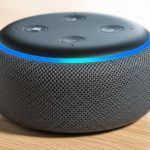
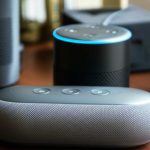
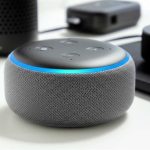
Yes, Alexa can absolutely connect to a Bluetooth speaker! It’s a fantastic way to boost your music quality or stream audio from your Echo device to a speaker you already love. Let’s get your sound sounding great!
Hey there, tech adventurer! Have you ever found yourself wishing your favorite tunes sounded a little bigger, a lot clearer, or just… better? I know I have! Sometimes, the built-in speaker on our smart devices is great for a quick weather update or a short podcast, but for truly immersive music or movie sound, we need something more. That’s where those awesome Bluetooth speakers come in, right?
But then the big question pops up: can your trusty Alexa device actually talk to that cool Bluetooth speaker you’ve got sitting around? You might be thinking, “Is it complicated?” or “Do I need a tech degree for this?” Relax, my friend! I’m here to tell you it’s way easier than you think. We’re going to dive into how you can connect your Alexa to a Bluetooth speaker, making your audio dreams a reality without any fuss.
Think of it like this: Alexa is your smart assistant, and your Bluetooth speaker is your awesome sound system. Connecting them is like giving Alexa a direct line to play music through a much bigger, better stage. We’ll go through it step-by-step, making sure you’re comfortable and confident every step of the way. So, grab a comfy seat, and let’s make some noise!

Let’s Talk About Sound: Why Connect Alexa to a Bluetooth Speaker?
So, why bother connecting your Alexa to a Bluetooth speaker in the first place? It’s all about upgrading your listening experience! Imagine your favorite playlist filling the room with rich, deep bass, or hearing every explosion in that movie with crystal clarity. That’s the magic a good Bluetooth speaker brings. It’s like going from a small whisper to a full concert hall experience.
Many Echo devices have decent speakers, but let’s be honest, they aren’t designed to be the ultimate sound system. Bluetooth speakers, on the other hand, are built for just that! They come in all shapes and sizes, from tiny portable ones to powerful party speakers. Connecting your Alexa means you get the best of both worlds: the smarts of Alexa and the incredible sound of your chosen speaker. It’s a win-win for your ears!
Can Alexa Connect to a Bluetooth Speaker? The Short Answer is YES!
I know you came here for a clear answer, so here it is: Absolutely! Alexa devices, like Echo Dots, Echo Shows, and even the original Echo, are designed to pair with Bluetooth speakers. This is one of their super handy features that lets you expand your audio capabilities beyond the device itself. It’s not some hidden trick; it’s a built-in function meant to make your life easier and your music sound better.
This connection opens up a world of possibilities. You can use your Bluetooth speaker as the primary audio output for Alexa, meaning all the music, podcasts, and responses from Alexa will come through it. It’s perfect for parties, when you want to relax with higher-quality audio, or simply when the built-in speaker isn’t cutting it. Let’s get this set up so you can start enjoying richer sound.

Getting Your Gear Ready: What You’ll Need
Before we jump into the setup, let’s make sure you have everything you need. It’s pretty straightforward, honestly!
An Alexa-enabled Device: This could be an Echo Dot, Echo Show, Echo Studio, or any other Amazon smart speaker. Just make sure it’s set up and connected to your Wi-Fi.
A Bluetooth Speaker: This is your sound booster! Make sure it’s charged or plugged in and ready to go.
The Amazon Alexa App: You’ll need this app on your smartphone or tablet to manage the connection. It’s available for both iOS and Android devices.
Bluetooth Enabled on Your Speaker: Most Bluetooth speakers have this on by default, but sometimes you need to put them in “pairing mode.” We’ll cover that!
That’s really it! No special cables or complicated software needed. Just your smart speaker, your audio powerhouse, and the handy Alexa app.
Pairing Up: Step-by-Step Guide to Connecting Alexa to Your Bluetooth Speaker
Alright, let’s get down to business! Connecting your Alexa device to your Bluetooth speaker is a simple process that takes just a few minutes. I’ll walk you through it, nice and slow.
Step 1: Put Your Bluetooth Speaker in Pairing Mode
This is the most important first step. Your Bluetooth speaker needs to be discoverable so Alexa can find it. How you do this depends on your speaker.
Look for a Bluetooth Button: Many speakers have a dedicated button with the Bluetooth symbol (usually a stylized “B”). Press and hold this button until you hear a sound or see a light flashing. This usually means it’s in pairing mode.
Check Your Speaker’s Manual: If you’re not sure, your speaker’s instruction manual is your best friend here. It will tell you exactly how to activate pairing mode.
Some Speakers Pair Automatically: For some newer speakers, they might automatically go into pairing mode when they’re turned on for the first time or if they aren’t already connected to another device.
Here’s a little tip: once you activate pairing mode, your speaker usually has a blinking light or a distinct sound to let you know it’s ready to connect. Keep it close to your Alexa device for the best signal.
Step 2: Open the Alexa App and Find Your Device
Now, grab your smartphone or tablet.
Open the Amazon Alexa app. Make sure you’re logged into the same Amazon account that your Alexa device is registered to.
Tap on the “Devices” icon in the bottom right corner of the app. This is where all your Alexa-enabled gadgets live.
Select “Echo & Alexa” from the list of device types.
This will show you a list of all your Amazon smart speakers.
Step 3: Select Your Echo Device
From the list of your Echo devices, tap on the specific one you want to connect to your Bluetooth speaker. This could be your main Echo in the living room or an Echo Dot in your bedroom.
Step 4: Navigate to Bluetooth Settings
Once you’ve selected your Echo device, you’ll see a screen with various settings for that device.
Scroll down until you find the “Bluetooth Connections” or “Bluetooth” option.
Tap on it. You’ll see options to “Pair a New Device” or manage existing connections.
Step 5: Initiate Pairing from the Alexa App
Now, tell Alexa to look for your speaker.
Tap on “Pair a New Device.”
Your Alexa device will start searching for nearby Bluetooth devices that are in pairing mode. This might take a few seconds.
Step 6: Select Your Bluetooth Speaker from the List
Once Alexa has found your speaker, its name should appear in the list within the Alexa app.
Tap on the name of your Bluetooth speaker.
Alexa will then attempt to connect to it. You might hear a confirmation sound from your Echo device, like “Connected to [Speaker Name],” or the light ring on your Echo might change color.
And voilà! You should now see your Bluetooth speaker listed as connected in the Alexa app. Your Alexa device will now use this speaker for all its audio output. How cool is that?
Using Your New Sound System: Voice Commands and More
Now that your Alexa and Bluetooth speaker are buddies, how do you actually use them together? It’s super intuitive!
Playing Music: Just ask Alexa to play your favorite song, artist, playlist, or radio station. For example, say, “Alexa, play jazz music.” The sound will automatically come from your connected Bluetooth speaker.
Controlling Volume: You can control the volume using your voice. Say, “Alexa, turn up the volume” or “Alexa, set volume to 5.” You can also use the volume buttons on your Bluetooth speaker itself, but using Alexa keeps things hands-free.
Pausing and Skipping: You can ask Alexa to pause playback, resume, skip to the next song, or go back to the previous one. Just use commands like “Alexa, pause” or “Alexa, next song.”
Checking Connection Status: If you ever want to know what’s connected, you can ask, “Alexa, what Bluetooth devices are connected?”
It feels pretty seamless once it’s set up. You just talk to Alexa like you normally would, and the sound comes out of your better speaker.
Troubleshooting Tips: When Things Don’t Connect
Sometimes, tech doesn’t cooperate right away. Don’t worry, these little hiccups are usually easy to fix! If your Alexa isn’t connecting to your Bluetooth speaker, try these steps.
Common Issues and Solutions
Speaker Not Found:
Is it in pairing mode? Double-check that your speaker is actively in pairing mode. It might have timed out after a few minutes of inactivity.
Too far away? Bring your Bluetooth speaker closer to your Alexa device. Obstacles like walls can interfere.
Already connected elsewhere? Make sure your Bluetooth speaker isn’t already connected to your phone or another device. Turn off Bluetooth on those other devices temporarily.
Connection Fails:
Restart Everything: Turn off both your Alexa device and your Bluetooth speaker. Wait about 30 seconds, then turn them back on. This often clears up temporary glitches.
Forget and Re-pair: In the Alexa app, go to your Echo device’s settings, tap on “Bluetooth,” select your speaker, and tap “Forget Device.” Then, put your speaker back into pairing mode and try pairing again.
No Sound After Connecting:
Volume Check: Make sure the volume is turned up on both your Alexa device (using voice commands) and your Bluetooth speaker itself.
Correct Output: Confirm in the Alexa app that the Bluetooth speaker is still showing as the active audio output. Sometimes, Alexa might revert to its internal speaker.
Audio Source: Try asking Alexa to play something different. Sometimes a specific song or stream might have an issue.
A quick tip from my own experience: sometimes, simply turning off and on the Bluetooth function on your phone can help clear up connection issues with other devices too. It’s like a mini refresh for your device’s wireless capabilities!
What About Using Alexa as a Bluetooth Speaker?
This is a question I get asked a lot! Can you use your Echo device itself as a Bluetooth speaker for your phone or tablet? The answer is also yes!
It’s a different kind of connection, but just as useful. If you want to play music from your phone through your Echo’s speaker, you can pair your phone to your Echo device using Bluetooth.
Here’s how to do that:
1. Put your Echo device in pairing mode by saying, “Alexa, pair Bluetooth.”
2. On your phone or tablet, go to your Bluetooth settings.
3. Look for your Echo device in the list of available devices and tap to connect.
4. Once paired, any audio from your phone will play through your Echo.
This is fantastic for when you want to use your phone’s music app but enjoy the Echo’s speaker quality. It’s a two-way street for Bluetooth with Alexa!
Comparing Bluetooth Speaker Options for Alexa
The world of Bluetooth speakers is huge! Choosing one can feel a bit overwhelming. Here’s a quick look at what makes different speakers great and how they might pair with Alexa.
Key Features to Consider
Sound Quality: This is subjective, but look for reviews that mention clear highs, solid mids, and good bass.
Portability: Do you want to move it around the house, or take it outdoors? Battery life is key here.
Durability: If you plan on using it near water or for adventures, look for water-resistant or rugged designs.
Connectivity: Most speakers use Bluetooth, but some offer Wi-Fi for multi-room audio or even aux-in ports for wired connections.
Battery Life: This can range from a few hours to over 20 hours on a single charge.
Here’s a little comparison table to give you an idea of what’s out there. Remember, these are just examples to illustrate different types!
| Speaker Type | Typical Price Range | Key Features | Best For |
| :—————– | :—————— | :————————————————— | :———————————————- |
| Ultra-Portable | $20 – $60 | Small, lightweight, long battery life, often water-resistant | On-the-go listening, travel, shower |
| Mid-Range | $70 – $150 | Balanced sound, decent battery, good for everyday use | Home use, small gatherings, office |
| Premium/Home | $150+ | Superior sound quality, smart features, robust build | Serious music lovers, home entertainment |
| Waterproof | $40 – $120 | IPX ratings (e.g., IPX7), floatable, rugged design | Poolside, beach, bathroom, outdoor adventures |
When you’re choosing a speaker to pair with Alexa, focus on reliability and sound. A speaker that connects easily via Bluetooth and provides the sound you love is the perfect match. Brands like Bose, JBL, Sony, and Ultimate Ears often get great reviews for their Bluetooth speakers.
Fun Facts and Advanced Tips for Alexa Bluetooth Users
Did you know that Bluetooth technology has evolved significantly? The latest versions offer better range and more stable connections. Amazon often updates its Alexa software, which can improve Bluetooth performance over time.
Advanced Tip: You can pair multiple Bluetooth devices to your Echo, but it can only actively connect to one at a time. If you want to switch between your phone and your speaker, you might need to disconnect the current device first or simply re-pair.
Another Cool Trick: If you have an Echo Show device, you can sometimes see the connection status or even manage Bluetooth pairings directly on its touchscreen, which is super convenient if you don’t have your phone handy.
For more in-depth information on Alexa’s capabilities, you can check out resources like CNET’s extensive guides on Echo devices. They often cover advanced features and troubleshooting.
Frequently Asked Questions (FAQ) About Alexa and Bluetooth Speakers
Let’s tackle some common questions you might still have.
Q: Do I need to pay for a subscription to connect Alexa to a Bluetooth speaker?
A: Nope! Connecting your Alexa device to a Bluetooth speaker is a free feature. You just need the devices themselves and the Alexa app.
Q: Can Alexa play music from my phone via Bluetooth?
A: Yes! You can pair your phone to your Echo device and play audio from your phone through the Echo’s speaker. It works in reverse too!
Q: How do I disconnect my Bluetooth speaker from Alexa?
A: You can either say, “Alexa, disconnect Bluetooth,” or go into the Alexa app, navigate to your Echo device’s settings, tap on Bluetooth, and select your speaker to disconnect or forget it.
Q: Will my Bluetooth speaker work with all Alexa devices?
A: Pretty much! Most Alexa-enabled devices (Echo, Echo Dot, Echo Show, etc.) support Bluetooth connectivity.
Q: Can Alexa connect to two Bluetooth speakers at once?
A: No, an Alexa device can only connect to one Bluetooth speaker at a time for audio output. However, some newer Echo devices support stereo pairing if you have two identical speakers (like two Echo Studio speakers), but this is a specific feature.
Q: My speaker won’t connect. What’s the first thing I should try?
A: Always start by making sure your Bluetooth speaker is in pairing mode and that it’s not connected to another device. A simple restart of both devices also fixes many issues!
* Q: Can I use my Bluetooth headphones with Alexa?
A: Yes, you can pair Bluetooth headphones to your Echo device just like you would a speaker. This is great for private listening.
Conclusion: Your Sound, Your Way!
So there you have it! Connecting your Alexa to a Bluetooth speaker is a fantastic way to enhance your audio experience. We’ve walked through how to pair them up, troubleshoot common issues, and even explored using your Echo as a speaker itself. It’s all about making your tech work for you, and getting that rich, room-filling sound is totally achievable.
Don’t be afraid to experiment! Try out different Bluetooth speakers to find the one that fits your style and sound preferences. With your Alexa and a great speaker working together, your music, podcasts, and even your smart home interactions will sound better than ever.
Now go enjoy amazing sound and make every moment louder and better! Happy listening!