Redragon Mechanical Gaming Keyboard
Keychron K8 Pro QMK/VIA
When it comes to mechanical keyboards, the market is flooded with options—but not all are created equal. Whether you’re a gamer grinding through late-night raids, a writer pounding out thousands of words, or a developer coding through the weekend, your keyboard can make or break your experience. That’s why we’re pitting two popular contenders against each other: the Redragon Mechanical Gaming Keyboard and the Keychron K8 Pro QMK/VIA. Both offer hot-swappable switches, solid build quality, and customization features—but they cater to very different users.
This head-to-head comparison dives deep into design, performance, software, connectivity, and real-world usability. You’ll learn which keyboard delivers better value, who each one is best suited for, and how they stack up in everyday use. Whether you prioritize budget-friendly reliability or premium customization, this guide will help you pick the right board for your setup.
In-Depth Look: Redragon Mechanical Gaming Keyboard
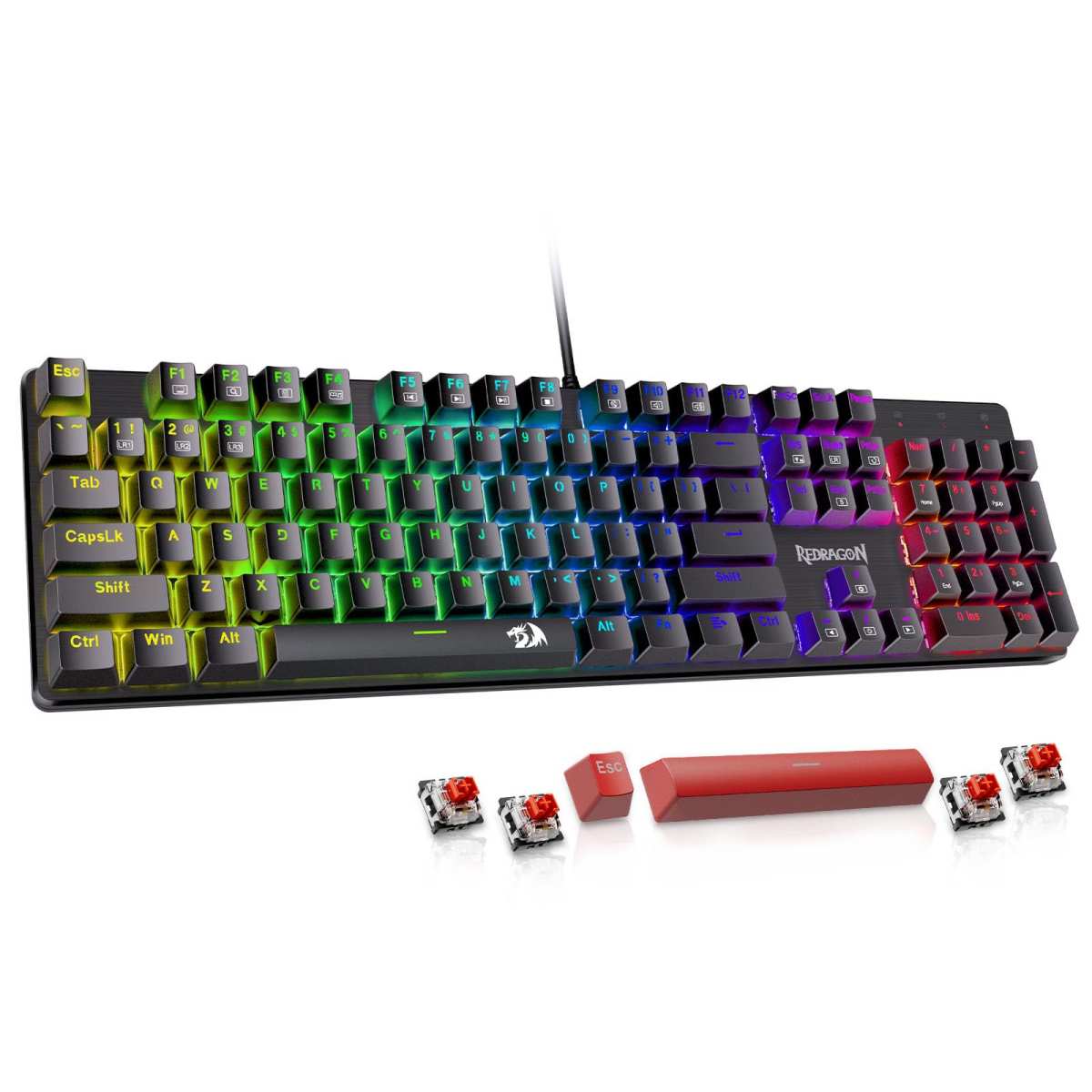
The Redragon Mechanical Gaming Keyboard is a no-frills, budget-friendly workhorse designed for gamers and typists who want reliable performance without breaking the bank. Priced under $50, it delivers surprising value with features like hot-swappable switches, full anti-ghosting, and vibrant RGB lighting—all in a sturdy full-size layout.
One of its standout features is the inclusion of hot-swappable linear red switches, which require minimal actuation force and offer a smooth, quiet keystroke ideal for long gaming sessions or office work. Unlike tactile or clicky switches, these are perfect if you prefer a consistent, gliding feel under your fingers. Plus, Redragon includes four spare switches and two extra keycaps, so you can easily replace worn-out switches without soldering—a rare perk at this price point.
The keyboard boasts 11 programmable backlight modes with adjustable brightness and speed across five levels. While the colors are fixed (you can’t customize individual key colors), the double-shot ABS keycaps ensure legends remain visible even after heavy use. The lighting is bright and even, creating an immersive atmosphere whether you’re gaming at night or working in low light.
Macro editing is supported via Redragon’s proprietary software, allowing you to remap keys, create shortcuts, or assign complex commands—great for MMO players or productivity hacks. However, note that the software doesn’t allow per-key color customization, which may disappoint RGB enthusiasts.
Build quality is solid for the price. The plastic chassis feels durable, and the wired USB connection ensures zero latency—a must for competitive gamers. All 104 keys are anti-ghosted, meaning every keypress registers accurately, even during intense multi-key combos. Twelve dedicated multimedia keys let you control volume, media playback, and system functions instantly.
Pros:
– Excellent value under $50
– Hot-swappable switches with spares included
– Full anti-ghosting and multimedia keys
– Bright, customizable RGB lighting
– Reliable wired connection
Cons:
– ABS keycaps may wear over time
– Limited software customization (no per-key RGB)
– No wireless option
– Linear switches may feel “mushy” to tactile lovers
Customer reviews highlight its reliability and ease of cleaning. One user noted, “It’s the best mechanical full-size keyboard for the price range… doesn’t have any frills or useless functions.” Another praised Redragon’s customer service: after a key malfunctioned within a month, they received a free replacement promptly. However, some users reported occasional key chatter (like the ‘W’ key registering multiple times), though this seems rare and often resolved via support.
This keyboard is best for budget-conscious gamers, home office users, or anyone needing a dependable wired mechanical board with basic customization. If you’re upgrading from a membrane keyboard and want to dip your toes into mechanical switches without spending over $100, the Redragon is a smart entry point. For more on similar models, check out our Redragon Mechanical Gaming Keyboard Review.
In-Depth Look: Keychron K8 Pro QMK/VIA
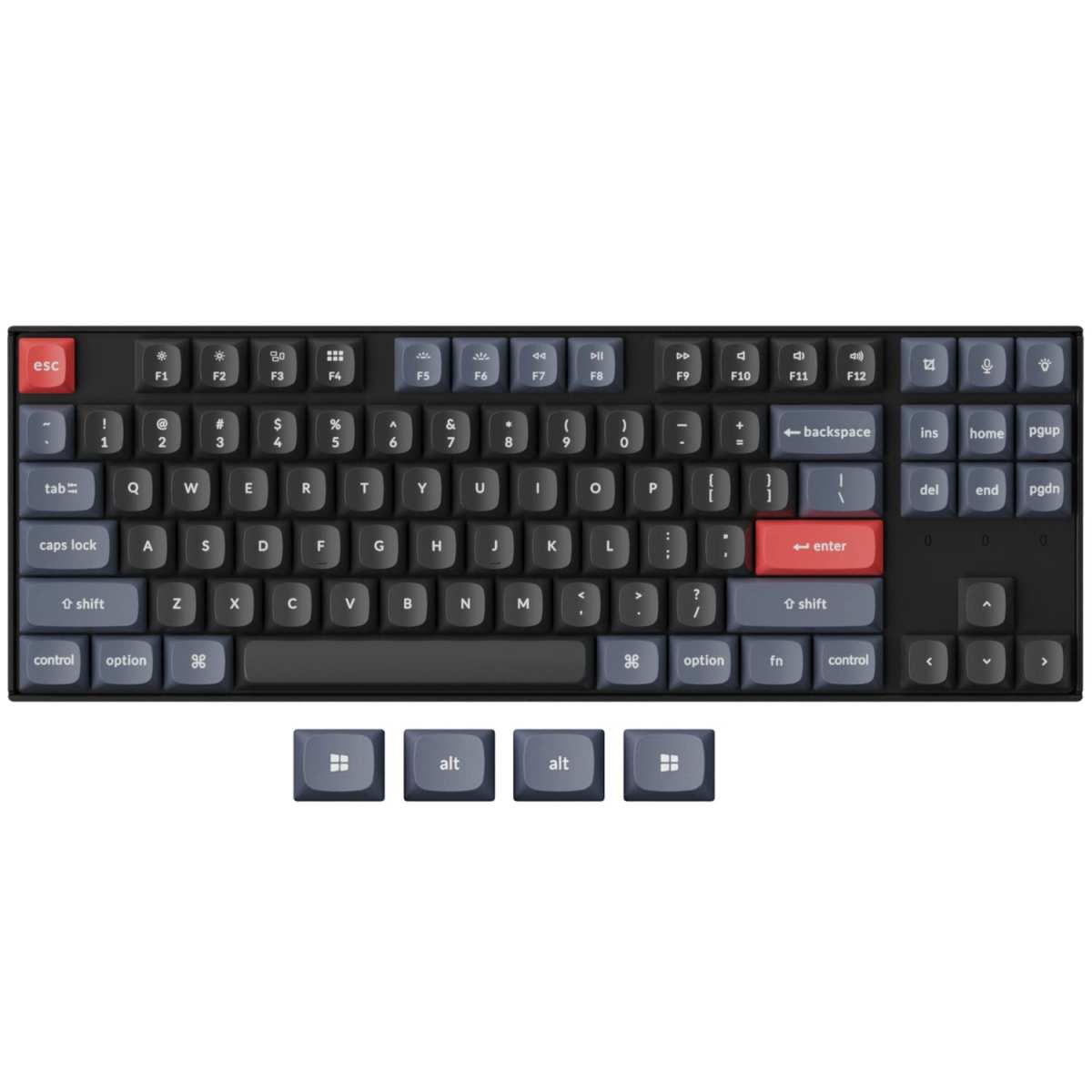
The Keychron K8 Pro QMK/VIA is a premium tenkeyless (TKL) mechanical keyboard built for enthusiasts, developers, and hybrid Mac/Windows users who demand top-tier customization and build quality. At around $120, it’s significantly pricier than the Redragon—but it delivers where it counts: firmware flexibility, premium materials, and a refined typing experience.
At its core is the open-source QMK/VIA firmware, which allows near-limitless customization. You can remap any key, create layers, assign macros, and tweak backlight effects—all without installing bloated software. This makes the K8 Pro ideal for power users who switch between operating systems or need specialized layouts for coding, design, or gaming. It’s the world’s first out-of-the-box wireless QMK/VIA keyboard, setting a new standard for accessibility.
The keyboard comes pre-lubed with Gateron G Pro Brown switches—tactile but quiet, offering a satisfying bump without the loud click. These switches are mounted on hot-swappable sockets compatible with most MX-style switches (3-pin and 5-pin), so you can easily swap in Cherry MX, Kailh, or other favorites. The PCB-mounted screw-in stabilizers reduce wobble on large keys like spacebar and Enter, resulting in a smoother, more consistent feel.
Keycaps are made from double-shot PBT in OSA profile—a hybrid between OEM and SA heights—offering excellent durability, texture, and resistance to shine. Unlike ABS, PBT won’t degrade or become slippery over time. The steel plate adds rigidity, while sound-dampening foam and silicone padding minimize ping and create a muted, premium typing sound.
Connectivity is versatile: Bluetooth 5.1 lets you pair with up to three devices (PC, laptop, tablet, phone), and USB-C provides a reliable wired option. The 4000mAh battery delivers up to 72 hours of typing on a single charge—perfect for travel or clutter-free desks. Though it only has white backlighting (not RGB), you can adjust brightness, speed, and effects via VIA, and the lighting is optimized for visibility from the typist’s angle.
Pros:
– Full QMK/VIA firmware support
– Premium PBT keycaps and steel plate
– Hot-swappable, pre-lubed Gateron switches
– Wireless + wired connectivity
– Excellent typing acoustics and stability
Cons:
– Higher price point (~$120)
– No RGB lighting (white only)
– Tenkeyless layout lacks numpad
– Steeper learning curve for QMK/VIA setup
Users rave about the build quality. One reviewer said, “This thing is solid!… I didn’t even know a keyboard COULD feel ‘natural’.” Another appreciated the seamless Mac/Windows switching, calling it “a fantastic keyboard” despite having to buy third-party clicky switches separately. The K8 Pro shines for creators, coders, and minimalists who value function over flash. For a deeper dive, read our Keychron K8 Pro Review.
Head-to-Head Comparison
Build Quality & Materials
The Keychron K8 Pro QMK/VIA clearly wins here. Its PBT keycaps, steel plate, and silicone dampening create a premium, long-lasting build. The Redragon uses ABS keycaps and a plastic frame—adequate for the price but less durable over time.
Customization & Software
Keychron dominates with QMK/VIA, offering professional-grade remapping and macro capabilities. Redragon’s software is functional but limited, especially with fixed RGB colors.
Connectivity
If you need wireless freedom, the Keychron is the only choice. The Redragon is wired-only—great for gaming latency but less flexible for multi-device setups.
Typing Experience
The Gateron Brown switches on the Keychron offer tactile feedback preferred by many typists, while the Redragon’s linear reds suit gamers who want smooth, rapid keystrokes. Stabilizers and sound dampening make the Keychron feel more refined.
Value for Money
The Redragon delivers exceptional bang-for-buck under $50. The Keychron costs more than double but justifies its price with premium materials, firmware, and wireless features.
Frequently Asked Questions
Q: Can I use the Redragon Mechanical Gaming Keyboard with a Mac?
A: Yes, but with limited functionality. It works in wired mode, though macOS-specific keys (like Command) may not be labeled. For full Mac compatibility, consider the Keychron K8 Pro QMK/VIA, which includes Mac keycaps and layout support.
Q: Are the switches on the Keychron K8 Pro QMK/VIA really hot-swappable?
A: Yes! The K8 Pro uses socketed PCB mounts compatible with most 3-pin and 5-pin MX switches. You can swap them without soldering—just pull and replace.
Q: Does the Redragon keyboard support per-key RGB lighting?
A: No. While it has 11 lighting modes, colors are fixed and cannot be customized per key. If RGB personalization is essential, look at higher-end boards like the Corsair K70 RGB Pro.
Q: Which keyboard is better for gaming?
A: The Redragon Mechanical Gaming Keyboard offers lower latency and full anti-ghosting at a budget price. However, the Keychron’s responsiveness and build quality also make it great for gaming—if you don’t mind the lack of RGB.
Q: Is the Keychron K8 Pro QMK/VIA worth the extra cost?
A: If you value customization, wireless freedom, and premium materials, absolutely. For casual users or strict budgets, the Redragon is a smarter pick. It depends on your priorities.
Final Verdict: Which One Should You Choose?
Choosing between these two keyboards comes down to your needs and budget. The Redragon Mechanical Gaming Keyboard is the ultimate budget champion—offering hot-swappable switches, solid build quality, and vibrant RGB lighting under $50. It’s perfect for gamers, students, or home office users who want a reliable wired mechanical keyboard without overspending.
On the other hand, the Keychron K8 Pro QMK/VIA is a premium, future-proof investment for power users, developers, and minimalists. With QMK/VIA firmware, wireless connectivity, PBT keycaps, and a refined typing experience, it’s built to last years—and adapt to your evolving workflow.
If you’re on a tight budget or prioritize gaming performance, go with the Redragon. But if you crave customization, durability, and a clutter-free wireless setup, the Keychron is worth every penny.
Ready to upgrade your typing game?
Check Redragon Price on Amazon
Check Keychron Price on Amazon