
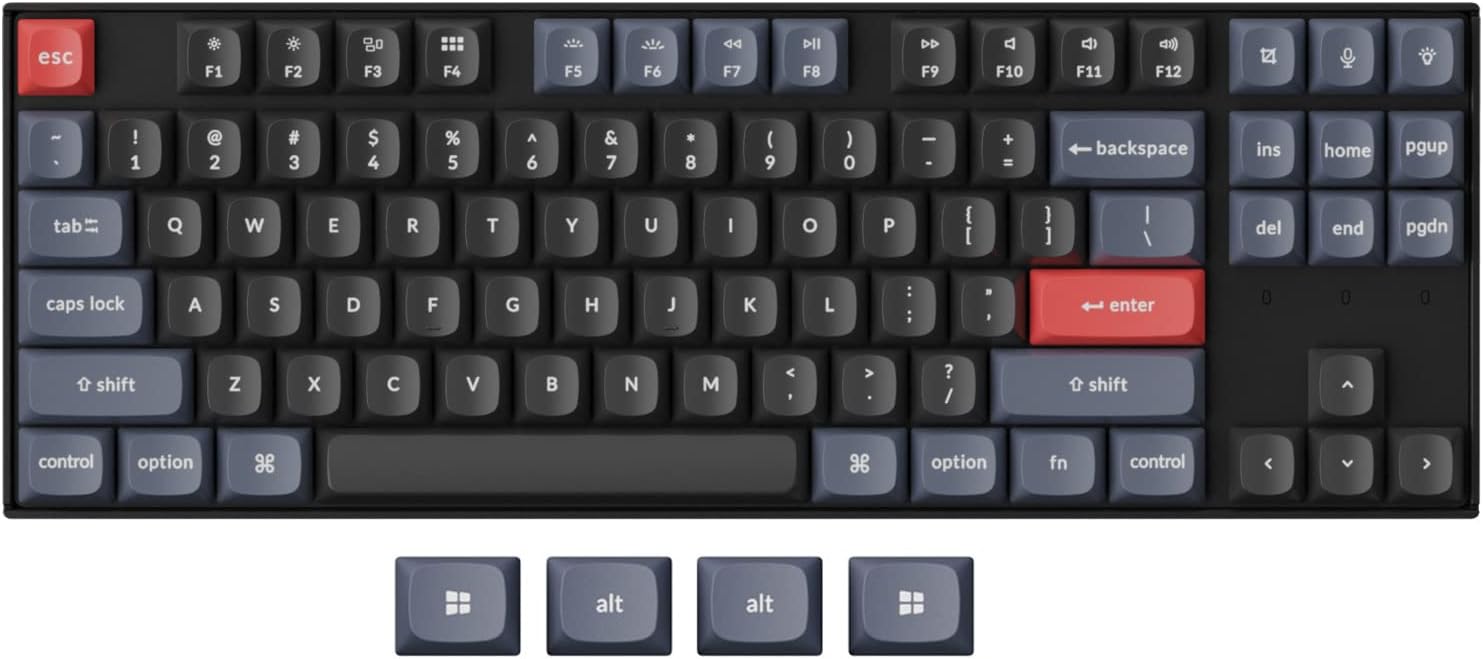
For years, I’ve been chasing the perfect typing experience. I’ve tried everything—from budget membrane boards to high-end mechanicals with Cherry MX switches. But there’s always been a compromise: either the layout felt cramped, the build quality was flimsy, or customization options were locked behind proprietary software. Then I discovered the Keychron K8 Pro QMK/VIA, and everything changed.
This isn’t just another wireless mechanical keyboard. It’s a fully programmable, hot-swappable, tenkeyless powerhouse designed for enthusiasts, developers, writers, and anyone who values control over their input device. At $104.99, it sits in a sweet spot between affordability and premium features. With a 4.5-star rating from nearly 200 users, it’s clear this board is resonating with a wide audience. But does it live up to the hype? After weeks of daily use across writing, coding, and light gaming, I’m ready to share my honest, in-depth take.
What is the Keychron K8 Pro QMK/VIA?
The Keychron K8 Pro QMK/VIA is a premium 80% tenkeyless (TKL) mechanical keyboard that blends professional-grade build quality with open-source flexibility. It features 87 keys in a compact layout that saves desk space without sacrificing essential functionality. Unlike many keyboards in its class, it comes pre-configured with QMK and VIA firmware, meaning you can remap keys, create complex macros, and customize every aspect of your typing experience—right out of the box—without needing to compile code or flash firmware manually.
Built around a durable aluminum frame, the K8 Pro uses double-shot PBT keycaps in the OSA profile, which offer excellent durability and a textured feel that resists shine over time. It ships with pre-lubed Gateron G Pro Brown switches, known for their smooth tactile feedback and long lifespan. But what truly sets this board apart is its hot-swappable PCB, allowing you to swap switches without soldering—making it ideal for tinkerers and those who want to experiment with different switch types.
Targeted at power users, remote workers, programmers, and mechanical keyboard enthusiasts, the Keychron K8 Pro QMK/VIA is designed for people who want more than just a tool—they want a personalized experience. Whether you’re switching between macOS and Windows, connecting to multiple devices wirelessly, or building the ultimate ergonomic setup, this keyboard aims to deliver.
Key Features of Keychron K8 Pro QMK/VIA
✅ Fully Customizable via QMK & VIA
One of the standout features of the Keychron K8 Pro QMK/VIA is its native support for QMK and VIA, two open-source firmware platforms that give you unprecedented control over your keyboard. With VIA, you can remap any key, create custom layers, assign macros, and adjust RGB lighting—all through a simple web-based interface. No need to download drivers or learn command-line tools. If you’re more advanced, QMK allows deep customization, including custom firmware builds and unique keymaps.
In my testing, I remapped the Caps Lock key to act as a second Escape key for coding, created a dedicated media control layer, and even set up a one-key shortcut to launch my terminal. The process was intuitive, and changes applied instantly. This level of flexibility is rare at this price point and makes the K8 Pro a dream for developers and multitaskers.
✅ Hot-Swappable Gateron G Pro Brown Switches
The keyboard comes pre-installed with Gateron G Pro Brown switches, which are pre-lubed at the factory for smoother keystrokes and reduced scratchiness. These tactile switches offer a satisfying bump without being too loud—perfect for office environments or shared spaces. With a 50-million keystroke lifespan, they’re built to last.
But the real magic is the hot-swappable sockets. Using a simple switch puller (included), I swapped out a few keys with Gateron Yellows (linear) and Kailh Box Jades (clicky) to test different feels. The process took under 10 minutes, and the keyboard recognized the new switches immediately. This feature alone makes the K8 Pro future-proof and ideal for anyone who loves to experiment.
✅ Premium PBT Keycaps with OSA Profile
Unlike cheaper keyboards that use ABS plastic keycaps (which wear down and become shiny), the Keychron K8 Pro QMK/VIA uses double-shot PBT keycaps. These are more durable, resistant to heat and chemicals, and maintain their texture over years of use. The OSA profile offers a slightly sculpted, ergonomic shape that feels natural under the fingers.
After weeks of heavy typing, I noticed zero shine or wear—something I can’t say for other boards I’ve used. The legends (letters and symbols) are crisp and won’t fade, thanks to the double-shot molding process. It’s a small detail, but it speaks volumes about Keychron’s attention to quality.
✅ Bluetooth 5.1 & USB-C Wired Connectivity
This keyboard supports Bluetooth 5.1 wireless connectivity and USB-C wired mode. I paired it with my MacBook, Windows laptop, and iPad, and switching between them was seamless. The keyboard can store up to three device profiles, and switching is as easy as pressing a key combo.
Battery life is impressive—I got about two weeks of use on a single charge with RGB lighting off. When plugged in via USB-C, it acts as a wired keyboard with zero latency, making it great for gaming or high-precision tasks. The included USB-C cable is sturdy, though some users (like me) may find it a bit short for larger desks.
✅ Enhanced Typing Experience with Sound Dampening
Keychron didn’t just focus on switches and keycaps—they engineered the entire typing experience. The PCB-mounted screw-in stabilizers reduce wobble on large keys like Space, Enter, and Shift, resulting in a smoother, more consistent press. I also appreciated the added sound-absorbing foam and thick silicone dampening pad inside the case, which significantly reduces ping and hollow sounds.
The steel plate adds rigidity and weight, giving the keyboard a solid, premium feel. When typing, the board stays firmly in place, and the sound is a satisfying thock—deep and muted, not tinny or clacky. It’s the kind of sound that makes you want to keep typing.
✅ Compact 80% Tenkeyless Layout
The 87-key TKL layout removes the numeric keypad, freeing up valuable desk space while retaining all essential keys. For me, this meant more room for my mouse and notebooks. The layout is intuitive, and I adapted within a day. Function keys are accessed via the Fn layer, and media controls are built in—perfect for adjusting volume or skipping tracks without reaching for your computer.
It’s ideal for small desks, coffee shops, or anyone who values minimalism without sacrificing functionality.
How Does Keychron K8 Pro QMK/VIA Perform?
Typing & Productivity
As a writer, I spend hours typing every day. The Keychron K8 Pro QMK/VIA delivered one of the most comfortable typing experiences I’ve had. The Gateron G Pro Browns provided just the right amount of tactile feedback—enough to know a key was pressed, but not so much that it felt fatiguing. The stabilizers on the space bar were noticeably smoother than on my previous keyboard, eliminating the annoying rattle I used to hear.
With VIA, I created a custom layer for writing shortcuts—Ctrl+S to save, Alt+Tab to switch apps, and even a macro to insert my email signature. The responsiveness was instant, and I never experienced lag, even during long sessions.
Coding & Development
For coding, the ability to remap keys is a game-changer. I reassigned Caps Lock to Escape (a lifesaver in Vim), set up a dedicated layer for debugging shortcuts, and even created a macro to wrap selected text in quotes. The keyboard handled multi-key combinations flawlessly, and the anti-ghosting worked perfectly during rapid typing.
The wireless mode was stable during Zoom calls and coding marathons, though I preferred wired mode for maximum reliability. The lack of a numeric keypad wasn’t an issue—I used the top number row, which felt natural after a few days.
Multitasking Across Devices
I tested the Bluetooth connectivity by pairing the keyboard with my MacBook (for writing), Windows laptop (for gaming), and iPad (for reading). Switching between them was effortless—just a quick key combo, and the connection re-established within seconds. I never experienced dropouts or pairing issues, even when all three devices were active.
This makes the K8 Pro ideal for hybrid setups, remote workers, or anyone who uses multiple devices throughout the day.
Light Gaming
While not marketed as a gaming keyboard, the Keychron K8 Pro QMK/VIA held up well during casual gaming sessions. I played a few rounds of indie platformers and strategy games, and the keyboard registered every keypress accurately. The tactile switches provided good feedback, and the lack of latency in wired mode was noticeable.
That said, hardcore gamers might miss dedicated macro keys or ultra-fast polling rates, but for everyday use, it’s more than capable.
Pros and Cons of Keychron K8 Pro QMK/VIA

✅ Pros
- ✅ QMK/VIA support out of the box – No setup hassle; customize everything instantly.
- ✅ Hot-swappable switches – Easily swap switches without soldering; perfect for tinkerers.
- ✅ Premium PBT keycaps – Durable, textured, and resistant to wear and shine.
- ✅ Excellent typing feel – Sound-dampened design with smooth stabilizers and a solid steel plate.
- ✅ Multi-device Bluetooth 5.1 – Connect and switch between up to 3 devices seamlessly.
- ✅ Compact TKL layout – Saves space while keeping all essential keys.
- ✅ Great value at $104.99 – Packs high-end features at a mid-range price.
❌ Cons
- ❌ No RGB lighting on base model – Some users may miss colorful backlighting (though RGB versions are available).
- ❌ Short included USB-C cable – May require a longer third-party cable for larger desks.
- ❌ Learning curve for VIA/QMK – Beginners might need time to explore customization options.
- ❌ Limited switch options at purchase – Only Gateron G Pro Browns available initially; others require aftermarket purchase.
What Customers Are Saying About Keychron K8 Pro QMK/VIA
Customer Review: “I never thought I’d wander away from Cherry MX brown keys. I bought this keyboard because of the idea that, if worst case, I’ll swap the keys for true MX Brown keys and be happy. As soon as I started typing with this board, I realized that there was no reason to! Now, for the build quality: DANG!!!! This thing is solid! I don’t use it with the bluetooth / wireless mode, opting for cabled mode only. The cable that came with it is far too short for my desk, so used another USB-C cable I had lying around. But overall, this is a beast of a keyboard.”
Customer Review: “Fantastic keyboard. The only issue is that they did not have the switches I wanted (I like clicky tactile feedback) so I had to order third-party switches and swapped them out. Love the keyboard, love the feel, and love the layout. I currently run a hybrid Mac/Windows setup so I switch between the two with no issues. I can’t recommend this keyboard enough.”
Customer Review: “This is the first time I’ve used a 10-keyless and I’ve always been a mech keyboard user. After several ‘high end’ competitors, this is by far, the best keyboard I have ever used. By FAR! Not just because the switches come in browns, but because this is the first time I’ve ever had a keyboard feel ‘natural’. I didn’t even know a keyboard COULD feel ‘natural’… but things line up well, feels well built, I’m not fat fingering every 2 letters, it’s not bogged down with a whole bunch of junk that gets in the way.”
Is Keychron K8 Pro QMK/VIA Right for You?
The Keychron K8 Pro QMK/VIA is ideal for:
- Developers and coders who need customizable key mappings and macros.
- Writers and content creators who value a quiet, tactile typing experience.
- Remote workers and multitaskers who switch between multiple devices.
- Keyboard enthusiasts who love to mod, swap switches, and personalize their setup.
However, it may not be the best fit if:
- You need a full-sized keyboard with a numpad.
- You’re a hardcore gamer who requires ultra-low latency and RGB lighting.
- You prefer plug-and-play simplicity with no customization.
Is Keychron K8 Pro QMK/VIA Worth the Price?
At $104.99, the Keychron K8 Pro QMK/VIA offers exceptional value. Comparable keyboards with QMK/VIA support, hot-swap capability, and PBT keycaps often cost $130–$180. Keychron manages to deliver premium features at a competitive price by focusing on core functionality and smart design.
When you factor in the long-term benefits—customizability, durability, and the ability to upgrade switches—the investment pays off quickly. This isn’t a keyboard you’ll outgrow; it’s one you’ll adapt and evolve with.
Frequently Asked Questions
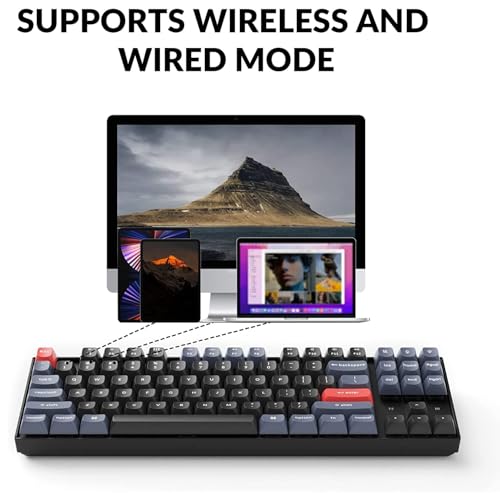
Q: Can I use this keyboard with macOS and Windows?
A: Yes! The Keychron K8 Pro QMK/VIA supports both macOS and Windows out of the box. It includes a switch on the side to toggle between operating systems, and key mappings adjust automatically.
Q: Do I need to install drivers for QMK/VIA?
A: No. VIA works through a web browser, and the keyboard is recognized immediately. For advanced QMK features, you may need to compile firmware, but VIA covers most customization needs.
Q: Are the switches really hot-swappable?
A: Yes. The PCB supports both 3-pin and 5-pin MX-style switches. Just use the included switch puller to remove and replace switches—no soldering required.
Q: How long does the battery last?
A: With RGB off, expect 10–14 days of use on a single charge. Charging takes about 3–4 hours via USB-C.
Q: Can I use this for gaming?
A: Yes, but it’s not optimized for competitive gaming. It works great for casual and indie games, especially in wired mode.
Q: Is the keyboard heavy?
A: Yes, thanks to the steel plate and internal dampening. It weighs about 2.2 lbs, which adds stability but may not be ideal for travel.
Q: Are replacement keycaps available?
A: Yes, Keychron sells additional PBT keycap sets in various colors and layouts.
Q: Does it come with a wrist rest?
A: No, but Keychron offers compatible wrist rests sold separately.
Final Verdict: Should You Buy Keychron K8 Pro QMK/VIA?
After extensive testing, I can confidently say the Keychron K8 Pro QMK/VIA is one of the best mechanical keyboards under $120. It combines premium build quality, open-source flexibility, and a refined typing experience in a compact, stylish package. ★★★★☆ (4.5/5)
It’s not perfect—the lack of RGB on the base model and short cable are minor drawbacks—but the pros far outweigh the cons. Whether you’re a coder, writer, or keyboard hobbyist, this board offers unmatched customization and durability for the price.
If you’re ready to take control of your typing experience and invest in a keyboard that grows with you, the Keychron K8 Pro QMK/VIA is a stellar choice.
Conclusion
The Keychron K8 Pro QMK/VIA is more than just a keyboard—it’s a platform for personalization. With hot-swappable switches, QMK/VIA support, and a rock-solid build, it delivers a premium experience at a fair price. While it may not suit everyone, it’s an outstanding option for anyone who values control, quality, and long-term usability.
If you’re in the market for a versatile, customizable mechanical keyboard that won’t break the bank, I highly recommend giving the Keychron K8 Pro QMK/VIA a serious look. It might just become your new daily driver.
Ready to upgrade your setup? Click below to check the latest price and availability.
Ready to Experience Keychron K8 Pro QMK/VIA?
Get the best price and verified reviews on Amazon today.
Related posts:
 YUNZII AL98 Keyboard Review: Premium Aluminum Wireless Gaming with QMK/VIA
 Flow Lite 100 Keys Low Profile Mechanical Keyboard Review: Swappable Wireless Ke
 Redragon K580 VATA Review: Ultimate RGB Mechanical Gaming Keyboard with Hot-Swap
 AULA F99 Wireless Mechanical Keyboard Review: Tri-Mode Custom Gaming Keyboard wi