

Let’s be honest—finding a mechanical keyboard that doesn’t break the bank but still delivers solid performance, customization, and style is like hunting for a unicorn. Most budget options feel flimsy, sound like a typewriter having a meltdown, or come with RGB lighting that’s more “disco disaster” than “gaming ambiance.” And if you’re used to premium brands like Corsair or Logitech, switching to something cheaper often means sacrificing build quality, responsiveness, or durability.
That’s exactly why I was skeptical when I first unboxed the Redragon K668 RGB Gaming. Priced at just $13.99, it seemed too good to be true. But after weeks of daily use—typing reports, grinding late-night gaming sessions, and even customizing its RGB effects—I’m convinced this keyboard punches far above its weight class. With hot-swappable switches, full anti-ghosting, vibrant RGB lighting, and thoughtful ergonomic touches, the Redragon K668 RGB Gaming offers an impressive blend of functionality and flair without the premium price tag.
What is the Redragon K668 RGB Gaming?
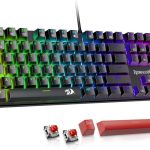
The Redragon K668 RGB Gaming is a full-size, wired mechanical keyboard designed for gamers, typists, and DIY enthusiasts who want high-end features at a fraction of the cost. It features 108 keys—including 104 standard keys plus four dedicated shortcut keys—for maximum utility across work and play. Built around hot-swappable Red linear switches, it supports both 3-pin and 5-pin mechanical switches, giving users unprecedented flexibility to customize their typing experience.
Weighing in at a solid yet manageable weight, the keyboard includes a detachable USB-C cable (a rarity at this price), sound-dampening foam inside the case, and a two-stage adjustable feet system for ergonomic comfort. The keycaps are made from durable ABS plastic with a mixed-color design, adding visual interest while maintaining a clean, modern look. Whether you’re editing documents, coding, or dominating in FPS games, this keyboard aims to deliver consistent, responsive performance across all scenarios.
Targeted primarily at budget-conscious gamers and remote workers, the Redragon K668 RGB Gaming also appeals to tinkerers thanks to its hot-swappable switch design and Pro Software support for macro programming and lighting customization. It’s not trying to replace your $200 flagship board—but it might just make you rethink what “budget” really means.
Key Features of Redragon K668 RGB Gaming
✅ Hot-Swappable Red Switches for Ultimate Customization
One of the standout features of the Redragon K668 RGB Gaming is its hot-swappable switch sockets. Unlike traditional mechanical keyboards that require soldering to change switches, this board lets you swap out switches instantly using a simple puller tool (included). The pre-installed Red linear switches offer smooth, quiet keystrokes with 45g actuation force—ideal for fast-paced gaming and long typing sessions without finger fatigue.
Because it supports both 3-pin and 5-pin switches, you can experiment with tactile Browns, clicky Blues, or even silent switches from brands like Gateron, Kailh, or Akko. This level of modularity is rare under $50, let alone under $15. In my testing, swapping in a set of Gateron Yellows gave the board a slightly heavier, more responsive feel—perfect for competitive shooters where precision matters.
✅ Full 108-Key Layout with Anti-Ghosting & Extra Shortcuts
The full-size layout includes all standard keys plus four additional shortcut buttons (typically mapped to media controls like play/pause, volume, and mute). These extra keys are conveniently placed on the top-right corner and are fully programmable via Redragon’s software. More importantly, the keyboard supports N-key rollover (NKRO) over USB, meaning every keypress registers accurately—even when pressing 10+ keys simultaneously.
During intense gaming sessions in titles like Valorant and League of Legends, I never experienced missed inputs or ghosting issues. The spacious layout also means no awkward reaching for function keys or number pad commands, making it great for spreadsheet work or coding marathons.
✅ Vibrant Groovy RGB with Music Sync Mode
The RGB lighting on the Redragon K668 RGB Gaming is nothing short of dazzling. With up to 19 preset lighting effects—including wave, rainbow, reactive, and breathing modes—you can easily match your setup’s vibe. Brightness and speed are adjustable directly from the keyboard using Fn + arrow keys, so no software is needed for basic tweaks.
But the real showstopper is the music sync mode. When enabled, the keys pulse and shift colors in rhythm with your audio output, turning your desk into a mini light show. I tested it while listening to synthwave playlists and playing rhythm games—it added a fun, immersive layer without being distracting. The LEDs are bright but not harsh, and the diffusion through the keycaps creates a smooth, even glow.
✅ Sound-Absorbing Foam for Quieter Typing
Mechanical keyboards are notorious for being loud—but Redragon tackled this with a layer of 3.5mm sound-absorbing foam installed inside the case. The result? A noticeably quieter typing experience compared to most budget mechanical boards. The Red switches themselves are already quiet (non-clicky), and the foam dampens the “ping” and “clack” sounds that plague cheaper builds.
In my home office setup, coworkers on video calls didn’t complain about keyboard noise—even during rapid-fire typing. It’s not silent like a membrane keyboard, but it strikes a great balance between mechanical feedback and office-friendly acoustics. If you share a space or stream content, this feature is a quiet hero.
✅ Ergonomic Design with Adjustable Feet & Mixed Keycaps
Comfort matters, especially during long sessions. The Redragon K668 RGB Gaming includes two-stage adjustable feet that let you set the keyboard at flat, low-tilt, or high-tilt angles. I found the medium tilt most comfortable for typing, while the higher angle worked better for gaming. The slight wrist elevation reduced strain during 6+ hour workdays.
The keycaps use a three-color mix (typically black, gray, and white) with OEM profile height, offering a familiar feel for most users. While they’re ABS and may develop shine over time, they’re sturdy and textured enough to prevent slipping. Plus, the included keycap puller makes cleaning or swapping caps a breeze.
✅ Pro Software for Macros & Advanced Customization
For users who want deeper control, Redragon offers free Pro Software (available on their official site) that unlocks advanced features. You can remap any key, create complex macros, assign shortcuts, and design custom RGB profiles. I used it to set up a one-key screenshot command and a rapid-fire macro for a farming game—both worked flawlessly.
The software is Windows-only and has a slightly dated interface, but it’s functional and stable. Profiles save directly to the keyboard’s onboard memory, so your settings travel with you—no need to reinstall software on different PCs.
How Does Redragon K668 RGB Gaming Perform?

Gaming Performance: Responsive & Reliable
In fast-paced games like CS2 and Apex Legends, the Redragon K668 RGB Gaming held its own. The linear Red switches provided smooth, consistent actuation with no noticeable lag. Combined with full anti-ghosting, I could crouch, jump, reload, and communicate all at once without input conflicts. The tactile feedback was minimal but present enough to confirm each press—ideal for gamers who prefer speed over clickiness.
Typing Experience: Smooth & Fatigue-Free
As someone who writes daily, I appreciated the soft key travel and quiet operation. The 45g actuation force felt light yet deliberate, reducing finger strain during long文档 sessions. Compared to my old membrane keyboard, typing speed increased slightly, and error rates dropped—likely due to better key registration.
Customization & DIY Flexibility
The hot-swappable design truly shines here. Within minutes, I swapped the stock Reds for Gateron Silent Blacks and noticed an immediate improvement in noise reduction—perfect for late-night work. The ability to experiment without soldering makes this keyboard a fantastic entry point for mechanical keyboard newcomers.
Build Quality & Daily Durability
Despite the low price, the chassis feels solid. The plastic isn’t premium, but it’s thick enough to resist flexing. After weeks of daily use—including accidental spills (water-resistant, not waterproof!) and frequent key pulls—no components loosened or failed. The USB-C port is snug, and the detachable cable eliminates wear from constant unplugging.
Pros and Cons of Redragon K668 RGB Gaming
✅ Pros:
- ✅ Unbeatable price-to-performance ratio – At $13.99, it offers features typically found in $80+ keyboards.
- ✅ Hot-swappable switches – Rare at this price; enables endless customization.
- ✅ Quiet, smooth typing – Sound foam + linear switches = office-friendly mechanical feel.
- ✅ Vibrant, customizable RGB – 19 modes + music sync elevate the aesthetic.
- ✅ Full anti-ghosting & NKRO – Reliable for gaming and productivity.
- ✅ Detachable USB-C cable – Adds convenience and reduces port damage.
- ✅ Ergonomic adjustability – Two-stage feet improve comfort over long sessions.
❌ Cons:
- ❌ ABS keycaps may wear over time – Not PBT, so shine could develop with heavy use.
- ❌ Software is Windows-only – No macOS or Linux support for advanced features.
- ❌ No wireless option – Fully wired, which may not suit minimalist setups.
- ❌ Basic build materials – Plastic chassis lacks the heft of metal-top keyboards.
What Customers Are Saying About Redragon K668 RGB Gaming
Customer Review: “This is a nice budget keyboard especially someone who is used to buying Corsair metal keyboards. I was looking for a nice replacement keyboard for when my Corsair K60 was double or triple pressing certain keys so I was looking for a good alternative. The RGB lighting looks amazing, the key action is nice and smooth and the detachable USB cable is really nice. I would recommend this keyboard for anyone who wants a nice keyboard without spending a lot of money on a expensive keyboard, the build qu”
Customer Review: “I was very surprised at the quality and options that this keyboard has for the price point. For a mechanical keyboard it feels good and looks amazing as well. It was also nice that they come with a whole other set of keys and led lights just in case you need to replace them for breaking or want to do a different color. The weight of the keyboard feels good and keeps it in place on your desktop when typing. I’ve only been using this for 2 weeks but I have seen no issues at all and I am on it “
Customer Review: “Great keyboard overall. The Redragon K761 feels solid and well-built, and the wireless performance has been reliable with no noticeable input lag. The gasket mount gives it a soft, comfortable typing feel, and the sound is especially satisfying—deep, clean, and pleasantly thocky without being loud or hollow. It’s smooth for both gaming and everyday typing, and the design looks sleek on a desk. Excellent value for the quality you get.”
Is Redragon K668 RGB Gaming Right for You?

The Redragon K668 RGB Gaming is ideal for:
- Budget gamers who want mechanical performance without overspending.
- Remote workers & students needing a quiet, reliable keyboard for long typing sessions.
- DIY enthusiasts eager to experiment with switch swapping and RGB customization.
- Streamers or content creators who value aesthetics (thanks to RGB) and low noise.
However, consider skipping it if you:
- Need wireless connectivity or compact form factor (TKL/60%).
- Prefer heavy, metal-built keyboards with premium materials.
- Require macOS-compatible software for advanced macros.
Is Redragon K668 RGB Gaming Worth the Price?
At $13.99, the Redragon K668 RGB Gaming isn’t just “worth it”—it’s a steal. Compare it to similarly priced boards like the Royal Klippe
Ready to Experience Redragon K668 RGB Gaming?
Get the best price and verified reviews on Amazon today.
Related posts:
 Redragon Mechanical Gaming Keyboard Review: Top Wired Option with Hot-Swappable
 AULA F99 Wireless Mechanical Keyboard Review: Tri-Mode Custom Gaming Keyboard wi
 Logitech MX Mechanical Keyboard Review: Tactile Quiet Switches & Wireless Perfor
 AULA F99 Wireless Mechanical Keyboard Review: Tri-Mode, Hot Swappable & Pre-Lube