Let’s be honest—finding the perfect mechanical keyboard is like searching for a unicorn. You want something that looks futuristic, feels buttery smooth under your fingers, lasts all day on a single charge, and doesn’t sound like a hailstorm on a tin roof. And if it’s going to sit on your desk 24/7, it better not look like a spaceship from a low-budget sci-fi flick. Enter the GravaStar Mercury K1 75%—a keyboard that somehow manages to check every box without breaking the bank.
I’ve been using mechanical keyboards for over a decade, from budget builds to high-end custom rigs, and I can confidently say the GravaStar Mercury K1 75% stands out in a crowded market. With a sleek aluminum alloy chassis, gasket-mounted design, and tri-mode wireless connectivity, it’s built for both serious gamers and productivity-focused typists who refuse to compromise on aesthetics or performance. Priced at $129.95 and boasting a 4.8-star rating from nearly 1,000 reviews, this keyboard has clearly struck a chord with users. But does it live up to the hype? After weeks of testing, I’m here to give you the full breakdown.
What is the GravaStar Mercury K1 75%?
The GravaStar Mercury K1 75% is a premium compact mechanical keyboard designed for gamers, creators, and keyboard enthusiasts who value build quality, customization, and versatility. It features a 75% layout—stripping away the numpad and function row while keeping essential keys like arrows and function modifiers—making it ideal for desk space efficiency without sacrificing usability.
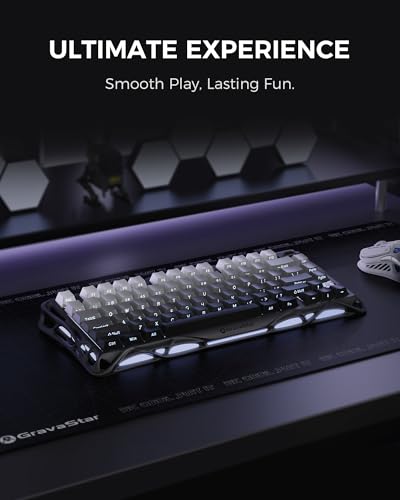
Crafted from a solid aluminum alloy exoskeleton with a striking gradient black finish, the Mercury K1 75% blends industrial strength with futuristic flair. Inside, it’s packed with features usually reserved for keyboards twice its price: hot-swappable switches, a gasket-mounted plate, multi-layer sound dampening, and dual RGB lighting systems. Whether you’re typing up reports, grinding in your favorite FPS, or just admiring its glow at 2 a.m., this keyboard delivers a refined experience from top to bottom.
Targeted at users who want a high-end feel without the custom-building hassle, the GravaStar Mercury K1 75% appeals to gamers, remote workers, streamers, and tech-savvy professionals. It’s especially attractive to those upgrading from membrane or entry-level mechanical keyboards who are ready for something more tactile, durable, and visually stunning.
Key Features of GravaStar Mercury K1 75%
✅ Futuristic Aluminum Alloy Design
The first thing you’ll notice about the GravaStar Mercury K1 75% is its bold, sculpted aluminum frame. Unlike plastic keyboards that flex or creak, this one feels rock-solid the moment you pick it up. The gradient black finish gives it a stealthy, almost cyberpunk aesthetic—perfect for RGB enthusiasts who want their setup to look like it belongs in a sci-fi movie. The symmetrical curves aren’t just for show; they provide ergonomic support and prevent wrist strain during long sessions. Plus, the weight (just under 2 lbs) ensures it stays planted on your desk, even during intense gaming marathons.
✅ Custom GravaStar x Kailh Linear Switches
At the heart of the Mercury K1 75% are exclusive GravaStar x Kailh linear switches. These aren’t your average off-the-shelf switches—they’re tuned for smooth, consistent keystrokes with a light 40gf actuation force. That means less finger fatigue over time, whether you’re coding for hours or spamming abilities in a fast-paced game. With a 1.5mm pre-travel and 3.5mm total travel distance, they strike a sweet spot between responsiveness and comfort. I found them noticeably smoother than Cherry MX Reds and quieter than many budget linear switches. And because they’re hot-swappable (more on that below), you can easily swap them out for tactile or clicky variants if your preferences change.
✅ Gasket-Mounted Design with Sound Dampening
One of the standout engineering choices in the GravaStar Mercury K1 75% is its gasket-mounted structure. Instead of a rigid screw-in plate, the keyboard uses flexible gaskets to suspend the switch plate, absorbing impact and reducing harsh bottom-out noise. Paired with a polycarbonate plate (lighter and more flexible than steel), this setup delivers a soft, cushioned typing feel that’s both satisfying and gentle on the fingers.
But the real magic happens with the five layers of sound-dampening foam lining the interior. From the top case to the bottom plate, every potential resonance point is padded. The result? A deep, thocky sound profile that’s rich and creamy—not pingy or hollow like cheaper boards. In my testing, even aggressive typing produced a muted, premium thud that didn’t disturb coworkers or roommates. It’s the kind of acoustics you’d expect from a $200+ custom build, not a sub-$130 production keyboard.
✅ Tri-Mode Connectivity (Wired, Bluetooth, 2.4GHz)
Versatility is key in today’s multi-device world, and the GravaStar Mercury K1 75% delivers with tri-mode connectivity. You can use it wired via USB-C (great for low-latency gaming), connect wirelessly via Bluetooth 5.0 (ideal for laptops, tablets, or secondary devices), or plug in the included 2.4GHz USB dongle for lag-free, tournament-grade responsiveness.
Switching between modes is seamless—just tap a function key combo, and you’re connected in seconds. I tested it across a Windows gaming PC, a MacBook Air, and an iPad, and pairing was instant every time. The 2.4GHz mode had zero detectable input lag, making it perfect for competitive play, while Bluetooth gave me the freedom to type from the couch without dragging cables everywhere. Battery life is equally impressive: up to 40 hours with default RGB lighting, and over 400 hours with lighting off. That’s weeks—or even months—of use between charges.
✅ Customizable RGB Lighting and Software Personalization
The GravaStar Mercury K1 75% doesn’t just shine—it dazzles. It features dual independent RGB lighting systems: one for the keycaps and another for the underglow along the aluminum frame. With 16.8 million colors and 13 preset lighting modes (including wave, ripple, reactive, and static), you can create a look that matches your mood, game, or room lighting.
Even better, the dedicated software (available for Windows and Mac) lets you go deep. You can remap keys, create macros, adjust polling rates, and design custom lighting profiles per application. I set mine to pulse red during gaming sessions and shift to a calm blue gradient while working. The software is intuitive, stable, and doesn’t require constant reinstalls—a rare win in the mechanical keyboard world.
✅ Hot-Swap Switches for Easy Customization
One of the best upgrades over traditional keyboards is the 5-pin hot-swap socket design. This means you can remove and replace switches without soldering—just pull out the old ones and snap in new ones. Want to try Gateron Yellows for a bouncier feel? Or lubed TTC Bluish Whites for a premium tactile bump? Go for it. The sockets support both 3-pin and 5-pin switches, giving you full compatibility with most aftermarket options.
I swapped in a few Kailh Box Jades for testing, and the process took under five minutes. No tools, no mess—just pure customization freedom. This feature alone makes the GravaStar Mercury K1 75% a future-proof investment, as your typing preferences can evolve without buying a whole new board.
How Does GravaStar Mercury K1 75% Perform?

🎮 Gaming Performance
In fast-paced titles like Valorant and Apex Legends, the GravaStar Mercury K1 75% held its own. The linear switches provided quick, consistent actuation with no noticeable delay, even during rapid key presses. The 2.4GHz wireless mode felt just as responsive as wired, and I experienced zero dropped inputs during intense firefights. The compact layout freed up mouse space, and the sturdy build prevented any wobble during aggressive movements. For esports or casual gaming, it’s more than capable.
⌨️ Typing Experience
As someone who types 8+ hours a day, comfort is non-negotiable. The Mercury K1 75% delivered a smooth, fatigue-free experience thanks to its light actuation force and soft landing from the gasket mount. The sound profile—deep and muted—made long writing sessions enjoyable rather than grating. Compared to my old Cherry MX Red keyboard, this one feels more refined and less fatiguing. The layout took a day to adjust to (missing function row), but after that, muscle memory kicked in, and I didn’t miss a beat.
🔋 Battery Life & Portability
With RGB off, I got over 300 hours of use—more than enough for a month of daily use. Even with lighting on, it easily lasted a full weekend of heavy gaming and typing. Charging via USB-C was fast, and the keyboard remained usable while plugged in. At just 75% size and under 2 lbs, it’s portable enough for travel, though the aluminum build makes it slightly heavier than plastic alternatives. Still, it fits comfortably in a backpack and feels premium wherever you take it.
🔌 Multi-Device Switching
I used the GravaStar Mercury K1 75% across three devices: my gaming PC (2.4GHz), MacBook (Bluetooth), and iPad (Bluetooth). Switching was effortless—just hold Fn + 1/2/3 to toggle between paired devices. Latency was imperceptible on all platforms, and the keyboard remembered my lighting and layout settings. For hybrid workers or students juggling multiple screens, this level of integration is a game-changer.
Pros and Cons of GravaStar Mercury K1 75%
✅ Pros:
- ✅ Premium aluminum build – Feels sturdy and looks stunning on any desk.
- ✅ Excellent sound and feel – Gasket mount + foam = thocky, quiet, and comfortable.
- ✅ Hot-swappable switches – Easy customization without soldering.
- ✅ Tri-mode wireless – Seamless switching between wired, Bluetooth, and 2.4GHz.
- ✅ Long battery life – Up to 400+ hours with RGB off.
- ✅ Customizable RGB – Dual lighting zones with rich software control.
- ✅ Great value – High-end features at a mid-range price.
❌ Cons:
- ❌ No built-in wrist rest – The aluminum edge can feel sharp during long sessions (a padded rest helps).
- ❌ Software only on Windows/Mac – No Linux support, which may deter some users.
- ❌ Front-facing legends – Key labels are on the front, not the top, which takes getting used to.
- ❌ No USB passthrough – Missing a handy feature for connecting peripherals.
What Customers Are Saying About GravaStar Mercury K1 75%
Customer Review: “TL/DR: I have this and a Mercury K1 Pro, and they’re both fantastic keyboards. They’re terrific straight out of the box, with zero customization, but it’s amazing how much you can change up the looks with a simple keycap swap (if desired). Battery life is fantastic – it feels endless if you forgo full RGB and just have keys light up as you type (40 hours default lighting, over 400 with no RGB). Just get one!”
Customer Review: “This keyboard is extremely well made. It sits, grips to any mouse pad and desk, size is perfect, and the charge lasts forever. It is silent and the RGB is very discreet and not invasive to the eye. The RGB is customizable through software or inputs through the function key. Highly recommend it, it is insanely similar to a Cherry MX 3. But it’s better—it looks better and is so far performing better. This keyboard is easy to use, connects easily with the dongle, and is not as lightweight as a Cherry…”
Customer Review: “WOW. This keyboard is really nice. The sound it makes is really pleasant, a nice relatively quiet ‘thocky’ and ‘creamy’ sound. Typing is a dream. The lighting options are beautiful and the keys as well as the outside of the keyboard are all customizable with colors and lighting pattern. This keyboard seamlessly connects via wired or wireless to my laptop and is highly comfortable and responsive for gaming as well as typing. The front-facing symbols on the keyboard take some getting used to and look…”
Is GravaStar Mercury K1 75% Right for You?
The GravaStar Mercury K1 75% is ideal for:
- Gamers who want responsive, low-latency performance with a premium feel.
- Remote workers & students needing a quiet, comfortable keyboard for long typing sessions.
- Tech enthusiasts who appreciate build quality, customization, and sleek design.
- Multi-device users who switch between PC, Mac, tablet, or phone regularly.
However, you might want to skip it if:
- You prefer full-size layouts with numpads.
- You need USB passthrough or dedicated media keys.
- You’re on a tight budget under $100.
Is GravaStar Mercury K1 75% Worth the Price?
At $129.95, the GravaStar Mercury K1 75% sits in a sweet spot between budget mechanicals and high-end customs. Compared to similar keyboards like the Keychron K8 Pro or Royal Klippe
Ready to Experience GravaStar Mercury K1 75%?
Get the best price and verified reviews on Amazon today.