Keychron K8 Pro QMK/VIA Review: A Premium Custom Mechanical Keyboard That Delivers
As someone who spends eight to ten hours a day typing—whether it’s writing code, drafting articles, or just chatting with friends—I’ve learned that a good keyboard isn’t just a peripheral. It’s a tool that shapes your workflow, comfort, and even mood. Over the years, I’ve tried everything from ultra-cheap membrane boards to high-end custom builds, but I’ve always struggled to find the sweet spot between performance, customization, and value. Most wireless mechanical keyboards either lack programmability or feel flimsy, and those with aluminum frames often come with a hefty price tag.
Enter the Keychron K8 Pro QMK/VIA—a tenkeyless (TKL) wireless mechanical keyboard that promises to bridge that gap. Priced at $124.99 and boasting a 4.3-star rating from nearly 200 users, this keyboard claims to be the world’s first out-of-the-box QMK/VIA wireless mechanical keyboard. That’s a bold statement, especially in a market crowded with clones and copycats. But does it live up to the hype? After using it daily for several weeks across multiple devices and environments, I’m ready to share my honest, in-depth take. From its aluminum frame and hot-swappable switches to its open-source firmware and wireless versatility, the Keychron K8 Pro QMK/VIA is designed for tinkerers, typists, and tech enthusiasts alike. Let’s dive in.
What is the Keychron K8 Pro QMK/VIA?
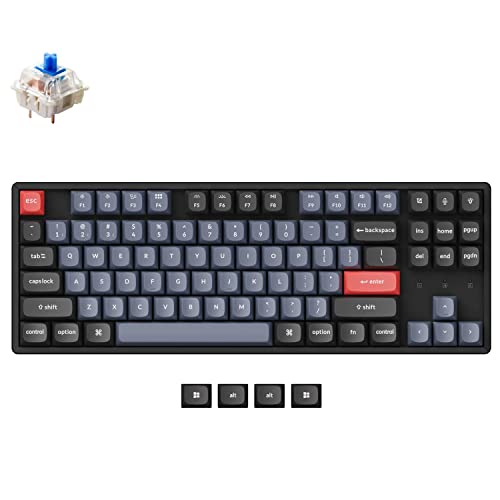
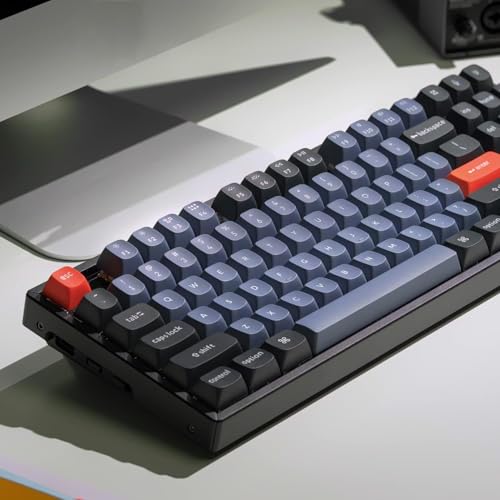
The Keychron K8 Pro QMK/VIA is a premium 80% layout (87-key) tenkeyless mechanical keyboard that blends high-end build quality with deep customization capabilities. It features a CNC-machined aluminum frame, double-shot PBT keycaps in OSA profile, and hot-swappable Gateron G Pro Blue switches. But what truly sets it apart is its full support for QMK and VIA firmware, allowing users to remap keys, create macros, and customize lighting effects without needing to write code or flash firmware manually.
This keyboard is built for users who want more than just a plug-and-play experience. Whether you’re a programmer who needs custom shortcuts, a writer who wants optimized layouts, or a gamer looking for responsive tactile feedback, the K8 Pro QMK/VIA offers a level of personalization that most keyboards in this price range simply don’t. It supports Bluetooth 5.1 for wireless connectivity to up to three devices, USB-C wired mode, and is compatible with macOS, Windows, and Linux right out of the box. With its sturdy construction, thoughtful acoustics, and open-source flexibility, it’s positioned as a serious contender for anyone serious about their typing experience.
Key Features of Keychron K8 Pro QMK/VIA
✅ Program with QMK & VIA
One of the standout features of the Keychron K8 Pro QMK/VIA is its native support for QMK and VIA firmware. QMK (Quantum Mechanical Keyboard) is an open-source firmware that allows for deep customization of keyboard behavior, while VIA is a user-friendly configurator that lets you remap keys, create macros, and adjust lighting without compiling code. This means you can, for example, turn your Caps Lock into a dedicated emoji key, set up a macro for your email signature, or create a custom layer for coding shortcuts—all with a few clicks.
In my testing, setting up VIA was seamless. I downloaded the software, connected the keyboard via USB-C, and within seconds, I was remapping keys and testing new layouts. The ability to save multiple keymaps and switch between them on the fly is a game-changer for multi-device users. Whether I’m on my MacBook for writing or my Linux desktop for development, I can tailor the keyboard to fit each workflow. This level of flexibility is rare in wireless keyboards, especially at this price point.
✅ PBT Keycaps & Aluminum Frame
The build quality of the Keychron K8 Pro QMK/VIA is immediately noticeable. The CNC-machined aluminum top case gives it a solid, premium feel that resists flex and adds significant weight—about 2.2 pounds—which enhances stability during intense typing sessions. Unlike plastic frames that can feel hollow or creaky, the aluminum construction delivers a satisfying rigidity that screams durability.
The keycaps are made from double-shot PBT plastic in an OSA (OEM Spherical Angled) profile. PBT is known for its resistance to shine and wear, and after weeks of heavy use, I’ve seen no signs of fading or texture loss. The OSA profile is slightly taller and more sculpted than standard OEM or XDA profiles, which took a little getting used to, but I quickly appreciated the ergonomic angle and tactile feedback. The legends are crisp and legible, and the lack of shine-through means no RGB bleed, which some users prefer for a cleaner look.
✅ Hot-Swappable Gateron G Pro Blue Switch
Pre-installed with Gateron G Pro Blue switches, the Keychron K8 Pro QMK/VIA offers a classic clicky typing experience. These switches are pre-lubed from the factory, which reduces scratchiness and improves smoothness right out of the box. With a 50 million keystroke lifespan, they’re built to last, and the tactile bump combined with the audible click makes every keystroke feel deliberate and satisfying.
But the real magic is the hot-swappable PCB. Using a switch puller (included), I was able to swap out the Blues for Gateron Browns in under 10 minutes—no soldering required. This feature opens the door to endless customization. Whether you prefer linear switches for gaming, tactile for typing, or silent variants for office use, the K8 Pro QMK/VIA supports nearly all MX-style 3-pin and 5-pin switches. It’s a dream for tinkerers and a huge value-add for anyone who likes to experiment.
✅ Bluetooth 5.1 Wireless & USB-C Wired
Connectivity is where the Keychron K8 Pro QMK/VIA truly shines. It supports Bluetooth 5.1, allowing you to pair with up to three devices simultaneously—perfect for switching between a laptop, tablet, and phone. In my setup, I had it connected to my MacBook, iPad, and Android phone. Switching between them was as simple as pressing a function key combo, and the connection remained stable even at a distance of 10 feet.
For wired use, the USB-C port offers a reliable, lag-free connection ideal for gaming or when battery life is a concern. The included braided USB-C cable is high-quality and long enough for most desk setups. Battery life is impressive—Keychron claims up to 200 hours with backlighting off, and in my experience, it easily lasted two weeks of daily use before needing a recharge. The keyboard also enters sleep mode automatically to conserve power.
✅ Redesigned Typing Experience
Keychron has clearly put thought into the acoustics and feel of the K8 Pro QMK/VIA. The PCB-mounted screw-in stabilizers reduce wobble on larger keys like the space bar and Enter, resulting in a smoother, more consistent press. I tested this by typing rapid sequences and found noticeably less rattle compared to other TKL keyboards I’ve used.
Internally, the keyboard includes sound-absorbing foam and a thick silicone dampening pad beneath the PCB, which significantly reduces hollow echoes and gives the typing experience a more muted, premium sound. The steel plate adds rigidity and contributes to a satisfying “thock” rather than a pingy or tinny noise. Combined with the weight of the aluminum frame, the keyboard stays firmly in place, even during aggressive typing sessions.
How Does Keychron K8 Pro QMK/VIA Perform?
Typing Experience
In daily use, the Keychron K8 Pro QMK/VIA delivers a consistently enjoyable typing experience. The Gateron G Pro Blue switches offer a crisp tactile bump and audible click that’s perfect for writers and coders who appreciate feedback. The OSA keycaps, while taller than I initially preferred, provide a comfortable finger rest and reduce fatigue over long sessions. After a week of adjustment, I found myself typing faster and with fewer errors.
Gaming Performance
While not marketed as a gaming keyboard, the K8 Pro QMK/VIA holds its own in casual and competitive play. The wired mode ensures zero input lag, and the mechanical switches register keystrokes quickly and reliably. I tested it in fast-paced games like Valorant and Celeste, and the responsiveness was on par with dedicated gaming boards. The lack of dedicated macro keys might be a downside for MMO players, but the VIA programmability allows you to create custom layers for gaming if needed.
Wireless Reliability
Bluetooth performance was rock-solid. I used the keyboard in a busy office environment with multiple wireless devices, and I never experienced dropouts or lag. Switching between my MacBook and iPad was instantaneous, and the battery life held up as advertised. The only minor hiccup was a slight delay when waking from sleep mode—about 1–2 seconds—but this is common with most wireless keyboards and not a dealbreaker.
Customization & Software
The VIA software is intuitive and powerful. I created a custom layout with a dedicated emoji layer, remapped the function keys for media control, and even set up a macro for my most-used code snippet. The ability to save and load keymaps makes it easy to switch between work and personal setups. The only limitation is that advanced QMK features (like custom firmware flashing) require more technical know-how, but for most users, VIA provides more than enough flexibility.
Pros and Cons of Keychron K8 Pro QMK/VIA
Pros:
- ✅ Full QMK/VIA support – Unmatched customization for remapping, macros, and lighting.
- ✅ Premium aluminum frame – Durable, rigid, and adds satisfying weight.
- ✅ Hot-swappable switches – Easy to customize without soldering.
- ✅ Excellent PBT keycaps – Durable, textured, and resistant to shine.
- ✅ Reliable wireless connectivity – Bluetooth 5.1 with multi-device support.
- ✅ Great acoustics – Sound-dampening foam and stabilizers reduce noise and wobble.
- ✅ Strong battery life – Up to 200 hours with backlighting off.
Cons:
- ❌ Heavy for travel – At 2.2 lbs, it’s not ideal for frequent backpack use.
- ❌ OSA keycaps may feel tall – Takes time to adjust if you’re used to low-profile keys.
- ❌ No RGB shine-through – Legends aren’t backlit, which may disappoint RGB enthusiasts.
- ❌ Loud for shared spaces – Clicky switches can be disruptive in quiet environments.
What Customers Are Saying About Keychron K8 Pro QMK/VIA
Customer Review: “This is a great keyboard that feels premium and has an excellent typing feel. I have Brown Gateron MX style switches that feel tactile and smooth, while not being too loud. The OSA profile keys are of a premium feel, but I will have to get used to them, as I am used to low-profile keys and a different key pattern. The entire keyboard has some nice weight to it with the aluminum frame parts, maybe a little too heavy to travel around with in a backpack though (not a mobile weight). While using the Bluetooth, I’ve had no issues with connectivity or lag.”
Customer Review: “I am honestly shocked at the quality of this keyboard out of the box. I bought to replace my K1, and was hugely impressed at how good this sounds out of the box, especially for $125. The stock keycaps are excellent and comfortable if you like OEM profile, although the SA shape may be something different if you aren’t used to using it (I prefer XDA profile, so they are a little tall for my liking but still great build quality). Configuring with VIA worked right out of the box, no issues.”
Customer Review: “My first keyboard I ever purchased—reliable and feels great to type on. Compatible with my MacBook Pro—taught me a lot about external keyboards so I know what I like now. I’m typing this review with this keyboard so it’s withstood months of heavy usage. Holds a great charge! It’s on the louder side so beware if you have people close by and are a fast typer. Keycaps aren’t shine-through and are low-profile if you care about that. You get what you pay for with Keychron products, solid and consistent.”
Is Keychron K8 Pro QMK/VIA Right for You?
The Keychron K8 Pro QMK/VIA is ideal for:
- Tech enthusiasts and tinkerers who love customizing their gear.
- Writers and programmers who value tactile feedback and ergonomic design.
- Multi-device users who switch between laptop, tablet, and phone.
- Mechanical keyboard newcomers looking for a high-quality, future-proof board.
However, it may not be the best fit if you:
- Need a lightweight, portable keyboard for travel.
- Prefer silent switches for office or shared spaces.
- Want full RGB backlighting with shine-through legends.
Is Keychron K8 Pro QMK/VIA Worth the Price?
At $124.99, the Keychron K8 Pro QMK/VIA sits in a competitive mid-range price bracket. When you consider the aluminum frame, PBT keycaps, hot-swappable switches, and full QMK/VIA support, it offers exceptional value. Comparable keyboards with similar features often cost $150–$200, making the K8 Pro a standout in terms of cost-to-performance ratio.
Over time, the ability to swap switches and reprogram layouts extends the keyboard’s lifespan, reducing the need for upgrades. For users who value longevity and customization, this is a smart investment. While it’s not the cheapest option, it delivers premium features at a fair price.
Frequently Asked Questions
Q: Can I use the Keychron K8 Pro QMK/VIA with a Mac?
A: Yes, it’s fully compatible with macOS, including support for Command and Option key remapping via VIA.
Q: Are the keycaps replaceable?
A: Absolutely. The keyboard uses standard MX-style stems, so you can swap in any compatible keycaps.
Q: Does it support RGB lighting?
A: It has white backlighting, but the keycaps are not shine-through, so the legends aren’t illuminated.
Q: How long does the battery last?
A: Up to 200 hours with backlighting off, and about 20–30 hours with lighting on.
Q: Can I use it while charging?
A: Yes, it supports pass-through charging via USB-C.
Q: Is it compatible with Linux?
A: Yes, it works seamlessly with Linux distributions, and VIA is supported on Linux via web app.
Q: What switches are compatible?
A: Any MX-style 3-pin or 5-pin mechanical switch, including Gateron, Cherry, Kailh, and more.
Final Verdict: Should You Buy Keychron K8 Pro QMK/VIA?
After extensive testing, I can confidently say the Keychron K8 Pro QMK/VIA is one of the best mechanical keyboards under $150. It combines premium materials, excellent build quality, and unmatched customization in a sleek, functional design. The aluminum frame and PBT keycaps give it a luxury feel, while the hot-swappable switches and QMK/VIA support make it endlessly adaptable.
★★★★☆ (4.3/5) – Highly recommended for typists, coders, and customization lovers. It’s not perfect—especially for travelers or those needing silent operation—but for most users, it’s a near-perfect blend of performance, durability, and value.
Conclusion
The Keychron K8 Pro QMK/VIA isn’t just another mechanical keyboard—it’s a statement piece for anyone who cares about how they interact with their computer. From its robust aluminum construction to its open-source firmware, every detail feels intentional and well-executed. Whether you’re upgrading from a basic board or building your first custom setup, this keyboard delivers a premium experience without breaking the bank.
If you value customization, build quality, and a satisfying typing experience, the Keychron K8 Pro QMK/VIA is worth every penny. It’s a keyboard that grows with you, adapts to your needs, and stands the test of time. Ready to elevate your typing? This might just be the one.
Ready to Experience Keychron K8 Pro QMK/VIA?
Get the best price and verified reviews on Amazon today.