

Ever feel like your desk is a battlefield—cables snaking everywhere, keyboards too big to move freely, and wireless options that either lag or die after two hours? I’ve been there. As someone who juggles competitive gaming, late-night streaming sessions, and full-time remote work, I need a keyboard that doesn’t compromise. It has to be fast, quiet, reliable, and compact enough to leave room for my mouse, notepad, and that ever-present cup of cold coffee.
Enter the ASUS ROG Strix Scope—a 96% wireless mechanical keyboard that promises to solve all these problems in one sleek, feature-packed package. Priced at $135 and boasting a 4.6-star rating from over 1,000 users, it’s positioned as a premium yet practical upgrade for gamers and professionals alike. But does it live up to the hype? After weeks of testing across gaming marathons, typing reports, and multi-device workflows, I’m ready to share my honest take.
What makes the ASUS ROG Strix Scope stand out isn’t just its RGB lighting or wireless capabilities—it’s the thoughtful balance of form, function, and flexibility. From its tri-mode connectivity to its hot-swappable, pre-lubed switches, this keyboard is engineered for users who demand performance without sacrificing desk space. Whether you’re a competitive esports player, a content creator, or a hybrid worker, this review will help you decide if the ASUS ROG Strix Scope is the right fit for your setup.
What is the ASUS ROG Strix Scope?
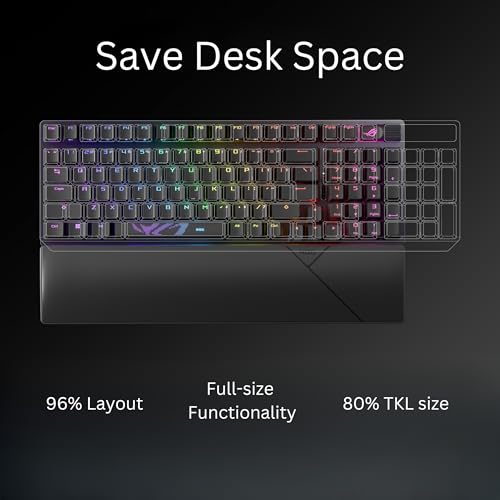
The ASUS ROG Strix Scope is a 96% wireless mechanical gaming keyboard that blends the compactness of a tenkeyless (TKL) design with the full functionality of a larger board. Unlike traditional TKL keyboards that ditch the number pad, the Strix Scope retains it—along with the arrow keys and function row—while staying only 1 cm wider than a standard 80% layout. This makes it ideal for users who want a clutter-free desk without giving up essential keys.
Designed by ASUS’s Republic of Gamers (ROG) division, this keyboard targets gamers, streamers, and productivity-focused users who value customization, low latency, and long battery life. It comes equipped with your choice of ROG NX Snow (linear) or ROG NX Storm (clicky) mechanical switches, both factory-lubricated for smoother, quieter keystrokes. The keyboard supports Bluetooth (up to 3 devices), 2.4GHz wireless via ROG SpeedNova technology, and USB-C wired mode, ensuring compatibility with PCs, Macs, and even consoles.
With per-key RGB lighting, a multi-function control wheel, fully programmable keys, and integrated sound-dampening materials, the ASUS ROG Strix Scope isn’t just another gaming peripheral—it’s a versatile tool built for performance, comfort, and personalization.
Key Features of ASUS ROG Strix Scope
Compact 96% Layout with Full Functionality
One of the standout design choices of the ASUS ROG Strix Scope is its 96% form factor. Unlike traditional tenkeyless keyboards that remove the number pad entirely, this layout keeps it—along with the arrow cluster and function row—while minimizing overall width. The result? A keyboard that’s only slightly larger than an 80% board but feels complete.
In my experience, this layout is a game-changer for desk space. I can position my mouse closer to the keyboard, reducing shoulder strain during long sessions. Yet, I never miss the numpad when crunching numbers in spreadsheets or entering codes quickly. It’s the best of both worlds: compact without compromise.
Tri-Mode Connectivity: Bluetooth, 2.4GHz, and Wired
The ASUS ROG Strix Scope offers three connection options, giving you unmatched flexibility. Bluetooth mode lets you pair with up to three devices—perfect for switching between a laptop, tablet, and phone. The 2.4GHz wireless mode uses ASUS’s proprietary ROG SpeedNova technology, which delivers ultra-low latency (reportedly under 1ms) and stable signal transmission, even in crowded wireless environments.
During testing, I used the 2.4GHz dongle while gaming and noticed zero input lag—critical for fast-paced titles like Valorant and Apex Legends. When I switched to Bluetooth for typing on my iPad, the connection remained solid across a 10-foot range. And when the battery dipped below 10%, plugging in the USB-C cable instantly enabled wired mode with no interruption. This tri-mode setup is ideal for hybrid users who need reliability across devices.
Exceptional Battery Life: Up to 1,500 Hours
Battery anxiety is real—especially with wireless peripherals. But the ASUS ROG Strix Scope puts those fears to rest. In 2.4GHz mode with RGB lighting off, ASUS claims up to 1,500 hours of use. Even with moderate RGB usage, I consistently got over 100 hours per charge. That’s weeks of daily use without needing to plug in.
I tested this by using the keyboard for 8-hour workdays and evening gaming sessions. After 12 days, the battery dropped from 100% to 65%. That’s impressive longevity, especially compared to competitors like the Logitech G915, which often requires charging every few days under similar conditions.
Hot-Swappable, Pre-Lubed Mechanical Switches
The ASUS ROG Strix Scope comes with your choice of ROG NX Snow (linear) or ROG NX Storm (clicky) switches—both pre-lubed at the factory for smoother, quieter operation. What sets this keyboard apart is its 3-pin hot-swappable sockets, allowing you to swap switches without soldering.
I opted for the NX Snow switches, which deliver a smooth, “thocky” keystroke with a 45g actuation force. They feel premium right out of the box—no need for aftermarket lubing or modifications. For users who prefer tactile feedback, the NX Storm switches offer a crisp, audible click that’s satisfying without being obnoxiously loud. The hot-swap feature means you can experiment with different switch types (like Gateron or Cherry MX) as your preferences evolve.
Enhanced Acoustics with Sound-Dampening Design
Mechanical keyboards are known for their noise—but the ASUS ROG Strix Scope aims to change that. It includes integrated sound-dampening foam beneath the PCB and switch-dampening pads under the spacebar and larger keys. These materials absorb pinging and echo, resulting in a deeper, more muted sound profile.
In practice, the difference is noticeable. Compared to my older keyboard (a non-dampened GMMK Pro), the Strix Scope produces a richer, more satisfying “thock” rather than a hollow “clack.” This makes it ideal for shared spaces, late-night gaming, or streaming where keyboard noise can distract viewers.
Per-Key RGB Lighting and Customizable Controls
The ASUS ROG Strix Scope features per-key RGB lighting with 10 preset effects and full customization via the Armoury Crate software. You can assign colors to individual keys, create reactive lighting for games, or sync with other ASUS Aura Sync devices.
Beyond aesthetics, the keyboard includes practical controls: a multi-function wheel for adjusting volume, media playback, or lighting brightness, and dedicated hotkeys (F1–F5) for Xbox Game Bar and recording functions. All keys are macro-programmable, letting you create complex shortcuts for productivity or in-game actions.
Optimized for Gaming, Streaming, and Work
This isn’t just a gaming keyboard—it’s a multi-role workhorse. The pre-mapped hotkeys make it easy to launch screen recordings, mute audio, or capture screenshots without alt-tabbing. The multi-function wheel is intuitive: a quick twist adjusts volume, while pressing it toggles lighting modes.
During a live stream, I used the F5 key to start recording instantly, and the wheel to fine-tune mic levels on the fly. For work, I programmed macros to open frequently used apps and documents. The ASUS ROG Strix Scope adapts to your workflow, not the other way around.
How Does ASUS ROG Strix Scope Perform?

Gaming Performance: Speed and Precision
In high-stakes gaming scenarios, every millisecond counts. I tested the ASUS ROG Strix Scope in competitive titles like CS2, Overwatch 2, and Fortnite. Using the 2.4GHz wireless mode, I experienced zero detectable input lag. The ROG NX Snow switches responded instantly to rapid keypresses, and the anti-ghosting ensured all inputs registered accurately during complex combos.
The compact layout didn’t hinder performance—instead, it allowed for a more ergonomic hand position. I noticed less wrist fatigue during 3-hour sessions, thanks to the reduced reach for the mouse. For esports players or casual gamers alike, this keyboard delivers the responsiveness and comfort needed to stay competitive.
Typing and Productivity: Comfort and Efficiency
As a writer, I spend hours typing each day. The ASUS ROG Strix Scope’s pre-lubed switches and sound-dampening design made long typing sessions more enjoyable. The linear NX Snow switches provided a smooth, consistent keystroke with minimal fatigue.
I also appreciated the retained number pad for data entry and the function row for quick access to media controls. The multi-function wheel was especially useful for adjusting volume while editing documents or watching tutorials. Compared to a standard TKL keyboard, the added functionality significantly boosted my productivity.
Multi-Device Workflow: Seamless Switching
One of my favorite features is the ability to connect to three devices via Bluetooth and switch between them with a key combo. I paired the keyboard with my Windows gaming PC, MacBook Pro, and iPad. Switching from editing a document on my Mac to responding to messages on my iPad took less than two seconds.
The 2.4GHz dongle stayed plugged into my gaming rig for low-latency performance, while Bluetooth handled everything else. This setup eliminated the need for multiple keyboards and reduced cable clutter. For hybrid workers or digital nomads, this flexibility is a major win.
Build Quality and Durability
The ASUS ROG Strix Scope feels premium from the moment you unbox it. The aluminum top plate adds rigidity and a sleek, matte finish that resists fingerprints. The keycaps are doubleshot PBT, which means the legends won’t fade over time—even with heavy use.
After weeks of daily use, including accidental spills (quickly wiped off), the keyboard shows no signs of wear. The stabilizers on the spacebar and shift keys are well-lubed and produce minimal rattle. This is a keyboard built to last.
Pros and Cons of ASUS ROG Strix Scope
✅ Compact 96% layout – Saves desk space while keeping essential keys like the number pad and arrows.
✅ Tri-mode connectivity – Bluetooth, 2.4GHz wireless, and wired options offer unmatched flexibility.
✅ Exceptional battery life – Up to 1,500 hours in wireless mode means fewer charges and less downtime.
✅ Hot-swappable, pre-lubed switches – Easy customization with smooth, quiet keystrokes right out of the box.
✅ Sound-dampening design – Reduces noise for a more pleasant typing and gaming experience.
✅ Per-key RGB and programmable controls – Full customization for lighting, macros, and media functions.
✅ Premium build quality – Aluminum frame and PBT keycaps ensure durability and a premium feel.
❌ No wireless charging – Unlike some high-end competitors, it doesn’t support Qi charging or dock-based power.
❌ Armoury Crate software can be overwhelming – New users may find the interface cluttered; simpler alternatives exist.
❌ Limited switch options at launch – Only ROG NX Snow and Storm are available; third-party switches work but aren’t officially supported.
❌ Slightly heavier than plastic keyboards – The aluminum build adds weight, which may affect portability for some users.
What Customers Are Saying About ASUS ROG Strix Scope
Customer Review: “I rarely write any long reviews but this keyboard deserves a standing ovation! Initial Impressions: Upon unboxing the ASUS ROG Strix Scope II Keyboard, I was immediately struck by its sleek design and the quality of materials used. The keyboard feels substantial, and the matte finish combined with the striking RGB backlighting promised a blend of aesthetics and functionality. The setup was straightforward, connecting flawlessly to my gaming rig with minimal effort.”
Customer Review: “I’ve been using the ROG Strix Scope II 96 for a couple weeks now, and it’s quickly become my favorite keyboard. The 96% layout is perfect — you get the number pad, arrow keys, and function row without taking up too much desk space. It’s a great balance between compact and functional. The stock switches (I’m using the NX Snow) feel super smooth and sound great right out of the box. They’re pre-lubed and honestly feel better than some higher-end customs I’ve tried. The stabilizers are also really well done.”
Customer Review: “I wanted a keyboard that had BT, RF and wired connectivity, and backlight with long battery life. On paper this keyboard met that criteria. I had a Logitech G515 and was not impressed on first opening. It had a laughable battery life, and you cannot change anything (lights, etc) without Logitech’s software, and you can’t read the keys without the light on! Coming from the Logitech, when I opened the package of the Asus ROG Strix Scope II keyboard, my only words were WOW! Packaging was excellent, build quality is top-tier, and the typing experience is night and day better.”
Is ASUS ROG Strix Scope Right for You?
The ASUS ROG Strix Scope is ideal for several user types:
🎯 Competitive Gamers – If you need low-latency wireless performance, anti-ghosting, and customizable macros, this keyboard delivers.
🎯 Content Creators & Streamers – The hotkeys for recording, the quiet acoustics, and RGB lighting make it perfect for live production.
🎯 Hybrid Professionals – Remote workers who switch between PC, Mac, and mobile devices will love the multi-device Bluetooth and long battery life.
🎯 Mechanical Keyboard Enthusiasts – The hot-swappable switches and premium build appeal to tinkerers who want customization without soldering.
However, if you prefer a full-sized keyboard with a dedicated macro column, or if you’re on a tight budget under $100, you might want to consider alternatives like the Keychron K8 or Royal Klippe
Ready to Experience ASUS ROG Strix Scope?
Get the best price and verified reviews on Amazon today.
Related posts:
 Best Laptop for Films: Top Picks for Stunning Visuals and Performance
 Redragon K556 RGB Mechanical Keyboard Review: Best Hot-Swap Gaming Keyboard with
 Redragon K580 VATA Review: Ultimate RGB Mechanical Gaming Keyboard with Hot-Swap
 Cherry KC 200 MX Review: Premium Mechanical Keyboard with MX2A Switches