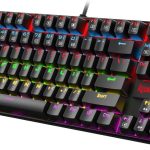
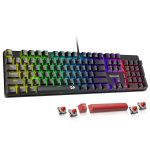
Redragon Mechanical Gaming Keyboard

RisoPhy Mechanical Gaming Keyboard
If you’re in the market for a new mechanical keyboard, you’re probably overwhelmed by the sheer number of options—especially when two models look similar on paper but feel completely different under your fingers. That’s exactly what we’re tackling today: a head-to-head showdown between the Redragon Mechanical Gaming Keyboard and the RisoPhy Mechanical Gaming Keyboard. Both are budget-friendly, full-size wired mechanical keyboards with RGB lighting and multimedia shortcuts, but they cater to very different typing and gaming preferences.
This comparison matters because choosing the right mechanical keyboard isn’t just about aesthetics—it’s about comfort, durability, responsiveness, and how well it fits into your daily workflow or late-night gaming sessions. Whether you’re a writer grinding out reports, a gamer chasing headshots, or someone who just wants a satisfying click with every keystroke, the switch type, build quality, and extra features can make or break your experience. In this article, we’ll break down every key difference, from switch feel and backlighting to ergonomics and real-world user feedback, so you can confidently pick the one that suits your needs.
By the end, you’ll know which keyboard delivers better value, which one feels better to type on, and which might be worth returning if it doesn’t match your expectations. We’ll also answer common questions like whether hot-swappable switches matter for casual users and how important anti-ghosting really is outside of competitive gaming.
View RisoPhy Mechanical Gaming Keyboard on Amazon →
In-Depth Look: Redragon Mechanical Gaming Keyboard
The Redragon Mechanical Gaming Keyboard is built for users who want a no-nonsense, reliable mechanical typing experience without breaking the bank. At its core, it features hot-swappable linear red switches—meaning you can easily replace worn-out switches without soldering, a rare find in this price range. These switches require less force to actuate (45g), making them ideal for fast-paced gaming or long typing sessions where finger fatigue is a concern. Whether you’re grinding through MMO raids or drafting emails at 2 a.m., the smooth, quiet keystrokes keep things comfortable.
One standout feature is the inclusion of 11 programmable backlight modes. While the colors aren’t customizable (you’re limited to preset patterns like breathing, wave, and reactive), the brightness and speed are adjustable across five levels. The double-injection ABS keycaps ensure legends don’t wear off easily and allow light to shine through clearly—even in dim lighting. For gamers, full N-key rollover means every keypress registers, even during intense combos. Plus, 12 multimedia shortcuts (volume, email, calculator, etc.) add practical value beyond gaming.
On the downside, the flat profile lacks ergonomic shaping, which might strain wrists over time. Also, while the build feels sturdy, some users report occasional key chatter (like the “W” key doubling up)—though Redragon’s customer service is praised for sending free replacements quickly. Speaking of support, the 24-month warranty is a huge plus, especially compared to competitors that offer only 12 months or less.
Customer reviews highlight its reliability and value. One user said, “It’s the best mechanical full-size keyboard for the price range… no frills, just solid performance.” Another appreciated the wired connection: “Wired is always more reliable and longer-lasting than Bluetooth.” However, a few noted that the linear switches felt “too smooth” for precise typing, preferring more tactile feedback.
Overall, this keyboard shines for RPG and MMO gamers, office workers needing durability, or anyone wanting hot-swap flexibility without spending premium prices. If you’ve read our detailed Redragon Mechanical Gaming Keyboard review, you’ll know it holds up well against pricier rivals.
In-Depth Look: RisoPhy Mechanical Gaming Keyboard
Stepping into the ring is the RisoPhy Mechanical Gaming Keyboard, a bold contender that leans heavily into tactile satisfaction. It uses clicky blue switches—known for their audible “click” and pronounced bump on actuation—which deliver high accuracy and quick response. If you love the classic mechanical keyboard sound and feel (think old IBM Model M), these switches will delight you. They’re great for writers, coders, or anyone who thrives on tactile feedback, though they’re definitely not office-friendly if noise is a concern.
The RGB backlighting offers nine dynamic modes with rainbow effects, five brightness levels, and adjustable speeds. Unlike the Redragon, the lighting here feels more immersive, with smooth color transitions that enhance late-night gaming setups. The ultra-slim design and double-shot ABS keycaps not only look sleek but also improve typing accuracy in low light. Plus, the inclusion of a keycap puller and four drainage holes makes cleaning and spill resistance hassle-free—a thoughtful touch for accident-prone users.
Ergonomics get a major upgrade here. The stair-up keycap design follows natural finger movement, reducing strain during long sessions. Foldable rear kickstands let you adjust the tilt, and four rubber feet keep the board firmly in place. With 100% anti-ghosting and 12 multimedia keys, it matches the Redragon in functionality but adds comfort-focused design elements often missing in budget boards.
Users rave about the typing experience. One reviewer said, “The feel is great and the pressure is just right to prevent accidental touches.” Another praised the lighting: “Bright but not screaming… looks classy and modern.” That said, the lack of hot-swappability means you’re stuck with blue switches forever—and there’s no mention of warranty length, which raises mild concerns about long-term support.
This keyboard excels for tactile typists, home gamers who don’t mind noise, or anyone prioritizing ergonomics and visual flair. Our full RisoPhy Mechanical Gaming Keyboard review dives deeper into its real-world performance.
Head-to-Head Comparison
Switch Feel & Typing Experience
The biggest difference lies in switch type. The Redragon’s linear red switches offer smooth, quiet strokes perfect for gaming or fast typing, while the RisoPhy’s clicky blues provide satisfying tactile bumps and audible feedback. If you type hundreds of words daily, blues may boost accuracy—but prepare your coworkers for the noise.
Customization & Upgradability
Redragon wins here with hot-swappable sockets, letting you experiment with different switches later. RisoPhy locks you into blues, though the included keycap puller helps with maintenance.
Lighting & Aesthetics
RisoPhy’s rainbow RGB looks more vibrant and modern, while Redragon’s fixed-color modes are functional but less flashy. Both offer solid brightness control, but RisoPhy edges ahead for ambiance.
Build Quality & Ergonomics
RisoPhy’s ergonomic design—with sloped keycaps and adjustable feet—makes it more comfortable for extended use. Redragon feels sturdy but flat, potentially causing wrist fatigue over time.
Value & Support
Redragon includes spare switches and a 2-year warranty, offering better long-term value. RisoPhy doesn’t specify warranty terms, which could be a red flag for some buyers.
Frequently Asked Questions
Q: Which keyboard is better for typing?
A: If you prefer tactile feedback and don’t mind noise, go with the RisoPhy Mechanical Gaming Keyboard. Its blue switches offer precise actuation. For smoother, quieter typing, choose the Redragon Mechanical Gaming Keyboard.
Q: Can I change the switches on the RisoPhy?
A: No—the RisoPhy uses soldered blue switches. Only the Redragon supports hot-swapping, making it the better choice if you want future flexibility.
Q: Are these keyboards compatible with Mac?
A: Yes! Both work with macOS, though some multimedia keys may require remapping. The RisoPhy explicitly lists Mac OS compatibility in its specs.
Q: Which has better spill resistance?
A: The RisoPhy includes four drainage holes and a keycap puller, giving it an edge in accidental spill scenarios.
Q: Is anti-ghosting really necessary?
A: For gaming or fast typing, yes. Both keyboards support full anti-ghosting, so you won’t miss inputs during intense sessions.
Final Verdict: Which One Should You Choose?
After testing both side by side, the winner depends entirely on your priorities. If you’re a gamer or typist who values quiet operation, switch flexibility, and strong customer support, the Redragon Mechanical Gaming Keyboard is the smarter investment. Its hot-swappable design and 2-year warranty make it future-proof and reliable.
On the other hand, if you crave tactile feedback, love RGB flair, and spend hours typing or gaming in comfort, the RisoPhy Mechanical Gaming Keyboard delivers a more engaging experience—just be ready for the clicky noise.
For most users, we lean toward the Redragon for its versatility and peace-of-mind warranty. But if ergonomics and sound matter more, RisoPhy won’t disappoint. Either way, both offer exceptional value under $60.
Ready to upgrade your setup? Click below to check current prices and grab yours today: