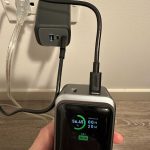
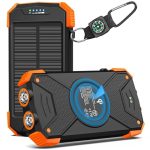
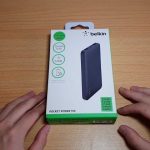
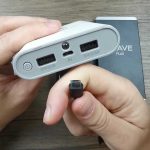
To charge a power bank quickly and efficiently, simply connect it to a compatible wall charger using the appropriate cable and ensure the power bank’s input port is clean and free of obstructions. Make sure to use the correct charging cable and adapter for optimal speed and safety.
A power bank can be charged in just a few simple steps—plug it into a power source, and you’re good to go! Charging your power bank is straightforward, but using the right charger and cable ensures it charges safely and faster. Whether you’re at home or on the go, understanding how to properly charge your device can extend its lifespan and keep your gadgets powered up whenever you need them most.

How Do You Charge a Power Bank?
Charging a power bank is a simple process, but knowing the right steps ensures your device stays ready whenever you need it. Proper charging helps maintain the health of the battery and extends its lifespan. In this guide, we’ll explore everything about how to charge a power bank effectively and safely.
Understanding Your Power Bank’s Charging Port
Most power banks come with a specific charging port, usually a USB Type-C or Micro-USB. The type of port affects the charging speed and compatibility. Always check the manufacturer’s information to identify the correct port for charging.
Using the wrong port or cable can slow down the process or damage the device. Ensure that the cable you use is compatible and in good condition for optimal performance.
Choosing the Right Power Adapter for Charging
The power adapter you select significantly impacts charging time. A higher wattage adapter can charge the power bank faster if it supports fast-charging technology. Look for adapters labeled with higher watt ratings, such as 18W or 20W, for quicker charging.
It’s best to use the original charger provided with the power bank or a charger recommended by the manufacturer. Using incompatible chargers might lead to slow charging or damage.
Steps to Properly Charge a Power Bank
Step 1: Connect the Cable to the Power Bank
Plug one end of the charging cable into the power bank’s charging port. Make sure the connection is secure to avoid interruptions during charging.
Step 2: Connect the Cable to the Power Adapter
Attach the other end of the cable to your power adapter. Use a quality cable and adapter to ensure safe and efficient charging.
Step 3: Plug the Adapter into a Power Outlet
Insert the adapter into a wall socket or a power strip. A stable power source ensures consistent charging without interruptions.
Step 4: Wait Until Charging Completes
Most power banks have an LED indicator or display that shows charging progress. Wait until the indicator shows full charge before disconnecting.
Optimizing Charging Speed and Battery Health
Use a High-Quality Charger
Always opt for certified, high-quality chargers compatible with your power bank. Cheap chargers may not deliver consistent power, leading to slow charging or damage.
Avoid Overcharging
Unplug the power bank once it reaches full capacity. Overcharging can reduce the overall lifespan of the battery.
Charge in a Cool Environment
Heat can negatively affect battery health. Charge your power bank in a cool, dry place to prevent overheating during the process.
Understanding Fast Charging and Its Benefits
Fast charging technology allows you to fill your power bank more quickly compared to standard charging. Devices with fast-charging capabilities can often reach full charge in a fraction of the time.
Ensure your power bank and charger support fast-charging standards like Power Delivery (PD) or Quick Charge (QC). These standards optimize charging speed while maintaining safety.
Signs Your Power Bank Needs Charging
- LED indicators show low battery levels
- Device connected to the power bank takes a long time to charge
- Power bank does not hold a charge for long periods
Regularly check your power bank’s indicators. Keeping it charged ensures you’re never caught without power in emergencies.
Maintaining Your Power Bank’s Battery Life
Periodic charging and discharging help keep the battery healthy. Avoid letting the power bank completely drain before recharging.
Store unused power banks in a cool, dry place and keep them charged at around 50% if not used for long periods. This practice helps maintain battery capacity over time.
Troubleshooting Charging Issues
Power Bank Isn’t Charging
- Check if the cable and adapter are functioning correctly
- Try a different outlet or charger
- Inspect the charging port for dust or damage
Charging Takes Too Long
- Ensure you’re using a compatible, high-wattage charger
- Verify the cable is in good condition
- Check for any firmware updates if your power bank supports them
Related Topics to Explore
- How to Extend the Battery Life of a Power Bank
- Best Cables and Chargers for Fast Charging
- Safety Tips When Charging Power Banks
- How to Properly Store a Power Bank When Not in Use
Understanding how to charge a power bank properly ensures it works efficiently and lasts longer. Always follow manufacturer instructions and use quality accessories to keep your device safe and ready whenever needed.
How to charge a power bank the proper way
Frequently Asked Questions
What type of cable do I need to charge my power bank?
You should use a compatible USB cable that matches your power bank’s input port. Most power banks use a standard USB-A or USB-C cable. Check the specifications on your device to ensure you select the correct cable, which will allow for efficient and safe charging.
Can I charge my power bank using a laptop or a wall charger?
Yes, you can charge your power bank with either a laptop or a wall charger, provided they have the correct port and deliver the appropriate voltage and current. Use a USB cable compatible with your power bank and connect it to a power source that supplies the recommended power output for optimal charging speed.
How long does it typically take to fully recharge a power bank?
The charging time depends on the capacity of your power bank and the power output of your charger. Small capacity power banks may take a few hours, while larger ones could require up to 12 hours or more. Refer to your device’s manual for specific charging times and always use a charger that matches the recommended specifications.
Is it safe to leave my power bank plugged in after it is fully charged?
Most modern power banks have built-in safeguards that prevent overcharging once they reach full capacity. However, it is advisable to unplug your power bank once it is fully charged to preserve battery health and prevent potential overheating or damage from prolonged charging.
Should I charge my power bank regularly even if I rarely use it?
Yes, you should recharge your power bank periodically, ideally every 3 to 6 months, to maintain optimal battery performance. Keeping it partially charged prevents the battery from becoming overly discharged, which can impair its capacity and lifespan over time.
Final Thoughts
To charge a power bank, connect it to a power source using the appropriate cable. Ensure the cable fits securely into both the power bank’s input port and the power outlet.
Check the indicator lights on the power bank to monitor charging progress. Once fully charged, unplug the power bank from the charger to prevent overcharging.
In conclusion, how do you charge a power bank? Simply connect it to a power source with the correct cable, watch for the indicator lights, and unplug once full. This process is quick and straightforward once understood.