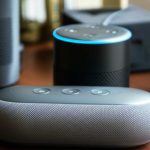
Yes, Alexa can sound significantly better with an external speaker! Connecting an external speaker boosts Alexa’s audio quality, giving you richer bass, clearer highs, and overall a more immersive listening experience for music, podcasts, and more.
Hey there, tech explorers! Max here from AffTechy.com, your go-to spot for making tech simple and fun. Have you ever felt like your favorite songs or podcasts through Alexa are just… okay? Maybe a little tinny, or lacking that deep bass that really makes music move you? I know I have! It’s like having a super smart friend who can tell you the weather, set timers, and even tell jokes, but their singing voice is a bit… meh.
We all love our smart speakers, right? They’re super handy for controlling our homes, getting quick answers, and playing tunes. But let’s be honest, the built-in speakers on most smart devices, including Alexa devices, are designed for convenience, not for audiophile-grade sound. They’re great for voice commands and casual listening, but when you want to truly feel the music or get lost in a podcast, they often fall a bit short.
The good news is, you don’t need to be a tech wizard to make your Alexa sound amazing. We’re going to dive into how connecting an external speaker can transform your audio experience. Think of it like giving your friend a professional sound system to sing through – suddenly, they sound incredible! We’ll cover why it makes a difference, what to look for in a speaker, and how to hook it all up. Let’s make your Alexa sound absolutely fantastic!
Let’s Talk About Sound: Why Alexa’s Built-in Speaker Isn’t Always Enough
So, why do most Alexa devices sound just… okay? It really comes down to size and purpose. These gadgets are packed with smart technology, microphones, and processors. To keep them compact and affordable, the speakers inside are usually small. Small speakers have limitations. They struggle to produce deep bass notes, and the mid-to-high frequencies can sometimes sound a bit harsh or muffled.

Think about your phone’s speaker. It’s good enough to hear a notification or a quick call, but you probably wouldn’t use it for a full concert experience. Alexa devices are similar. Their primary job is to hear you and respond, and their built-in speaker is secondary. It’s designed to be clear enough for spoken word, not necessarily for rich, nuanced music.
This is where an external speaker swoops in like a superhero! It’s designed specifically for sound. These speakers have bigger drivers, better acoustics, and more powerful amplifiers. They’re built to fill a room with sound, deliver powerful bass, and reproduce music the way the artist intended.
Does Alexa Sound Better With an External Speaker? The Big Yes!
Okay, so we’ve hinted at it, but let’s be super clear: Yes, absolutely! When you connect an external speaker to your Alexa device, you are almost always going to get a significant upgrade in sound quality. It’s one of the easiest and most impactful ways to boost your audio experience.
Why is this so true? External speakers are engineered with sound quality as their top priority. They often feature:
Larger speaker drivers: These move more air, creating richer bass and fuller sound.
Better cabinet design: The enclosure of a speaker is crucial for acoustics. Premium speakers use materials and designs that minimize distortion and enhance sound.
More powerful amplifiers: This means louder, clearer sound without the distortion you might get from a small, underpowered built-in speaker.
Advanced audio processing: Many external speakers have built-in tech to fine-tune the sound, like equalizers that balance bass and treble.
Imagine listening to your favorite upbeat song. With Alexa’s built-in speaker, you might hear the melody and vocals clearly, but the drums might sound a bit flat, and the bassline might be barely noticeable. Now, with a good external speaker, those drums will thump, the bass will groove, and the vocals will soar. It’s a whole new level of enjoyment!
How Does Alexa Connect to an External Speaker?
This is the fun part! There are a few main ways your Alexa device can talk to an external speaker, and they’re all pretty straightforward. Most people use Bluetooth or an audio cable.
1. Bluetooth: The Wireless Wonder
This is by far the most popular method. It’s super convenient because there are no messy wires!
How it works: Your Alexa device (like an Echo Dot) sends the audio signal wirelessly to the external speaker using Bluetooth technology.
What you need: An Alexa device with Bluetooth capability (most Echo devices have this) and a Bluetooth-enabled external speaker.
Why it’s great: No cables, easy setup, and you can place your speaker wherever you like within range.
Things to note: There can sometimes be a tiny bit of lag with Bluetooth, but it’s usually unnoticeable for music. The connection range is typically around 30 feet.
2. Audio Cable: The Classic Connection
For a super stable, high-fidelity connection, an audio cable is a fantastic option.
How it works: You plug one end of an audio cable into the audio-out port on your Alexa device (if it has one – some older Echo devices do) and the other end into the audio-in port on your external speaker.
What you need: An Alexa device with an audio-out jack (check your device specs!) and an external speaker with an audio-in jack. You’ll also need a 3.5mm audio cable.
Why it’s great: Very reliable connection, no wireless interference, and often provides the clearest sound.
Things to note: You’re limited by cable length, and it’s not as sleek as a wireless setup.
3. Wi-Fi Streaming (for specific setups)
Some advanced setups might use Wi-Fi, especially if you’re using multi-room audio systems or specific smart speakers that integrate directly. However, for most users looking to boost their single Alexa device’s sound, Bluetooth or a cable are the go-to methods.
Step-by-Step: Connecting Your Alexa via Bluetooth
Ready to make some noise? Connecting via Bluetooth is super simple. Let’s walk through it together.
Step 1: Put Your External Speaker in Pairing Mode
First, turn on your external Bluetooth speaker. Most speakers have a dedicated Bluetooth button. You’ll usually press and hold this button until a light blinks or you hear a sound indicating it’s ready to pair. Check your speaker’s manual if you’re unsure.
Step 2: Open the Alexa App
On your smartphone or tablet, open the Amazon Alexa app.
Step 3: Go to Devices
Tap on the “Devices” icon, usually found at the bottom of the screen.
Step 4: Select Your Alexa Device
From the list of your devices, tap on the Alexa device you want to connect to your external speaker (e.g., “Living Room Echo Dot”).
Step 5: Find Bluetooth Settings
Scroll down to find the “Bluetooth” option and tap on it.
Step 6: Pair New Device
Tap on “Pair a New Device.” Alexa will start searching for nearby Bluetooth devices.
Step 7: Select Your Speaker
You should see your external speaker’s name appear in the list. Tap on its name to connect.
Step 8: Confirmation!
You’ll hear a confirmation sound from your Alexa device, and the speaker’s light might change to indicate it’s connected. Now, when you ask Alexa to play music, it will stream through your external speaker!
Quick Tip: If you want to switch back to the Alexa device’s built-in speaker later, just go back to the Bluetooth settings in the Alexa app and select “Disconnect” or choose to play through the device speaker.
Step-by-Step: Connecting Your Alexa via Audio Cable
If your Alexa device and speaker support it, using an audio cable is another great option.
Step 1: Check Your Ports
Make sure your Alexa device has an “Audio Out” or “Line Out” port (often a 3.5mm jack). Also, ensure your external speaker has an “Audio In” or “Line In” port.
Step 2: Get the Right Cable
You’ll need a standard 3.5mm male-to-male audio cable. They’re inexpensive and widely available.
Step 3: Plug It In
Connect one end of the audio cable to your Alexa device’s audio-out port and the other end to your external speaker’s audio-in port.
Step 4: Select the Correct Input on Your Speaker
Your external speaker might have multiple inputs. You’ll need to select the “Aux” or “Line In” input using your speaker’s controls or remote.
Step 5: Tell Alexa to Play
Now, when you ask Alexa to play music, it should automatically send the audio through the connected cable to your external speaker. There’s usually no app setting needed for this wired connection.
Important Note: Not all Alexa devices have an audio-out port. For example, the original Echo Dot and Echo Show 5 do not. Always check your specific device’s specifications. If your Alexa device only has an audio-in port (common on smart displays for playing sound from other devices), you can’t use it this way.
What to Look for in an External Speaker for Alexa
Not all external speakers are created equal. To get that “amazing audio” you’re looking for, here are a few things to consider:
Connectivity Options
Bluetooth: Essential for most users. Look for a recent Bluetooth version (like 4.2 or 5.0) for better stability and range.
3.5mm Audio Input: If you prefer a wired connection or want a backup, make sure it has this port.
Sound Quality
Driver Size: Larger drivers (like 3 inches or more) generally mean better bass.
Frequency Response: This tells you the range of sounds the speaker can produce. A wider range (e.g., 50Hz – 20kHz) is better.
Wattage (Power): Higher wattage usually means louder sound without distortion. For a small room, 10-20W might be enough; for a larger space, aim for 30W+.
Portability and Battery Life
Portable Speakers: Great if you want to move your Alexa’s sound around the house or take it outdoors. Check the battery life – how many hours can it play on a single charge?
Home Speakers: If it’s staying put, a larger, more powerful speaker might be better, and you won’t worry as much about battery.
Smart Features (Optional)
Some speakers are designed to work seamlessly with voice assistants. While you’re connecting Alexa to it, some speakers might offer additional integrations.
Price
You can find great speakers at various price points. Set a budget and look for the best features within that range.
Comparing Popular Speaker Types for Alexa
To give you a better idea, let’s look at a few types of speakers and what they offer for your Alexa experience.
| Speaker Type | Typical Price Range | Key Features for Alexa | Best For |
| :—————- | :—————— | :———————————————————– | :——————————————————————— |
| Portable Bluetooth Speaker | $30 – $200+ | Wireless connectivity, battery-powered, often water-resistant | Moving around the house, outdoor listening, easy setup |
| Smart Speaker (e.g., Sonos, Bose) | $100 – $400+ | Superior sound quality, often Wi-Fi and Bluetooth, premium build | Dedicated home audio, audiophiles, seamless integration with smart home |
| Computer Speakers (with Aux Input) | $25 – $150+ | Good sound for their size, often wired, can be compact | Desktop setups, small rooms, budget-conscious users |
| Bookshelf Speakers (with Amp) | $100 – $500+ (plus amp cost) | Highest potential sound quality, requires more setup | Serious music lovers, dedicated home theater or music rooms |
As you can see, there’s a speaker for every need and budget! A portable Bluetooth speaker is a fantastic starting point for most people looking to give their Alexa an audio upgrade without a lot of fuss.
Making Alexa Play Music Through Your External Speaker
Once you’re connected, how do you actually get Alexa to use your new speaker? It’s usually automatic!
After Bluetooth Pairing: Once your speaker is paired in the Alexa app, any music or audio played through Alexa will automatically go to the connected speaker. You don’t need to say anything special. Just ask Alexa to play your favorite song or podcast, and enjoy the enhanced sound.
For Wired Connections: If you used an audio cable, the sound should also switch over automatically. Your Alexa device detects that something is plugged into its audio-out port and routes the sound there. You might need to ensure your external speaker is set to the correct input (“Aux” or “Line In”).
If for some reason it doesn’t seem to be working, here are a few quick troubleshooting tips:
Check the connection: Make sure the Bluetooth is still connected in the Alexa app, or that the audio cable is firmly plugged in at both ends.
Volume levels: Ensure the volume is turned up on both your Alexa device (you can often control this via the app or voice commands) and your external speaker.
Restart devices: Sometimes, a simple restart of your Alexa device and your external speaker can clear up connection issues.
Forget and re-pair (Bluetooth): In the Alexa app, you can “Forget” the Bluetooth device and then go through the pairing process again.
Alexa Multi-Room Music with External Speakers
Did you know you can create a whole-home audio system with Alexa, even using external speakers? If you have multiple Echo devices, or even some smart speakers that work with Alexa, you can group them together.
When you set up a “Multi-Room Music” group in the Alexa app, you can tell Alexa to play music across all your selected speakers simultaneously. This is perfect for parties or just enjoying music throughout your home. If one or more of these speakers in your group is a high-quality external speaker, your entire multi-room setup will benefit from that improved sound.
For example, you could have an Echo Dot in the kitchen connected via Bluetooth to a small portable speaker, and a larger Echo device in the living room connected to a soundbar. By grouping them, you can have music playing in both rooms with better-than-average audio quality everywhere!
Enhancing Your Alexa Experience Beyond Just Music
It’s not just about music! Connecting to an external speaker can improve other Alexa interactions too.
Podcasts and Audiobooks: Hear every word with crystal clarity. The nuanced dialogue in a podcast or the descriptive narration of an audiobook will feel much more engaging.
News Briefings: Get your daily news with a fuller, richer sound.
Movie and TV Show Audio (with Echo Show devices): If you use an Echo Show device that can connect to an external speaker (often via Bluetooth), the audio for videos will be dramatically better. Think of watching YouTube clips or Prime Video on your Echo Show with booming sound!
Gaming Sound Effects: If you use Alexa for any interactive games or skills that involve sound effects, they will be much more immersive.
It really transforms Alexa from a functional assistant into a true entertainment hub.
Fun Fact: The Science Behind Better Sound
Ever wonder why* bigger speakers sound better? It’s physics! Larger speaker cones (drivers) can move more air. This is what creates sound waves. Moving more air allows them to reproduce lower frequencies (bass) more effectively and with less distortion. Smaller speakers have to work much harder to produce the same amount of bass, which can lead to that “tinny” or “muddy” sound. External speakers are simply designed with the physics of sound in mind, giving them a natural advantage.
Frequently Asked Questions (FAQ)
Here are some common questions beginners have about connecting external speakers to Alexa.
Q1: Will any external speaker work with Alexa?
Generally, yes! As long as the external speaker has either Bluetooth connectivity or a 3.5mm audio input port, you should be able to connect it to a compatible Alexa device. Always check your Alexa device’s capabilities (like whether it has an audio-out port) and your speaker’s features.
Q2: Do I need a paid subscription for Alexa to use an external speaker?
No, you do not need any special subscription. The ability to connect an external speaker via Bluetooth or audio cable is a standard feature of most Alexa devices. Your music streaming services might require subscriptions (like Spotify Premium or Amazon Music Unlimited), but the connection itself is free.
Q3: Can I connect my Alexa device to a soundbar?
Yes, many people do! Most soundbars have Bluetooth or an audio-in port, making them compatible. Connecting your Alexa device to a soundbar via Bluetooth is a popular way to get significantly better TV and music audio in your living room.
Q4: What’s the difference between using Bluetooth and an audio cable?
Bluetooth is wireless and convenient, offering flexibility in speaker placement. However, it can sometimes have a slight delay or be prone to interference. An audio cable provides a direct, stable, and often higher-fidelity connection, but it requires physical wires and limits speaker placement.
Q5: How do I know if my Alexa device has an audio-out port?
You’ll need to check the specifications for your specific Alexa model. Look for a 3.5mm jack labeled “Audio Out” or “Line Out” on the back or bottom of the device. Devices like the Echo Dot (3rd Gen and later) and Echo (3rd Gen and later) typically have this port, while some older or smaller models might not.
Q6: Can I connect two external speakers to one Alexa device?
With Bluetooth, most Alexa devices can only connect to one Bluetooth speaker at a time. However, if your external speakers support a stereo pairing feature themselves (where two identical speakers can link together), you can connect one of those speakers to Alexa, and then pair the second speaker to the first. Some advanced setups using Wi-Fi or specific smart speaker systems might allow for more complex multi-speaker configurations.
Q7: Will my Alexa voice commands still work with an external speaker?
Absolutely! Your Alexa device’s microphones are separate from its speaker. When you connect an external speaker, you are only redirecting the audio output. Alexa will still hear your voice commands perfectly, and then send the audio response to your chosen external speaker.
Conclusion: Amp Up Your Alexa Sound!
So there you have it! We’ve explored why your Alexa’s built-in speaker might be holding back your audio experience and, more importantly, how easily you can fix that. Connecting an external speaker, especially via Bluetooth, is a game-changer for anyone who loves music, podcasts, or just wants richer sound from their smart assistant.
You’ve learned the different connection methods, how to set them up step-by-step, and what to look for in a speaker that will truly make your audio amazing. Remember, you don’t need to be an audio expert to enjoy fantastic sound. It’s all about choosing the right tools and making simple connections.
Don’t let your favorite tunes sound flat or your audiobooks lose their immersion. Take a little time to pair up an external speaker with your Alexa, and prepare to be impressed. Now go enjoy amazing sound and make every moment louder and better!