Yes, a party sound box can absolutely work without Bluetooth! While Bluetooth is common, many sound boxes offer versatile connection options like AUX cables, USB drives, SD cards, and even Wi-Fi streaming. Understanding these alternatives ensures you can enjoy your music regardless of your device’s connectivity.
## Can Party Sound Box Work Without Bluetooth?
The pulsing bass, the infectious rhythm, the collective energy – a party sound box is the heart of any great get-together. We often associate these powerful audio machines with seamless wireless connectivity, primarily through Bluetooth. It’s convenient, it’s ubiquitous, and it’s usually the first method people think of. But what happens when your phone’s Bluetooth is acting up, or you want to connect a device that doesn’t have Bluetooth at all? The big question on many minds is: **Can party sound box work without Bluetooth?** The answer, thankfully, is a resounding yes!
While Bluetooth has become the go-to for many wireless audio needs, it’s far from the only way to get your tunes pumping through a party sound box. The market is filled with devices designed with versatility in mind, offering a range of connection options to suit different devices and preferences. This article will delve into the various ways you can get your party started, even if you’re not relying on Bluetooth.
### Exploring the Diverse Connectivity Options
Modern party sound boxes are often engineered with a suite of input options designed to cater to a wide array of audio sources. This ensures that whether you’re a tech wiz or someone who prefers more traditional methods, you can easily connect your music. Let’s break down the common alternatives to Bluetooth.
#### The Reliable AUX Cable Connection
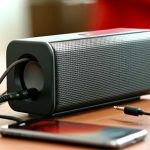
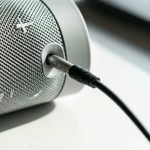
One of the oldest and most reliable methods for connecting audio devices is the AUX (auxiliary) cable. You’ll typically see this as a 3.5mm jack, similar to what you’d find on most headphones. If your party sound box has an AUX-in port, you can connect almost any device with a headphone jack or an audio output.
##### How it Works
You’ll need a standard 3.5mm male-to-male audio cable. Plug one end into the headphone or audio output port of your source device (like a smartphone, tablet, laptop, or MP3 player) and the other end into the AUX-in port on your party sound box. Once connected, you’ll usually need to select the “AUX” input source on your sound box.
##### Practical Tips
* **Cable Quality Matters:** While simple, a good quality AUX cable can make a difference in audio clarity. Cheaper cables might be prone to interference.
* **Volume Control:** Remember that the volume on both your source device and the sound box will affect the overall output. It’s often best to set your source device’s volume to about 80-90% and then adjust the main volume on the sound box for the loudest, cleanest sound without distortion.
* **Troubleshooting:** If you’re not getting sound, double-check that both ends of the cable are securely plugged in and that the correct input source is selected on your sound box.
This method is fantastic because it’s a direct wired connection, meaning you don’t have to worry about wireless interference or pairing issues. For anyone looking to connect older devices that might lack Bluetooth, or when you need a rock-solid connection, the AUX cable is your best friend.
#### USB and SD Card Playback: Direct Music Access
Many party sound boxes come equipped with USB ports and SD card slots. These features turn your speaker into a standalone music player, allowing you to play audio files directly from a USB flash drive or an SD memory card. This is incredibly convenient as it means you don’t even need your phone or another playback device connected during the party.
##### How it Works
Simply load your music files (MP3, WMA, WAV formats are common) onto a USB drive or an SD card. Insert the drive or card into the corresponding port on your sound box. The sound box will typically scan the storage device and begin playing music automatically, or you might need to select the USB/SD input from the device’s controls.
##### Practical Tips
* **File Format Compatibility:** Check your sound box’s manual to confirm which audio file formats it supports. Most common formats are usually covered, but it’s good to be sure.
* **Organize Your Music:** For easier navigation, consider organizing your music into folders on the USB drive or SD card. Some sound boxes allow you to navigate through folders.
* **Keep it Simple:** Avoid extremely large storage devices or overly complex file structures, as some older or simpler models might struggle to read them. A 32GB or 64GB drive is usually more than sufficient for a party’s playlist.
This direct playback option is a lifesaver if your primary device runs out of battery or if you want to ensure uninterrupted music playback without managing another connected device. It’s a truly “plug-and-play” experience.
#### Wi-Fi Streaming: The Modern Approach
For those with a modern setup, Wi-Fi connectivity is becoming increasingly common and offers a powerful alternative to Bluetooth. Wi-Fi streaming generally provides a more stable connection over longer distances than Bluetooth and can handle higher audio quality.
##### How it Works
Many party sound boxes can connect to your home Wi-Fi network. Once connected, you can stream music from various sources, including:
* **Streaming Services:** Directly from apps like Spotify, Apple Music, Tidal, etc., using the speaker’s built-in app or through casting protocols.
* **Network Attached Storage (NAS):** Playing music stored on your home network.
* **Internet Radio:** Accessing thousands of online radio stations.
The specific method of connecting and streaming will depend on the sound box. Some may have a dedicated app for setup and control, while others might support protocols like AirPlay (for Apple devices) or Chromecast (for Android and other devices).
##### Practical Tips
* **Stable Wi-Fi is Key:** Ensure you have a strong and stable Wi-Fi signal in the area where the sound box will be used.
* **App Setup:** Familiarize yourself with the manufacturer’s app for initial setup and to explore all streaming options.
* **Network Requirements:** Some speakers might require a 2.4GHz Wi-Fi network, while others support 5GHz. Check your router settings if you encounter connection issues.
Wi-Fi streaming is a fantastic option for parties where you want to control the music from multiple devices or when you want to maintain high-fidelity audio without the limitations of Bluetooth. For users who want to integrate their sound system with their smart home, Wi-Fi is often the preferred choice. For example, if you’re looking to enhance your home entertainment, you might be interested in learning if you can connect a Bluetooth speaker to a TV, which often involves Wi-Fi or dedicated transmitters.
#### RCA and Optical Inputs: For the Audiophiles
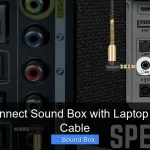
While less common on portable party sound boxes, larger, more professional-grade sound systems or home-theater-style speakers might feature RCA or optical (TOSLINK) inputs. These are typically used for connecting to AV receivers, TVs, or dedicated audio players.
##### How it Works
* **RCA:** These are the red and white (and sometimes yellow for video) ports. You’d use RCA cables to connect from an audio source with RCA outputs to the corresponding inputs on the sound box.
* **Optical (TOSLINK):** This uses a fiber optic cable and is often found on newer TVs and audio equipment, providing a digital audio signal.
##### Practical Tips
* **Identify Your Ports:** Make sure your audio source actually has the output ports that match the inputs on your sound box.
* **Digital vs. Analog:** Optical is a digital connection, often providing clearer sound than analog RCA connections, especially for surround sound.
These inputs are usually for more permanent setups or when a high-quality, direct digital or analog signal is desired from a specific piece of equipment.
### Connecting Devices Without Bluetooth
Now that we’ve explored the various input methods, let’s focus on specific scenarios where Bluetooth isn’t an option.
#### Older Smartphones and MP3 Players
Many older phones or dedicated MP3 players were designed before Bluetooth became standard. These devices often rely heavily on their headphone jacks. In this case, the AUX cable connection is your go-to solution. It’s a direct audio link that bypasses the need for wireless technology. You can simply plug your device into the sound box and have your music playing instantly. This is similar to how you might connect a device to a smart speaker. For instance, if you’re wondering [Can I Use Alexa As Bluetooth Speaker Without Wifi Amazing](https://afftechy.com/can-i-use-alexa-as-bluetooth-speaker-without-wifi-amazing/), understanding these wired options is crucial if Wi-Fi is unavailable.
#### Laptops and Computers
While most modern laptops have Bluetooth, some older models might not. Even if they do, a wired connection can sometimes offer better stability or higher audio fidelity, especially for tasks like video editing or gaming where audio sync is critical. The AUX cable is a simple way to connect your laptop’s headphone output to the sound box. Alternatively, if your laptop has a digital audio output (like optical or USB audio out), and your sound box supports it, you could achieve even higher sound quality. For gamers, understanding how to connect audio is paramount; for example, if you’re asking [Can I Connect Ps4 To Bluetooth Speaker Amazing Sound](https://afftechy.com/can-i-connect-ps4-to-bluetooth-speaker-amazing-sound/), you’ll find that wired options are often the most reliable.
#### Gaming Consoles
Some gaming consoles, like older PlayStation or Xbox models, might not have built-in Bluetooth audio output capabilities. While newer consoles are more Bluetooth-friendly, if you have an older system or want to use a specific controller setup, you might need alternative methods.
* **PS4/PS5:** These consoles have headphone jacks on their controllers, or dedicated audio output ports. You can often connect a 3.5mm AUX cable from the controller or console’s audio out to your party sound box. For the PS5, there are also ways to connect; if you’re curious about [Can I Connect Bluetooth Speaker To Ps5 Amazing Sound](https://afftechy.com/can-i-connect-bluetooth-speaker-to-ps5-amazing-sound/), you’ll find wired and adapter solutions exist.
* **Xbox:** Similar to PlayStation, Xbox consoles have audio outputs that can be utilized with an AUX cable, or you might need specific adapters depending on the model. Understanding [Can I Connect Bluetooth Speaker To Xbox Amazing Sound](https://afftechy.com/can-i-connect-bluetooth-speaker-to-xbox-amazing-sound/) can help you explore these options.
In many cases, using a wired connection like an AUX cable is the most straightforward and universally compatible method for gaming consoles if Bluetooth isn’t supported directly.
#### Smart TVs and Streaming Devices
Connecting a sound box to a TV can significantly enhance the viewing experience. Many smart TVs have Bluetooth, but if yours doesn’t, or if you experience lag, other options are available.
* **AUX Output:** If your TV has a headphone jack or an audio-out port, an AUX cable is a simple solution.
* **Optical Output:** Many modern TVs feature an optical audio output. If your sound box has an optical input, this will provide a high-quality digital audio signal.
* **HDMI ARC/eARC:** Some sound boxes are designed to connect via HDMI ARC (Audio Return Channel) or eARC, allowing audio to be sent from the TV back to the sound box through the same HDMI cable.
* **External Bluetooth Transmitters:** If your TV lacks Bluetooth but you really want a wireless connection, you can buy an external Bluetooth transmitter that plugs into your TV’s audio output (AUX or Optical) and broadcasts the audio wirelessly to your party sound box. You can learn more about [Can You Hook Up A Bluetooth Speaker To A Tv Astonishingly Easy](https://afftechy.com/can-you-hook-up-a-bluetooth-speaker-to-a-tv-astonishingly-easy/) to explore these options.
### Choosing the Right Connection Method for Your Party
The best connection method for your party sound box depends on several factors:
1. **Your Music Source:** What kind of audio output does your primary device have? Does it have Bluetooth, a headphone jack, USB, or Wi-Fi capabilities?
2. **The Party Sound Box Features:** What input ports does your sound box offer? Always check the rear or side panel for AUX, USB, SD card slots, or network ports.
3. **Desired Audio Quality:** For critical listening or high-fidelity needs, wired connections (AUX, Optical) or Wi-Fi streaming often perform better than Bluetooth, which can sometimes compress audio.
4. **Convenience:** Bluetooth and Wi-Fi offer wireless freedom, while USB/SD playback offers true standalone operation. AUX is simple and reliable.
5. **Reliability:** For critical moments in a party, a stable wired connection like AUX can be more dependable than a wireless signal that might drop.
**Think about your setup:** If you have a collection of old CDs and a CD player with an AUX out, an AUX cable is perfect. If you want to stream your entire music library from your computer without interrupting your work on the PC, Wi-Fi streaming is ideal. If you want guests to easily plug in their phones without dealing with pairing, a front-facing AUX port is a great feature.
### Conclusion: More Than Just Bluetooth
So, to circle back to our main question: **Can party sound box work without Bluetooth?** Absolutely! Bluetooth is a popular convenience, but it’s just one piece of the puzzle when it comes to connecting your audio. From the steadfast reliability of an AUX cable to the direct access of USB drives and the modern convenience of Wi-Fi streaming, there are numerous ways to get your party sound box singing.
By understanding the different connectivity options available on your sound box and your audio devices, you can ensure that the music never stops, no matter the technological limitations. So next time you’re planning a party, don’t let a Bluetooth hiccup ruin the vibe. Explore the diverse connections your sound box offers and keep the good times rolling!
Key Takeaways
- Bluetooth isn’t the only way: Party sound boxes often have multiple input options beyond Bluetooth for connecting your music source.
- Wired connections offer reliability: AUX cables provide a stable, high-quality audio link that doesn’t depend on wireless signals.
- Direct playback from storage: USB ports and SD card slots allow you to play music directly from flash drives or memory cards, eliminating the need for a separate device.
- Wi-Fi streaming for convenience: Many modern sound boxes support Wi-Fi connectivity, enabling seamless streaming from online services or local networks.
- Older devices can still connect: If your music source lacks Bluetooth, an AUX or line-in port on the sound box is your best bet.
- Consider the sound box’s features: Always check the specific input options available on your party sound box model to understand its full capabilities.
Frequently Asked Questions
What is the most common non-Bluetooth input on party sound boxes?
The most common non-Bluetooth input you’ll find on party sound boxes is the AUX (auxiliary) port, typically a 3.5mm jack. This allows for a simple wired connection from most audio devices.
Can I play music from my laptop if it doesn’t have Bluetooth?
Yes, absolutely. If your laptop lacks Bluetooth, you can most likely connect it to a party sound box using an AUX cable plugged into the headphone jack, or by using a USB drive with your music files if the sound box supports USB playback.
Is Wi-Fi streaming better than Bluetooth for a party?
Wi-Fi streaming can often offer a more stable connection over longer distances and potentially higher audio quality compared to Bluetooth. It’s excellent for continuous streaming from online services or network devices.
Will a USB drive work in any party sound box?
Not necessarily. While many party sound boxes have USB ports for playback, compatibility with file formats and the drive itself can vary. It’s always best to check your sound box’s manual to see if it supports USB music playback and what file formats are compatible.
How do I troubleshoot if my AUX cable isn’t working?
First, ensure the cable is securely plugged into both the sound box and your device. Try a different AUX cable, as the cable itself might be faulty. Also, confirm that you have selected the correct input source (AUX) on your sound box.
Can I connect my old MP3 player to a modern sound box?
Yes, in most cases. If your old MP3 player has a standard headphone jack, you can easily connect it to a party sound box using a 3.5mm AUX cable. This is a reliable way to bring older music collections to life.