Quick answer: No, 2.4 GHz isn’t necessarily too slow; it depends on what you’re doing. For basic browsing and streaming, it’s usually fine, but for gaming or heavy downloads, it might fall short. It’s all about matching your Wi-Fi speed to your needs.
Feeling frustrated with slow Wi-Fi? Many people wonder if 2.4 GHz is outdated or just too sluggish for their online demands. The truth is, 2.4 GHz offers better range and better penetration through walls, making it ideal for simple tasks. However, it can become crowded, leading to interference and slower speeds, especially in busy areas. If you’re experiencing lag during gaming or struggling with fast downloads, switching to a 5 GHz network might be beneficial. Understanding the strengths and limitations of 2.4 GHz can help you optimize your internet experience without unnecessary upgrades. So, whether it’s too slow depends on your specific activities and environment.

Is 2.4 GHz too slow?
Understanding Wi-Fi Frequencies
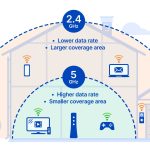
Wi-Fi networks operate mainly on two frequency bands: 2.4 GHz and 5 GHz. The 2.4 GHz band has been around longer and is more common in many homes and public places. It offers a wider range but generally has slower speeds compared to the 5 GHz band.
This frequency can penetrate walls and other obstacles better, making it ideal for larger spaces. However, because many devices use the 2.4 GHz band, it often experiences more interference. This can lead to slower speeds and less reliable connections during busy times.
Why Is 2.4 GHz Generally Slower?
The main reason 2.4 GHz tends to be slower is its lower data transfer capacity. It can handle fewer data bits per second than 5 GHz. The technology was designed for simple tasks like browsing websites and sending emails, not high-speed activities.
Another factor is that the 2.4 GHz band is crowded. Many older devices, wireless phones, and smart gadgets use this band. This increases congestion, causing slower speeds and possible disconnections. During peak hours, this can become a real problem.
Comparison of 2.4 GHz and 5 GHz Speeds
| Feature | 2.4 GHz | 5 GHz |
|---|---|---|
| Maximum speed | Up to 600 Mbps | Up to 1300 Mbps or more |
| Range | Longer, up to 150 feet or more | Shorter, around 50-100 feet |
| Interference | High, lots of devices use it | Lower, fewer devices use it |
This comparison shows that if speed is your priority, 5 GHz offers faster transfer rates, but if you need coverage, 2.4 GHz might be better.
Activities That Require Faster Wi-Fi
Not all internet activities demand high speeds. Browsing websites or checking emails usually work fine on 2.4 GHz. However, streaming high-definition videos, online gaming, or downloading large files benefit from faster connections.
If you do these activities often, relying solely on 2.4 GHz could cause buffering, lag, or long download times. To avoid this, consider upgrading to a dual-band router that supports both frequencies.
Can You Improve Speed on 2.4 GHz?
Yes, there are ways to boost your 2.4 GHz Wi-Fi performance. First, position your router in a central location away from walls and metal objects. This helps signals travel more effectively throughout your space.
Second, reducing the number of devices connected to your network during busy times can lessen interference. Using a Wi-Fi analyzer app can also identify crowded channels, so switching to a less congested channel may improve speeds.
Why Do Some Devices Only Support 2.4 GHz?
Many older or budget devices only work on the 2.4 GHz band. This is because they were manufactured before the widespread adoption of 5 GHz technology. If you want to use high-speed Wi-Fi on these devices, you’ll need a compatible router or a dual-band one.
Some smart home gadgets like thermostats or security cameras also operate only on 2.4 GHz due to their lower power consumption and longer range. This means your network must support both bands for seamless connectivity across all devices.
Balancing Speed and Range
Choosing between 2.4 GHz and 5 GHz depends on your needs. If you want maximum coverage, 2.4 GHz is beneficial despite its slower speeds. For activities that require speed, like gaming or streaming, 5 GHz is preferable.
Many modern routers are dual-band, allowing devices to switch automatically for optimal performance. This setup combines the advantages of both frequencies, giving you flexibility and better overall Wi-Fi experience.
Is Upgrading Your Router Worth It?
Upgrading to a newer, more advanced router can significantly improve your Wi-Fi speeds. Modern routers feature better technology, improved antennas, and support for both 2.4 GHz and 5 GHz bands.
Investing in a dual-band or tri-band router can greatly reduce interference and congestion issues. This is especially true if many devices are connected simultaneously in your home or office.
Related Topics to Consider
- Mesh Wi-Fi Systems: These systems use multiple units to extend coverage and improve speeds across larger areas.
- Wi-Fi Signal Boosters: Devices that amplify your current Wi-Fi signal, helpful if your range is limited.
- Router Placement Tips: Position your router in a central location for the best signal distribution.
- Device Compatibility: Check which frequency bands your devices support before upgrading your network.
Understanding Your Internet Speed Needs
It’s important to assess what speeds you actually need. For basic web browsing and emails, 2.4 GHz is often enough. For streaming, gaming, or working from home, faster speeds on 5 GHz might be essential.
Using an internet speed test can help you determine if your current connection meets your requirements. If not, upgrading your hardware or changing your usage habits could be the solution.
The Future of Wi-Fi Technology
Wi-Fi technology continues to evolve with new standards like Wi-Fi 6 and Wi-Fi 6E. These newer standards offer faster speeds, better handling of multiple devices, and improved efficiency.
These advancements mean that the gap between 2.4 GHz and 5 GHz may narrow as technology becomes more capable. Keeping your equipment updated ensures you get the best possible performance for your needs.
Summary: Should You Be Concerned About 2.4 GHz Speed?
While 2.4 GHz offers slower speeds compared to 5 GHz, it remains a reliable option for many users. Its longer range and better obstacle penetration make it suitable for simpler internet activities.
If your activities demand high speeds, consider switching to or adding 5 GHz networks. A combination of both, supported by the right router, provides the best balance of coverage and speed for a busy home or office.
Overall, whether 2.4 GHz is too slow depends on what you need it for. You can enhance its performance or expand your network using modern equipment and strategic setup choices.
Slow 2.4GHz WiFi on Netgear WNDR4000? Here's a fix.
Frequently Asked Questions
Can 2.4 GHz handle multiple devices at once?
While 2.4 GHz networks can connect multiple devices simultaneously, performance may decline if many devices use the network heavily. This frequency is more susceptible to interference, which can slow down connections when several users are online at the same time.
How does 2.4 GHz compare to 5 GHz in terms of speed?
Generally, 2.4 GHz offers slower speeds compared to 5 GHz. The 5 GHz band provides higher data rates and less interference, making it better suited for activities that require fast internet, like gaming and HD streaming.
Is 2.4 GHz suitable for online gaming or high-definition streaming?
For activities like online gaming or streaming high-quality videos, 2.4 GHz might not offer enough speed and stability. These tasks benefit from the faster, less congested 5 GHz band, which supports quick data transfer and minimal lag.
What factors can cause 2.4 GHz to feel sluggish?
Interference from other wireless devices, physical obstructions, and a high number of connected devices can all slow down a 2.4 GHz network. Ensuring fewer devices are active and positioning your router optimally can help improve performance.
Should I switch to a different frequency for better performance?
If you experience slow speeds or frequent disconnections with 2.4 GHz, switching to a 5 GHz network can offer faster and more reliable performance, especially in environments with many competing wireless signals.
Final Thoughts
2.4 GHz offers reliable Wi-Fi coverage over larger areas, making it ideal for basic browsing and email. However, it may struggle with high-bandwidth activities like gaming or HD streaming.
If your devices demand fast connection speeds, upgrading to 5 GHz can provide better performance.
Ultimately, is 2.4 GHz too slow? It depends on your needs. For simple tasks, it suffices, but for high-speed requirements, consider alternatives.