The 5 GHz band is generally the best choice for Wi-Fi if you want faster speeds and less interference, especially in crowded areas. While 2.4 GHz offers better range, 5 GHz provides more capacity for streaming, gaming, and heavy data usage. The ideal MHz depends on your needs—if you prioritize speed and a stable connection, 5 GHz is usually superior.
Choosing the right MHz for Wi-Fi depends on your internet usage, device compatibility, and environment. The 2.4 GHz band covers a wider area and penetrates walls better, making it suitable for larger spaces or older devices. Conversely, 5 GHz offers higher speeds and less congestion but shorter range. Understanding these differences helps you select the best frequency for your home or office, ensuring optimal performance and a seamless online experience. Now, let’s explore which MHz band is best for your specific needs.

Which MHz is Best for Wi-Fi?
Choosing the right MHz band for Wi-Fi can seem confusing at first. The two main options are 2.4 GHz and 5 GHz bands. Both have advantages and disadvantages that can affect your internet experience.
Understanding Wi-Fi Frequency Bands
Wi-Fi networks typically operate on two primary frequency bands: 2.4 GHz and 5 GHz. These bands help deliver wireless internet signals to your devices. Knowing how each band works can help you pick the best one for your needs.
What is the 2.4 GHz Band?
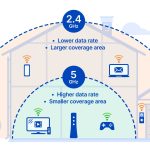
The 2.4 GHz band is older and more common. It offers a wider range but has lower data speeds. Many devices like smart home gadgets and older smartphones use this band because of its compatibility.
What is the 5 GHz Band?
The 5 GHz band is newer and designed for faster internet. It provides higher data transfer rates and less interference. However, it has a smaller coverage area and might struggle to reach far corners of your home.
Comparing the Speed and Range of 2.4 GHz and 5 GHz
Speed and range are key factors when choosing a MHz band for Wi-Fi. Let’s compare these two bands to see which fits your situation best.
| Feature | 2.4 GHz | 5 GHz |
|---|---|---|
| Maximum Speed | Up to 600 Mbps | Up to 1300 Mbps or more |
| Range (Coverage Area) | Longer, reaches more rooms | Shorter, good for close devices |
| Interference | More prone to interference | Less interference, clearer signals |
Which MHz Band is Best for Different Uses?
The ideal MHz for Wi-Fi depends on what you mainly do online. Simple tasks like browsing or emailing work fine on 2.4 GHz. Heavy activities like streaming, gaming, or large downloads benefit from 5 GHz speeds.
For Streaming and Gaming
If you often watch videos in high quality or play online games, the 5 GHz band offers faster speeds. It reduces lag and buffering, making your experience smoother.
For General Web Browsing and Smart Devices
2.4 GHz is suitable here because it covers more space and connects well with devices that don’t need high speeds. It’s a good choice for smart home gadgets or devices far from the router.
Factors to Consider When Choosing the Best MHz Band
Several factors influence which band is better for your Wi-Fi setup. These include your home’s size, device compatibility, and potential interference.
Home Size and Layout
In a larger home, the 2.4 GHz band can help ensure your signal reaches every corner. For smaller, open spaces, 5 GHz provides faster internet within its coverage zone.
Device Compatibility
Some older devices only support 2.4 GHz. Check your gadgets to see which band they work with best. Newer devices typically perform well on 5 GHz.
Interference and Obstacles
Walls, furniture, and electronic devices can interfere with Wi-Fi signals. The 2.4 GHz band is more affected by interference, while 5 GHz can bypass some obstacles for better performance.
Balancing Speed and Range with Dual-Band Routers
Many routers today support both 2.4 GHz and 5 GHz bands, known as dual-band routers. They allow devices to switch seamlessly based on activity and signal quality.
Advantages of Dual-Band Routers
- Flexible connection options: Connect high-speed devices to 5 GHz while maintaining stable connections for others on 2.4 GHz.
- Reduced congestion: Less interference and better overall network performance.
How to Optimize Your Wi-Fi Settings
To get the best performance, assign devices to the appropriate band. Use your router’s management interface to set preferences or enable automatic switching.
Understanding Wi-Fi Standards and Their Impact
Wi-Fi standards influence speed, range, and reliability. The most common are 802.11n, 802.11ac, and 802.11ax (Wi-Fi 6).
802.11n
This standard supports both 2.4 GHz and 5 GHz bands and offers speeds up to 600 Mbps. It’s widely compatible and good for basic use.
802.11ac
Powers faster Wi-Fi on 5 GHz, delivering speeds over 1 Gbps. It’s suitable for high-demand activities like 4K streaming and gaming.
Wi-Fi 6 (802.11ax)
The latest standard offers even higher speeds, better security, and improved performance in crowded environments. It works on both bands and is ideal for future-proofing your network.
The Best MHz Band for Different Environments
Various environments require different Wi-Fi MHz choices. Here’s a quick guide:
- Large homes or offices: Use 2.4 GHz for coverage, supplement with 5 GHz for high-speed tasks.
- Small apartments or rooms: 5 GHz provides faster speeds within a limited space.
- Public places or crowded areas: Opt for 5 GHz if available to reduce congestion.
Future Trends in Wi-Fi Frequencies
New technologies are emerging that may impact which MHz band is best. Wi-Fi 6E opens up the 6 GHz band, offering even faster speeds and less interference.
Impact of Wi-Fi 6E and 6 GHz
This new band provides a fresh spectrum for high-performance networks. It’s beneficial for homes with many connected devices or for high-bandwidth activities.
Choosing the best MHz band for Wi-Fi depends on your specific needs, home layout, device compatibility, and internet usage habits. The 2.4 GHz band offers better coverage for basic tasks and larger areas, while 5 GHz provides faster speeds ideal for streaming and gaming. Dual-band routers allow flexibility, letting you enjoy the benefits of both. Staying updated on Wi-Fi standards and future developments ensures your network remains efficient and ready for upcoming technology.
Boost your WiFi Speed with an OLD Router!
Frequently Asked Questions
What factors should I consider when choosing between 2.4 GHz and 5 GHz for Wi-Fi?
The decision depends on the environment and device requirements. The 2.4 GHz band offers broader coverage, making it suitable for larger spaces or devices farther from the router. However, it might experience more interference from other devices like microwaves and Bluetooth gadgets. The 5 GHz band provides faster speeds and less congestion, ideal for activities that demand high bandwidth, such as streaming or gaming, but has a shorter range. Consider your device proximity and the number of competing networks to select the best frequency.
How does Wi-Fi frequency impact internet speed and latency?
Higher frequency bands, like 5 GHz, usually deliver faster internet speeds and lower latency compared to 2.4 GHz. This makes 5 GHz preferable for activities requiring real-time responsiveness, such as online gaming or video conferencing. Conversely, 2.4 GHz offers more stable connections over longer distances but may slow down during peak usage due to interference. Choose the frequency based on your need for speed versus coverage area.
Can I use both 2.4 GHz and 5 GHz simultaneously on my Wi-Fi network?
Yes, many modern routers support dual-band connections, allowing devices to operate on both frequencies at the same time. This setup enables you to assign devices to the most suitable band—placing high-bandwidth devices on 5 GHz for faster speeds, while keeping broader coverage on 2.4 GHz for devices farther from the router. Utilizing both bands efficiently enhances overall network performance and user experience.
What are the typical use cases where 2.4 GHz outperforms 5 GHz?
The 2.4 GHz band excels in scenarios involving long-distance connections and penetration through walls and obstacles. It is well-suited for smart home devices, such as thermostats or security cameras, that are spread throughout a house. Additionally, when multiple devices are connected and close together, 2.4 GHz can handle the traffic better due to its wider coverage area, despite potentially slower speeds.
Are there any compatibility concerns with choosing a specific MHz band for Wi-Fi?
Most modern devices support both 2.4 GHz and 5 GHz bands, but older gadgets may only operate on 2.4 GHz. Before changing your network settings, verify that your devices can handle the desired frequency. Using incompatible devices on a different band might cause connectivity issues, so ensure your equipment supports dual-band functionality or select a band compatible with all your devices.
Final Thoughts
The best MHz for Wi-Fi depends on your specific needs and environment. The 2.4 GHz band offers wider coverage but may face more interference, making it ideal for larger spaces. Conversely, the 5 GHz band provides faster speeds and less congestion, perfect for high-bandwidth activities.
Choosing the right MHz involves balancing range and speed. If you need broader coverage, 2.4 GHz works well. For faster data transfer, opt for 5 GHz.
Which MHz is best for Wi-Fi? The answer varies, but for overall performance, 5 GHz often delivers superior speed and less interference, making it a popular choice.