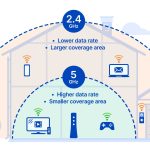
The best choice among 2.4 GHz, B, G, or N depends on your needs: for faster speeds and better performance, N is the top pick, followed by G and then B. The 2.4 GHz band is popular for its range, but the different standards (B, G, N) determine speed and capacity. For everyday use, N offers the best balance of speed and range, making it ideal for streaming, gaming, and multiple devices. B is outdated and slow, G is decent but less capable than N, which is the most advanced and widely used standard today. Choosing the right one can significantly improve your internet experience.
If you’re wondering which Wi-Fi standard will give you the best overall performance, N is the clear winner. It offers higher speeds, better signal stability, and improved capacity for multiple devices. Whether you’re at home or in a small office, understanding these options helps you make smarter choices for reliable connectivity.

Which is best 2.4 GHz, B or G or N?
Understanding the 2.4 GHz Frequency Band
The 2.4 GHz band is one of the most common frequencies used for Wi-Fi connections. It offers good range and compatibility with many devices, making it a popular choice. This band is divided into smaller channels that help facilitate wireless communication.
Differences Between Wi-Fi Standards: B, G, and N
Each Wi-Fi standard—B, G, and N—has its own features and capabilities. They evolved over time to offer faster speeds, better range, and improved reliability. Understanding these differences helps determine the best option for specific needs.
Wi-Fi Standard B (802.11b)
Standard B was introduced in the late 1990s and was the first widely adopted Wi-Fi standard. It operates only on the 2.4 GHz band and provides data speeds up to 11 Mbps. Its simple design made it affordable, but it lacked the speed necessary for high-bandwidth activities.
Pros of Wi-Fi B
- Low cost and easy to set up
- Good for basic internet browsing
- Compatible with many older devices
Cons of Wi-Fi B
- Limited data transfer speeds
- Susceptible to interference from other devices
- Not suitable for streaming or gaming
Wi-Fi Standard G (802.11g)
Introduced in 2003, G increased maximum speeds to 54 Mbps and used the same 2.4 GHz band. It was backward compatible with B, which made it a popular upgrade for existing networks. G improved performance but still faced interference issues due to the crowded 2.4 GHz spectrum.
Pros of Wi-Fi G
- Faster speeds than B
- Compatible with older devices supporting B
- Widely supported on various devices
Cons of Wi-Fi G
- Vulnerable to interference from cordless phones and Bluetooth devices
- Limited to 54 Mbps maximum speed
- Performance can decrease in crowded areas
Wi-Fi Standard N (802.11n)
Standard N was released in 2009 and marked a significant jump in Wi-Fi technology. It operates on the 2.4 GHz and 5 GHz bands, supporting speeds up to 600 Mbps using multiple antennas (MIMO technology). N offers better range, reliability, and speed compared to B and G.
Pros of Wi-Fi N
- Higher data transfer speeds
- Improved signal range
- Supports multiple devices simultaneously
- Backward compatible with B and G
Cons of Wi-Fi N
- More expensive hardware
- Can experience interference at 2.4 GHz
- Requires compatible routers and devices for optimal performance
Speed and Range Comparison
| Wi-Fi Standard | Maximum Speed | Typical Range | Interference Susceptibility |
|---|---|---|---|
| B | 11 Mbps | Up to 150 feet (45 meters) | High |
| G | 54 Mbps | Up to 150 feet (45 meters) | Moderate |
| N | Up to 600 Mbps | 200+ feet (60+ meters) | Lower, but affected at 2.4 GHz |
Compatibility With Devices
Devices supporting B are now rare, but most legacy devices support G or N. Modern smartphones, laptops, and smart home gadgets favor N or newer standards for faster speeds. Choosing N ensures better future proofing and compatibility.
Interference and Network Performance
The 2.4 GHz band is crowded with devices like microwaves, cordless phones, and Bluetooth gadgets. B and G are more prone to interference, which can slow down connection speeds. N offers better performance but may still suffer from congestion.
Choosing the Right Standard for Your Needs
If you need basic internet browsing, B might suffice, although G is a better option with higher speeds. For streaming, gaming, or multiple device connections, N provides the best performance. Always consider your device compatibility and network environment.
Summary of Key Points
- Wi-Fi B: Simple, low speed, good for basic tasks.
- Wi-Fi G: Faster, compatible with B, suitable for general use.
- Wi-Fi N: Highest speeds, best range, supports multiple devices.
Related Topics to Consider
- Dual-band routers and their benefits
- How to improve Wi-Fi signal strength
- Differences between 2.4 GHz and 5 GHz Wi-Fi
- Upgrading your Wi-Fi network: when and why
Final Tips for Choosing the Best Wi-Fi Standard
Choose a standard based on your specific needs and devices. If future-proofing is important, N is the top choice. For basic usage on older devices, G or B can still work, but consider upgrading for better speed and reliability. Always ensure your router supports the latest standards compatible with your gadgets for smooth wireless connectivity.
What's The Difference Between B, G And N Routers? – Newsy
Frequently Asked Questions
How does the 2.4 GHz B standard compare to G and N in terms of speed?
The 2.4 GHz B standard offers the slowest data transfer rates among the three, with maximum speeds around 11 Mbps. G standard improves on that with speeds up to 54 Mbps, making it suitable for basic internet activities. The N standard provides significantly higher speeds, often exceeding 600 Mbps under optimal conditions, supporting more demanding tasks like streaming and gaming.
Which standard provides the best range and coverage in a wireless network?
The B standard generally offers the best range due to its lower frequency, which penetrates walls and obstacles more effectively. G also provides decent coverage but may be slightly less extensive than B. The N standard, while faster, might have a slightly reduced range depending on network setup and interference, but advanced configurations can optimize its coverage.
Are all these standards compatible with modern devices?
Most modern devices support G and N standards because they are more recent and widely adopted. However, B standard is mostly outdated and rarely found on new devices. If you want broader compatibility and future-proofing, focusing on N or newer standards like AC (not part of this list) will benefit you more.
What are the main differences in network congestion and interference among these standards?
The B standard, being older and slower, tends to operate on a less congested portion of the spectrum but offers limited bandwidth. G and N standards operate on similar 2.4 GHz frequencies, which are more crowded with other devices like Bluetooth and microwaves, leading to potential interference. N offers advanced features like multiple-input multiple-output (MIMO) that help improve performance despite interference.
Is it worth upgrading from B or G to N for better Wi-Fi experience?
Upgrading to N standard can significantly improve your Wi-Fi experience by providing faster speeds, better reliability, and enhanced coverage. It also ensures compatibility with newer devices and supports more demanding applications. If you currently use B or G standards, upgrading will make a noticeable difference in your network performance.
Final Thoughts
Which is best 2.4 GHz, B or G or N?
The B standard offers slower speeds and less reliability, making it less suitable for modern needs. G improves on this with higher speeds and better range, ideal for everyday use. N provides the fastest performance, supporting multiple devices simultaneously with increased stability.
For most users, N is the best choice due to its superior speed and versatility. It handles multiple connections smoothly and reduces interference. Ultimately, 2.4 GHz N stands out as the top option among these standards.