The realistic speed of a 2.4 GHz Wi-Fi connection typically hovers between 20 to 50 Mbps under normal conditions, but it can vary greatly depending on factors like interference, device quality, and network congestion. While the theoretical maximum speed for 2.4 GHz is higher, real-world usage rarely reaches those peaks, making it crucial to understand what you can expect in everyday scenarios.
In short, 2.4 GHz Wi-Fi usually offers speeds around 20-50 Mbps in practical use, suitable for basic browsing, streaming, and light downloads. The actual speed you experience depends on many factors, so it’s good to set realistic expectations.
If you’re wondering about the true speed of your 2.4 GHz Wi-Fi connection, know that while it can theoretically reach up to 600 Mbps under ideal conditions, typical speeds are often much lower. Factors such as physical obstructions, network traffic, and interference from other devices significantly impact the actual performance. This frequency band is known for its broader coverage but generally slower speeds compared to 5 GHz, making it perfect for basic internet tasks but less ideal for high-bandwidth activities. Understanding these limitations helps you optimize your Wi-Fi setup and ensure smoother online experiences.

What is the realistic speed of 2.4 GHz?
Understanding 2.4 GHz Frequency
The 2.4 GHz frequency band is one of the most common frequencies used for Wi-Fi networks. It’s popular because it offers a good balance between range and speed. Many household devices, like routers, cordless phones, and Bluetooth devices, operate on this band.
Theoretical Speed vs. Real-World Speed
While the theoretical maximum speed of a 2.4 GHz connection can be quite high, actual speeds are usually much lower. The advertised maximum speed often refers to ideal conditions, which rarely happen in everyday use. Realistic speeds depend on multiple factors like interference, distance, and device capabilities.
What Is the Maximum Theoretical Speed of 2.4 GHz Wi-Fi?
The latest standards, such as Wi-Fi 5 (802.11n), can deliver maximum speeds up to 600 Mbps on the 2.4 GHz band. Wi-Fi 4 (802.11g) offers speeds up to 54 Mbps, but these are under perfect conditions. It’s important to remember that these figures are maximums, not typical user experiences.
Factors That Influence Actual Speed
- Distance: The farther you are from your router, the slower your connection tends to be.
- Interference: Other devices like microwaves or Bluetooth gadgets can disrupt signals.
- Network Traffic: Multiple devices sharing the same network can reduce speed for each device.
- Router Quality: Modern routers with better technology tend to provide faster and more reliable speeds.
Typical Realistic Speeds of 2.4 GHz Wi-Fi
In everyday environments, users generally experience speeds between **10 Mbps and 50 Mbps** on a 2.4 GHz network. These speeds are sufficient for browsing, streaming videos in standard quality, and using social media. However, they might struggle with high-definition streaming or large downloads.
Comparison with 5 GHz Wi-Fi
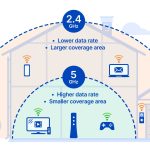
The 5 GHz band offers higher maximum speeds, often reaching over 1 Gbps with modern technology. This makes it suitable for tasks requiring fast data transfer, like gaming or 4K video streaming. However, 5 GHz signals have a shorter range and are less effective through walls and obstacles.
How to Maximize Your 2.4 GHz Speed
Place Your Router Properly
Position your router in a central, open location to reduce obstacles and interference. Keep it away from electronic devices that may cause signal disruption. Elevate the router off the floor for better coverage.
Limit Interference
Reduce interference by minimizing the number of appliances operating in the same frequency and avoiding dense furniture or thick walls near the router.
Update Firmware and Devices
Ensure your router’s firmware is up to date for optimal performance. Use devices that support the latest Wi-Fi standards to benefit from faster speeds.
Use Wi-Fi Extenders or Mesh Networks
In larger homes, Wi-Fi extenders or mesh network systems can help expand coverage and improve speed throughout the space.
Understanding Wi-Fi Standards and Their Impact on Speed
Different Wi-Fi standards have been developed over the years, each offering different maximum speeds and features.
Wi-Fi 4 (802.11g)
– Max speed: 54 Mbps
– Frequency: 2.4 GHz
– Good for basic internet browsing and emailing
Wi-Fi 5 (802.11n)
– Max speed: 600 Mbps
– Frequency: Both 2.4 and 5 GHz
– Better performance for video streaming and online gaming
Wi-Fi 6 (802.11ax)
– Max speed: Over 9 Gbps in theory
– Frequency: Both 2.4 and 5 GHz
– Significantly improves speed, capacity, and efficiency in crowded networks
Is 2.4 GHz Suitable for All Internet Activities?
For activities like browsing the web, checking emails, and streaming videos in standard definition, a 2.4 GHz connection is usually adequate. However, for high-demand tasks such as 4K streaming or large file downloads, users should consider a faster connection, often on the 5 GHz band.
Summary of 2.4 GHz Speed Expectations
| Activity | Typical Speed Range | Suitability |
|---|---|---|
| Web browsing, emails | 10-50 Mbps | Excellent |
| Streaming in SD quality | 5-25 Mbps | Good |
| HD streaming, gaming | 25-50 Mbps | Acceptable but may experience lag |
| Large downloads, 4K videos | 50+ Mbps | May require faster connections |
Closing Thoughts on 2.4 GHz Speed
While the maximum theoretical speeds of 2.4 GHz Wi-Fi are impressive on paper, most users experience lower speeds due to various factors. Understanding these helps set realistic expectations and guides improvements for better internet experiences.