Yes, WiFi extenders do work to boost your internet signal, but their effectiveness depends on your specific setup and needs. They can be a quick fix for dead zones but might not always deliver perfect speeds across your entire home. So, the answer is: WiFi extenders are useful tools that can improve coverage, but they aren’t a one-size-fits-all solution.
If you’re frustrated with slow or spotty WiFi in parts of your house, you’re not alone. Many people wonder whether a WiFi extender can help, especially when traditional routers seem to fall short. The good news is, WiFi extenders can be effective in expanding your signal range, making it easier to enjoy fast internet throughout your space. However, their success hinges on proper placement and the quality of your existing network. Before investing, it’s worth understanding how they work and what limitations they might have in your specific environment.

Do WiFi Extenders Work?
Understanding How WiFi Extenders Function
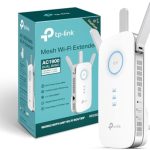
WiFi extenders, also known as WiFi boosters or repeaters, are devices designed to increase your wireless network’s coverage. They work by capturing the existing WiFi signal from your router and rebroadcasting it to areas with weak or no signal. This process helps eliminate dead zones in your home or office, allowing devices to connect more reliably.
The core function of a WiFi extender is to extend the reach of your current network. It does not create a new network but rather amplifies the signal from your existing one. When set up properly, they make it possible for rooms located far from your router to access fast and steady internet connections.
It’s important to note that WiFi extenders are different from mesh networks. While extenders simply amplify signals, mesh systems create multiple seamless points of coverage. Understanding this distinction can help you decide which solution better fits your needs.
Do WiFi Extenders Improve Internet Coverage?
Yes, WiFi extenders can significantly improve coverage in large or complex spaces. If your WiFi signal weakens or drops when you move to certain areas, an extender can help bridge that gap.
For example, in multi-story homes, signals often struggle to reach upper floors. Installing a WiFi extender on each level can ensure every room receives a strong signal. This benefits activities like streaming, gaming, or working from home without constant interruptions.
However, the effectiveness depends on the placement of the extender. Positioning it too close to the router limits its range extension, while placing it too far away results in poor signal capture. Proper placement is key to maximizing benefits.
Are There Limitations to WiFi Extenders?
While WiFi extenders are useful, they do have some limitations. They can sometimes reduce your network’s overall speed by half, especially if they are not dual-band or properly configured.
Bandwidth sharing occurs because the extender reuses the same WiFi channel to communicate with both your router and connected devices. This can lead to slower speeds, particularly if multiple devices are connected simultaneously.
Another challenge is interference. WiFi signals can be disrupted by walls, furniture, appliances, or other electronics. Extenders may struggle to work effectively in environments with many obstacles or signals from neighboring networks.
Types of WiFi Extenders and Their Effectiveness
There are several types of WiFi extenders, each with different features and performance levels:
- Single-band extenders: Operate on one frequency, usually 2.4 GHz. They are less expensive but can cause congestion because they share the channel with your existing WiFi network.
- Dual-band extenders: Use both 2.4 GHz and 5 GHz frequencies. They offer better performance and less interference, making them suitable for high-bandwidth activities.
- Smart extenders: Come with app-based management, allowing easier setup and control. They tend to offer better performance and stability.
Choosing the right type depends on your network needs, household size, and budget. Generally, dual-band and smart extenders provide a better experience with fewer speed drops.
How to Maximize the Effectiveness of WiFi Extenders
Proper placement is essential for WiFi extender performance. Place the device halfway between your router and the dead zone. Avoid putting it behind thick walls, metal objects, or large appliances that may interfere with signals.
Updating the firmware of your extender and router can improve functionality. Regular updates fix bugs and enhance performance.
Use a WiFi analyzer tool to identify the best location for your extender. These apps show signal strengths and help you find spots with the least interference.
Ensure the extender supports your internet speed. If your plan offers gigabit speeds, choose an extender that can handle high data rates to avoid bottlenecks.
Setting Up a WiFi Extender: Step-by-Step Guide
Getting your WiFi extender up and running is straightforward. Start by plugging it into an outlet within a good range of your router.
Connect to the extender’s network via a smartphone or computer. Follow the setup instructions, usually accessed through a web browser or the device’s app.
Select your existing WiFi network during setup and enter your WiFi password. The extender will then connect and amplify your signal.
After configuration, move the extender to its optimal location based on the signal strength indicator, if available. Verify that your devices experience improved coverage and speed.
Do WiFi Extenders Affect Your Network Speed?
WiFi extenders can impact internet speed, but the extent depends on the device and setup. Single-band extenders tend to slow the network more because they use the same channel for communication.
Dual-band extenders mitigate this issue by splitting traffic between two frequencies, maintaining better speeds for connected devices.
In some cases, you’ll notice a slight decrease in speed, especially when multiple devices are streaming or gaming simultaneously. However, a well-placed dual-band extender often provides enough bandwidth to satisfy most users.
To minimize speed loss, avoid overcrowding your network with devices and periodically restart your extender to keep it running smoothly.
Alternative Solutions to WiFi Extenders
If WiFi extenders don’t meet your needs, consider other options:
- Mesh WiFi systems: These create a unified network with multiple access points, offering seamless coverage and consistent speeds throughout your home.
- Upgrading your router: A more powerful router with better range can eliminate need for extenders. Look for models with multiple antennas and beamforming features.
- Powerline adapters: Use your home’s electrical wiring to carry internet signals. They are effective in homes with thick walls or interference issues.
Each option has advantages and trade-offs. Mesh systems tend to be more user-friendly and scalable, but they can be more expensive.
Cost and Value of WiFi Extenders
WiFi extenders vary in price depending on features and performance. Basic models can cost as little as $20, while high-end dual-band smart extenders may range up to $100 or more.
Consider your internet needs and home layout when choosing an extender. Investing in a quality device can improve your online experience and prevent costly service upgrades.
Look for models with good reviews, reliable brand reputation, and compatibility with your current router.
Final Thoughts: Do WiFi Extenders Really Work?
WiFi extenders can be highly effective in expanding coverage and improving connection quality in your home or office. Their success largely depends on proper placement, choice of device, and understanding their limitations.
While they may introduce some speed drops, well-chosen and correctly set up extenders often provide a noticeable boost in WiFi performance. For larger spaces or challenging environments, they are a cost-effective solution to enhance your wireless experience.
Always evaluate your specific needs, consider alternative options if necessary, and follow best practices for setup and placement. With the right approach, WiFi extenders can make your internet reliable and accessible in every corner of your space.
WiFi Extenders Explained: Do You Really Need One?
Frequently Asked Questions
How can I tell if my WiFi extender is working properly?
To determine if your WiFi extender functions effectively, check the signal strength on devices connected to the extender. Ensure that your device receives a strong and stable connection. You can also run a speed test near the extender and compare the results with your main router to confirm that the extender is boosting your network as intended. Additionally, verify the extender’s indicator lights to confirm proper operation and proper connection to your existing network.
Will a WiFi extender slow down my internet speed?
In some cases, a WiFi extender may slightly reduce your internet speed because it repeats the existing signal, which can introduce some latency. However, many modern extenders are designed to minimize this impact and maintain good speeds. To maximize performance, place the extender in an optimal location—close enough to the router to pick up a strong signal but far enough to extend coverage effectively. Upgrading to a newer, faster extender can also help reduce any noticeable slowdown.
Can a WiFi extender improve coverage in large or multi-story homes?
Yes, a WiFi extender can significantly improve coverage in large or multi-story homes by expanding the range of your network. Proper placement of the extender ensures that it receives a strong signal from the main router and distributes it to areas with weak or no coverage. For best results, position the extender midway between your router and the dead zones, avoiding obstructions like thick walls or large furniture that can interfere with the signal.
Do WiFi extenders work with all types of internet service providers?
Most WiFi extenders are compatible with a wide range of internet service providers and network types. They work by connecting wirelessly to your existing network, regardless of your ISP. However, always check the compatibility specifications of the extender before purchasing, especially if you have a unique setup or use advanced internet configurations. Most consumer-grade extenders are designed to work seamlessly with standard home internet services.
What are some common issues that prevent WiFi extenders from working correctly?
Common issues include placing the extender too far from the main router, which leads to weak signals and poor performance. Interference from other electronic devices or thick walls can also disrupt the connection. Incorrect configuration or outdated firmware may hinder functionality as well. Ensuring the extender is positioned properly, updating its software, and following the manufacturer’s setup instructions can help improve performance and resolve these issues.
Final Thoughts
Do WiFi extenders work? Yes, they can improve your internet coverage by boosting signals in dead zones. However, their effectiveness depends on your home’s layout and the quality of the extender.
In some cases, extenders might reduce overall speed or create additional network issues. It’s essential to choose the right device and place it strategically for the best results.
In conclusion, WiFi extenders do work if used correctly. They offer a practical solution for expanding coverage, especially in larger homes or tricky spaces.