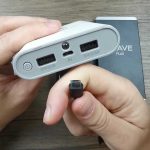
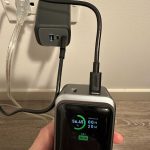
To use a power bank efficiently, simply connect your device using the appropriate charging cable, switch on the power bank if there’s a power button, and let it do the work. Make sure the power bank is charged beforehand, and keep the device close for quick charging. It’s a straightforward way to keep your gadgets alive on the go!
Power banks are essential accessories for anyone constantly on the move. They provide a quick and easy way to recharge smartphones, tablets, or other devices without needing a power outlet. Using one correctly involves ensuring it’s charged, selecting the right cable, and knowing when and how to connect your device. By following simple steps, you can make the most of your power bank and avoid running out of battery when you need your devices the most. Whether you’re traveling, commuting, or just away from home, mastering the use of a power bank keeps your devices powered up and ready to go.

How to Use a Power Bank
Using a power bank might seem simple at first, but knowing the right steps can help you get the most out of it. Proper use ensures your devices stay charged and the power bank lasts longer. In this section, we will explore everything you need to know to use a power bank effectively.
Understanding Your Power Bank
First, it’s important to understand what your power bank is. It is a portable device designed to store electrical energy and transfer it to your smartphones, tablets, or other gadgets. Most power banks come with a battery indicator, charging ports, and sometimes additional features like LED lights or fast charging options.
Key Features to Know
- Capacity: Measured in milliampere-hours (mAh), indicates how much charge it can store.
- Input/Output Ports: Usually USB or USB-C, through which you charge the power bank and connect devices.
- Charging Speed: Some power banks support fast charging, which charges devices quicker.
Step-by-Step Guide to Using a Power Bank
Charging the Power Bank
Begin by charging your power bank fully before use. Connect it to a power source using the included cable. This ensures maximum efficiency when powering your devices later.
Connecting Your Device
Plug your device’s charging cable into the power bank’s output port. Make sure it is secure. The device should start charging automatically or after pressing a power button, if available.
Monitoring Charging Status
Most power banks have LED indicators or display screens showing remaining charge. Keep an eye on this to know when to recharge the power bank.
Best Practices for Charging Devices
Using the Correct Cable and Port
Always use the cable provided with your device or a compatible one. Connect to an appropriate output port on the power bank to avoid slow charging or damage.
Optimal Charging Settings
If your power bank supports fast charging, enable it for compatible devices. Avoid connecting multiple devices simultaneously if your power bank has limited capacity.
Charging Multiple Devices
Some power banks have multiple output ports. Connect your devices carefully, ensuring total power consumption does not exceed the bank’s capacity.
How to Maximize Your Power Bank’s Lifespan
Proper Charging Habits
Don’t let your power bank deplete completely or stay fully charged for long periods without use. Recharge before the charge drops below 20% for better battery health.
Storage Tips
Keep your power bank in a cool, dry place when not in use. Avoid exposure to extreme temperatures or moisture that can damage the internal battery.
Maintaining the Battery
Occasionally, charge and discharge your power bank to maintain battery capacity. Avoid overcharging by unplugging it once fully charged.
Safety Tips for Using a Power Bank
Proper Handling
Handle your power bank with care. Avoid dropping or crushing it, which can damage internal components.
Avoid Overloading
Do not connect devices whose total charging power exceeds the power bank’s maximum output limit.
Prevent Overheating
If the power bank gets excessively hot during use, disconnect devices immediately. Store and use it in a well-ventilated area.
Related Topics
Choosing the Right Power Bank
Consider capacity, size, weight, and charging speed when selecting a power bank suitable for your needs. Larger capacity power banks are great for prolonged use, while smaller ones are portable for daily errands.
Comparing Power Bank Types
There are different types like lithium-polymer and lithium-ion power banks. Understand their differences to pick the best for your lifestyle and devices.
Charging with Solar Power Banks
Some power banks incorporate solar panels, making them suitable for outdoor activities. Remember, solar charging takes longer and is less reliable in low sunlight.
Using Power Banks for Multiple Devices
If you have several gadgets, look for power banks with high capacity and multiple output ports. This helps keep all your devices charged during trips or emergencies.
Troubleshooting Common Issues
If your power bank isn’t charging or your devices aren’t charging properly, check connections, cables, and power sources. Sometimes, resetting or recharging the power bank fixes minor issues.
Knowing how to properly use and maintain your power bank helps extend its life and keeps your devices ready at all times. Follow these steps to ensure safe and efficient charging, making your portable power solution a reliable partner for daily life.
How To Use A Portable Power Bank To Charge Your Devices-Tutorial
Frequently Asked Questions
How can I ensure my power bank is ready for use?
To make sure your power bank is ready, connect it to a power source using the included charging cable. Allow it to fully charge before first use, as this helps maximize battery health and ensures it can provide optimal charging capacity for your devices.
What should I do if my power bank isn’t charging my device?
If your power bank isn’t charging your device, first check that the connection is secure and that you’re using a compatible cable. Ensure the power bank has enough charge; if not, charge the power bank fully. Also, verify that your device’s charging port is clean and undamaged.
How do I properly turn on and off my power bank?
Most power banks have a power button. To turn it on, press and hold the button for a second or two until indicator lights turn on. To turn it off, press the button again. Avoid pressing multiple buttons simultaneously to prevent accidental activation or deactivation.
Can I use my power bank while it is charging?
It depends on the design of your power bank. Some models allow simultaneous charging and device charging, but others do not. Check the manufacturer’s instructions to confirm whether your device supports this feature to prevent any possible damage or malfunction.
How should I store my power bank when not in use?
Store your power bank in a cool, dry place away from direct sunlight and metal objects. Keep it partially charged—around 50-70%—if you plan to store it for an extended period. Avoid leaving it fully discharged or constantly connected to power for long durations.
Final Thoughts
To use a power bank effectively, start by charging it fully before your trip. Connect your device with the appropriate cable and press the power button on the bank. Keep an eye on the indicator lights to ensure your device is charging.
Always use a compatible power bank to avoid damage. When not in use, store it in a cool, dry place to maximize its lifespan.
In conclusion, how to use a power bank simply involves charging it beforehand, connecting your device properly, and monitoring the process. Follow these steps for efficient and safe charging anytime you need it.