To know if your power bank is fully charged, simply check the indicator lights—most models show a full charge with all lights steady or a specific icon—and give it a quick press to see if the LED turns on completely. Alternatively, connect your power bank to a device and see if it starts charging immediately, which indicates it’s ready. Many power banks now come with digital displays that show the exact remaining battery percentage, making it easier than ever to know when your device is fully juiced up.
A fully charged power bank ensures your devices are always ready for use, especially when you’re on the go. Recognizing the signs of a full charge is simple with indicator lights or a digital display, and some models even notify you with sound or vibration. Knowing these cues helps prevent overcharging and keeps your power bank and devices in top shape. In this guide, we’ll explore easy ways to check your power bank’s charge level so you never run out of power unexpectedly.

How to Know if Power Bank is Fully Charged
Understanding the Charging Indicator Lights
Many power banks come with LED indicator lights that show the charging status. When plugged into a power source, these lights often change color or turn off once the charging is complete. For example, a common design is a blinking light during charging and a steady light when fully charged. Recognizing these signals helps users easily determine when their power bank is ready for use without guesswork.
Checking the LED Indicators in Detail
Most power banks feature multiple LED lights to indicate different levels of charge. Typically, each light represents a 25% increase in battery level. When all lights are illuminated or a specific indicator turns solid, it signifies that the power bank has reached full capacity. Some models also have a dedicated “full” indicator, which turns green or blue when charging is finished. Getting comfortable with these signals ensures you don’t unplug prematurely or overcharge your device.
Using the Power Bank’s Display Screen
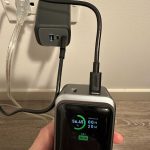
More advanced models include a digital display that shows the precise percentage of charge remaining. When the display reads 100%, the power bank is fully charged. Keep in mind that some displays update in real-time, while others might take a few moments to reflect the latest charging status. Regularly checking this digital readout provides a quick, exact way to confirm full charge without relying solely on indicator lights.
Monitoring the Charging Time
Knowing the typical charging time for your power bank helps gauge when it might be fully charged. Most portable chargers take between two to six hours to fully charge, depending on their capacity and charger wattage. For example, a 10,000mAh power bank usually takes about three hours with a standard 2A charger. If the power bank has been plugged in for longer than the usual charging time, it is likely fully charged, especially if the indicator lights confirm it.
Understanding Charging Protocols and Safety Features
Some power banks include automatic shut-off features that turn off charging once the device reaches full capacity. Others have built-in protections against overcharging, which automatically stop charging to protect the battery health. Recognizing these features can help prevent overcharging and extend the lifespan of your power bank, and ensure you’re aware when the device is completely filled.
Testing the Power Bank with a Device
A practical way to check if a power bank is fully charged is to connect it to a device such as a smartphone or tablet. If the device charges quickly and consistently, the power bank likely has a full or near-full charge. Conversely, if charging seems slow or intermittent, the power bank might not be fully charged. Make it a habit to test after the indicator shows full or the display reads 100% to confirm.
Battery Calibration and Ensuring Accurate Readings
Sometimes, the indicator lights or digital displays might not reflect the true charge level accurately. Performing a battery calibration by fully charging the power bank to 100% and then letting it drain completely before recharging can help recalibrate the indicators. This process ensures that the readings are precise, preventing confusion about the actual charge status.
Common Signs that a Power Bank is Fully Charged
There are several signs that indicate your power bank has reached full capacity:
- Indicator lights turn solid or change color to signify full charge.
- The display shows 100% or a full battery icon.
- Charging stops automatically, thanks to the device’s safety features.
- Charging time exceeds the typical duration, implying the power bank is ready.
Being aware of these signs helps you avoid overcharging, which can reduce battery lifespan over time.
How Temperature Affects Charging and Detection
Battery health and charging signals can behave differently depending on temperature. Charging a power bank in extremely cold or hot conditions might result in inaccurate indicator readings or slower charging times. To ensure accurate detection of full capacity, charge your device in a moderate temperature environment and monitor signals closely.
Additional Tips for Proper Charging
– Always use the charger and cable recommended by the manufacturer.
– Avoid overcharging by unplugging once fully charged.
– Store your power bank in a cool, dry place when not in use to preserve battery health.
– Regularly check the indicator lights or display to confirm the charge status.
Summary: The Best Ways to Confirm Your Power Bank is Fully Charged
To sum up, verifying a fully charged power bank involves paying attention to indicator lights, reading digital displays, understanding charging times, and recognizing automatic safety features. Combining these methods provides a clear, accurate picture of your device’s charge status. Regularly monitoring your power bank ensures optimal performance and a longer battery life.
By familiarizing yourself with these signs and tips, you can easily tell when your power bank is ready for your next adventure or daily use. Proper charging not only maximizes efficiency but also protects the lifespan of your device, making sure you always have power when needed.
How to tell if a power bank is fully charged
Frequently Asked Questions
What indicator shows that a power bank is fully charged?
Most power banks feature LED lights that serve as charging indicators. When the power bank is charging, the lights often blink or display a specific color. Once fully charged, these lights typically remain steady or turn off, indicating the device has reached its maximum capacity.
How can I tell if the power bank’s battery level is at 100%?
Many power banks have a digital display or LED indicators that show the current charge level. When all the LED lights are lit or the digital screen reads 100%, it confirms the power bank is fully charged and ready for use.
Is there a way to verify my power bank’s full charge without indicators?
If your power bank lacks visual indicators, you can check its full charge by disconnecting it from the charger and using it to charge a device. If the device charges normally and the power bank’s battery indicator does not diminish after some time, it suggests the power bank is fully charged.
How long should I expect a power bank to take to reach full capacity?
The charging time varies depending on the power bank’s capacity and the charger’s output. A typical 10,000mAh power bank usually takes about 4-6 hours to fully charge with a standard charger. Monitoring the LED indicators or display helps confirm when the charging process completes.
What steps can I take to ensure my power bank charges fully each time?
Make sure to use a compatible charger with sufficient output power. Avoid disconnecting the power bank mid-charge and wait until the indicator signals completion before unplugging. Regularly check the indicators or display to confirm the device reaches full capacity.
Final Thoughts
Knowing if your power bank is fully charged is simple. Most power banks have indicator lights that turn green or stop blinking when charging is complete. Some models also display a digital screen showing the battery percentage.
Pay attention to the device’s instructions, as they often specify what signals indicate full charge. Removing the power bank from the charger once it reaches 100% prevents overcharging.
In conclusion, how to know if power bank is fully charged depends on indicator lights, digital displays, and following manufacturer guidelines. Checking these signs ensures your device is ready for use and maintains its battery health.