Experiencing no sound from your waterproof sound box? Don’t panic! This guide offers straightforward solutions, starting with the basics like checking connections and volume levels. We’ll help you troubleshoot common issues, from Bluetooth pairing problems to potential water damage, so you can enjoy your music again.
Ah, the joy of a waterproof sound box! Whether you’re by the pool, at the beach, or even in the shower, these rugged speakers are designed to bring the tunes wherever life takes you. But what happens when that life-giving music suddenly cuts out? That dreaded silence can be a real mood killer. If your waterproof sound box has suddenly gone quiet, don’t despair! This guide is here to help you troubleshoot and fix that no-sound issue, so you can get back to enjoying your favorite soundtracks.
It’s frustrating, isn’t it? You’ve got your waterproof sound box ready for an adventure, you press play, and… nothing. The lights might be on, it might even be connected, but the sound just isn’t coming out. This can happen for a variety of reasons, from simple settings glitches to something a little more serious. The good news is that most of the time, this problem is fixable with a few simple steps. Let’s dive in and get your sound box singing again!
Key Takeaways
- Check the Basics First: Always start with the simplest solutions like ensuring the device is on, volume is up, and it’s correctly paired.
- Volume Levels Matter: Confirm that both the sound box and the connected audio source have their volumes turned up.
- Troubleshoot Connectivity: Re-pairing your device, forgetting the sound box, and trying a different source can resolve Bluetooth issues.
- Inspect for Damage: Look for any visible signs of water ingress or physical damage to the speaker grille and ports.
- Consider a Reset: A factory reset can often fix software glitches that might be preventing sound output.
- Cleanliness is Key: Dust or debris can sometimes block speaker grilles, so a gentle clean might be necessary.
- When to Seek Professional Help: If none of the DIY fixes work, it might be time to contact the manufacturer or a repair professional.
📑 Table of Contents
- 1. The Absolute Basics: Are We Even On?
- 2. Connectivity Conundrums: Is It Talking to Your Device?
- 3. Water Damage and Debris: The Waterproof But Not Invincible Story
- 4. Software Glitches and Resetting Your Speaker
- 5. Testing the Aux Input (If Available)
- 6. When All Else Fails: Professional Help and Warranty
1. The Absolute Basics: Are We Even On?
Before we get into anything complicated, let’s cover the absolute fundamentals. Sometimes, the simplest answer is the correct one, and we can easily overlook the obvious when we’re trying to solve a problem.
Is the Speaker Powered On?
This might sound silly, but double-check that your waterproof sound box is actually turned on. Look for power indicator lights. If there are no lights, it might be a battery issue.
Is the Volume Turned Up?
Check the volume on the sound box itself. Many speakers have physical buttons or touch controls for volume. Make sure it’s not turned all the way down or muted.
Is the Audio Source Volume Up?
Just as important is checking the volume on the device you’re playing music from (your phone, tablet, etc.). Sometimes, the sound box might be working perfectly, but your phone’s volume is set to zero. Try increasing the volume on your phone. If you’re playing music from a laptop, ensure the system volume is up and not muted. You can find more detailed steps on how to fix laptop sound not working if that’s your source device.
2. Connectivity Conundrums: Is It Talking to Your Device?
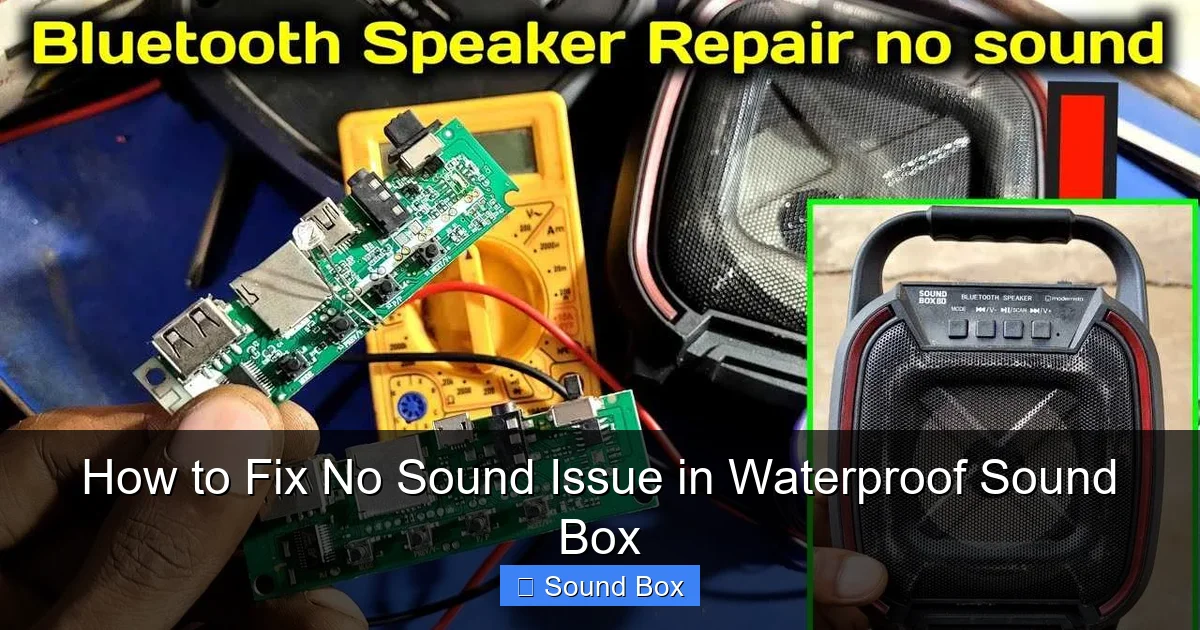
Visual guide about How to Fix No Sound Issue in Waterproof Sound Box
Image source: techsynchron.com
Most waterproof sound boxes connect wirelessly via Bluetooth. If the connection isn’t solid, you won’t get any sound. Let’s troubleshoot those wireless links.
Is it Paired Correctly?
Your sound box needs to be paired with your audio device. Make sure it’s discoverable and has successfully connected. You might need to put your sound box into pairing mode. This usually involves pressing and holding a Bluetooth button until a light flashes or you hear a confirmation sound.
Try Forgetting and Re-pairing
Sometimes, the Bluetooth connection gets a little confused. On your phone or other audio device, go to your Bluetooth settings. Find your sound box in the list of paired devices, and select “Forget” or “Unpair.” Then, put your sound box back into pairing mode and reconnect it. This fresh start can often resolve issues. For specific instructions on pairing your phone, check out how to pair a Bluetooth speaker to an iPhone.
Test with a Different Device
If you’re still having trouble, try connecting your sound box to a different phone, tablet, or laptop. If it works with another device, the problem is likely with your original audio source. If it doesn’t work with any device, the issue is more likely with the sound box itself.
Check for Interference
Other wireless devices, thick walls, or even microwave ovens can sometimes interfere with Bluetooth signals. Try moving closer to your sound box or away from potential sources of interference.
3. Water Damage and Debris: The Waterproof But Not Invincible Story

Visual guide about How to Fix No Sound Issue in Waterproof Sound Box
Image source: linuxgenie.net
While these speakers are built for water, “waterproof” doesn’t always mean “indestructible.” Saltwater, chlorine, and even prolonged submersion can sometimes cause issues. Also, sand and dirt can be sneaky culprits.
Inspect for Physical Damage
Carefully examine your sound box. Are there any visible cracks or damage to the casing? Pay close attention to the speaker grille. Is it dented, warped, or clogged with debris?
Is it Clean?
If you’ve been using your speaker at the beach or near a dusty environment, sand or dirt might have gotten into the speaker grille. This can muffle or completely block the sound. Gently try to clean the grille. You can use a soft brush or a can of compressed air to dislodge any particles. Be very careful not to push debris further into the speaker. For more detailed advice, you might find how to clean sand from waterproof Bluetooth speakers helpful. If it’s just general dirt, how to clean a waterproof speaker offers some great tips.
What About Water Damage?
If the speaker has been submerged for too long, or if it wasn’t sealed properly, water might have gotten inside. Look for any signs of moisture inside the charging port or speaker grill. If you suspect water damage, turn the speaker off immediately and do not try to charge it. Let it dry out completely. You might need to place it in a dry, well-ventilated area for a couple of days. Some people recommend placing electronics in a bag of rice, but this is often debated as it can sometimes introduce dust. A better approach is to simply leave it to air dry.
4. Software Glitches and Resetting Your Speaker

Visual guide about How to Fix No Sound Issue in Waterproof Sound Box
Image source: linuxgenie.net
Like any electronic device, waterproof sound boxes can experience software glitches that prevent them from functioning correctly, including producing sound. A factory reset can often resolve these issues.
Performing a Factory Reset
A factory reset will restore your sound box to its original settings, erasing any saved Bluetooth pairings or configuration issues. The method for performing a reset varies by manufacturer and model. You’ll usually find this information in your speaker’s user manual. Common methods include:
- Pressing and holding a specific combination of buttons (like Power and Bluetooth) for a set amount of time (e.g., 10-15 seconds).
- Using a small pin or paperclip to press a recessed reset button.
Always refer to your product’s manual for the exact reset procedure. A successful reset usually means you’ll need to re-pair your sound box with your devices afterward. If you’re having trouble finding instructions for your specific model, you might want to search online for “[Your Speaker Brand and Model] factory reset.”
5. Testing the Aux Input (If Available)
Some waterproof sound boxes have an auxiliary (AUX) input, allowing you to connect devices with an audio cable. This is a great way to bypass Bluetooth issues entirely and test if the speaker’s internal amplifier and speaker drivers are working.
How to Use the Aux Input
If your speaker has an AUX port:
- Find an AUX cable (a standard 3.5mm audio cable).
- Connect one end to your audio source (phone, MP3 player, etc.) and the other end to the AUX input on your sound box.
- Make sure your sound box is turned on and that the input is set to AUX (some speakers switch automatically, others have a button to select the input).
- Play some audio from your connected device.
If you get sound through the AUX cable, then the issue is definitely with the Bluetooth functionality of your sound box. If there’s still no sound, the problem is likely with the speaker’s internal components. If you’re trying to connect a TV to your speaker, you might need a specific cable or adapter, so looking up guides like how to connect Bluetooth speaker to TV with aux cable could be useful.
6. When All Else Fails: Professional Help and Warranty
If you’ve gone through all the troubleshooting steps above and your waterproof sound box still isn’t producing any sound, it’s time to consider professional help or warranty options.
Check Your Warranty
If your speaker is still under warranty, contact the manufacturer. They may be able to offer further troubleshooting steps or arrange for a repair or replacement. Keep your proof of purchase handy!
Consider Professional Repair
For speakers out of warranty, professional repair might be an option, though it can sometimes be more expensive than buying a new speaker. Look for electronics repair shops in your area that specialize in audio equipment.
Is it Time for a New One?
Sadly, sometimes electronics reach the end of their lifespan, or the cost of repair outweighs the benefit. If your speaker is old or has sustained significant damage, it might be time to invest in a new waterproof sound box.
If you’re interested in exploring other sound solutions, like improving audio quality in specific environments, check out our guides on how to reduce echo inside a tent or getting the best sound in an open pool area. These can help you maximize your listening experience in various settings.
In conclusion, a silent waterproof sound box can be a real bummer, but most of the time, the issue is something you can fix yourself. By methodically working through these troubleshooting steps, from the simplest checks to more advanced resets, you’ll likely get your music pumping again in no time. Remember to be patient, and don’t be afraid to consult your speaker’s manual or the manufacturer’s support if you get stuck. Happy listening!
Frequently Asked Questions
My waterproof sound box is connected via Bluetooth but still no sound. What should I do?
If your waterproof sound box shows as connected but there’s no sound, first check that the volume on both the speaker and your audio source (phone, tablet) is turned up. Then, try unpairing and re-pairing the speaker from your device’s Bluetooth settings.
Can water damage cause my waterproof sound box to stop working?
Yes, even though they are waterproof, prolonged submersion, saltwater, or chlorine can sometimes cause damage. If you suspect water ingress, turn the speaker off immediately and let it dry thoroughly before attempting to use or charge it.
My sound box has an AUX input, but still no sound. What does this mean?
If you get no sound even when connected via an AUX cable, it suggests the issue might be with the sound box’s internal components or speaker drivers, rather than a Bluetooth connectivity problem.
How do I perform a factory reset on my waterproof sound box?
The exact method for a factory reset varies by manufacturer. Typically, it involves pressing and holding a combination of buttons, or using a small pin on a reset button. Consult your speaker’s user manual for specific instructions.
What should I do if my waterproof sound box is physically damaged?
If you notice cracks or damage to the casing or speaker grille, this could be the cause of the no-sound issue. Assess the extent of the damage and consider if it’s a repairable issue or if it’s time to replace the speaker.
My sound box works with my phone, but not my tablet. What’s wrong?
This indicates the issue lies with your tablet’s Bluetooth connection or settings, not the sound box itself. Try restarting your tablet, clearing its Bluetooth cache, or forgetting and re-pairing the sound box within your tablet’s Bluetooth menu.