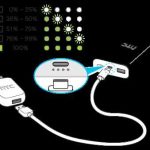
To know if your power bank is fully charged, simply check its indicator lights or display—most have a LED system that shows the charging status. When all lights are steady or a specific indicator shows full, your power bank is ready to go. Sometimes, it may stop charging altogether, signaling it’s topped off.
In short, the easiest way to tell if your power bank is fully charged is to look for full indicator lights or an accurate digital display. Ensuring it’s fully charged before heading out guarantees you won’t run out of power when you need it most. Checking the lights or display is quick and simple, making it a handy habit for anyone relying on portable power.
If you’re wondering how to be sure your power bank is ready, the key lies in understanding its LED indicators or display signals. Most rechargeable power banks have specific visual cues that make it easy to identify when they’re fully charged. Often, you’ll see all lights steady or a particular icon illuminated, which indicates the device has finished charging. Knowing these signs helps prevent overcharging and ensures your power bank is always prepared to give you a full charge when needed.

How Do You Know If Your Power Bank Is Fully Charged
Understanding Power Bank Charging Indicators
Most power banks come with built-in indicators that help you see their charging status. These indicators are usually LED lights or digital screens. When the power bank starts charging, the lights often blink or display different colors. Once it is fully charged, these lights typically turn solid or change to a specific color, signaling completion. Recognizing these signals helps prevent overcharging and keeps your device in good shape.
LED Lights as Charging Indicators
LED lights are the most common method used to show the power bank’s charging status. They are simple and easy to interpret. For example, a single blinking LED usually means charging is ongoing. Multiple lights lighting up progressively indicate the battery level, and all lights solidifying indicate full charge. Some models have a specific color change, such as from red to green, to show that the power bank is ready to use.
Digital Screen Displays
Higher-end power banks might have a digital display that shows the exact percentage of charge left. When the display shows 100%, your power bank is fully charged. Digital screens offer a more precise reading compared to LED indicators, which often only give a general idea of charge status. It’s important to check the screen regularly during charging to know when to disconnect it.
Using the Power Bank’s Built-in Buttons
Some power banks feature a button that activates the display or indicator lights. Pressing this button can reveal the current charge level. When the indicator shows 100% or the lights turn solid without flashing, your power bank is fully charged. This method is simple and especially useful if your device has no dedicated charging indicator.
How to Check the Charge Level Safely
Always press the button gently and avoid pressing too hard, which could damage the indicator. Wait for the lights or display to stabilize before making a conclusion. If uncertain, consult your power bank’s manual for specific instructions on checking the charge status.
Duration of Charging: How Long Should It Take?
Knowing how long it takes for your power bank to fully charge helps you estimate when it is ready. The charging time varies depending on the capacity and the power source used.
Typical Charging Times Based on Capacity
- Small power banks (up to 5,000mAh): usually take about 2 to 4 hours.
- Medium power banks (6,000 to 10,000mAh): generally need 4 to 6 hours.
- Large power banks (more than 10,000mAh): can take 8 hours or longer.
Always check your device specifications for more accurate estimates.
Factors Affecting Charging Speed
Several factors influence how quickly your power bank charges, including:
- The output power of the charging source (high-output chargers charge faster).
- The quality of the charging cable (good cables maintain steady power flow).
- The health and age of your power bank (older batteries may charge slower).
Monitoring these factors can help you determine whether your charging process is proceeding normally.
Charging with the Correct Equipment
Using the right power adapter and cable is crucial for efficient and safe charging. Always utilize the charger that came with your power bank or choose one with the correct output specifications.
Optimal Charging Power Ratings
Check your power bank’s specifications for the recommended output. For example:
- A device with a 5V/2A output charges faster than one with 5V/1A.
- Using chargers with higher wattage can speed up charging, but only if your power bank supports fast charging.
Using incompatible chargers can lead to slow charging or damage.
Safe Charging Practices
Avoid charging your power bank with damaged cables or adapters. Always plug into a reliable power source and avoid using the device during charging to prevent overheating.
How to Tell If Your Power Bank Is Overcharged
Overcharging can harm the battery and reduce its lifespan. Recognizing signs of overcharging is essential.
Signs of Overcharging
- The indicator lights stay solid at full capacity for extended periods.
- The device heats up noticeably during or after charging.
- Battery performance diminishes quickly after multiple charges.
To prevent damage, unplug the power bank once it reaches full charge.
Preventing Overcharge Damage
Some power banks have built-in overcharge protection to stop charging automatically. If yours does not, consider setting a timer or monitoring the indicator lights closely. Avoid leaving your power bank plugged in overnight or for extended periods.
Battery Maintenance for Accurate Charging Indicators
Maintaining your power bank ensures that indicator lights reflect the true charge level. Proper care involves regular usage and avoiding complete discharges.
Regular Usage
Use your power bank periodically to keep the battery active. Batteries can lose capacity if left unused for long periods. A healthy battery provides accurate indicator readings.
Proper Storage
Store your power bank in a cool, dry place when not in use. Avoid exposing it to extreme temperatures, which can affect battery health and indicator accuracy.
Calibration for Accurate Indicators
Occasionally fully drain and recharge your power bank to calibrate the battery level indicator. This helps the device give accurate readings.
Indicators of a Fully Charged Power Bank: Summary
To summarize, you can identify when your power bank is fully charged by observing:
- The LED lights remain solid or change color (e.g., from red to green).
- The digital display shows 100% or maximum capacity.
- The charging duration matches expected times based on your device’s capacity.
- No more heat or flashing lights indicating ongoing charging.
Being attentive to these signs helps maximize your device’s lifespan and ensures reliable performance.
Additional Tips to Keep Your Power Bank Ready
Keeping your power bank at full charge when not in use improves its readiness. Remember to:
- Charge it at least once every few months if unused for a long time.
- Use quality charging cables and adapters.
- Monitor the charging process to avoid overcharging or overheating.
These habits ensure your power bank remains reliable and fully functional whenever you need it.
Related Topics for Better Power Bank Usage
Consider exploring the following areas to enhance your understanding:
Fast Charging Technologies
Learn about Quick Charge or Power Delivery, which can significantly reduce charging times when compatible devices are used.
Battery Health and Lifespan
Understand how multiple charge cycles affect your power bank’s capacity and how to extend its life.
Safe Disposal and Recycling
Properly recycle your power bank when it no longer holds a charge to protect the environment.
Ensuring your power bank is fully charged involves understanding its indicators, using proper equipment, and practicing good maintenance. Remaining vigilant during the charging process helps prolong your device’s lifespan and guarantees it’s ready when you need it most.
How to tell if a power bank is fully charged
Frequently Asked Questions
What visual indicators show that my power bank is fully charged?
Most power banks have LED indicator lights that signal when charging is complete. Typically, a solid green or white light indicates full charge, while blinking or red lights suggest charging is ongoing or incomplete. Check the user manual for specific color codes related to your device.
How does the charging process inform you that your power bank is ready to use?
When you connect your power bank to a power source, the indicator lights usually change from blinking or red to steady. Once all lights are stable or the designated indicator shows full capacity, your power bank has reached full charge and is ready for use.
Can the charging time help you determine when your power bank is fully charged?
Yes, monitoring the recommended charging duration provides clues about the completion of the process. Most power banks specify how long they take to charge fully; once that duration passes without the indicator changing, your device is likely fully charged. Avoid disconnecting prematurely to ensure battery health.
Are there any signs from the power bank’s display or app that confirm it is fully charged?
If your power bank features a display or companion app, it will typically show a percentage or status update when charging is complete. Look for indicators like 100% or a “full” status to confirm your device’s readiness for use.
What precautions should I take to ensure my power bank charges fully and safely?
Use the original or compatible chargers to ensure optimal charging speed and safety. Avoid disconnecting the power bank until charging indicators confirm full capacity. Also, keep the device in a cool, dry place during charging to prevent overheating and prolong battery life.
Final Thoughts
Knowing how do you know if your power bank is fully charged helps you avoid overcharging and prolongs its lifespan. Usually, the LED indicator turns solid or changes color when the process is complete. Some models also emit a sound or display a specific indicator on the screen.
Check your power bank’s manual for exact instructions, as indicators vary by device. Being attentive to these signs ensures your power bank charges efficiently and safely.