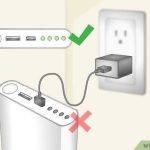
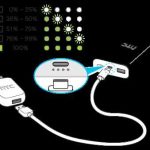
To quickly tell if your power bank is fully charged, look for the indicator lights or display—most will show a solid light or indicate 100%. Alternatively, some models beep or turn off once fully charged. In general, you can also check the LED indicators; if all are lit steadily, your power bank is complete.
Knowing when your power bank is fully charged is simple once you understand these signals. Most devices use LED lights or digital displays to show their charging status, and recognizing these cues can save you from overcharging or undercharging.
Power banks usually have LED indicator lights or digital displays that tell you when they are fully charged. When all the lights are solid or the display reads 100%, your device is ready to go. To avoid damaging the battery, it’s best to unplug once full. In this article, we’ll explore the most reliable ways to confirm your power bank’s charging status, ensuring you always have reliable power when you need it most.

How Do You Know If Power Bank Is Fully Charged
Understanding Power Bank Charging Indicators
Power banks usually come with visual indicators to show their charging status. These indicators may include LED lights, digital displays, or even color-changing lights. When the power bank is plugged into a charging source, these indicators start to light up, giving you a clear signal of the charging progress.
LED Lights as Indicators of Full Charge
Most common power banks use LED lights to signal different charging levels. Typically, they have multiple LEDs, with each representing a portion of the battery’s capacity. When all the LEDs light up steadily, it generally means the power bank has reached a full charge. For example, if there are four LEDs, three might blink during charging, and all four stay solid once the battery is full.
Digital Displays and Their Role
Some advanced power banks feature digital screens showing the exact percentage of remaining charge. When the display reads 100%, it indicates the battery is fully charged. These screens are especially helpful if you want a precise idea of the power level, unlike mere LED indicators.
Pay Attention to Charging Time
Knowing the typical charging time for your power bank model can help identify when it’s fully charged. Usually, manufacturers specify how long it takes to charge the device fully. If your power bank has been plugged in for the recommended duration, it’s likely ready for use.
Using the Power Bank’s Built-in Notification System
Some power banks emit sounds or vibrations once fully charged. Check if your device has such features, as these can serve as convenient alerts indicating the battery is complete.
How to Confirm Full Charge with a Multimeter
For those who want to be certain, using a multimeter to measure voltage is a good method. A fully charged power bank typically shows a voltage close to its maximum capacity, which is often printed on the device or in the manual. Be sure to compare the reading with the manufacturer’s specifications.
Common Signs That Indicate the Power Bank Is Fully Charged
Apart from indicators, some signs include:
- The charger or LED stops blinking and shows a steady light.
- The power bank stops heating up after some time.
- Charging duration matches the recommended time by the manufacturer.
These signs can help you spot a full charge without relying solely on indicators.
Difference Between Fully Charged and Overcharging
It’s vital to know when the power bank is fully charged to prevent overcharging. Overcharging can damage the battery over time, reducing its lifespan. Modern power banks often have safeguards to stop charging automatically once full, but manual checks still help.
Tips for Proper Charging and Maintaining Power Bank Health
To keep your power bank in top shape:
- Use the original or high-quality chargers recommended by the manufacturer.
- Avoid leaving the device plugged in after it’s fully charged.
- Charge the power bank periodically, even when not in use, to keep the battery healthy.
- Store the power bank in a cool, dry place to prevent battery degradation.
Understanding the Charging Cycles and Battery Health
Every power bank has a limited number of charge cycles. Fully charging and discharging regularly can shorten its lifespan. Therefore, knowing when the device is full allows you to optimize its health and performance over time.
Related Topics to Explore
Consider exploring topics like how to calibrate your power bank, the difference between fast charging and standard charging, and how environmental factors affect charging efficiency. These insights can help you get the most out of your device.
Summary of Key Points
To know if your power bank is fully charged:
- Look for steady LED lights or full digital display reading.
- Confirm charging time matches manufacturer recommendations.
- Utilize additional notifications like sounds or vibrations if available.
- Check voltage with a multimeter for precise confirmation.
Following these steps ensures your power bank is ready for reliable use whenever needed, prolonging its lifespan and maintaining optimal performance.
How to tell if a power bank is fully charged
Frequently Asked Questions
What indicators show that a power bank has finished charging?
Most power banks have LED indicator lights that signal when charging is complete. Typically, these lights change color, turn off, or display a solid light once the device reaches full capacity. Refer to your power bank’s manual to understand the specific indicator signals for your model.
Can you rely solely on the charging cable or device to know if the power bank is fully charged?
No, the charging cable or device alone doesn’t confirm the power bank’s charge status. Always monitor the LED indicators on your power bank. When the indicator shows full charge, it confirms the device has reached its maximum capacity.
How long does it usually take for a power bank to be fully charged, and how can I tell when that happens?
The charging time depends on the power bank’s capacity and the charger’s output. Most power banks indicate full charge through their indicator lights, which either turn off or change color. Checking this visual cue helps ensure you disconnect the device once fully charged.
Are there any signs that suggest the power bank may be overcharged or needs to be disconnected?
If the LED indicators stop changing or keep blinking after reaching a certain charge level, it generally means the power bank is fully charged. To avoid overcharging, disconnect the power bank once the indicators show full capacity, following the manufacturer’s guidelines.
Is it necessary to unplug the power bank immediately after it reaches full charge?
It is recommended to unplug the power bank once it indicates full charge to preserve battery health and prevent overcharging. Many modern devices stop charging automatically, but unplugging ensures safety and maintains optimal battery performance.
Final Thoughts
Knowing if your power bank is fully charged is simple. Check the LED indicator lights; a steady or specific color often signals full capacity. Many power banks automatically stop charging once complete, but some may continue to glow or blink.
You can also connect your device; once it stops charging or the indicator shows 100%, your power bank likely reached full charge. Always refer to the manufacturer’s instructions for precise details.
How do you know if power bank is fully charged? Usually, indicators or automatic stops confirm full capacity, making it easy to maintain your device readiness.