Yes, you absolutely can use your Amazon Echo Dot as a Bluetooth speaker! It’s a super easy way to stream music, podcasts, or anything else from your phone or tablet directly to your Echo Dot.
Hey there, tech explorers! Ever found yourself with a fantastic playlist on your phone, but the sound is just… meh? Or maybe you’ve got a movie on your tablet and wish the audio was a bit more immersive? We’ve all been there. Picking the right speaker can feel like a puzzle sometimes, with all sorts of jargon and features.
But what if I told you that little cylinder sitting on your counter, the one that plays music when you ask Alexa, can actually do more? What if it can become the speaker for all your other devices too? It’s true! Your Echo Dot is more versatile than you might think.
Today, we’re going to dive into how you can turn your Echo Dot into a powerful Bluetooth speaker. No complicated tech talk, just simple steps. We’ll go from figuring out if your Dot can do it, to getting it all set up in minutes. Ready to boost your sound game without buying a new gadget? Let’s break it down step by step!
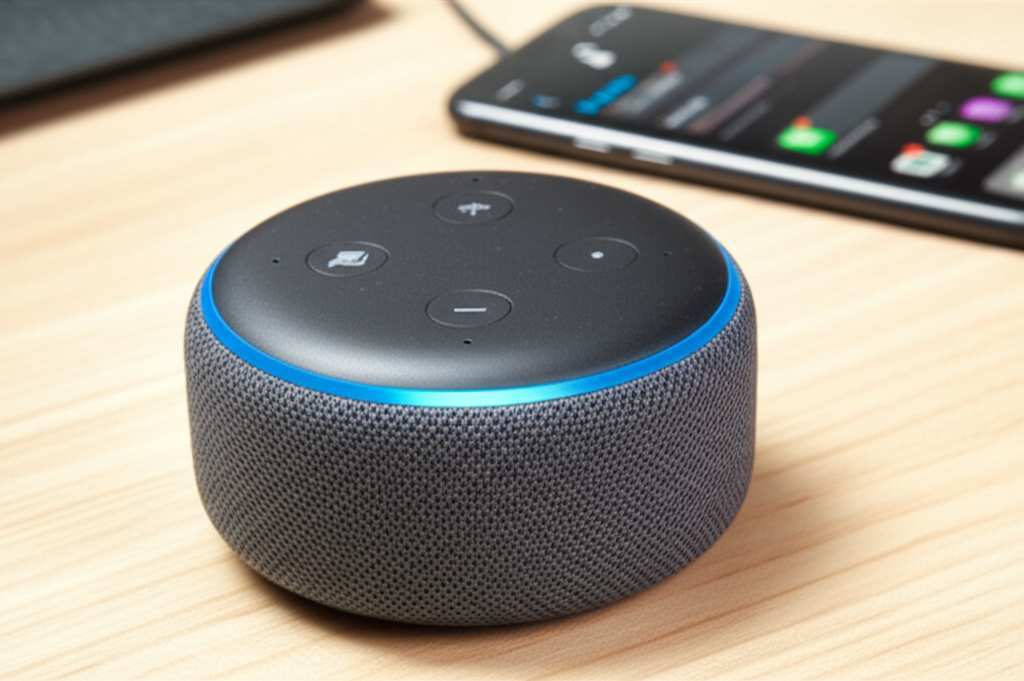
What’s the Big Deal with Bluetooth Speakers?
Think about it: music makes life better, right? Whether you’re cooking up a storm in the kitchen, chilling on the couch, or getting ready for a party, good sound makes the experience so much richer. Bluetooth speakers are awesome because they’re wireless. You can easily connect your phone, tablet, or computer to them without messy wires.
This means you can control your music from anywhere in the room. No more fumbling with cables! Plus, most Bluetooth speakers offer a richer, fuller sound than your phone’s built-in speaker. It’s like upgrading from a whisper to a clear, vibrant voice.
Can My Echo Dot Actually Be a Bluetooth Speaker?
The short answer is a resounding YES! Most Amazon Echo devices, including all generations of the Echo Dot, have built-in Bluetooth capabilities. This means they can act as both a Bluetooth speaker for your other devices and as a standalone smart speaker that connects to Wi-Fi. It’s like having a two-in-one gadget!
This feature is a game-changer for anyone who loves streaming audio. You can play your favorite tunes from Spotify, Apple Music, or any other app on your phone, directly through your Echo Dot. The sound quality on Echo Dots is surprisingly good for their size, making them a great option for everyday listening.
Why Use Your Echo Dot as a Bluetooth Speaker?
You might be thinking, “Why bother? I already have a smart speaker.” Well, there are a few really cool reasons!
Convenience: If you’ve already got an Echo Dot, you don’t need to buy another speaker. It’s already there, ready to go!
Sound Upgrade: Let’s be honest, your phone’s speaker isn’t always the best. Connecting to an Echo Dot gives you a much fuller and louder sound experience for your music, podcasts, or audiobooks.
Flexibility: Need to play a podcast from your tablet in the living room? Or stream a song from your laptop while you work? Your Echo Dot can handle it wirelessly.
Multi-room Audio (Kind Of): If you have multiple Echo devices, you can group them in the Alexa app to play music simultaneously. Using Bluetooth on one Dot can be part of that broader audio setup.
It’s all about making your existing tech work harder for you. And the Echo Dot is a champ at that!
Let’s Get Connected: How to Pair Your Device with Echo Dot
Getting your Echo Dot set up as a Bluetooth speaker is super simple. You don’t need to be a tech wizard. Just follow these easy steps, and you’ll be jamming in no time!
First, make sure your Echo Dot is powered on and connected to your Wi-Fi. Then, grab your phone, tablet, or computer.
Step-by-Step Pairing Guide
Here’s how to connect your device. It’s usually just a few quick taps!
1. Open the Alexa App: You’ll need the Amazon Alexa app on your smartphone or tablet. If you don’t have it, download it from your device’s app store.
2. Go to Devices: In the app, tap on the “Devices” icon. It’s usually at the bottom right.
3. Select Your Echo Dot: Find your Echo Dot in the list of devices and tap on its name.
4. Find Bluetooth Settings: Scroll down to find the “Bluetooth Connections” section. You’ll see options to “Pair a New Device” or “Connect to a Device.”
5. Put Echo Dot in Pairing Mode: Tap on “Pair a New Device.” Your Echo Dot will then say something like, “Now in pairing mode.” It’s listening for your device!
6. Open Bluetooth on Your Phone/Tablet: Go to the Bluetooth settings on your phone or tablet. Make sure Bluetooth is turned on.
7. Scan for Devices: Your device will start looking for nearby Bluetooth devices.
8. Select Your Echo Dot: You should see your Echo Dot appear in the list of available devices. It might be listed as “Echo Dot” followed by some numbers or its name. Tap on it.
9. Confirm Pairing: Your phone or tablet will say it’s connected! Your Echo Dot will also announce that it’s connected to your device.
That’s it! Your Echo Dot is now acting as a Bluetooth speaker for your phone or tablet. Easy, right?
Alternative Method: Using Voice Commands
You can also use voice commands to connect your Echo Dot. It’s a bit quicker if you’re already talking to Alexa!
1. Say the Magic Words: Say, “Alexa, pair Bluetooth.”
2. Echo Dot Responds: Your Echo Dot will say it’s in pairing mode.
3. Follow Steps 6-9 Above: On your phone or tablet, go to Bluetooth settings, scan, and select your Echo Dot from the list.
This voice command method is super handy when you want to switch devices or connect quickly.
Playing Your Audio: What to Expect
Once paired, your Echo Dot will automatically play audio from your connected device.
Music Apps: Open Spotify, Apple Music, YouTube Music, or any other music app on your phone and press play. The sound will come out of your Echo Dot.
Podcasts & Audiobooks: Just like music, any podcast or audiobook app will stream audio through the Dot.
Videos: Watching a video on your tablet? The sound will now play through your Echo Dot for a more immersive experience.
You can control the volume using your voice (“Alexa, volume up”) or by using the volume buttons on your Echo Dot. You can also control playback (play, pause, skip) from your connected device.
Managing Your Bluetooth Connections
Your Echo Dot can remember multiple devices. This is great because you don’t have to re-pair every time.
Connecting to a Previously Paired Device: If your Echo Dot is already paired with your phone, you can often just say, “Alexa, connect to my phone” (or whatever you named your device). If that doesn’t work, go to your phone’s Bluetooth settings, find your Echo Dot, and tap to connect.
Disconnecting: To disconnect your device, you can say, “Alexa, disconnect Bluetooth.” Or, go to your phone’s Bluetooth settings and disconnect from the Echo Dot. You can also say, “Alexa, stop Bluetooth audio.”
Forgetting Devices: If you want to remove a device completely, go back to the Alexa app, select your Echo Dot, go to Bluetooth Connections, and you’ll see a list of paired devices. You can tap on a device and choose “Forget Device.”
This makes it easy to switch between your phone, a friend’s phone, or your tablet.
Understanding Echo Dot Sound Quality
Now, let’s talk sound. The Echo Dot isn’t going to blow you away with audiophile-grade sound, but it’s pretty darn good for its size and price!
Echo Dot (3rd Gen) vs. Echo Dot (4th Gen)
There are slight differences in sound quality between generations. The 3rd Gen Echo Dot has a pretty decent sound, while the 4th Gen (the spherical one) offers a slightly richer bass and clearer treble.
Here’s a quick look:
| Feature | Echo Dot (3rd Gen) | Echo Dot (4th Gen) |
|---|---|---|
| Sound Profile | Clear, balanced sound | Slightly warmer, with improved bass |
| Size | Compact, fabric-covered disc | Spherical, fits any decor |
| Connectivity | Bluetooth, Wi-Fi | Bluetooth, Wi-Fi, Smart Home Hub (4th Gen with clock only) |
| Best For | Basic music, voice control | Enhanced music listening, voice control |
What does this mean for you? If you have a 4th Gen Echo Dot, you might notice a little more depth in your music. But honestly, both are excellent upgrades from your phone’s speaker for casual listening!
When to Use Echo Dot vs. Dedicated Bluetooth Speaker
So, is the Echo Dot always the best choice? Not necessarily! It’s fantastic for convenience and when you already have one. But for serious music lovers or outdoor parties, a dedicated Bluetooth speaker might be better.
Echo Dot as Bluetooth Speaker: Pros and Cons
Let’s weigh the good and the not-so-good.
- Pros:
- No extra cost if you already own an Echo Dot.
- Easy setup and pairing.
- Good sound for its size, an upgrade from phone speakers.
- Voice control for basic functions.
- Can be part of a multi-room Alexa audio setup.
- Cons:
- Sound quality is good, but not as powerful or rich as dedicated speakers.
- Requires Wi-Fi for initial setup and Alexa features.
- Not portable like many Bluetooth speakers (needs to be plugged in).
- Battery life isn’t a factor, as it’s always plugged in.
Dedicated Bluetooth Speakers: What They Offer
Dedicated Bluetooth speakers come in all shapes and sizes, from tiny portable ones to larger boomboxes.
| Feature | Typical Dedicated Bluetooth Speaker | Echo Dot (as Bluetooth Speaker) |
|---|---|---|
| Portability | High (often battery-powered) | Low (requires power outlet) |
| Sound Quality | Varies greatly, often better bass and volume | Good for its size, but limited by speaker drivers |
| Connectivity | Bluetooth, sometimes Wi-Fi or aux-in | Bluetooth, Wi-Fi (for Alexa features) |
| Smart Features | None (unless it’s a smart speaker combo) | Full Alexa voice assistant capabilities |
| Price | Wide range, from $20 to $300+ | ~$40-$50 (for the Dot itself) |
As you can see, if you need something for the beach or a picnic, a dedicated portable speaker is your best bet. But for everyday listening around the house, your Echo Dot is a fantastic and budget-friendly option!
Fun Facts About Bluetooth Audio
Did you know Bluetooth technology is named after a Viking king? King Harald Bluetooth united Denmark and Norway in the 10th century, and just like he united tribes, Bluetooth technology was designed to unite different devices wirelessly. Pretty cool, huh?
Also, Bluetooth uses radio waves to communicate, typically in the 2.4 GHz frequency band. This is the same band used by Wi-Fi, which is why sometimes you might get a little interference, though it’s rare with modern devices.
Troubleshooting Common Issues
Sometimes technology likes to throw a little curveball. If you’re having trouble connecting your Echo Dot, don’t worry! Here are a few common fixes:
Echo Dot Not Appearing in Bluetooth List:
Make sure your Echo Dot is in pairing mode (say “Alexa, pair Bluetooth”).
Ensure Bluetooth is turned ON on your phone or tablet.
Try restarting both your Echo Dot and your phone/tablet.
Move your devices closer together.
Audio Cutting Out or Stuttering:
Check the distance between your Echo Dot and your device. Too far can cause issues.
Minimize interference from other wireless devices.
Make sure both your Echo Dot and your device have the latest software updates.
Echo Dot Not Responding to Voice Commands After Pairing:
Your Echo Dot needs to be connected to Wi-Fi for Alexa features. If you’re only using it as a Bluetooth speaker, Wi-Fi is still essential for its smart brain.
Try disconnecting and re-pairing.
If you’re still stuck, checking out Amazon’s support pages or forums can offer more specific solutions.
Frequently Asked Questions (FAQ)
Got more questions? We’ve got answers!
Can I use my Echo Dot as a Bluetooth speaker for my TV?
Yes, you can! If your TV has Bluetooth output capabilities, you can pair it with your Echo Dot just like you would a phone. Some older TVs might need a separate Bluetooth transmitter.
Do I need Wi-Fi to use Echo Dot as a Bluetooth speaker?
Yes, you need Wi-Fi for the initial setup in the Alexa app and for your Echo Dot to function as a smart speaker. Once paired, you can stream audio via Bluetooth even if your Wi-Fi is temporarily down, but the Dot won’t be able to respond to Alexa commands.
Will my Echo Dot play sound from my computer?
Absolutely! Just go to your computer’s Bluetooth settings, put your Echo Dot in pairing mode, and connect. You can then stream music, videos, or any audio from your computer to your Echo Dot.
Can I use my Echo Dot for gaming audio?
You can! If you’re playing games on your phone or tablet, the audio will come through your Echo Dot. Just be aware that there might be a slight delay (latency) which could be noticeable in fast-paced games.
How do I disconnect my phone from Echo Dot without using voice commands?
You can disconnect by going to the Bluetooth settings on your phone or tablet and tapping to disconnect from your Echo Dot. You can also turn off Bluetooth on your phone.
Can I pair multiple phones to my Echo Dot at the same time?
No, an Echo Dot can only be actively paired and playing audio from one device at a time. You can pair multiple devices to it over time, but only one can be connected for audio playback.
What happens if I leave my phone connected to Echo Dot all the time?
If your phone stays connected via Bluetooth, your Echo Dot will continue to play audio from your phone whenever it’s available and the Bluetooth connection is active. You might want to disconnect it when you’re not using it to save your phone’s battery or prevent accidental playback.
Wrapping Up: Your Sound, Your Way!
See? Using your Echo Dot as a Bluetooth speaker is incredibly straightforward. It’s a fantastic way to give your existing tech a boost and enjoy better sound quality without spending extra money. Whether you’re streaming your favorite morning podcast, setting the mood with a chill playlist, or just want louder audio for that viral video, your Echo Dot has got your back.
You’ve learned how to pair your devices, manage connections, and even troubleshoot a few hiccups. You’re now officially ready to transform your Echo Dot into a versatile audio hub. It’s all about making technology work for you, simply and effectively.
So go ahead, give it a try! Connect your phone, crank up the volume, and enjoy a richer sound experience. Now go enjoy amazing sound and make every moment louder and better!