**Short answer:** For most users, 20MHz is better for 2.4 GHz because it offers a more stable connection with less interference, although 40MHz can provide faster speeds if your environment is less crowded and you need higher throughput.
Choosing between 20MHz and 40MHz for your 2.4 GHz Wi-Fi depends on your environment and your needs. If your area is crowded with many Wi-Fi networks, sticking to 20MHz usually gives you a more reliable and consistent connection. On the other hand, if you’re in a less congested area and want faster speeds for activities like streaming or gaming, 40MHz can be beneficial. Understanding the trade-offs can help you optimize your network for both speed and stability. Now, let’s explore what makes each option suitable and how to decide which one works best for you.

Which is better, 20MHz or 40MHz for 2.4 GHz?
Understanding Channel Bandwidth in Wi-Fi
Wi-Fi networks operate on specific frequencies and use channels to transmit data. The channel bandwidth, measured in megahertz (MHz), determines how much data can flow through a particular channel. In the 2.4 GHz band, common bandwidths are 20MHz and 40MHz. A wider bandwidth like 40MHz allows more data to pass through, potentially boosting speeds. Conversely, a narrower 20MHz bandwidth might provide more stable connections and less interference.
Impacts of 20MHz Bandwidth on Wi-Fi Performance
Using 20MHz bandwidth is the standard setting for most 2.4 GHz networks. This bandwidth usually results in **more reliable connections**. Since it occupies less spectrum, it reduces the chances of overlapping with other networks. This setting is especially useful in crowded areas with many Wi-Fi signals. Also, it conserves bandwidth, leaving room for other devices to operate smoothly.
Advantages of 20MHz Bandwidth
- Better stability: Less interference from neighboring networks.
- Compatibility: Works well with older devices that may not support wider channels.
- Less congestion: Ideal for areas with many wireless networks.
Disadvantages of 20MHz Bandwidth
- Lower data speeds: Limited bandwidth can restrict fast data transfer.
- Reduced throughput: Not optimal for activities requiring high bandwidth like streaming HD videos or online gaming.
Understanding 40MHz Bandwidth in the 2.4 GHz Band
Using 40MHz doubles the channel width, which can increase data transfer speeds significantly. This wider channel allows more data to flow simultaneously, leading to improved performance for high-bandwidth activities. However, it also increases the risk of interference, especially in environments with many Wi-Fi networks close by.
Benefits of 40MHz Bandwidth
- Higher speeds: Better suited for streaming, gaming, and transferring large files.
- Enhanced performance: Makes real-time activities smoother and more responsive.
- Future-proofing: Allows devices to handle more demanding applications.
Drawbacks of 40MHz Bandwidth
- Increased interference: Overlapping channels can cause slower speeds or dropped connections.
- Limited coexistence: Not recommended in busy Wi-Fi environments.
- Compatibility issues: Some devices or routers may not effectively support wider channels.
Which Should You Use? Comparing 20MHz and 40MHz
Choosing between 20MHz and 40MHz depends on your specific needs and environment. If you prioritize **stability and reliability**, especially in crowded areas, 20MHz is generally better. For households or offices with fewer networks and a need for **faster speeds**, 40MHz can be advantageous. Remember, wider channels increase the chance of **interference** and may reduce overall network performance if many networks are nearby.
Factors to Consider When Deciding
| Factor | 20MHz | 40MHz |
|---|---|---|
| Interference Susceptibility | Lower | Higher |
| Speed | Moderate | Higher |
| Stability | More stable | Less stable in crowded areas |
| Compatibility | Better | May face issues with older devices |
| Use Case | Frequent browsing, stable connections | Streaming, online gaming requiring high bandwidth |
Optimal Settings for Different Environments
In a typical apartment or office with many Wi-Fi networks, setting your router to 20MHz offers a reliable connection with less interference. If your environment has fewer networks and you want faster speeds for videos or gaming, switching to 40MHz can improve performance. Some advanced routers allow automatic switching between channels based on network congestion, which can offer the best of both worlds.
How to Change Channel Width Settings
Most routers allow you to adjust the channel bandwidth via their admin interface. Look for options labeled ‘Channel Width,’ ‘Bandwidth,’ or similar. Usually, you can choose between 20MHz, 40MHz, or auto. Experimenting with these settings can help find the best balance between speed and stability based on your environment.
Additional Tips for Optimizing Wi-Fi Performance
- Position your router: Place it in a central, open location to maximize coverage.
- Limit interference: Keep the router away from microwaves, cordless phones, and other electronics.
- Update firmware: Regularly update your router’s firmware for security and performance improvements.
- Use the less congested channel: Use Wi-Fi scanning tools to identify cleaner channels for your network.
Related Topics
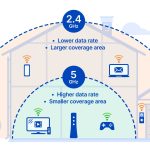
Understanding the differences between 2.4 GHz and 5 GHz Wi-Fi bands can also improve your network’s performance. The 5 GHz band typically supports wider channels and offers faster speeds but with less coverage. Combining both bands with dual-band routers provides flexibility and better overall network performance.
Choosing between 20MHz and 40MHz bandwidth settings in a 2.4 GHz Wi-Fi network hinges on your environment and performance needs. It’s wise to prioritize stability in crowded areas with 20MHz and switch to 40MHz when you require higher speeds in less congested spaces. Adjusting these settings can make a noticeable difference in your Wi-Fi experience, ensuring smoother connections and faster data transfer where needed.
Does 2.4GHz at 20MHz or 40MHz Bandwidth Increase Network Range?
Frequently Asked Questions
How does channel bandwidth affect Wi-Fi performance in the 2.4 GHz band?
Channel bandwidth determines how much data can be transmitted over a specific channel. A wider bandwidth, like 40MHz, allows for higher data rates, which can enhance performance for activities such as streaming or gaming. However, it also increases the chance of interference from neighboring networks, potentially reducing stability. Conversely, a narrower 20MHz channel offers better stability and reduced interference but limits maximum data throughput. Choosing between them depends on your environment and usage needs, balancing speed with reliability.
In what scenarios should I prefer a 20MHz channel over a 40MHz channel?
If you live in a densely populated area with many Wi-Fi networks nearby, sticking with a 20MHz channel can help avoid interference and maintain reliable connections. It is also suitable for simple browsing, emailing, or other low-bandwidth activities. When your devices are close to the router with minimal interference, 20MHz offers a stable and consistent connection without sacrificing much speed. For environments with high congestion, sticking to 20MHz ensures your network remains dependable.
Can using a 40MHz channel cause problems in crowded Wi-Fi environments?
Yes, using a 40MHz channel in crowded areas can cause interference with neighboring networks, leading to slower speeds and unstable connections. Since 40MHz channels occupy a wider frequency range, they are more prone to overlap with other networks operating on nearby channels. This interference can result in decreased overall performance, especially when multiple networks are sharing the same space. In such settings, opting for a narrower 20MHz channel often provides a more stable experience.
How does the choice between 20MHz and 40MHz impact device compatibility?
Most modern Wi-Fi devices support both 20MHz and 40MHz channels, but some older devices might only function well with 20MHz settings. Using 40MHz can improve speed for compatible devices, but it may cause connectivity issues with devices that have limited support for wider channels. Ensuring your devices are compatible with the chosen channel width helps maintain consistent network performance and avoids potential compatibility problems.
What are the trade-offs when selecting between 20MHz and 40MHz for different Wi-Fi activities?
Choosing 20MHz prioritizes stability and reduces interference, making it ideal for basic internet activities like browsing and emails. On the other hand, 40MHz provides higher data rates, benefiting bandwidth-intensive tasks such as HD streaming or online gaming. The trade-off is that 40MHz can lead to increased interference and instability in crowded environments. Decide based on your specific needs—if reliability matters most, 20MHz suits better; for speed and performance, 40MHz may be advantageous in low-interference areas.
Final Thoughts
Choosing between 20MHz and 40MHz for 2.4 GHz depends on your needs.
20MHz offers better stability and less interference, ideal for crowded environments.
40MHz provides higher speeds but can cause more interference with nearby networks.
Which is better, 20MHz or 40MHz for 2.4 GHz? For most users, 20MHz remains the smarter choice for consistent performance.