Want to build your own Bluetooth speaker? This guide makes it super easy! We’ll walk you through picking parts and putting them together. You’ll have your custom speaker playing tunes in no time.
Hey there, tech adventurer! Ever get that feeling when you’re listening to your favorite song, and it just needs a little more oomph? Or maybe you’re watching a movie, and the sound feels a bit flat. That’s where a good speaker comes in, right? But sometimes, finding the perfect speaker feels like a treasure hunt with too many confusing specs.
I totally get it. Walking into an electronics store or scrolling online can feel overwhelming. All those numbers and technical terms can make your head spin! You just want to enjoy your music or movies with awesome sound.
Well, what if I told you that you can create your own custom Bluetooth speaker? It sounds like a big project, but I promise, it’s totally doable, even if you’re new to this. We’re going to break it down, step by step.
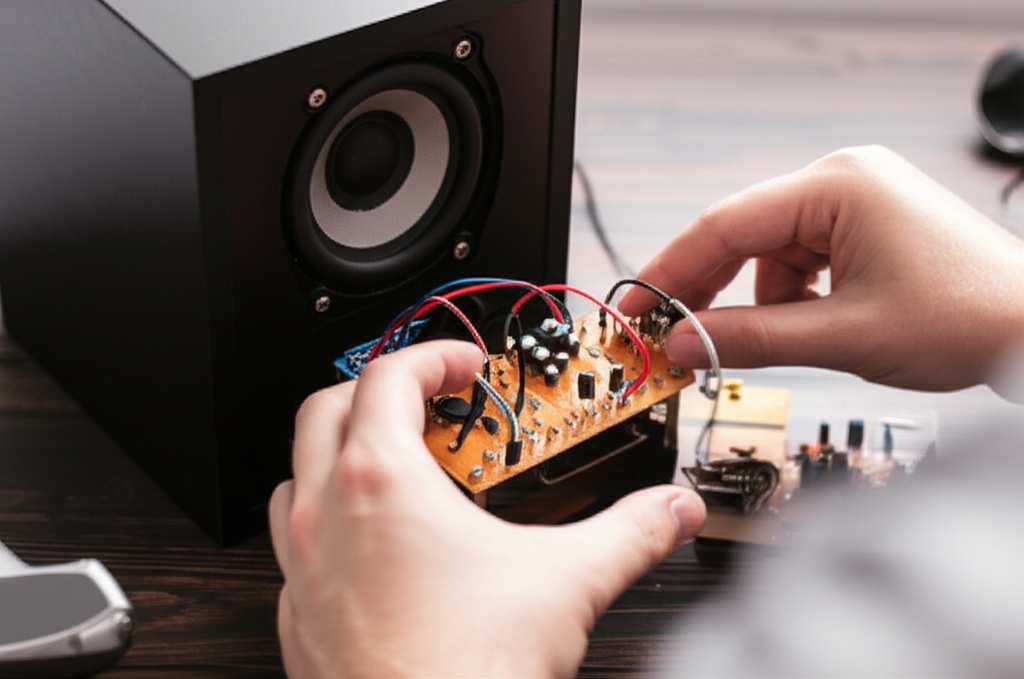
Think of it like building with LEGOs, but instead of a cool castle, you get awesome sound! We’ll go from picking out the parts to hearing your first song blast out. Ready to dive in and make some noise? Let’s get started!
Why Build Your Own Bluetooth Speaker?
You might be thinking, “Why bother building one when I can just buy one?” That’s a fair question! Buying a speaker is definitely the quickest way to get sound. But building your own has some really cool perks that you just can’t get from a store-bought gadget.
First off, it’s incredibly satisfying. There’s a special kind of pride that comes from creating something with your own hands. When your friends ask about your awesome speaker, you can say, “I made this!” It’s a real conversation starter.
Plus, you get to customize it exactly how you want. Want a speaker that looks like a vintage radio? Or maybe one that’s super portable and rugged for outdoor adventures? When you build it yourself, the design is all yours.
Let’s Talk About Sound: The Core Components
Before we start snapping parts together, let’s peek under the hood. What makes a Bluetooth speaker actually speak sound? It’s like the ingredients in your favorite recipe. Each part plays a crucial role in bringing your music to life.
At its heart, a Bluetooth speaker needs a few key things to work its magic. You’ve got the parts that make the sound, the parts that power it, and the smart bits that let it connect wirelessly. We’ll go over each one so you know what we’re looking for.
The Essential Parts You’ll Need
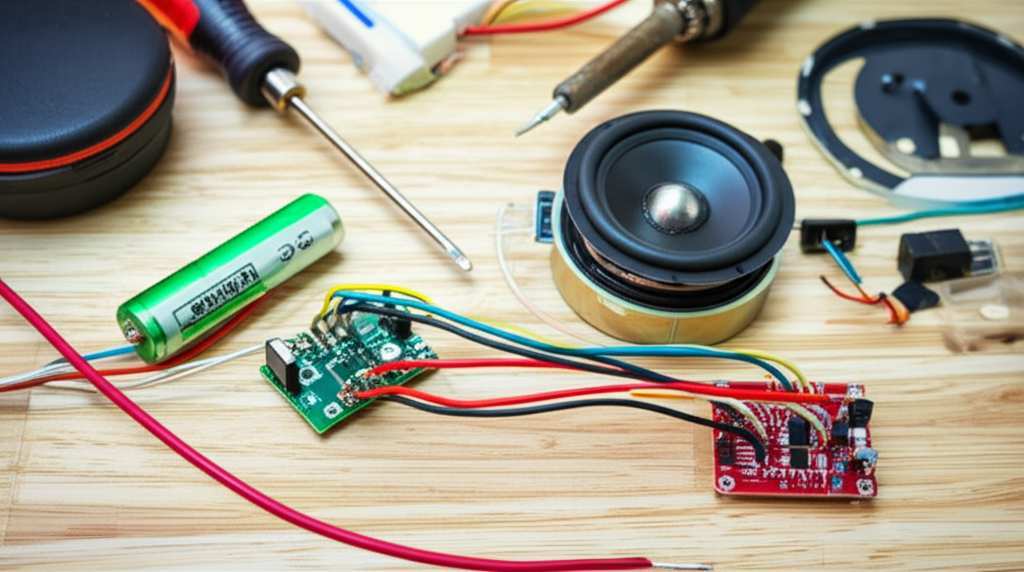
So, what exactly goes into a DIY Bluetooth speaker? Don’t worry, it’s not rocket science! We’ll keep it simple. Think of these as your main building blocks. You can find most of these online from electronics hobby stores or even on Amazon.
Here’s a list of the must-have components:
Speaker Driver(s): These are the actual parts that produce the sound. They’re like the tiny musicians inside your speaker. You can get them in different sizes for more bass or clearer highs.
Bluetooth Audio Receiver Module: This is the brain that receives the music signal from your phone or tablet. It’s what makes it “Bluetooth.”
Amplifier Module: Speakers need power to make sound loud enough to hear. The amplifier boosts the audio signal from the Bluetooth module.
Battery: To make it portable, you’ll need a rechargeable battery. Lithium-ion batteries are common and a good choice.
Battery Charging Module: This handy little board safely charges your battery. You’ll also need a way to connect it to a power source, like a USB port.
Enclosure (The Box!): This is the case for your speaker. It can be made from wood, plastic, or even recycled materials. A good enclosure helps the sound quality!
Wiring and Connectors: You’ll need some wires to connect all the parts and maybe some connectors for easy hookups.
Switches (Power and maybe Volume): A power switch is essential. A volume control knob is a nice-to-have addition.
Don’t worry if this list looks a bit long. We’ll explain how each part connects in the next steps. It’s like assembling a puzzle, and each piece has its place.
Step-by-Step: Assembling Your Custom Speaker
Alright, let’s get our hands dirty! This is where the magic happens. We’ll go through the assembly process piece by piece. Remember to take your time and double-check your connections. It’s better to be slow and steady than to rush and make a mistake.
Step 1: Prepare Your Enclosure
First, you need a home for all your components. This is your speaker’s box, or enclosure. You can buy a pre-made wooden or plastic box, or you can get creative and build your own! If you’re building one, make sure it’s sturdy.
You’ll need to cut holes in the enclosure for your speaker driver(s), any buttons or switches, and maybe a charging port. Measure twice, cut once! A clean cut makes everything look much more professional.
Step 2: Mount the Speaker Driver(s)
Carefully place your speaker driver(s) into the holes you made. Secure them in place using screws or a strong adhesive. Make sure they are mounted snugly so they don’t vibrate against the enclosure.
This is where the sound actually comes from, so it’s important they’re seated well. A good seal helps the speaker produce a fuller sound.
Step 3: Wire Up the Power System
Now, let’s connect the power. You’ll connect your battery to the battery charging module. Then, you’ll connect the charging module to your amplifier module. Most amplifier modules will have a spot labeled “VCC” or “+”, and another labeled “GND” or “-“. This is where your battery connects.
If you have a power switch, wire it in between the battery and the amplifier. This way, you can easily turn your speaker on and off. Double-check that you have the positive and negative wires connected correctly. Getting this wrong can damage your components.
Step 4: Connect the Bluetooth and Amplifier Modules
This is where the “smart” part comes in. Your Bluetooth audio receiver module will usually have an output, often labeled “OUT” or “L/R”. Connect these output wires to the input of your amplifier module.
The amplifier module will have an output for the speaker. Connect these wires to your speaker driver(s). Again, pay close attention to positive and negative connections. Usually, red is positive and black is negative.
Step 5: Test Your Connections
Before you seal everything up, it’s time for a test run! Connect your battery (or turn on your power switch). If you have a power indicator light on your modules, it should light up.
Now, try to pair your phone or tablet with the Bluetooth receiver. You might need to press a button on the module to make it discoverable. Once paired, play some music. Do you hear sound? Is it coming from the speaker?
If everything works, amazing! If not, don’t panic. Go back and carefully check all your wiring. Loose connections are the most common culprit.
Step 6: Final Assembly and Finishing Touches
Once you’re confident everything is working, it’s time to put it all together. Secure all the modules inside the enclosure. You might use hot glue, double-sided tape, or small screws. Make sure nothing is loose and rattling around.
Close up your enclosure. You can paint it, decorate it, or add other cool features like LED lights. Make it uniquely yours!
Making the Sound Shine: Tips for Better Quality
Building a speaker is one thing, but making it sound great is another. A few smart choices can make a huge difference in how your music fills the room. It’s all about the details!
Here are some tips to help you get the best sound out of your DIY creation:
Choose Good Speaker Drivers: Don’t skimp here! Better drivers mean better sound. Look for drivers with a good frequency response.
The Enclosure Matters: The box your speaker sits in is super important. A sealed, sturdy enclosure helps prevent sound distortion and gives you better bass. If you’re using wood, MDF is a great material for speaker boxes.
Consider Multiple Drivers: For richer sound, you might want to use more than one driver. A smaller tweeter for high frequencies and a larger woofer for bass can create a more balanced sound.
Proper Amplification: Make sure your amplifier is powerful enough for your speaker drivers, but not too powerful. An underpowered amp can distort sound, while an overpowered one can damage your drivers.
Placement of Components: Try to arrange the components inside so they don’t interfere with the speaker cone’s movement.
Understanding Key Features: What to Look For
When you’re picking out parts, you’ll see lots of technical terms. Don’t let them scare you! Let’s break down some of the most common ones so you can make informed choices.
Here are some features you’ll encounter and what they mean for your speaker:
Wattage (W): This tells you how powerful the amplifier is. Higher wattage generally means louder sound. For a small personal speaker, 5-15W might be enough. For a room-filling speaker, you might look for 20W or more.
Frequency Response (Hz): This indicates the range of sounds the speaker can produce. A wider range (e.g., 50 Hz – 20,000 Hz) means it can reproduce both deep bass (low Hz) and crisp treble (high Hz).
Impedance (Ohms – Ω): This is the electrical resistance of the speaker. You need to match the impedance of your speaker driver to the output impedance of your amplifier. Most common speakers are 4 or 8 Ohms.
Bluetooth Version (e.g., 4.0, 5.0): Newer Bluetooth versions offer better range, faster connection speeds, and more stable connections. Bluetooth 5.0 is current and a great choice.
Battery Capacity (mAh – milliampere-hours): This tells you how long your speaker can play before needing a recharge. Higher mAh means longer battery life.
A Quick Look at Speaker Driver Sizes
The size of your speaker driver directly impacts the sound it produces. Here’s a simple guide:
| Driver Diameter | Typical Sound Produced | Best For |
| :————– | :———————————– | :——————————————– |
| 1-3 inches | Mid-range and treble frequencies | Small portable speakers, adding clarity |
| 3-5 inches | Good balance of mids and some bass | Versatile for small to medium speakers |
| 5-8 inches | Deeper bass and fuller sound | Larger speakers, home audio, better bass |
| 8+ inches | Rich, powerful bass | Subwoofers, high-fidelity home systems |
So, if you want a speaker that really hits those low notes, you’ll want to consider a larger driver. For a super compact speaker that’s easy to carry, smaller drivers are the way to go.
Choosing the Right Parts: A Little Help
Picking the perfect components can feel like a puzzle. You want parts that work well together. Here’s a little guidance to help you select the best bits for your project.
For Beginners: Start simple! Get a single full-range speaker driver (which handles most frequencies) and a combined Bluetooth receiver/amplifier module. This reduces the number of parts and connections.
For Better Bass: If you want deeper bass, consider a larger driver (like 5 inches or more) or a two-way system with a separate woofer for bass and a tweeter for highs.
Portability: For a portable speaker, look for a smaller battery with a good mAh rating and a compact amplifier. The enclosure size will also be a big factor.
Sound Quality Focus: If sound quality is your top priority, invest in higher-quality speaker drivers and a robust amplifier. A well-designed enclosure will also be crucial.
Let’s compare some common component types you might find. This can help you see the differences.
Bluetooth Module vs. Amplifier Module Comparison
Many modules come combined, but sometimes you’ll find them separate. Here’s a simplified look:
| Feature | Basic Bluetooth Receiver Module | Basic Amplifier Module | Combined Module |
| :—————- | :————————————— | :—————————————— | :——————————————- |
| Function | Receives audio wirelessly | Boosts audio signal for speakers | Receives audio and boosts it |
| Input | Bluetooth | Audio from Bluetooth module | Bluetooth |
| Output | Audio signal | Audio signal to speakers | Audio signal to speakers |
| Power Req. | Low | Varies (needs power source) | Varies (needs power source) |
| Complexity | Simple | Simple to moderate | Simplest for DIY, fewer connections |
| Good For | Adding Bluetooth to existing systems | Powering speakers with any audio source | Compact DIY Bluetooth speakers |
When you’re starting out, a combined Bluetooth amplifier module is your best friend. It’s like getting two essential parts in one, which means fewer wires and less confusion. You can find these readily available online from electronics suppliers.
Fun Facts About Sound!
Did you know that sound travels about 767 miles per hour through air? That’s super fast! And the range of human hearing is typically from about 20 Hz to 20,000 Hz. That’s why speakers aim to reproduce sounds within this range.
Different materials also affect sound. For example, wood is a popular choice for speaker enclosures because it absorbs vibrations well, leading to clearer sound. Plastic can sometimes resonate more, which might add unwanted coloration to the audio.
Troubleshooting Common Issues
Even with the best plans, sometimes things don’t go perfectly the first time. Don’t get discouraged! Most DIY electronics problems are pretty easy to fix if you know where to look.
Here are a few common issues and how to solve them:
No Sound:
Check all your power connections. Is the battery charged? Is the power switch on?
Ensure the amplifier module is receiving power.
Double-check that the speaker wires are connected securely to both the amplifier and the speaker driver.
Make sure your device is actually paired with the Bluetooth module.
Sound is Distorted or Crackly:
The volume might be too high for the amplifier or speaker. Try turning it down.
Check for loose wires. Any rattling connection can cause distortion.
Ensure your amplifier is powerful enough for your speaker. An underpowered amp will struggle.
Bluetooth Won’t Connect:
Make sure the Bluetooth module is in pairing mode. Some have a button you need to press.
Turn off Bluetooth on your device and then turn it back on.
Try “forgetting” the speaker in your device’s Bluetooth settings and then re-pairing.
Ensure there aren’t too many other Bluetooth devices active nearby, which can cause interference.
If you’re stuck, searching online for the specific module numbers you’re using can often bring up helpful forums or guides. Websites like Adafruit or SparkFun have great communities and tutorials for hobbyists.
Frequently Asked Questions (FAQ)
Got more questions? That’s totally normal when you’re diving into a new project! Here are some common ones beginners ask.
Q1: Can I really build a good Bluetooth speaker myself?
Absolutely! With the right parts and this guide, you can build a speaker that sounds fantastic. It’s a rewarding project that lets you learn and create something unique.
Q2: What’s the most difficult part of building a Bluetooth speaker?
For many beginners, the trickiest part is the wiring. It’s important to connect the positive and negative wires correctly. Taking your time and double-checking your connections will help a lot.
Q3: How much does it typically cost to build a DIY Bluetooth speaker?
The cost can vary a lot depending on the parts you choose. A basic speaker might cost around $30-$50 for components. If you opt for premium parts, it could be more, but you often get better sound quality.
Q4: Do I need special tools to build this?
You’ll need some basic tools like a screwdriver, wire strippers, and maybe a soldering iron if your modules don’t have screw terminals. A drill can be helpful for making holes in the enclosure. Many parts can be connected without soldering!
Q5: What if I want my speaker to be waterproof?
Making a speaker waterproof is a more advanced project! You’d need to use specialized waterproof components, seal the enclosure thoroughly, and ensure any ports are also waterproof. It’s definitely possible but adds complexity.
Q6: How long does the battery usually last?
Battery life depends on the battery’s capacity (mAh) and how loud you play your music. A typical DIY speaker might last 4-8 hours on a single charge. You can always use a larger battery for longer playtime, but it will be bigger and heavier.
Q7: Where’s the best place to buy components?
Online retailers like Amazon, eBay, and specialized electronics hobby sites like Adafruit, SparkFun, and AliExpress are great places to find all the parts you need. Compare prices to get the best deals!
Your Custom Sound Creation Awaits!
Wow, we’ve covered a lot! From understanding the basic parts to wiring them up and troubleshooting, you’re now equipped to build your very own Bluetooth speaker. It’s an amazing way to get into electronics and create something you can actually use and enjoy every day.
Remember, the most important thing is to have fun with it. Don’t be afraid to experiment with different enclosures or decorations to make your speaker truly one-of-a-kind. The tech world is all about exploring and learning, and this project is a perfect entry point.
So, gather your parts, follow the steps, and get ready to experience your favorite music like never before. You’ve got this! Now go enjoy amazing sound and make every moment louder and better!