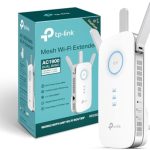
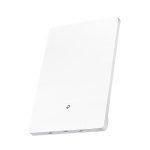
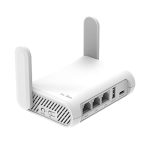
The best WiFi booster depends on your specific needs, but generally, the **NETGEAR Nighthawk X6S** stands out as a top choice due to its powerful coverage and fast speeds. For most users looking to eliminate dead zones and improve their internet connection, investing in a reliable and user-friendly booster can make all the difference.
Quick answer: The NETGEAR Nighthawk X6S is often considered the best WiFi booster because it offers extensive coverage, high-speed performance, and easy setup, making it ideal for large homes or busy households.
Struggling with weak WiFi signals in certain areas of your home? You’re not alone, and the good news is that a good WiFi booster can transform your internet experience. Finding the right one can be confusing with so many options on the market, but understanding what features matter most can help you choose the perfect fit. Whether you’re streaming, working remotely, or gaming, a quality WiFi booster ensures that every corner of your space gets strong, reliable connectivity. This article will guide you through the best options available, highlighting key features and what to consider when making your decision.

What is the best WiFi booster?
Choosing the best WiFi booster can seem overwhelming with so many options available. The right booster depends on your needs, WiFi setup, and budget. This guide will help you understand what to look for and highlight top models in the market.
Understanding WiFi Boosters
WiFi boosters, also called signal extenders or repeaters, are devices that enhance your existing WiFi signal. They work by receiving the WiFi from your router and rebroadcasting it to reach areas with weak coverage.
Boosters help eliminate dead zones in your home or office, making your internet faster and more reliable in every corner.
Types of WiFi Boosters
There are mainly two types of WiFi boosters:
- Range Extenders: These devices extend the WiFi signal to farther areas by repeating the signal received from the router.
- Mesh WiFi Systems: These are more advanced setups that create a seamless WiFi network with multiple nodes working together.
Range extenders are usually cheaper and easier to set up, while mesh systems provide better coverage for larger spaces and more devices.
Key Features to Consider in a WiFi Booster
Coverage Area
Determine the size of the space you want to cover. Some boosters are suitable for small apartments, while others are designed for large homes or offices. Check the manufacturer’s specifications for maximum range.
Speed Compatibility
Ensure the booster supports your internet speed. If your internet plan offers gigabit speeds, select a booster that can handle those speeds without bottlenecking your network.
WiFi Standards
The latest standards are WiFi 5 (802.11ac) and WiFi 6 (802.11ax). WiFi 6 offers better speed and capacity, especially in environments with many connected devices.
Dual-Band vs. Single-Band
Dual-band boosters operate on 2.4 GHz and 5 GHz frequencies simultaneously, offering more flexibility and less congestion. Single-band models are simpler but might experience interference.
Ease of Setup and Use
Look for models with user-friendly apps or setup processes. Some boosters allow quick setup via smartphone apps, saving time and reducing frustration.
Compatibility with Existing Network
Verify that the booster is compatible with your current router and internet provider. Most modern boosters support a wide range of routers and standards.
Top WiFi Boosters in the Market
1. Netgear Nighthawk X6S (EX8000)
This is a powerful range extender supporting WiFi 5 standard and speeds up to 3 Gbps. It has a coverage of up to 2,500 square feet and can connect up to 50 devices. Its tri-band technology minimizes congestion and interference.
2. TP-Link RE650 AC2900
Offers dual-band WiFi with speeds up to 2.9 Gbps. Its four antennas improve coverage, and the device is compatible with most routers. It also has a built-in Ethernet port for wired devices.
3. ASUS RP-AC55
Ideal for smaller spaces, this dual-band booster supports speeds up to 1750 Mbps. It features a simple setup process and has an intelligent signal indicator to find the best placement.
4. Google Nest Wifi
This is a mesh system rather than a traditional booster, but it provides seamless coverage up to 4400 square feet in a single setup. It’s easy to manage via the Google Home app, making it perfect for tech beginners.
5. Linksys RE7000 Max-Stream AC1900+
A dual-band extender supporting speeds up to 1.9 Gbps. Its seamless roaming feature ensures your device connects to the best signal as you move around your home.
How to Choose the Right WiFi Booster for Your Home
Assess Your WiFi Needs
Consider the size of your space and the number of devices. Larger homes with multiple floors often benefit from mesh systems, while small apartments may do well with range extenders.
Check Your Current Router’s Compatibility
Most boosters work with standard routers, but some advanced features may require specific standards or frequencies. Confirm compatibility before purchasing.
Understand Your Budget
Entry-level boosters can cost under $50, while high-end mesh systems may reach over $300. Set a budget that matches your coverage needs and desired features.
Read Consumer and Expert Reviews
Look for real-world performance tests and user feedback. Reviews can reveal potential issues with setup, speed, or durability.
Best Placement Strategies for Optimal Performance
Place your WiFi booster halfway between your router and the area with poor coverage. Avoid obstructions like thick walls and large metal objects that block signals.
Ensure the booster is in an open space for better signal reception, and avoid placing it near other electronics that could cause interference.
Future Trends in WiFi Boosters
Emerging technologies like WiFi 6E and WiFi 7 will offer even faster speeds and better capacity. Future boosters may integrate these standards for improved connectivity.
Integration with smart home systems and AI-powered optimization will make WiFi boosts more intuitive and reliable over time.
Finding the best WiFi booster involves understanding your home’s unique needs, knowing the features that matter most, and selecting a device that fits your budget. By considering coverage, speed, standards, and ease of use, you can improve your internet experience significantly.
Wi-Fi Extender vs. Booster vs. Repeater: What’s the Difference?
Frequently Asked Questions
What features should I consider when choosing a WiFi booster?
Look for a WiFi booster that supports dual-band or tri-band connectivity to reduce interference and improve speed. Check its compatibility with your router and ensure it has easy setup options, such as a mobile app or WPS button. Additionally, consider the device’s range, number of Ethernet ports, and whether it has a user-friendly interface for management. These features help you select a booster that fits your network needs effectively.
How does the placement of a WiFi booster affect its performance?
Position your booster midway between your router and the area with weak signal. Avoid placing it near metal objects, thick walls, or electronic devices that can cause interference. Elevate the device to a higher position, such as on a shelf, and ensure it has a clear line of sight to the router. Proper placement ensures optimal coverage and better connection speeds in your coverage area.
Can a WiFi booster improve internet speed for multiple devices simultaneously?
Yes, a good WiFi booster can support multiple devices at once, provided it has sufficient bandwidth and range. Look for boosters that support MU-MIMO technology, which allows simultaneous communication with multiple devices, reducing lag and improving overall network performance. Keep in mind that actual speed improvements depend on your internet plan and the devices connected.
What is the difference between a WiFi booster and a mesh WiFi system?
A WiFi booster enlarges the existing network coverage by amplifying the signal from your router, but it usually creates a separate network or requires manual switching. In contrast, a mesh WiFi system uses multiple nodes that work together seamlessly to provide consistent coverage throughout your home. Mesh systems typically offer better coverage, easier management, and a unified network experience, especially in larger or multi-floor homes.
How long do WiFi boosters typically last, and do they need regular updates?
WiFi boosters generally last several years with proper use. Manufacturers often release firmware updates that improve performance, security, and compatibility. Regularly updating the firmware ensures your device stays secure and functions efficiently. If you notice consistent connection issues or outdated hardware, it may be time to consider replacing your booster.
Final Thoughts
The best WiFi booster depends on your specific needs and budget. Consider factors like range, speed, and device compatibility.
Popular models like the Netgear Nighthawk and TP-Link RE650 offer reliable performance for most users.
Ultimately, what is the best WiFi booster will vary, but choosing a trusted brand with good reviews ensures better connectivity.
In conclusion, for most homes and small offices, the Netgear Nighthawk is an excellent choice to improve your WiFi coverage.