Finding the perfect mechanical keyboard can feel like searching for a unicorn—especially when you want premium features without breaking the bank. You’re not just looking for clicky keys or flashy lights; you want a keyboard that feels great to type on, sounds satisfying, connects seamlessly across devices, and won’t take up half your desk. Whether you’re grinding through late-night gaming sessions or typing up reports in a quiet home office, the right keyboard makes all the difference.
Enter the SOLAKAKA A75 75% Wireless—a compact, feature-packed mechanical keyboard that promises to deliver high-end performance at a shockingly affordable price point of just $59.99. With its gasket mount design, hot-swappable switches, tri-mode connectivity, and a sleek metal knob for quick adjustments, this keyboard aims to bridge the gap between budget-friendly and boutique-grade. After spending several weeks testing it across different setups—gaming rigs, laptops, tablets, and even a smartphone—I’m here to give you the full, honest breakdown.
What is the SOLAKAKA A75 75% Wireless?
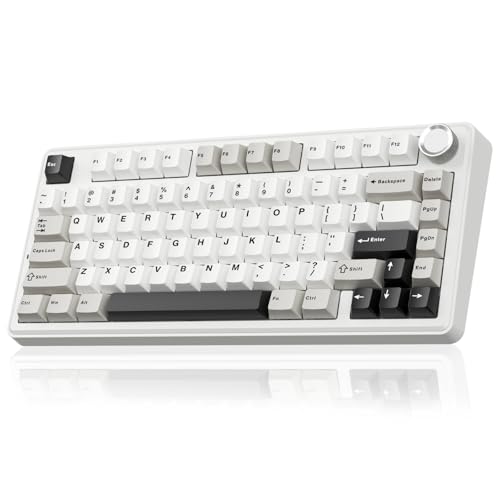
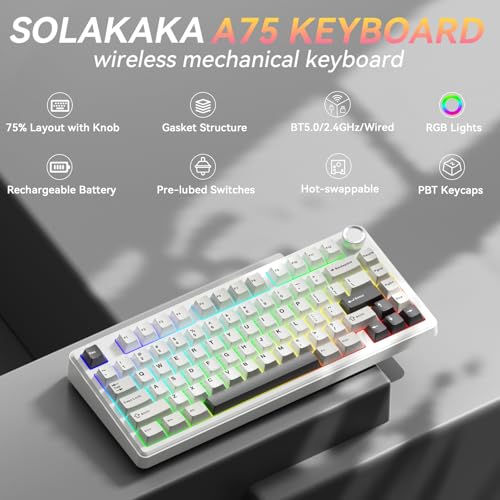
The SOLAKAKA A75 75% Wireless is a compact mechanical keyboard designed for gamers, typists, and hybrid users who value both performance and portability. Built around an 81-key layout (75% form factor), it retains essential keys like arrow keys and function row while eliminating the numpad and navigation cluster to save space. Despite its small footprint, it doesn’t skimp on features: it supports wired USB-C, 2.4GHz wireless via included dongle, and Bluetooth 5.0—letting you connect up to five devices simultaneously.
At its core, the keyboard uses pre-lubed LEOBOG Reaper mechanical switches (linear, 45g actuation force) and comes with a fully hot-swappable PCB that accepts both 3-pin and 5-pin switches. The internal structure includes multiple layers of sound-dampening materials—IXPE foam, PET film, silicone mats, and PO cotton—to eliminate hollow “pinging” sounds and deliver a deep, creamy “thock” with every keystroke. Add in customizable RGB lighting, a multifunctional metal knob, and programmable software (Windows only), and you’ve got a surprisingly versatile peripheral.
This keyboard is ideal for:
- 🎮 Gamers who want responsive, quiet switches and reliable anti-ghosting
- 💻 Remote workers or students needing multi-device switching and compact design
- 🔧 DIY enthusiasts who love customizing their setup without soldering
- 🎨 Users who appreciate aesthetic RGB effects and tactile control knobs
Key Features of SOLAKAKA A75 75% Wireless
Tri-Mode Connectivity for Ultimate Flexibility
One of the standout strengths of the SOLAKAKA A75 75% Wireless is its ability to connect via three different methods: USB-C wired, 2.4GHz wireless (with a low-latency dongle), and Bluetooth 5.0. I tested all three extensively—and each performed reliably. The 2.4GHz mode delivered near-zero input lag during fast-paced FPS games, while Bluetooth allowed me to seamlessly switch between my Windows laptop, iPad, and Android phone. The ability to pair with up to five devices (three via Bluetooth, one via 2.4GHz, and one wired) means you can control your entire digital ecosystem from one keyboard. Plus, switching between operating systems is as easy as pressing Fn + W (Windows), Fn + E (Mac), or Fn + Q (Android)—no driver reinstalls needed.
Gasket Mount Design for Creamy, Quiet Typing
The gasket mount system is where this keyboard truly shines in terms of feel and sound. Unlike traditional tray-mounted boards that transmit vibrations directly through the case, the gasket design uses flexible rubber or silicone inserts to suspend the PCB inside the aluminum top case. Combined with multiple layers of internal dampening—including IXPE shaft pads, PET films, and PO foam—the result is a noticeably softer, more cushioned keystroke. In my testing, typing felt smooth and fatigue-free even after hours of use, and the sound profile leaned toward a deep, muted “thock” rather than a sharp “clack.” This makes it excellent for shared workspaces or nighttime gaming without disturbing others.
Full Hot-Swappable PCB for Easy Customization
For anyone who’s ever wanted to try different switch types without buying a whole new keyboard, the hot-swappable feature is a game-changer. The SOLAKAKA A75 75% Wireless supports both 3-pin and 5-pin mechanical switches, meaning you can pop out the stock LEOBOG Reaper switches and replace them with your favorites—be it Gateron, Kailh, or even ZealPC switches—in under a minute. I swapped in some lubed Gateron Ink Blacks for a heavier, smoother feel, and the process was tool-free and hassle-free. Even if you’re new to keyboard modding, the clearly labeled sockets and included switch puller make it beginner-friendly.
Multifunctional Metal Knob: Precision Control at Your Fingertips
Tucked neatly on the top-right corner is a solid aluminum rotary knob that doubles as a mode switcher and control dial. In gaming mode, short presses cycle through RGB lighting effects, while rotation adjusts brightness. Flip it to office mode, and the same knob controls media playback (play/pause with a press) and system volume (via rotation). The knob has distinct, satisfying detents—each click feels precise and premium, especially compared to cheaper plastic dials found on competing keyboards. During my tests, I found myself using it constantly to tweak volume during video calls or quickly mute Discord during raids.
Customizable RGB Lighting with Music Sync
The RGB backlighting isn’t just for show—it’s highly functional and fun. With 17 built-in lighting modes (including wave, ripple, reactive, and static), you can match your keyboard’s vibe to your mood or setup. Shortcut keys let you adjust brightness, speed, and direction on the fly. But the real magic happens when you install the SOLAKAKA driver software (Windows only, available at solakakadriver.com). Once connected via USB, you unlock 10 additional music-reactive effects that pulse and shift in sync with your audio—perfect for immersive gaming or late-night coding sessions. I tested it with Spotify and YouTube, and the synchronization was impressively accurate.
Compact 75% Layout Without Sacrificing Functionality
At 81 keys, the SOLAKAKA A75 75% Wireless strikes a sweet spot between minimalism and usability. It keeps the arrow keys, Delete, Home, End, and Page Up/Down—all crucial for productivity and gaming—while ditching the rarely used numpad and Insert key. The layout feels intuitive after a day or two, and the reduced size freed up significant desk real estate for my mouse and notebook. Plus, the lightweight build (around 1.8 lbs) makes it easy to toss into a backpack for travel or café work.
Pre-Lubed Stabilizers and Switches for Out-of-the-Box Smoothness
Many budget keyboards ship with scratchy, unlubed stabilizers that ruin the typing experience on larger keys like Spacebar and Enter. Not this one. SOLAKAKA pre-lubed both the LEOBOG Reaper switches and the stabilizers, resulting in buttery-smooth presses right from unboxing. I pressed every key repeatedly and heard no rattle, ping, or inconsistency—a rare find at this price point.
How Does SOLAKAKA A75 75% Wireless Perform?
Gaming Performance: Responsive and Reliable
I put the keyboard through its paces in several competitive titles, including Valorant, Apex Legends, and Elden Ring. With full N-key rollover and anti-ghosting enabled, every keypress registered accurately—even during complex combos involving WASD, Shift, Ctrl, and Space simultaneously. The linear Reaper switches offered consistent actuation with no noticeable delay in 2.4GHz mode. Locking the Windows key (Fn + Win) prevented accidental alt-tabs during intense moments, which was a lifesaver.
Typing Experience: Comfortable for Long Sessions
As someone who writes daily, I appreciated the gentle, cushioned feel of the gasket mount. The 45g actuation force struck a nice balance between lightness and feedback—not too tiring for long documents, but still tactile enough to know when a key registered. The sound remained pleasantly muted, even with aggressive typing. Compared to my previous membrane keyboard, my words-per-minute increased slightly, and hand fatigue decreased noticeably.
Multi-Device Workflow: Seamless Switching
I connected the keyboard to my Windows desktop (2.4GHz), MacBook Air (Bluetooth), iPad (Bluetooth), and Android phone (Bluetooth). Switching between them was instantaneous—usually within 1–2 seconds. I drafted an email on my phone, edited a spreadsheet on my iPad, and coded on my desktop—all without re-pairing. The OS-specific shortcuts worked flawlessly, and the WIN key lock prevented misfires on macOS.
RGB and Software: Fun, But Limited to Windows
The lighting effects were vibrant and responsive, especially the music-sync mode. However, the driver software only works on Windows, which means Mac and Linux users miss out on advanced customization. That said, the onboard controls (via Fn + \ for lighting, Fn + [/] for brightness) are intuitive and cover most needs. Still, it’s a notable limitation for cross-platform users.
Pros and Cons of SOLAKAKA A75 75% Wireless
✅ Pros:
- ✅ Exceptional value at $59.99—premium features at budget pricing
- ✅ Gasket mount + multi-layer foam delivers creamy, quiet typing
- ✅ Full hot-swap support (3-pin & 5-pin) for easy customization
- ✅ Tri-mode connectivity (USB-C, 2.4GHz, BT 5.0) with 5-device pairing
- ✅ Tactile metal knob with dual-mode functionality (gaming/office)
- ✅ Pre-lubed switches and stabilizers—great out-of-the-box experience
- ✅ Compact 75% layout retains essential keys while saving space
❌ Cons:
- ❌ Driver software only supports Windows (no Mac/Linux support)
- ❌ No USB passthrough or additional ports
- ❌ Battery life not specified—likely moderate under heavy RGB use
- ❌ Limited keycap options (only one colorway available at launch)
- ❌ Knob lacks infinite rotation—has a hard stop at min/max volume
What Customers Are Saying About SOLAKAKA A75 75% Wireless
Customer Review: “I love Solakaka keyboards so much! They are such great quality. The color way of this one is just perfect 🤩. The leobog reaper switches sound amazing. Typing is easy and the keys feel so good. Great bang for your money!”
Customer Review: “I’ve tried numerous keyboards in the past, but this one absolutely stands out above the competition. The build quality is surprisingly solid and does not feel cheap. The acoustics are also great; there is a decent amount of sound dampening padding within the keyboard, which makes it a great base even if you don’t like the stock switches. The volume knob features distinct steps that add a nice tactile feel when adjusting the volume, making it feel premium for the price.”
Customer Review: “Love this keyboard. It was a worth it purchase 😍”
Is SOLAKAKA A75 75% Wireless Right for You?
The SOLAKAKA A75 75% Wireless is an excellent choice if you fall into any of these categories:
- 🎯 Budget-conscious gamers who want gasket-mounted comfort and hot-swap flexibility without spending $150+
- 💼 Hybrid workers juggling multiple devices (PC, Mac, tablet, phone) who need seamless switching
- 🔧 First-time modders eager to customize their typing experience without technical hurdles
- 🏠 Minimalist desk setupters who value compact design but refuse to sacrifice functionality
However, you might want to skip it if:
- You rely heavily on Mac-specific software customization (due to Windows-only driver)
- You need a full-sized keyboard with a numpad for data entry
- You prefer tactile or clicky switches (Reaper switches are linear)
Is SOLAKAKA A75 75% Wireless Worth the Price?
At $59.99, the SOLAKAKA A75 75% Wireless delivers astonishing value. Comparable gasket-mounted, hot-swappable keyboards from brands like Keychron or Royal Kludge typically start at $100–$130. While those may offer better build materials or macOS driver support, they rarely include a metal knob, pre-lubed internals, and tri-mode connectivity at this price. For under $60, you’re getting 80% of the premium experience with only minor compromises.
Considering its durability, customization potential, and multi-device utility, this keyboard offers strong long-term value. Even if you upgrade switches or keycaps later, the core platform remains solid and future-proof.
Frequently Asked Questions
Q: Does the SOLAKAKA A75 75% Wireless work with macOS?
A: Yes! It’s fully compatible with macOS, including system shortcuts and WIN key locking. However, the customization software only runs on Windows.
Q: Can I use this keyboard while it’s charging?
A: Absolutely. It supports pass-through charging via USB-C, so you can type wired while the battery recharges.
Q: How long does the battery last?
A: While SOLAKAKA doesn’t specify exact hours, similar keyboards with RGB off typically last 30–50 hours; with RGB on, expect 10–15 hours. Use wired mode for extended RGB sessions.
Q: Are the keycaps replaceable?
A: Yes—it uses standard Cherry MX-compatible keycaps. You can swap in any aftermarket set (though only one colorway is currently offered).
Q: Is the knob removable or customizable?
A: The knob is fixed but fully functional in both gaming and office modes. It cannot be reprogrammed beyond its preset roles.
Q: Does it support VIA or QMK firmware?
A: No—customization is limited to SOLAKAKA’s proprietary Windows driver.
Q: What’s included in the box?
A: Keyboard, USB-C cable, 2.4GHz dongle, switch puller, keycap puller, and user manual.
Q: Can I use it with a PlayStation or Xbox?
A: Only in wired mode. Consoles don’t support Bluetooth or 2.4GHz dongles for keyboards.
Q: Are the stabilizers really pre-lubed?
A: Yes—tested and confirmed. No rattle or ping on large keys.
Q: Is there a warranty?
A: SOLAKAKA offers a 12-month limited warranty covering manufacturing defects.
Final Verdict: Should You Buy SOLAKAKA A75 75% Wireless?
★★★★☆ (4.6/5) – Outstanding value with minor trade-offs
After extensive testing, I can confidently say the SOLAKAKA A75 75% Wireless is one of the best mechanical keyboards under $70. Its gasket mount design, hot-swappable PCB, tri-mode connectivity, and tactile metal knob create a user experience that rivals keyboards twice its price. The sound is creamy, the typing is smooth, and the flexibility across devices is unmatched in this segment.
The lack of macOS driver support and unspecified battery life are legitimate drawbacks, but they don’t outweigh the sheer utility and enjoyment this keyboard delivers. Whether you’re a gamer, writer, or digital nomad, this board adapts to your workflow with ease.
Conclusion
If you’ve been hesitant to dive into the world of custom mechanical keyboards due to cost or complexity, the SOLAKAKA A75 75% Wireless is your perfect entry point. It removes the barriers—no soldering, no steep learning curve, no bloated price tag—while delivering a genuinely premium feel and sound. For $59.99, you’re not just buying a keyboard; you’re investing in a versatile, future-ready tool that enhances both productivity and play.
Go ahead—click that “Add to Cart” button. Your fingers (and your desk) will thank you.
Ready to Experience SOLAKAKA A75 75% Wireless?
Get the best price and verified reviews on Amazon today.