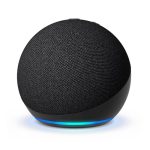
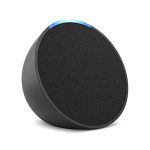
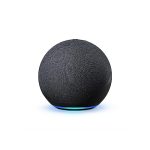
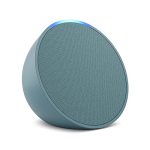
Yes, you can use an Echo Dot as a Bluetooth speaker without WiFi. First, place your Echo Dot in Bluetooth pairing mode.
Then, connect it to your device via Bluetooth settings. The Echo Dot is a popular smart speaker with many features. Sometimes, you might want to use it without WiFi. This could be when you’re traveling or facing internet issues. Using it as a Bluetooth speaker is a handy solution.
The process is straightforward and involves just a few steps. By the end of this guide, you’ll be able to enjoy music from your Echo Dot without needing WiFi. Stay tuned to learn how to make the most of your Echo Dot in offline mode.
Requirements
Ensure your Echo Dot is fully charged. Bluetooth must be enabled on the device you want to connect.
Necessary Devices
To use an Echo Dot as a Bluetooth speaker without WiFi, you need two main devices. First, you need an Echo Dot. This is essential. Second, you need a Bluetooth-enabled device like a smartphone, tablet, or laptop. These are the basic devices required.
Ensuring Bluetooth Compatibility
Check that your device supports Bluetooth. Most modern devices do. Ensure that the Bluetooth feature on your device is turned on. Then, make sure the Echo Dot is in pairing mode. This allows your device to find and connect to the Echo Dot.
Credit: www.timesnownews.com
Initial Setup
Connect Echo Dot to your device via Bluetooth by holding the action button. Navigate to Bluetooth settings on your device and select Echo Dot from the list. Enjoy music without needing WiFi.
Powering The Echo Dot
First, plug your Echo Dot into a power outlet. Use the adapter that came with the device. Wait for the light ring to turn blue. This means the device is booting up. When the light turns orange, it is ready to set up. This process takes a few minutes.
Activating Bluetooth Pairing Mode
Press and hold the Action button on your Echo Dot. The button has a small dot on it. Hold it until the light ring turns orange. Your Echo Dot is now in pairing mode. Open Bluetooth settings on your phone or tablet. Find and select your Echo Dot from the list. Once paired, you can play music from your device.
Connecting Devices
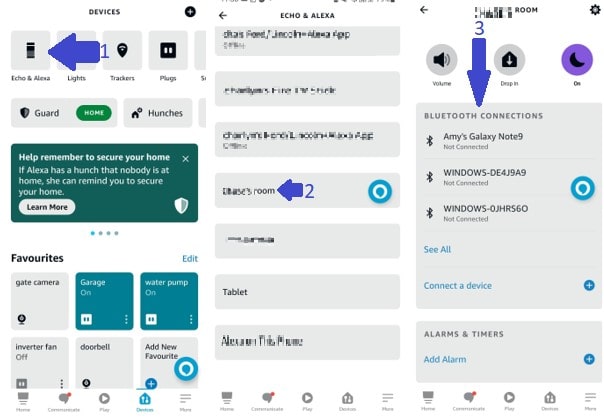
First, turn on your Echo Dot. Open the Alexa app on your smartphone. Go to the Devices section. Select your Echo Dot from the list. Tap on Bluetooth. Enable Bluetooth on your phone. Look for your Echo Dot in the Bluetooth devices list. Tap on it to pair.
Once paired, play some music on your phone. The sound should come from the Echo Dot. If it doesn’t, check the volume. Also, make sure the Echo Dot is the active Bluetooth device. This confirms the connection.

Credit: www.youtube.com
Playing Audio
Connect your phone to Echo Dot via Bluetooth. Open your music app on the phone. Start playing your favorite songs. The Echo Dot will play the music. No WiFi needed. Easy and quick.
Use the volume buttons on your Echo Dot. Press the “+” button to increase volume. Press the “-” button to decrease volume. You can also adjust volume from your phone. Simple and convenient.
Troubleshooting
Use Echo Dot as a Bluetooth speaker without WiFi by enabling Bluetooth on your device. Pair the Echo Dot through the Alexa app, then connect your phone or tablet. Enjoy your music and audio without the need for WiFi.
Common Connection Issues
Sometimes the Echo Dot does not connect. Ensure your device is in range. Check if Bluetooth is enabled on your phone. Remove any other connected devices. Restart both your Echo Dot and your phone. This can solve many issues.
Resetting Bluetooth Settings
Go to the Alexa app. Find your Echo Dot in the devices list. Tap on Bluetooth devices. Select “Forget” for each device listed. This clears old connections. Now, pair your phone again with the Echo Dot. This often fixes connection problems.
Credit: rockymtnruby.com
Tips And Tricks
Place the Echo Dot in the center of the room. This helps the sound spread evenly. Avoid placing it near walls or corners. Adjust the volume for clear sound. Too loud can distort audio. Try different positions to find the best spot. Keep the speaker clean. Dust can affect sound quality.
Charge the Echo Dot fully before using. This ensures longer playtime. Turn off the speaker when not in use. This saves battery. Use a power-saving mode if available. Lower the volume to save energy. Avoid using the speaker in very hot or cold places. Extreme temperatures can drain the battery faster. Keep the device updated for better performance.
Frequently Asked Questions
Can I Use My Echo Dot As A Bluetooth Speaker Without Wi-fi?
No, you cannot use an Echo Dot as a Bluetooth speaker without Wi-Fi. It needs Wi-Fi for initial setup.
Can I Use Echo Dot As A Bluetooth Speaker?
Yes, you can use an Echo Dot as a Bluetooth speaker. Pair it with your device via Bluetooth settings.
How To Put Alexa In Bluetooth Mode?
To put Alexa in Bluetooth mode, say, “Alexa, pair. ” Then, connect your device via Bluetooth settings.
Can The Echo Dot Be Used Alone?
Yes, the Echo Dot can be used alone. It functions as a smart speaker with Alexa built-in.
Conclusion
Using your Echo Dot as a Bluetooth speaker without WiFi is simple. Follow the steps discussed, and you’ll enjoy your music in no time. No need for complex setups or extra gadgets. Just pair your devices and start playing. It’s a convenient way to use your Echo Dot on the go.
This method works well for those who prefer offline music. Now, you can enjoy your favorite tunes anytime, anywhere. Try it out and experience the ease of wireless music enjoyment.