
Quickly fix your Chinese Bluetooth speaker by finding the reset button or using a simple button combination. This guide makes it easy to get your sound back!
Hey there, tech adventurers! Max here from AffTechy.com, your go-to spot for making technology feel super simple and fun. You know, those little Bluetooth speakers we love? They can really boost our music, make movie nights epic, or even make game soundscapes come alive. But sometimes, they get a little… well, stubborn.
It can be frustrating when your speaker just won’t connect or plays up. You might be tempted to toss it aside, but don’t! Most of the time, a simple reset is all it needs to get back to its noisy, happy self.
Picking the right speaker can feel like a puzzle, with all those specs and features. But understanding a few basics, like how to fix a glitchy one, is super empowering.
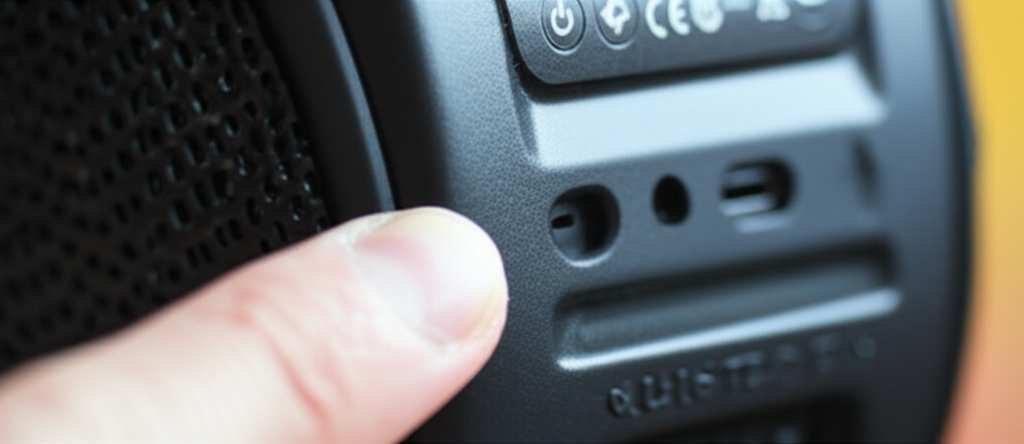
Today, we’re diving into how to reset your Chinese Bluetooth speaker. It sounds techy, but I promise, it’s way easier than you think. Let’s break it down step by step and get your tunes flowing again!
Why Would Your Speaker Need a Reset?
Sometimes, electronic gadgets can get a bit confused. Think of it like your phone freezing up – a quick restart often does the trick. Your Bluetooth speaker is no different.
If your speaker isn’t pairing with your device, if the sound is cutting out, or if it’s just acting plain weird, a reset can clear out any temporary glitches. It’s like giving the speaker a fresh start.
This process usually returns the speaker to its original factory settings. It wipes out any saved Bluetooth connections, so you’ll need to pair it with your devices again afterward. But hey, that’s a small price to pay for a working speaker!
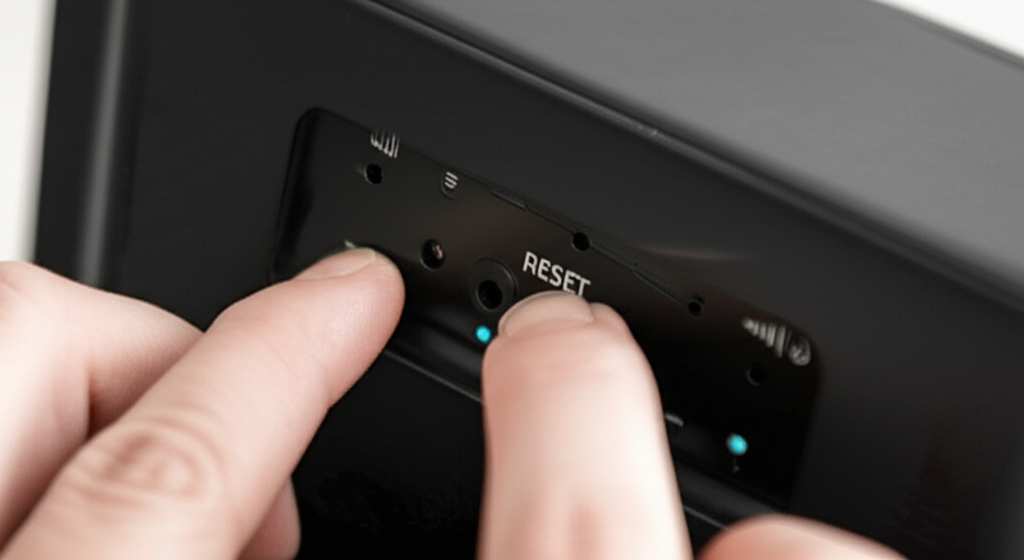
Finding the Reset Button: The Stealthy Approach
Many Bluetooth speakers, especially those from smaller brands or those with simpler designs, have a hidden reset button. It’s not always obvious, so you might need to do a little detective work.
Where to Look for That Tiny Button
This little button is often so small you’ll need something pointy to press it. Think of a paperclip, a toothpick, or even the tip of a pen.
You’ll typically find it in these spots:
- On the bottom of the speaker.
- On the back panel, perhaps near other ports.
- Sometimes it’s disguised as a tiny hole labeled “RST” or “Reset.”
If you find a tiny hole, that’s likely your reset button! You’ll need to gently insert your paperclip or toothpick and press it down for a few seconds.
The Button Combination Trick: When There’s No Visible Button
Don’t see a tiny hole? No worries! Many speakers use a combination of buttons to trigger a reset. This is a common feature on many brands, and Chinese speakers often follow suit.
Common Button Combinations to Try
These combinations usually involve pressing and holding one or two buttons for a specific duration. It might take a little trial and error, but one of these should work.
Here are some common combinations to test:
- Power + Volume Down: Press and hold both the power button and the volume down button for about 10-15 seconds.
- Power + Bluetooth/Pairing Button: Try holding down the power button and the Bluetooth or pairing button simultaneously for the same amount of time.
- Volume Up + Volume Down: Some speakers reset by holding both volume buttons together.
- Power Button Only: For simpler models, just holding the power button down for a longer period (20-30 seconds) might initiate a reset.
Keep an ear out for a sound or a light change. This usually indicates that the reset has been successful. Your speaker might turn off and then back on by itself.
Step-by-Step: The General Reset Process
While specific steps can vary slightly, here’s a general guide that covers most Chinese Bluetooth speakers. Think of this as your universal reset cheat sheet!
Step 1: Power Off Your Speaker
First things first, make sure your speaker is turned off. If it’s already on and acting up, try to power it down normally. If it won’t power off, you might need to let the battery drain completely, or try a reset method that forces a shutdown.
Step 2: Locate the Reset Mechanism
Now, let’s do that detective work we talked about.
- Look for a tiny hole labeled “RST” or “Reset” on the speaker’s body.
- If you don’t see a hole, check the buttons.
Step 3: Execute the Reset
This is where the magic happens!
- If you found a reset hole: Gently insert a straightened paperclip or toothpick into the hole. Press and hold for about 5-10 seconds. You might feel a slight click.
- If you’re using a button combination: Press and hold the identified buttons (e.g., Power + Volume Down) for 10-15 seconds.
Step 4: Observe for Confirmation
Your speaker will likely give you a sign that the reset is complete.
- It might beep or make a specific sound.
- An LED light might flash or change color.
- The speaker might automatically turn off and then back on.
If you don’t hear or see anything, try holding the buttons for a few seconds longer. Sometimes, persistence is key!
Step 5: Power On and Re-Pair
Once the reset is confirmed, turn your speaker back on. It should now be in its default state.
- Go to the Bluetooth settings on your phone, tablet, or computer.
- Look for the speaker’s name in the list of available devices.
- Select it to pair again.
You might need to “forget” the device from your phone’s Bluetooth list and then search for it again if it doesn’t appear immediately.
When All Else Fails: Advanced Tips and Tricks
Sometimes, the standard reset might not be enough, or you might have a particularly unique speaker. Here are a few more things you can try.
Tip 1: Check the Manual (If You Have It!)
This might sound obvious, but if you still have the original manual that came with your speaker, it’s your best friend! It will have the exact instructions for your specific model.
Many manuals are available online too. Try searching for your speaker’s brand and model number on Google. You might find a digital copy.
Tip 2: Search Online for Your Specific Model
If you know the brand and model number of your speaker, a quick search on Google or YouTube can be incredibly helpful. Many users have already figured out the reset process for specific models and shared it online.
Look for videos or forum posts. Someone has probably already solved your exact problem!
Tip 3: Contact the Manufacturer or Seller
If you’ve tried everything and your speaker is still misbehaving, it might be time to reach out for help.
Contact the seller where you bought the speaker or the manufacturer directly. They might have specific troubleshooting steps or be able to arrange a repair or replacement if it’s under warranty.
Understanding Speaker Features: What Matters Most?
When you’re looking for a new speaker, or just trying to understand your current one better, a few features really stand out. Knowing these can help you choose the best fit for your needs.
Key Features to Consider
Here’s a quick rundown of what’s important:
- Bluetooth Version: Newer versions (like Bluetooth 5.0 or 5.1) offer better range, faster connections, and more stable audio.
- Battery Life: How long does it play music on a single charge? This is crucial for portability.
- Sound Quality: This is subjective, but look for terms like “rich bass,” “clear highs,” and “balanced sound.”
- Water Resistance: If you plan to use it near pools or at the beach, look for an IP rating (e.g., IPX7 means it can be submerged in water).
- Connectivity Options: Besides Bluetooth, does it have an AUX input or a USB port for other devices?
Comparing Popular Speaker Types
Let’s look at how different types of speakers stack up. This can give you an idea of what to expect in terms of features and price.
A Quick Comparison Table
| Feature | Mini Portable Speaker | Smart Speaker | Outdoor Speaker |
|—————–|———————–|—————|—————–|
| Size | Very small | Medium | Medium to Large |
| Portability | Excellent | Limited | Limited |
| Battery Life | 6-12 hours | N/A (plug-in) | 10-20+ hours |
| Durability | Varies | Indoor use | High, often water/dust resistant |
| Primary Use | On-the-go listening | Voice control, home audio | Outdoor parties, rugged use |
| Typical Price | $20 – $100 | $50 – $200+ | $70 – $250+ |
As you can see, a mini portable speaker is great for taking music anywhere, while an outdoor speaker is built tough for adventures. Smart speakers, on the other hand, are more about convenience and home integration.
Troubleshooting Common Bluetooth Issues
Resetting is great, but sometimes other small issues pop up with Bluetooth. Here are a few quick fixes for other common problems.
Quick Fixes for Bluetooth Glitches
- Speaker won’t pair: Ensure Bluetooth is on for both devices. Turn both off and on again. Try resetting the speaker.
- Sound cuts out: Move your device closer to the speaker. Minimize obstructions. Check if other devices are interfering.
- Device not found: Make sure the speaker is in pairing mode. Sometimes you need to hold the Bluetooth button longer.
- Poor sound quality: Ensure the audio file isn’t low quality. Try a different app or music source.
Remember, Bluetooth signals can be affected by walls and other electronics. Keeping your device and speaker relatively close helps a lot!
A Note on “Chinese Bluetooth Speakers”
When we say “Chinese Bluetooth speakers,” it’s often a broad term. Many fantastic brands manufacture their products in China, and some lesser-known ones might not have extensive support or clear documentation.
The good news is that the technology behind most Bluetooth speakers is quite standardized. The reset methods we discussed are common across many brands, regardless of where they are made.
Why Support Can Be Tricky
Sometimes, the challenge with these speakers isn’t the tech itself, but the availability of support. Finding an official website or a dedicated customer service line can be tough.
That’s why resources like online forums, YouTube tutorials, and community troubleshooting tips are so valuable. We’re all in this tech adventure together!
When to Consider an Upgrade
If you’ve tried resetting your speaker multiple times and it’s still giving you grief, or if its features are just too outdated for your needs, it might be time for an upgrade.
Signs It’s Time for a New Speaker
- Battery no longer holds a charge for a reasonable amount of time.
- Sound quality is significantly degraded (crackling, distortion).
- Bluetooth connection is consistently unstable, even after resets.
- It lacks modern features you now need (e.g., newer Bluetooth version, water resistance).
Think about what you love most about music and how you listen. This will guide you to a speaker that fits your lifestyle perfectly. For example, if you’re always on the move, a rugged, long-lasting battery speaker is key. If you want to fill a large room with sound, you might look at a more powerful model.
Frequently Asked Questions (FAQ)
Let’s tackle some common questions beginners have about resetting their speakers.
Q1: How do I know if my speaker is reset?
A: You’ll usually hear a sound, see a light change, or the speaker might restart itself. It’s like a little confirmation signal!
Q2: Will resetting my speaker delete my music?
A: No, resetting only affects the speaker’s settings and Bluetooth connections. Your music is stored on your phone or other devices, not the speaker itself.
Q3: Do I need to reset it every time it disconnects?
A: Usually not! A reset is for when the speaker isn’t working correctly. Most of the time, it will reconnect automatically or with a simple tap.
Q4: Can I reset my speaker if it won’t turn on?
A: This is tricky. If it won’t power on at all, a reset might not be possible. You might need to check the charging cable or port, or contact support.
Q5: What if I don’t have a paperclip?
A: No problem! A toothpick, a needle, a small nail, or even the end of a pen (if it’s small enough) can work. Just be gentle!
Q6: How long should I hold the reset button?
A: Typically, 5 to 15 seconds is enough. If nothing happens, try holding it a bit longer, up to 20-30 seconds.
Q7: Can resetting damage my speaker?
A: Not if done correctly. Just be gentle with the buttons and any reset holes. It’s designed to be a safe troubleshooting step.
Wrapping Up: Get Your Sound Back!
So there you have it! Resetting your Chinese Bluetooth speaker is usually a straightforward process that can bring your music back to life. Whether it’s a hidden button or a button combo, you’ve got the power to fix those little tech hiccups.
Don’t let a stubborn speaker get you down. With these simple steps, you can troubleshoot and get back to enjoying your favorite tunes, podcasts, or audiobooks. Remember to check your manual or search online if you get stuck – the tech community is always here to help!
Now go enjoy amazing sound and make every moment louder and better!


