Unlock the full potential of your sound box by learning to adjust treble and bass. This guide will walk you through understanding these crucial audio elements and how to tweak them for a richer, more balanced listening experience. Get ready to customize your sound to perfection.
Ever feel like your music or audio just isn’t hitting the mark? Maybe the vocals sound a bit muffled, or the drums lack that satisfying punch. If so, you’re likely experiencing a sound that could benefit from a little tweaking. The secret often lies in understanding and adjusting the treble and bass controls on your sound box. These two elements are the backbone of your audio experience, shaping everything from the crispness of a cymbal crash to the deep rumble of a bass guitar. Learning how to adjust treble and bass is like becoming your own sound engineer, empowering you to tailor the audio to your exact preferences.
Think of your sound box as a kitchen. The basic ingredients are all there, but without the right seasoning, the dish might fall flat. Treble and bass are your salt and pepper, your herbs and spices. They allow you to enhance certain flavors and bring out the best in your audio. Whether you’re a music aficionado, a movie buff, or someone who just enjoys clear dialogue from their favorite shows, mastering these adjustments can make a world of difference. This guide is here to break down exactly how you can adjust treble and bass in your sound box, turning an okay listening experience into an extraordinary one.
Key Takeaways
- Understanding Treble and Bass: Treble controls high frequencies (crispness, clarity), while bass manages low frequencies (depth, warmth).
- Location of Controls: Adjustments are typically found on the sound box itself, a remote, or through a connected app.
- Dialing in Treble: Increase treble for clearer vocals and instruments; decrease if the sound is too harsh or sibilant.
- Boosting Bass: Increase bass for a fuller, more impactful sound; decrease if it becomes muddy or overwhelming.
- Finding the Sweet Spot: Start with neutral settings and make small adjustments, listening carefully to the changes.
- Context Matters: Adjustments may vary depending on the music genre, room acoustics, and personal preference.
- Advanced Settings: Some sound boxes offer equalizer (EQ) presets or manual EQ bands for finer control.
📑 Table of Contents
What Exactly Are Treble and Bass?
Before we dive into the “how,” let’s quickly cover the “what.” Understanding these terms is fundamental to making effective adjustments.
Treble: The High Frequencies
Treble refers to the higher frequencies in sound. This is where you’ll find the crispness, the clarity, and the detail. Think about the shimmering sound of a cymbal, the breathiness of a singer’s voice, or the delicate notes of a flute. When treble is well-balanced, these elements sound clear, distinct, and lively. If there’s too much treble, the sound can become harsh, piercing, or even sibilant (that unpleasant “s” sound in speech). Too little treble, and your audio might sound dull, muffled, or lacking in definition.
Bass: The Low Frequencies
Bass, on the other hand, controls the lower frequencies. This is the foundation of your sound – the warmth, the depth, and the impact. Imagine the thumping of a kick drum, the deep growl of a bass guitar, or the rumble of an explosion in a movie. Sufficient bass makes the audio feel full, powerful, and immersive. Too much bass can make your sound muddy, boomy, and overwhelming, drowning out other frequencies. Conversely, too little bass can leave your audio sounding thin, tinny, and lacking in energy.
Where to Find Treble and Bass Controls
Visual guide about How to Adjust Treble and Bass in Sound Box
Image source: images.nexusapp.co
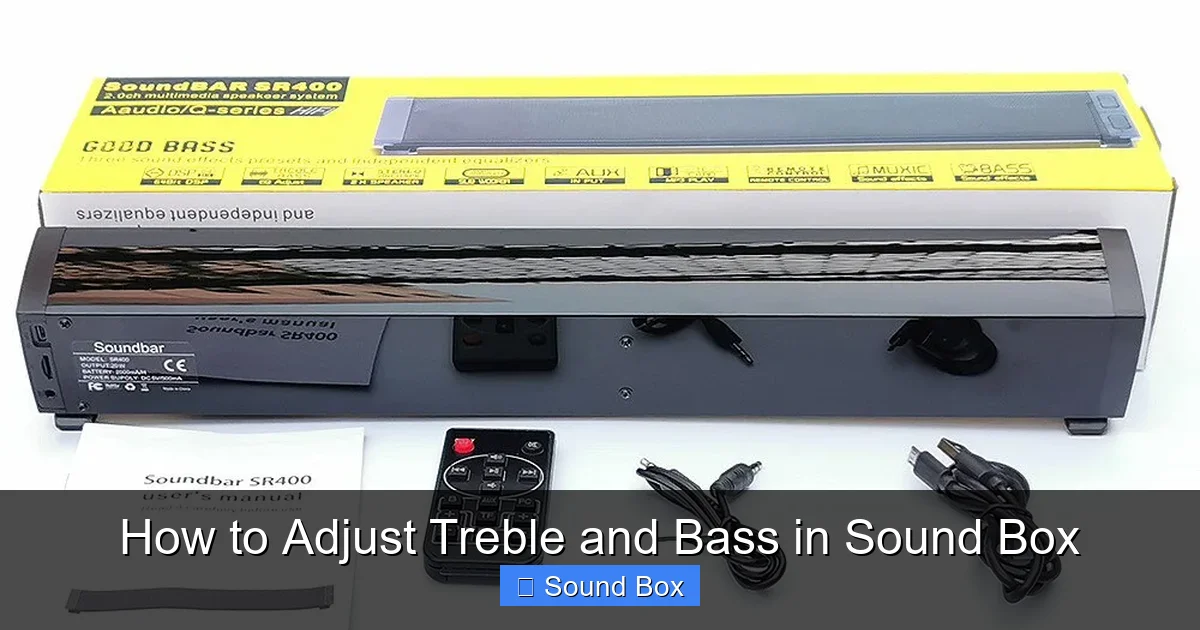
The location of these crucial controls can vary depending on the type and model of your sound box. However, they generally fall into a few common categories.
On the Sound Box Itself
Many portable and some home audio systems have physical knobs or buttons directly on the unit.
- Knobs: You might find two separate knobs, often labeled “Treble,” “Bass,” “Highs,” and “Lows,” or sometimes combined into a single “Tone” control.
- Buttons: Some units use simple buttons like “+” and “-” for each frequency range, or pre-set “Bass Boost” buttons.
These are often the most straightforward to use, allowing for quick adjustments without needing another device.
Using a Remote Control
More sophisticated sound systems, like home theater receivers or advanced sound bars, typically come with a remote control. This remote will have dedicated buttons for adjusting treble and bass, often displayed with icons representing high and low frequencies. This offers convenience, allowing you to fine-tune your sound from your listening position.
Through a Dedicated App
The most modern sound boxes, especially Bluetooth speakers and smart home audio devices, often rely on a companion smartphone app for control.
- App Interface: These apps usually feature a user-friendly interface where you can find sliders or numerical values for treble and bass.
- Equalizer (EQ) Presets: Many apps also offer pre-programmed EQ settings (like “Rock,” “Pop,” “Movie,” “Voice”) or a full manual equalizer for more granular control over multiple frequency bands.
This is where you’ll often find the most flexibility and advanced customization options.
How to Adjust Treble and Bass: Step-by-Step
Visual guide about How to Adjust Treble and Bass in Sound Box
Image source: images.nexusapp.co
Now that you know what you’re looking for, let’s get down to the actual adjustment process. The key is to make small, incremental changes and listen carefully.
Step 1: Start with a Neutral Setting
Before you begin adjusting, ensure your sound box is set to its neutral or “flat” setting. This usually means setting both treble and bass controls to the middle position, or disabling any special sound modes. This gives you a clean baseline to work from. If you’re using an app, look for a “Reset” or “Flat” EQ option.
Step 2: Choose Your Audio Source
Select a piece of audio you are very familiar with. This could be your favorite song, a movie scene with dialogue you know well, or a podcast. Using familiar audio makes it easier to identify subtle changes and understand how the adjustments are affecting the sound.
Step 3: Adjusting the Treble
Let’s start with treble. Play your chosen audio and listen carefully.
- To Increase Treble: If the sound seems a bit dull or muffled, slowly turn up the treble control. Listen for increased clarity in vocals and instruments. Pay attention to cymbals, hi-hats, and any sharp percussive sounds.
- To Decrease Treble: If the sound is too harsh, sharp, or if you notice an annoying “s” hiss, slowly turn down the treble control. The goal is to make the sound smoother and more pleasant without losing too much detail.
Practical Tip: Be cautious with extreme treble boosts, as they can quickly lead to listening fatigue. Aim for clarity, not shrillness.
Step 4: Adjusting the Bass
Now, let’s move on to bass.
- To Increase Bass: If your audio feels thin or lacks impact, slowly increase the bass control. Listen for a richer, deeper sound, particularly in kick drums, basslines, and lower vocal ranges.
- To Decrease Bass: If the sound is muddy, boomy, or overwhelming, slowly turn down the bass control. You want the bass to be felt and heard, but not to the point where it drowns out other parts of the audio.
Practical Tip: Too much bass can make your sound box vibrate excessively, which can actually degrade sound quality. If you hear rattling or excessive shaking, you’ve likely added too much bass.
Step 5: Finding the Sweet Spot – The Balancing Act
This is where the magic happens. You’ll likely find yourself going back and forth between treble and bass adjustments.
- Listen Critically: Are the vocals clear? Is the bass present but not overpowering? Do the different instruments sound distinct?
- Make Small Adjustments: It’s easy to overdo it. Make tiny turns of the knob or small movements of the slider. Pause and listen after each adjustment.
- Consider the Genre: A classical piece might benefit from more nuanced treble for delicate instruments, while a hip-hop track might demand a more pronounced bass. If you’re watching a movie, you might want more bass for action scenes and clearer treble for dialogue.
This iterative process of adjusting and listening is how you’ll find your personal “sweet spot.” It’s a journey of discovery for your ears!
Advanced Adjustments: Equalizers and Presets
Visual guide about How to Adjust Treble and Bass in Sound Box
Image source: images.nexusapp.co
For those seeking more control, many sound boxes offer advanced features like equalizers (EQs) and pre-programmed sound modes.
Understanding the Equalizer (EQ)
An equalizer allows you to adjust specific frequency bands rather than just overall treble and bass. A typical EQ might have sliders for:
- Low Frequencies (e.g., 60Hz, 100Hz): For sub-bass and deep rumble.
- Mid-Low Frequencies (e.g., 250Hz, 500Hz): For warmth and body in instruments.
- Mid Frequencies (e.g., 1kHz, 2kHz): Crucial for vocal presence and clarity.
- Mid-High Frequencies (e.g., 4kHz, 8kHz): For presence and articulation.
- High Frequencies (e.g., 16kHz): For airiness and sparkle.
By adjusting these individual bands, you can sculpt your sound with incredible precision. For instance, if vocals are a bit thin, you might boost the 1kHz or 2kHz band slightly. If a guitar solo sounds too harsh, you might slightly cut a band around 4kHz.
Using EQ Presets
Most apps and advanced systems will offer EQ presets. These are pre-configured settings designed for different types of audio or listening scenarios:
- Flat: The neutral setting.
- Rock: Often emphasizes bass and treble, with a slight dip in the mids.
- Pop: Usually a balanced sound with slightly enhanced bass and clear highs.
- Jazz: May focus on clarity and a more natural sound for instruments.
- Classical: Aims for a balanced and detailed reproduction.
- Movie/Drama: Typically boosts bass for impact and clarity for dialogue.
- Voice/Podcast: Enhances mid-frequencies for clear speech.
Experiment with these presets to see if any suit your listening habits. They can be a great starting point for finding your preferred sound profile. Don’t be afraid to use them as a template and then tweak them further.
Troubleshooting Common Sound Issues with Treble and Bass
Sometimes, even with adjustments, your sound might not be quite right. Here are a few common issues and how treble and bass adjustments can help.
Problem: Music sounds muffled or unclear.
- Cause: Insufficient treble.
- Solution: Gradually increase the treble. Listen for vocals and instruments to become clearer and more defined.
Problem: Vocals sound harsh or sibilant.
- Cause: Too much treble.
- Solution: Gradually decrease the treble. This should smooth out the harshness and reduce the “s” sounds.
Problem: Bass is overwhelming or muddy.
- Cause: Too much bass, or bass overpowering other frequencies.
- Solution: Gradually decrease the bass. You might also need to slightly decrease the lower mid-frequencies on an EQ if available to clean up muddiness.
Problem: The sound is too thin or tinny.
- Cause: Insufficient bass and/or too much treble.
- Solution: Increase the bass gradually. You might also consider slightly reducing the treble if it’s contributing to the thinness.
Problem: My sound box buzzes or distorts at higher volumes.
- Cause: While not always a treble/bass issue, excessive boosting of either can exacerbate distortion.
- Solution: Try reducing both bass and treble slightly. If the problem persists, it might indicate an issue with the speaker’s amplifier or drivers. You might need to look into troubleshooting fixes like how to fix buzzing noise in Bluetooth speaker quick fixes.
Tips for Optimizing Your Sound Box Settings
Beyond just turning knobs, a few other considerations can enhance your listening experience.
Room Acoustics Matter
The room your sound box is in significantly affects how sound travels. Hard surfaces (like glass or bare walls) reflect sound, potentially making it boomy or echoey. Softer surfaces (like carpets and curtains) absorb sound. If your room has a lot of hard surfaces, you might need to dial back the bass slightly to compensate. Conversely, a very “dead” room with lots of soft furnishings might benefit from a slight bass boost.
Speaker Placement
Where you place your sound box is as important as its settings. For many speakers, keeping them away from walls can prevent bass buildup. Experimenting with placement can reveal improvements even before you touch the controls. For instance, if you’re trying to achieve a fuller sound, check out our guide on how to make a Bluetooth speaker have more bass.
Consider Your Source Material
As mentioned, different music genres and audio sources have different EQ profiles. A heavily compressed pop song might sound different than a high-fidelity jazz recording. Be prepared to make small adjustments based on what you’re listening to. If you want to ensure your Bluetooth speaker sounds its best outdoors, consider tips on how to get best sound from Bluetooth speaker in open pool area.
Listen at Moderate Volumes
Our ears perceive bass and treble differently at various volume levels. What sounds balanced at a low volume might become boomy or piercing at a high volume. It’s often best to find your ideal settings at a comfortable listening level and then adjust slightly if needed for louder playback.
Don’t Be Afraid to Experiment
Ultimately, the “best” sound is subjective. What sounds perfect to one person might not to another. The controls and settings are there for you to play with. So, don’t hesitate to twist those knobs, slide those faders, and explore different EQ presets. Your ears are the ultimate judge!
Conclusion
Adjusting treble and bass in your sound box is a powerful way to personalize your audio experience. By understanding the role of high and low frequencies and knowing where to find and how to use the controls, you can transform ordinary sound into something truly captivating. Remember to start with a neutral setting, make small, deliberate adjustments, and listen critically to the results. Whether you’re using physical knobs, a remote control, or a smartphone app, the goal is to achieve a balanced, clear, and enjoyable sound that suits your taste and your content. So go ahead, start experimenting, and rediscover your favorite music, movies, and podcasts with sound that’s perfectly tuned just for you!
Frequently Asked Questions
What is the difference between treble and bass?
Treble refers to the high-frequency sounds, providing clarity, detail, and crispness. Bass refers to the low-frequency sounds, offering depth, warmth, and impact. Adjusting them allows you to fine-tune the overall character of your audio.
How do I know if I’m adding too much bass?
If your audio sounds muddy, boomy, or if you notice rattling or excessive vibration from the speaker, you’re likely adding too much bass. The bass should be felt and heard, but not overpower other elements or distort the sound.
Can adjusting treble and bass fix poor sound quality?
Adjusting treble and bass can significantly improve perceived sound quality by balancing frequencies and enhancing clarity or depth. However, it cannot fix fundamental issues like damaged speaker components or very low-quality audio sources.
Should I always keep my treble and bass at the default setting?
No, default settings are a starting point. Your ideal treble and bass levels will depend on the music genre, room acoustics, the quality of the sound box, and your personal preference. Experimenting is key.
What is an equalizer (EQ) and how does it relate to treble and bass?
An equalizer (EQ) is a more advanced tool that allows you to adjust specific frequency bands within the sound spectrum. Treble and bass controls are essentially simplified EQs that adjust broad ranges of high and low frequencies, respectively.
How often should I adjust my sound box settings?
You don’t need to adjust them constantly. It’s recommended to find settings that work well for your typical listening environment and preferred genres. However, you might want to make small tweaks when listening to music with a very different sound profile or when moving your speaker to a new location.