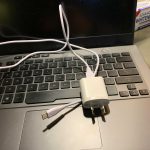
A typical laptop charger uses between 45 to 100 watts, depending on the device’s power needs. Curious about how much energy your laptop consumes and how it might affect your electricity bill? Keep reading to discover the factors that influence wattage and how to determine the power your charger uses.
In short, laptop chargers generally draw between 45 and 100 watts during use, with some powerful models requiring even more. The exact number depends on your laptop’s specifications and whether it’s charging or in use. Understanding this can help you better manage energy consumption and optimize your device’s performance.
When it comes to understanding how many watts a laptop charger uses, it’s essential to consider the charger’s design and the laptop’s requirements. Most modern laptops come with chargers rated between 45 and 100 watts, with lightweight ultrabooks usually consuming less power, around 45W, while high-performance gaming or workstation laptops might need 150W or more. The wattage indicates how much energy the charger supplies to the laptop at any moment, especially during charging or intensive tasks. Knowing the wattage can help you estimate your energy costs and choose the right charger for your needs. Whether you’re looking to reduce your power footprint or just curious, understanding wattage is a key step in managing your device’s energy use efficiently.

How Many Watts Does a Laptop Charger Use
Understanding Wattage in Laptop Chargers
Laptop chargers come in different wattages, which indicates how much power they supply to the device. The wattage tells you the rate at which energy is transferred from the charger to the laptop. Generally, a higher wattage charger can charge your laptop faster and support more demanding tasks.
What Does Wattage Mean?
Wattage, measured in watts (W), shows the amount of power a charger provides during operation. For example, a 65W charger supplies 65 watts of power to your laptop. This number helps determine if your charger can handle your laptop’s energy needs effectively.
How Wattage Affects Your Laptop’s Performance
A more powerful charger can provide faster charging, especially for high-performance laptops. If the wattage is too low, charging may be slow, or your laptop might not run at full capacity while charging. Always match the wattage recommendation from your laptop manufacturer for optimal performance.
Common Wattage Ranges for Laptop Chargers
Laptop chargers typically fall within a few standard wattage ranges, depending on the type of device. Understanding these ranges helps you choose the right charger for your needs.
Entry-Level Laptops
Most basic or entry-level laptops use chargers with wattages between 30W and 45W. These are enough to support everyday tasks like browsing, watching videos, or using simple applications.
Mid-Range Laptops
Mid-range laptops usually require chargers that deliver between 45W and 65W. These are common for portable laptops that handle multitasking, light gaming, and moderate creative work.
High-Performance Laptops
High-end gaming or professional laptops often need chargers with wattages of 80W, 90W, or even 150W. These chargers support intensive tasks like video editing, 3D rendering, or gaming.
Factors Influencing the Wattage of Laptop Chargers
Several aspects determine the wattage your laptop charger needs or uses.
Type of Laptop
Different brands and models have varying power requirements. Gaming laptops and mobile workstations often demand higher wattages than ultrabooks or basic notebooks.
Battery Capacity
Laptops with larger battery capacities may require chargers with higher wattage to maintain performance and speed up charging times.
Usage Patterns
Heavy tasks like gaming, video editing, or 3D modeling cause increased power consumption. During such activities, your laptop may draw more power, which can influence the charger’s wattage handling capabilities.
How to Determine the Wattage of Your Laptop Charger
Identifying the wattage of your current charger is straightforward. Most chargers have their wattage labeled directly on the device.
Check the Charger Label
Look for information printed on the bottom or side of your charger. It often states input and output specifications, including voltage (V) and current (A).
Calculate Wattage
Use the formula: Wattage (W) = Voltage (V) x Current (A). For example, if the charger shows 19V and 3.42A, then the wattage is approximately 65W.
Verify Compatibility
Always match the charger’s wattage and connector type with your laptop’s specifications. Using a charger with a different wattage can cause charging issues or damage.
Energy Consumption and Efficiency
The wattage a charger uses during operation impacts not just charging speed but also energy consumption.
Power Usage vs. Power Supplied
While a 65W charger supplies 65 watts under load, the actual power consumption depends on how much your laptop is drawing during use. Idle laptops may draw less power, leading to lower energy use.
Charging Efficiency
Modern chargers are designed to be efficient, meaning most of the power supplied goes directly into charging the battery or powering the device. Less energy is wasted as heat.
Impact on Electricity Bills
The wattage of your charger influences how much electricity it consumes over time. Though chargers are generally energy-efficient, using a high-wattage charger for extended periods can slightly increase your energy costs.
Comparing Different Types of Laptop Chargers
Different laptops have varying charging systems based on their design and power needs.
Standard vs. USB-C Chargers
USB-C chargers are becoming more common and can range from 30W to 100W or more, depending on the device. They offer versatile compatibility and faster charging for compatible laptops.
Power Delivery Technology
Many modern chargers support Power Delivery (PD), which adjusts power output based on the connected device. This ensures optimal charging speed and efficiency.
Original vs. Third-Party Chargers
Using genuine chargers designed for your laptop guarantees proper wattage and safety. Third-party options might vary in power output, so check specifications carefully before use.
Energy Saving Tips and Best Practices
Reducing power consumption is beneficial for battery health and energy costs.
Use the Correct Wattage Charger
Always select a charger that matches your laptop manufacturer’s specifications for wattage and voltage. Using a charger with too low wattage can slow charging and impact performance.
Unplug When Fully Charged
Avoid leaving your laptop plugged in constantly once it’s fully charged. Overcharging can affect battery life over time.
Optimize Power Settings
Adjust your laptop’s power settings to reduce energy use during idle or light tasks. This can lower the overall power draw from your charger.
Keep Chargers in Good Condition
Inspect your charger regularly for damage or wear. A damaged charger can be inefficient or unsafe, leading to higher energy consumption.
Future Trends in Laptop Charging Wattage
Advances in technology continue to influence laptop charger wattage and efficiency.
Higher Wattage Chargers for Ultrabooks and Gaming Laptops
Manufacturers are designing chargers that support faster charging and more demanding tasks, with wattages increasing to 100W or beyond.
Wireless Charging Developments
Research is underway for wireless charging solutions that could reduce the need for physical cables and improve convenience.
Smart Chargers with Energy Management
Future chargers may include smart features that optimize power delivery based on usage, improving efficiency and battery health.
By understanding the wattage requirements and usage of your laptop charger, you can ensure safe, efficient, and effective charging. Matching your device’s needs with the right wattage helps maintain optimal performance and extends your laptop’s lifespan.
How to purchase the right laptop charger
Frequently Asked Questions
What factors influence the power consumption of a laptop charger?
The power consumption of a laptop charger depends on its wattage rating, which varies based on the laptop’s energy needs. Higher-performance laptops often require chargers with higher wattage, typically between 65W and 150W. Additionally, the charging process itself, including whether the laptop is in use or idle, influences how much power is drawn. Environmental factors like voltage fluctuations can also affect power consumption slightly.
Can using a charger with a higher wattage rating affect my laptop’s performance?
Using a charger with a wattage rating higher than your laptop’s requirement generally does not harm your device. The laptop only draws the amount of power it needs. In fact, a higher wattage charger can provide more power during intensive tasks, potentially reducing charging time. However, ensure that the charger is compatible with your device to avoid any electrical issues.
How does the wattage of a charger impact its energy efficiency?
The wattage of a charger influences how quickly it can deliver power, but not necessarily its efficiency. Modern chargers are designed to be energy-efficient across various wattages. A charger with the appropriate wattage for your laptop ensures efficient charging, minimizing energy waste and reducing the overall power consumption during use.
Is it true that some chargers consume more power even when the laptop is fully charged?
Many chargers draw a small amount of power to remain in standby or idle mode, even when the laptop is fully charged. This power usage is minimal but consistent. Using chargers with better energy efficiency features or unplugging them when not in use can help reduce unnecessary energy consumption.
What is the typical wattage range for most laptop chargers on the market?
Most laptop chargers fall within a range of 45W to 130W, suitable for a wide array of laptops from ultrabooks to gaming notebooks. Entry-level models usually require around 45W to 65W, while high-performance and gaming laptops might need 90W or more to support their demanding hardware requirements. Always select a charger that matches your laptop’s specifications for optimal performance.
Final Thoughts
A typical laptop charger uses between 30 to 90 watts depending on the model and usage. Smaller chargers for ultrabooks tend to use less power, while gaming laptops require more.
Energy consumption varies based on whether the laptop is charging or in use. When fully charged, the charger’s power draw decreases.
Understanding how many watts a laptop charger uses helps manage energy efficiency and reduce electricity costs.
In summary, the answer to how many watts a laptop charger uses ranges from 30 to 90 watts. Being aware of this helps you optimize your device’s energy usage effectively.