Mic feedback noise is a common, annoying sound caused by a loop of amplified sound. It happens when a microphone picks up the sound from a speaker that’s playing that same sound, and then re-amplifies it. This article breaks down the common culprits, from speaker placement and volume levels to equipment issues, and offers straightforward solutions.
Ever been in the middle of a great speech, a lively karaoke session, or an important online meeting, only to be startled by a high-pitched, ear-splitting squeal? That’s mic feedback, and it’s probably one of the most annoying sounds in the audio world. It’s like the microphone is suddenly screaming at you for no reason. But there’s a very good reason, and understanding it is the first step to silencing that irritating noise for good.
This isn’t just a minor inconvenience; it can disrupt performances, ruin recordings, and make communication impossible. Fortunately, it’s usually not a sign of expensive equipment failure. More often than not, it’s a simple matter of acoustics and how sound travels. Let’s dive deep into why your mic might be producing that dreaded feedback noise and, more importantly, how to fix it.
## Understanding the Dreaded Feedback Loop
At its heart, microphone feedback, often called acoustic feedback, is a form of audio oscillation. It occurs when there’s a complete loop of amplification. Picture this: your microphone picks up sound. That sound is then amplified by your speaker system. The amplified sound from the speaker is then picked up by the microphone *again*. If the amplification is strong enough, this process repeats itself, with the sound getting louder and louder at specific frequencies, creating that piercing squeal.
### The Sound’s Journey: From Mic to Speaker and Back
Think of it like a conversation that gets out of hand. You say something (microphone picks up sound). Your friend repeats it louder (speaker amplifies sound). You hear your friend and say it even louder (microphone picks up amplified sound). If this keeps going, it can become a cacophony. In audio terms, the microphone is the “ear,” and the speaker is the “mouth.” When the “mouth” is too close to the “ear,” and the volume is high, the “conversation” gets out of control.
This loop happens when the sound picked up by the microphone from the speaker is as loud, or louder, than other sounds the microphone is trying to capture. Different microphones have different pickup patterns (where they are most sensitive to sound), and speakers project sound in various ways. The interplay between these factors is crucial in understanding why feedback occurs.
## Common Causes of Microphone Feedback
Now that we know the basic principle, let’s look at the specific reasons why this feedback loop might be happening with your setup. Most of the time, it’s one or a combination of these common issues.
### Speaker Placement and Proximity
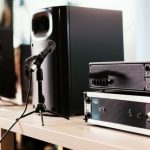
This is arguably the biggest culprit. If your speakers are too close to your microphone, or if the microphone is pointed directly at a speaker, the sound has a very easy path back into the microphone. This creates a strong and direct feedback loop.
* **The “Pointing Directly” Problem:** Imagine your microphone is an open mouth and your speaker is a loud voice. If you point the microphone directly at the speaker, it’s like shouting into someone’s ear. It’s going to pick up a lot of that sound.
* **The “Too Close Together” Problem:** Even if the mic isn’t pointed directly, if it’s too close to the speaker, it will still pick up a significant amount of the speaker’s output. This is especially true for live performances or presentations where microphones are often placed strategically.
Practical Tip: Always try to position your speakers so they are not directly in front of or behind your microphones. Ideally, place speakers to the sides and slightly in front of the microphones, or behind them but angled away. This helps to minimize the amount of sound the microphone picks up from the speakers.
### Volume Levels – The Amped-Up Culprit
This might seem obvious, but it’s worth stressing: too much volume is a major trigger for feedback. When you turn the volume up on your speakers, you increase the intensity of the sound they produce. If this intensity exceeds a certain threshold, the microphone will pick it up, and the feedback loop can start.
* **Going Overboard:** It’s tempting to crank the volume to ensure everyone can hear, but there’s a point where you push the system beyond its limits, especially in relation to microphone sensitivity.
* **The Gain Stage Battle:** Audio systems have multiple stages of amplification. The “gain” setting on your microphone or mixer controls the initial level of the signal. If the gain is set too high, it makes the entire system more prone to picking up and amplifying noise, including speaker bleed.
Practical Tip: Start with your volume and gain settings at their lowest points and gradually increase them while monitoring the sound. Stop increasing the volume as soon as you hear any hint of unwanted noise or distortion. It’s better to have slightly lower volume that’s clear than loud, piercing feedback.
### Incorrect Gain and Sensitivity Settings
This is related to volume but focuses specifically on the microphone’s input sensitivity. The gain control on your audio interface, mixer, or even directly on some microphones acts like a volume knob for the microphone’s input signal.
* **Too Much Gain:** If the gain is set too high, the microphone becomes extremely sensitive. It will pick up even faint sounds from the speakers and the room, and amplify them significantly. This makes it very easy to trigger feedback.
* **Not Enough Gain:** Conversely, if the gain is too low, you’ll have to turn up the main volume much higher to get a decent sound level, which can also lead to feedback issues and a “noisy” overall sound.
Practical Tip: Aim for a “sweet spot” for your gain. You want enough signal to have a healthy level without being so high that you’re clipping (distorting) or making the microphone overly sensitive to ambient noise. A good rule of thumb is to set the gain so that your loudest desired sound peaks around -12dB to -6dB on your meter.
### Microphone Type and Pickup Pattern
Not all microphones are created equal, and their design significantly impacts their susceptibility to feedback.
* **Condenser vs. Dynamic Mics:** Condenser microphones are generally more sensitive than dynamic microphones. This means they pick up more detail, but they are also more prone to picking up background noise and feedback. Dynamic microphones are more robust and less sensitive, making them a better choice in high-volume or feedback-prone environments.
* **Polar Patterns:** This refers to the direction from which a microphone picks up sound.
* **Omnidirectional:** Picks up sound equally from all directions. Very prone to feedback as it captures everything, including speaker sound from all angles.
* **Cardioid:** Picks up sound primarily from the front, with some rejection from the sides and significant rejection from the rear. This is the most common pattern for live vocals and instruments because it helps isolate the desired sound and reject stage noise and speaker bleed.
* **Supercardioid/Hypercardioid:** Even more directional than cardioid, with tighter front pickup and even greater side and rear rejection. However, they have small “lobes” of sensitivity directly behind them, which can sometimes cause feedback if a speaker is placed precisely in that spot.
Practical Tip: If you frequently experience feedback, consider using a microphone with a cardioid or supercardioid pickup pattern. Ensure you’re using it correctly, with the main sound source (your voice, instrument) directed into the front of the microphone.
### Equipment Issues and Cable Problems
Sometimes, the problem isn’t just acoustics or settings, but faulty equipment.
* **Damaged Cables:** A damaged or poor-quality XLR cable (the standard microphone cable) can introduce noise, hum, and intermittent audio problems, which can sometimes manifest as feedback or make feedback worse.
* **Faulty Microphone:** A microphone that has been dropped or has internal damage can develop issues that make it more susceptible to feedback or produce unwanted noise on its own.
* **Speaker Problems:** While less common, issues with speakers themselves (like blown drivers or internal wiring problems) could theoretically contribute to audio anomalies that resemble feedback.
Practical Tip: Always use good quality, well-maintained cables. If you suspect a cable, try swapping it out for a known good one. If you have multiple microphones, try using a different one to see if the feedback persists.
### Room Acoustics and Frequency Build-Up
The environment where you are using your microphone can play a significant role. Every room has its own acoustic properties, meaning sound waves can reflect off walls, ceilings, and floors.
* **Reflections and Resonances:** Certain frequencies might “resonate” in a room, meaning they are amplified by reflections. If one of these resonant frequencies is also amplified by your speaker system, it can more easily trigger a feedback loop. This is why feedback might occur at a specific volume in one room but not another.
* **Hard Surfaces:** Rooms with a lot of hard, reflective surfaces (like bare walls, tiled floors, or large windows) tend to have more pronounced acoustic issues and resonances.
Practical Tip: While you can’t always control room acoustics, you can mitigate their impact. Soft furnishings like carpets, curtains, and upholstered furniture can help absorb sound and reduce reflections. In professional settings, acoustic treatment is used to manage these issues.
## Troubleshooting Steps to Eliminate Mic Feedback
When that dreaded squeal starts, it’s time to act fast. Here’s a systematic approach to troubleshoot and eliminate mic feedback:
### 1. Lower the Volume and Gain Immediately
This is your first and most important step. As soon as you hear feedback, reduce the master volume of your speakers and the gain on your microphone input. This breaks the feedback loop instantly.
### 2. Check Speaker and Microphone Placement
Are the speakers too close to the mic? Is the mic pointed at a speaker? Adjust their positions. Move the microphone further away from the speakers, or angle the speakers away from the microphone.
### 3. Adjust Microphone Gain
Once the volume is down, try adjusting the microphone’s gain. Set it just high enough to get a good signal level for your voice or instrument without being excessively sensitive.
### 4. Identify the Troublesome Frequencies (If Possible)
Sometimes, feedback happens at a very specific, annoying frequency. If you have an equalizer (EQ) on your mixer or audio interface, you can try to identify and reduce this frequency.
* **How to Find It:** With the microphone on and the system at a low-to-moderate volume, slowly bring up the master volume or the microphone gain until feedback just starts to occur. Listen carefully to the pitch of the squeal.
* **Cutting Frequencies:** Use your graphic or parametric EQ to find that specific frequency and lower its level. You might need to sweep through frequencies until you match the feedback pitch. Often, reducing a narrow band of frequencies can eliminate feedback without noticeably affecting the overall sound quality. This technique is common in live sound.
### 5. Check Your Cables and Connections
Ensure all your audio cables are securely plugged in and are not damaged. If you have spare cables, try swapping them out. Loose connections can cause intermittent audio problems that might be mistaken for feedback.
### 6. Consider Your Microphone’s Pickup Pattern
If you’re using an omnidirectional microphone in a situation where feedback is common, consider switching to a cardioid microphone. If you are already using a cardioid mic, make sure you are speaking directly into its “front” and that your speakers aren’t positioned in the mic’s null points (where it rejects sound the most) or, conversely, in its minor rear pickup lobe.
### 7. Test in a Different Environment
If possible, try setting up your microphone and speaker system in a different room. If the feedback disappears, you know the room’s acoustics were a significant factor.
### 8. Use a Feedback Suppressor (Advanced)
For permanent installations or critical applications, dedicated feedback suppressor units can be used. These devices electronically analyze the audio and automatically introduce narrow filters to notch out feedback frequencies as they occur. However, for most casual users, proper setup and volume management are sufficient.
## When to Seek Professional Help
While most feedback issues are solvable with basic troubleshooting, there are times when you might need a professional. If you’ve tried all the above steps and are still experiencing persistent, uncontrollable feedback, it might be worth consulting an audio engineer or a sound technician. They have specialized knowledge and equipment to diagnose and resolve complex audio problems. This is especially true for venues, broadcast studios, or professional recording setups.
## Conclusion: Enjoying Clear, Feedback-Free Audio
Mic feedback is a frustrating but often understandable phenomenon. By understanding the fundamental principle of the audio loop and recognizing the common causes—speaker placement, volume, gain settings, and even room acoustics—you are well-equipped to prevent and solve it. Remember, the key is a balanced approach: get your gain set correctly, manage your volume levels prudently, and position your speakers and microphones thoughtfully.
With these tips in your arsenal, you can say goodbye to those jarring squeals and hello to clear, crisp audio for your presentations, performances, and everyday communication. Don’t let feedback noise ruin your sound experience; take control and enjoy the clarity you deserve.
- Microphone Feedback Loop: The core reason for feedback is a sound loop where the microphone picks up amplified sound from speakers and re-amplifies it, creating a squeal or howl.
- Proximity is Key: The closer the microphone is to the speaker, or the more the sound from the speaker is directed into the microphone, the higher the risk of feedback.
- Volume Levels Matter: Excessive volume is a primary trigger. When the speaker’s output exceeds the microphone’s ability to handle it, feedback is likely.
- Incorrect Gain Settings: Too much gain on your microphone or audio interface boosts the signal too much, making it more susceptible to picking up and re-amplifying ambient or speaker noise.
- Equipment Issues: Faulty cables, damaged microphones, or poorly designed speaker systems can all contribute to unwanted feedback.
- Room Acoustics: The way sound bounces around a room can also play a role, causing certain frequencies to become overly prominent and lead to feedback.
- Types of Microphones: Different microphone types (e.g., dynamic vs. condenser) have varying sensitivities and pickup patterns that can influence feedback susceptibility.
Frequently Asked Questions
What is the most common reason for microphone feedback?
The most common reason for microphone feedback is the creation of a feedback loop. This happens when a microphone picks up amplified sound from a speaker, and that amplified sound is then re-amplified by the microphone, creating a continuous cycle that results in a high-pitched squeal.
How can I prevent feedback if my microphone is too close to the speaker?
If your microphone is too close to the speaker, the best preventative measure is to increase the distance between them. If that’s not possible, try angling the speaker away from the microphone or using a microphone with a more directional pickup pattern, like a cardioid microphone.
Is it possible to have feedback even if my volume is not very high?
Yes, it is possible. Feedback can occur if the microphone’s gain (sensitivity) is set too high, even at moderate volumes. Too much gain means the microphone is picking up even faint sounds, including speaker bleed and ambient noise, and amplifying them excessively, which can initiate the feedback loop.
Can the type of microphone affect feedback?
Absolutely. Highly sensitive microphones, like condenser mics, are more prone to picking up ambient sounds and speaker output, making them more susceptible to feedback. Dynamic microphones, which are less sensitive, are generally better at rejecting unwanted noise and reducing feedback potential.
What should I do if the feedback happens at a specific, loud frequency?
If feedback occurs at a specific, loud frequency, you can often resolve it using an equalizer (EQ). By identifying the exact frequency of the feedback (often by slowly raising the volume until it starts) and then reducing that specific frequency band on your EQ, you can eliminate the squeal without significantly impacting the overall sound quality.
Are there any quick fixes for persistent microphone feedback?
The quickest fixes involve immediately lowering the volume and gain. If the problem persists, repositioning the microphone and speakers is usually the next best step. Ensuring all cables are securely connected and functional also helps, as faulty equipment can sometimes mimic or worsen feedback issues.