Bluetooth speaker sound quality isn’t magic! It’s shaped by simple things like speaker size, battery, and even where you put it. Understand these surprising factors to pick and place your speaker for the best sound ever!
Hey there, tech explorer! Ever crank up your favorite song on a Bluetooth speaker, only to be a little… underwhelmed? Yeah, me too. It’s like having a superhero cape but only being able to fly a few inches off the ground. We want that epic sound, right?
Picking out a new speaker can feel like navigating a maze. So many numbers, so many features! It’s easy to get lost in the jargon and wonder, “What actually makes a speaker sound good?”
Well, guess what? It’s not as complicated as it seems. We’re going to uncover the secrets together. Think of me as your friendly guide, ready to demystify all those techy terms.
We’ll break down exactly what makes a Bluetooth speaker sing (or just mumble). You’ll learn the simple truths that affect sound quality, so you can finally enjoy your music, podcasts, and movies the way they were meant to be heard. Ready to dive in and make your sound amazing? Let’s get started!

Why Does My Bluetooth Speaker Sound “Just Okay”?
It’s a question many of us have asked. You spend good money on a speaker, but the sound doesn’t quite hit the mark. It might be too tinny, too muddy, or just lacking that punch. This can happen for a bunch of reasons, and they’re usually not super technical.
Think about your favorite singer. They sound amazing on stage with a huge sound system. But if they tried to sing through a tiny megaphone, it just wouldn’t be the same, would it? Speakers are kind of like that. Their size and design play a huge role in how they deliver sound.
We’ll explore how the speaker’s insides, the power it gets, and even your room’s setup can change everything. It’s not about having the most expensive gear; it’s about understanding what makes any speaker perform its best.
The Shocking Truths About Bluetooth Speaker Sound
Let’s get straight to the juicy stuff! These are the factors that truly impact how your Bluetooth speaker sounds, often in ways you might not expect.
1. Size Matters: More Than You Think!
This might seem obvious, but it’s a big one. A tiny speaker can only push so much air. Bigger drivers (the parts that actually make the sound) can create deeper bass and louder volumes without distortion.
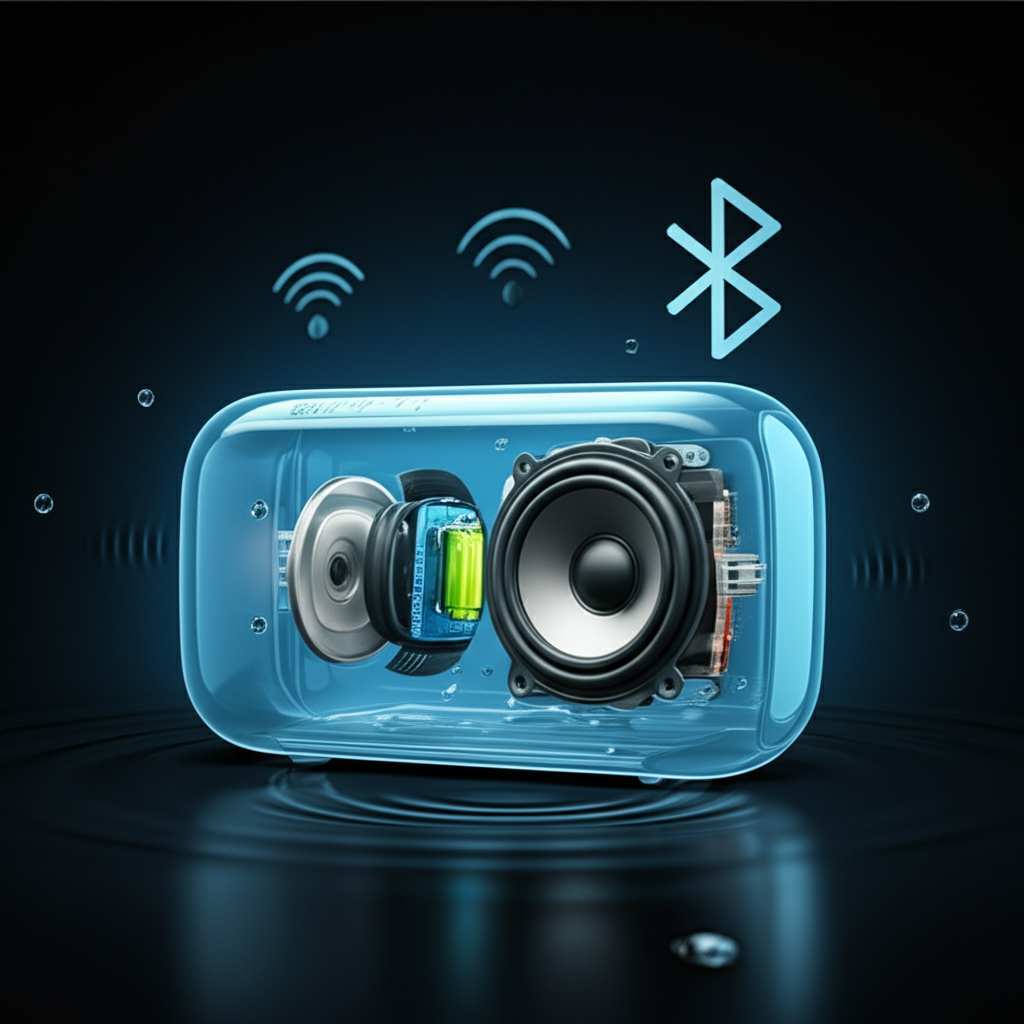
Imagine trying to fill a big room with just one small whisper. It won’t work! Larger speakers have more space for these drivers and other components, allowing them to produce a richer, fuller sound.
2. Power Source: Battery vs. Plugged In
Did you know that a speaker often sounds better when it’s plugged into the wall? This is because wall power provides a consistent, strong flow of electricity. Batteries, while convenient, can sometimes limit the speaker’s power output.
When a speaker runs on battery, it might automatically reduce its power to save energy. This can mean less bass and lower maximum volume. So, if you want the absolute best sound, especially for longer listening sessions, keeping it plugged in is a great idea.
3. Bluetooth Version and Codecs: The Digital Connection
This one sounds technical, but let’s break it down simply. Bluetooth technology has different versions, and newer versions are better at sending high-quality audio. Also, “codecs” are like special languages that your phone and speaker use to talk about sound.
Some codecs are better than others. For example, aptX and LDAC are known for delivering near-CD quality sound over Bluetooth. If your phone and speaker both support these, you’ll hear a difference. Older codecs might compress the sound more, leading to a less detailed experience.
4. Driver Quality and Design: The Heart of the Sound
Speakers have different types of “drivers” that create sound. There are woofers for bass, tweeters for treble, and mid-range drivers for everything in between. The quality of these drivers and how they are arranged matters a lot.
High-end speakers might have separate, dedicated drivers for different sound frequencies. This allows each driver to do its job perfectly, resulting in clearer highs, richer mids, and deeper lows. Even the materials used for the drivers can affect the sound.
5. Speaker Enclosure: It’s Not Just a Box!
The “enclosure” is the physical body of the speaker. It’s not just a random box! The material, shape, and how well it’s sealed all affect the sound. A well-designed enclosure helps control vibrations and enhances bass response.
Think of it like a musical instrument. The wood of a guitar helps shape its sound. Similarly, the enclosure of a speaker is engineered to prevent unwanted resonances and to direct sound waves effectively. Cheaper speakers often use flimsy plastic that can buzz or rattle.
6. Active vs. Passive Speakers: Who’s Doing the Work?
Most Bluetooth speakers are “active.” This means they have a built-in amplifier. You just connect your device, and it plays. “Passive” speakers need a separate amplifier to power them.
For us Bluetooth users, we’re almost always dealing with active speakers. The quality of the built-in amplifier directly impacts how well the speaker can drive its drivers and produce clear, powerful sound. A weak amplifier can lead to distortion, even with good drivers.
7. Speaker Placement: Your Room’s Role
This is a huge, often overlooked factor! Where you put your speaker can dramatically change its sound. Placing a speaker too close to a wall can boost bass, sometimes too much, making it sound boomy.
Experimenting with placement is key. Try pulling it away from corners, placing it on a stable surface, and considering the height. Even small adjustments can make a noticeable difference in clarity and bass.
8. Battery Health: A Silent Killer of Sound
As a speaker ages, its battery can degrade. A weaker battery might not provide enough consistent power, leading to reduced volume and poorer sound quality, especially at higher listening levels.
If your speaker sounds weaker than it used to, even when plugged in, the battery might be the culprit. Some speakers have replaceable batteries, while others require professional service.
9. Water and Dust Resistance: A Trade-Off?
Many portable Bluetooth speakers boast water and dust resistance. While this is super handy for outdoor adventures, the extra seals and membranes needed for this protection can sometimes slightly dampen the sound quality.
Manufacturers try to balance durability with sound, but it’s a compromise. A speaker designed for rugged use might not sound as pristine as one designed purely for indoor audio fidelity.
10. Compression and Streaming Quality: The Source Matters!
Even with the best speaker, if the audio source is low quality, the sound will suffer. This is especially true for music streaming services. They often use compression to save data, which can reduce audio fidelity.
Always try to stream music at the highest quality setting available on your service. Services like Spotify, Apple Music, and Tidal offer different quality tiers. Higher quality means more data, but much better sound.
Key Features That Boost Sound Quality
Let’s look at some specific things to keep an eye out for when you’re checking out speaker specs.
Driver Size: Larger drivers generally mean better bass and volume. Look for specs mentioning driver diameter (e.g., 2.5-inch woofer).
Frequency Response: This tells you the range of sounds the speaker can produce, from low bass to high treble. A wider range (e.g., 50Hz – 20kHz) is usually better.
Power Output (Watts): Higher wattage generally means louder sound, but it’s not the only factor. Quality of amplification matters more.
Bluetooth Version: Aim for Bluetooth 5.0 or higher for better range, stability, and audio quality.
Supported Audio Codecs: Look for support for aptX, LDAC, or AAC if you want higher fidelity.
Understanding Speaker Specs: A Quick Guide
Here’s a peek at what those numbers and acronyms actually mean for your listening experience.
| Spec | What it Means | Impact on Sound |
|---|---|---|
| Woofer Size (e.g., 3 inches) | The speaker driver responsible for low frequencies (bass). | Larger woofers can produce deeper, more impactful bass. |
| Tweeter Size (e.g., 1 inch) | The speaker driver responsible for high frequencies (treble). | Smaller, well-designed tweeters deliver clear, crisp highs. |
| Frequency Response (e.g., 60Hz – 20kHz) | The range of audible sound frequencies the speaker can reproduce. | A wider range means the speaker can produce more detail across the spectrum. |
| Power Output (Watts RMS) | The continuous power the speaker can deliver without distortion. | Higher wattage can mean louder volume without sacrificing clarity. |
| Bluetooth Version (e.g., 5.2) | The standard for wireless communication between devices. | Newer versions offer better range, faster connections, and more stable audio streaming. |
| Supported Codecs (e.g., SBC, AAC, aptX) | The digital “languages” used to transmit audio over Bluetooth. | Advanced codecs like aptX and LDAC provide higher audio quality than basic SBC. |
So, what does this table tell us? It shows that a speaker with a larger woofer and a wider frequency response is likely to give you a richer sound. And if your phone supports a better codec like aptX, and the speaker does too, you’re in for a treat! It’s all about how these pieces work together.
How to Get the Best Sound from Your Current Speaker
You don’t always need a new speaker to improve your audio experience. Here are some simple tips to make the most of what you have.
Positioning is Key:
Avoid corners: Placing speakers in corners can make bass sound muddy and overwhelming.
Stable surface: Put your speaker on a solid, vibration-free surface. A wobbly table can mess with the sound.
Ear level: For optimal listening, try to position the speaker so the sound is directed towards your ears.
Distance from walls: Experiment by moving the speaker away from walls to see how it affects the bass.
Check Your Source Quality:
Streaming settings: Go into your music app and crank up the streaming quality. It might use more data but will sound much better.
File quality: If you play local audio files, make sure they are in a high-quality format like FLAC or high-bitrate MP3.
Keep it Charged (or Plugged In):
Full battery: Ensure your speaker has a good charge.
Plug it in: For the best performance, especially at higher volumes, plug your speaker into a power outlet.
Update Your Devices:
Firmware: Sometimes, speaker manufacturers release firmware updates that can improve performance. Check their website.
Phone/Tablet OS: Make sure your phone or tablet’s operating system is up to date. This can improve Bluetooth connectivity.
Clean Your Speaker:
Grilles: Dust and debris can accumulate on speaker grilles, subtly affecting sound. Gently clean them with a soft brush or vacuum attachment.
Advanced Tips for Audiophiles (and Curious Minds!)
Want to dive a little deeper? Here are some things that true sound enthusiasts consider.
Latency: This is the delay between when the sound is produced by your device and when you hear it from the speaker. It’s usually not an issue for music, but it can be noticeable with videos or gaming. Newer Bluetooth versions and certain codecs (like aptX Low Latency) help reduce this.
Multi-speaker Pairing: Many modern speakers can pair with another identical speaker to create a stereo soundstage or a wider sound field. This can dramatically improve immersion.
DSP (Digital Signal Processing): This is like a smart audio chip inside the speaker that adjusts the sound in real-time. Good DSP can make even small speakers sound fuller and more balanced.
Porting: Some speakers have a “port” – a hole or vent in the enclosure. This is designed to enhance bass response by allowing air to move more freely. The design of this port is crucial.
Frequently Asked Questions (FAQ)
Got more questions? Let’s clear them up!
Q1: Does the material of the speaker matter for sound quality?
Yes, it really does! The enclosure material affects how vibrations are handled. Harder, denser materials like wood or high-quality plastics tend to reduce unwanted rattling and resonance, leading to cleaner sound compared to flimsy plastic.
Q2: Is a higher Bluetooth version always better for sound?
Generally, yes! Newer Bluetooth versions (like 5.0 and above) offer more stable connections, better range, and can handle higher-quality audio streams. They also use power more efficiently.
Q3: Why does my speaker sound quieter when it’s not plugged in?
This is usually because the speaker is trying to conserve battery power. It might limit the output of its amplifier to extend listening time. Plugging it in provides a constant, strong power source, allowing it to perform at its best.
Q4: Can I improve the bass on my small Bluetooth speaker?
You can try a few things! Positioning it closer to a wall or in a corner can sometimes boost bass, but be careful not to make it too boomy. Also, check if your music app has an equalizer you can use to boost bass frequencies. Some speakers also have “bass boost” features.
Q5: What’s the difference between a speaker advertised as “loud” and one that sounds “good”?
Loudness is about sheer volume (measured in decibels or watts). “Good sound” is about clarity, balance, and fidelity across all frequencies. A speaker can be loud but sound distorted or muddy. The best speakers are both loud and* clear.
Q6: Should I buy a speaker that’s waterproof?
If you plan to use your speaker near water (pool, beach, shower) or in dusty environments, then yes, waterproof or water-resistant speakers are a great investment! Just be aware that the seals and design for water protection can sometimes be a slight trade-off for pure audio perfection. For home use only, it might not be necessary.
Q7: How does the shape of a speaker affect sound?
The shape is super important! It’s not just for looks. Speaker enclosures are designed to direct sound waves effectively, minimize reflections, and reduce unwanted resonance. For example, rounded edges can help prevent sound from bouncing off the cabinet in weird ways.
Wrapping It Up: Your Sound, Your Rules!
So there you have it! We’ve peeled back the curtain on what really makes a Bluetooth speaker sound fantastic. It’s not just about fancy specs; it’s about understanding the interplay of size, power, design, and even where you place it.
You’ve learned that a bigger driver can mean richer bass, that a consistent power source is crucial, and that those little things like Bluetooth codecs and speaker enclosures play a bigger role than you might have thought. You also know that sometimes, the simplest tricks – like moving your speaker a foot or two – can make a world of difference.
Don’t let confusing tech terms hold you back from enjoying amazing audio. Use this knowledge to pick your next speaker with confidence, or to get the best sound possible from the one you already own. Go ahead, experiment with placement, check those streaming settings, and really listen to what your speaker can do.
Now go enjoy amazing sound and make every moment louder and better! Happy listening!