Have you ever spent hours trying to work or create on a monitor that just doesn’t fit your portrait needs? It’s frustrating when your screen can’t rotate or adjust properly.
Small details like awkward viewing angles or eye strain make daily tasks harder than they should be. But finding the right monitor for portrait mode changes everything. Suddenly, your workflow feels smoother, your eyes feel less tired, and your space looks cleaner.
Whether you’re coding, designing, or reading long documents, a good portrait monitor helps you stay focused and comfortable. In this article, I’ll share some top monitors that make portrait mode easy and enjoyable. Keep reading to discover which model could be the perfect fit for your setup and bring more ease to your daily routine.
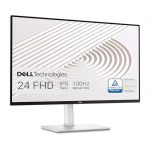
Dell S2425hs Monitor

The Dell S2425HS Monitor is ideal for professionals, gamers, and everyday users who seek a high-quality display with smooth performance and ergonomic flexibility. If you need a reliable 23.8-inch FHD (1920×1080) monitor that can handle everything from work tasks to multimedia consumption with eye comfort features, this monitor is a perfect fit.
Pros:
- 100Hz refresh rate for smooth visuals and reduced motion blur
- TÜV Rheinland Eye Comfort 4 Star certification to minimize eye strain during extended use
- Ergonomic adjustments including height, tilt, swivel, and pivot for personalized viewing angles
- Integrated 2x5W speakers offering decent audio without needing external speakers
- High contrast ratio (1500:1) for vibrant colors and deeper blacks
Cons:
- Limited resolution at Full HD, which might not satisfy users wanting 4K clarity
- Speakers are basic and may not replace dedicated audio systems for audiophiles
The Dell S2425HS Monitor boasts a sleek silver design that fits well in any modern workspace. Its 23.8-inch screen offers a crisp Full HD (1920×1080) resolution that is perfect for daily computing, video streaming, and casual gaming. The 100Hz refresh rate ensures smoother motion, reducing lag and screen tearing, which is beneficial for gamers and professionals who work with fast-moving visuals.
Ergonomics play a significant role in user comfort, and this model excels with adjustable height, tilt, swivel, and pivot features. This flexibility allows users to customize their viewing angle for optimal posture and reduced fatigue. The TÜV Rheinland Eye Comfort 4 Star rating highlights its ability to minimize blue light and flicker, protecting users’ eyes during long sessions. Additionally, the built-in 2x5W speakers provide convenient audio without cluttering the desk with extra equipment.
To buy this product, click here.
Crua 24.5 Inch Gaming Monitor

The CRUA 24.5Inch Gaming Monitor is ideal for avid gamers, graphic designers, and professionals who demand vibrant colors and smooth performance. If you need a monitor with fast refresh rates, excellent color accuracy, and ergonomic adjustability, this monitor is designed to enhance your visual experience and comfort during long hours of use.
Pros:
- 144Hz/165Hz refresh rate for ultra-smooth gameplay
- FHD 1920x1080P resolution delivering crisp and clear visuals
- 120% sRGB color gamut ensuring vibrant and accurate colors
- Height, pivot, swivel, and tilt adjustable stand for personalized ergonomics
- Support for FreeSync technology to reduce screen tearing
- Multiple connectivity options including DisplayPort and HDMI
- Wall mount compatible (75mm x 75mm) for flexible setup
Cons:
- Lacks higher resolution options like QHD or 4K
- Design is quite standard and may not appeal to those seeking flashy aesthetics
- No built-in speakers, requiring external audio solutions
The CRUA 24.5Inch Gaming Monitor boasts a fast refresh rate of up to 165Hz, which is essential for gamers seeking fluid motion and reduced input lag. Coupled with its Full HD 1920×1080 resolution, this monitor delivers sharp images and smooth gameplay visuals. The impressive 120% sRGB color coverage ensures that colors appear vivid and true to life, making it equally suited for creative professionals who need color accuracy for photo editing or design work.
Ergonomics have been thoughtfully addressed with the ability to adjust the monitor’s height, pivot, swivel, and tilt. This flexibility helps users set up their workspace for maximum comfort, reducing strain during extended sessions. Additionally, the inclusion of FreeSync support and multiple input options like DisplayPort and HDMI make this monitor versatile and compatible with a wide range of devices, while the option to wall mount adds convenience for those with limited desk space. Overall, the CRUA 24.5Inch Gaming Monitor is a balanced choice for users who prioritize performance and color fidelity without breaking the bank.
To buy this product, click here.
Samsung 27” Borderless Business Monitor

The Samsung 27” (S40GD) Borderless Business Monitor is ideal for professionals and gamers who seek a versatile display that combines sleek design with high performance. If you are someone who values an immersive viewing experience with a sharp and vibrant display, this monitor is a perfect choice. It is especially suitable for office workers, graphic designers, and casual gamers looking for a high refresh rate and ergonomic comfort.
Pros:
- Borderless design offers an elegant and modern look, maximizing screen space.
- IPS Panel ensures excellent color accuracy and wide viewing angles.
- 100Hz refresh rate provides smooth visuals, reducing motion blur for gaming and video playback.
- Eye Saver Mode reduces eye strain during extended usage.
- Ergonomic design allows easy adjustments for comfortable viewing positions.
- Game Picture Mode enhances gaming visuals with optimized settings.
- 3 Year Warranty offers peace of mind with reliable after-sales support.
Cons:
- The weight of 8.82 pounds may require a sturdy desk or monitor arm.
- No built-in speakers, so external audio devices are necessary.
- Limited connectivity options compared to some competitors.
The Samsung 27” (S40GD) monitor features a crisp IPS panel that delivers vivid colors and consistent brightness across wide viewing angles, making it excellent for collaborative work and multimedia consumption. The borderless design not only looks sleek but also helps in setting up multi-monitor configurations with minimal distraction. With a 100Hz refresh rate, this monitor ensures fluid motion rendering, which is especially beneficial for gamers and professionals dealing with fast-moving visuals.
Additionally, the Eye Saver Mode technology helps reduce blue light emission, minimizing eye fatigue during long working hours. The monitor’s ergonomic design allows users to adjust the height and tilt, promoting better posture and comfort. The inclusion of Game Picture Mode means users can easily switch to optimized settings tailored for gaming, enhancing the overall experience. Backed by a 3-year warranty, this monitor guarantees durability and reliable performance for everyday use.
To buy this product, click here.
Flytocca Portable Monitor
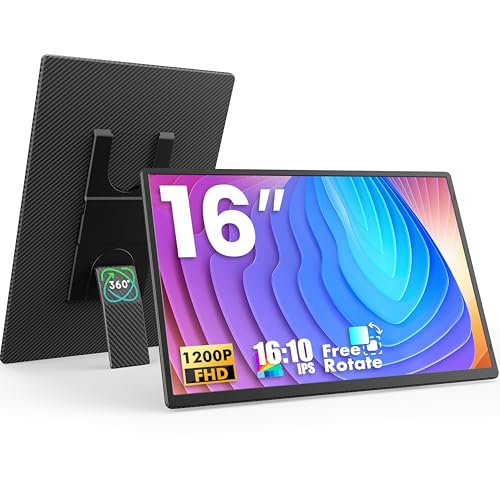
The FLYTOCCA Portable Monitor is perfect for professionals, students, and travelers who need a versatile and lightweight second screen. Ideal for those who work remotely, attend virtual classes, or require additional display space on the go, this 16-inch monitor enhances productivity without adding bulk to your setup.
Pros:
- High-resolution 1200P FHD display for crisp and clear visuals
- Horizontal and vertical orientation flexibility with built-in kickstand
- Plug & Play functionality for easy setup without drivers
- Ultra-thin zero frame design enhances portability and aesthetic appeal
- Built-in speakers eliminate the need for external audio devices
- Premium smart cover protects the screen and doubles as a stand
- Lightweight at just 1.46 pounds for easy travel
Cons:
- Limited connectivity options may require adapters for some devices
- Speakers may not provide high volume or deep bass
- Screen brightness could be insufficient in very bright environments
The FLYTOCCA Portable Monitor offers a stunning 16-inch 1200P Full HD display that delivers sharp images and vibrant colors, ideal for both work and entertainment. Its ability to switch between horizontal and vertical orientations with a sturdy kickstand adds versatility, allowing users to customize their viewing experience to suit different tasks such as coding, reading, or multitasking with multiple windows.
Designed with portability in mind, this monitor features an ultra-thin zero frame design that reduces bulk and maximizes screen space. The plug-and-play setup means users can connect it effortlessly to laptops or other devices without installing additional software. Plus, the built-in speakers and premium smart cover enhance convenience, making it a practical companion for travel and remote work scenarios.
To buy this product, click here.
Hp Series 3 27 Inch Fhd Monitor

The HP Series 3 27 inch FHD Monitor is ideal for professionals, students, and casual users seeking a reliable and visually comfortable display for everyday computing tasks. If you need a monitor with a crisp Full HD (1920 x 1080) resolution, an IPS panel for wide viewing angles, and eye protection features, this model is a great choice. It suits those who spend extended hours in front of the screen and value both performance and eye care.
Pros:
- Sharp Full HD display with vibrant colors thanks to the IPS panel
- Comfortable viewing experience with Eye Ease technology and Eyesafe certification
- Good contrast ratio of 1300:1 for clear image differentiation
- Bright screen with 250 nits brightness suitable for most indoor environments
- Sleek black design that fits well in any workspace
Cons:
- Lack of detailed physical dimension specifications
- Brightness level might be insufficient in very bright rooms or direct sunlight
- No advanced features like USB-C or high refresh rate for gaming enthusiasts
The HP Series 3 27 inch FHD Monitor offers a 27-inch screen that provides ample space for multitasking and detailed viewing. Its IPS panel ensures consistent and accurate colors from almost any angle, making it perfect for graphic work, watching videos, or general productivity. The 1300:1 contrast ratio enhances image clarity, so users can enjoy sharp visuals whether browsing the web or working on documents.
Additionally, this monitor is equipped with Eye Ease technology and carries the Eyesafe certification, which reduces harmful blue light emissions without compromising color quality. This feature is especially beneficial for users who spend long hours in front of the screen, helping to minimize eye strain and fatigue. With a brightness of 250 nits, it delivers a clear and comfortable viewing experience in most indoor lighting conditions. Overall, the HP Series 3 27 inch FHD Monitor combines essential features with eye comfort to meet the needs of everyday users.
To buy this product, click here.
Frequently Asked Questions
What Makes A Monitor Ideal For Portrait Mode?
A good portrait mode monitor offers height, tilt, swivel, and pivot adjustments. It provides sharp resolution and ergonomic design for comfortable vertical viewing.
Which Monitor Has The Best Refresh Rate For Portrait Use?
The CRUA 24. 5 Inch Gaming Monitor features a 144Hz/165Hz refresh rate. This ensures smooth visuals, ideal for fast-moving content in portrait mode.
Are Built-in Speakers Useful In Portrait Monitors?
Yes, monitors like Dell S2425HS and FLYTOCCA include integrated speakers. They enhance multimedia experience without needing extra audio devices.
How Important Is Eye Comfort In Portrait Monitors?
Eye comfort is crucial for long usage. Dell S2425HS and Samsung LS27D402GANXGO offer TÜV Rheinland and Eye Saver modes to reduce eye strain.
Can Portable Monitors Support Portrait Orientation?
Yes, FLYTOCCA’s 16 Inch Portable Monitor supports vertical use with a kickstand. It’s perfect for travel and dual-screen setups.
Do All Portrait Monitors Support Wall Mounting?
Most do, including CRUA and Samsung models. They feature VESA-compatible mounts (75mmx75mm) for flexible placement and ergonomic setups.
Conclusion
Choosing the best monitor for portrait mode depends on your needs and space. Each option here offers good features like adjustable stands and clear displays. Whether you want a compact portable screen or a larger business monitor, these models deliver sharp images and comfort.
Easy setup and eye-care technology help reduce strain during long use. Refresh rates and color accuracy vary, so consider what matters most for your work or hobbies. A good monitor will make reading, coding, or design easier when used in portrait orientation.
Remember to check for pivot and height adjustments for better ergonomics. These monitors balance performance and comfort without confusing extras. Pick the one that fits your budget and daily tasks well. This will help you enjoy a smooth and productive experience with portrait mode.